Network Access Protection (NAP)

wildbilly

New member
Local time
3:48 PM
Messages
33
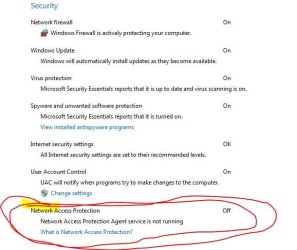
Windows 7 states that this s OFF. Is this normal, what is it, and can I trun it on?

thanks
 
Last edited:

My Computer

Computer Manufacturer/Model Number
DELL
OS
WINDOWS 7 64-bit Ultimte
CPU
Quad Core 2
Motherboard
Dell
Memory
4 Gig
Graphics Card(s)
Nvidia 8600 GTS
Sound Card
on board
Monitor(s) Displays
22 inch HD
Hard Drives
500 gig
160 gig
Other Info
Windows experience rating of 5.9
Check this for a more detailed solution ---==> Link
 

My Computer

Computer type
PC/Desktop
Computer Manufacturer/Model Number
LENOVO K450 @3.0GHZ
OS
64-bit Windows 8.1 Pro
CPU
Core(TM) i5 CPU 4330 Haswell @ 3.20GHz
Motherboard
LENOVO
Memory
12.00 GB
Graphics Card(s)
Intel(R) HD Graphics
Sound Card
Intel HD integtrated
Monitor(s) Displays
HP 25' ISP Monitor
Screen Resolution
1900/1020
Hard Drives
(1) ST1000DM003-1CH162 (2) Generic STORAGE DEVICE USB Device (3) Generic STORAGE DEVICE USB Device
Internet Speed
100mb down/10mb up
Check this for a more detailed solution ---==> Link


ok....i read it, tried to start the service with no luck. Im guessing it just for business.....i just want to know why windows even informed me about this.
 

My Computer

Computer Manufacturer/Model Number
DELL
OS
WINDOWS 7 64-bit Ultimte
CPU
Quad Core 2
Motherboard
Dell
Memory
4 Gig
Graphics Card(s)
Nvidia 8600 GTS
Sound Card
on board
Monitor(s) Displays
22 inch HD
Hard Drives
500 gig
160 gig
Other Info
Windows experience rating of 5.9
really hoping for an answer on this...anyone?
 

My Computer

Computer Manufacturer/Model Number
DELL
OS
WINDOWS 7 64-bit Ultimte
CPU
Quad Core 2
Motherboard
Dell
Memory
4 Gig
Graphics Card(s)
Nvidia 8600 GTS
Sound Card
on board
Monitor(s) Displays
22 inch HD
Hard Drives
500 gig
160 gig
Other Info
Windows experience rating of 5.9
We'll need to know more about your setup - what software (in particular security software) as well as what configuration modifications you've made.
 

My Computers

System One System Two

  • Computer type
    PC/Desktop
    Computer Manufacturer/Model Number
    The Beast Model A (homebrew)
    OS
    Windows 11 21H2 Current build
    CPU
    AMD Ryzen 9 3950X
    Motherboard
    MSI MEG X570 GODLIKE
    Memory
    4 * 32 GB - Corsair Vengeance 3600 MHz
    Graphics Card(s)
    EVGA GeForce RTX 3080 Ti XC3 ULTRA GAMING (12G-P5-3955-KR)
    Sound Card
    Realtek® ALC1220 Codec
    Monitor(s) Displays
    2x Eve Spectrum ES07D03 4K Gaming Monitor (Matte) | Eve Spec
    Screen Resolution
    3x 3840 x 2160
    Hard Drives
    3x Samsung 980 Pro NVMe PCIe 4 M.2 2 TB SSD (MZ-V8P2T0B/AM) } 3x Sabrent Rocket NVMe 4.0 1 TB SSD
    PSU
    PC Power & Cooling’s Silencer Series 1050 Watt, 80 Plus Plat
    Case
    Fractal Design Define 7 XL Dark ATX Full Tower Case
    Cooling
    SteelSeries Apex Pro Wired Gaming Keyboard
    Keyboard
    SteelSeries Apex Pro
    Mouse
    Logitech MX Master 3S | MX Master 3 for business
    Internet Speed
    AT&T LightSpeed Gigabit Duplex Ftth
    Antivirus
    Windows Defender + MB 3
    Browser
    Nightly (default) + Firefox (stable),Chrome, Edge
  • Computer type
    PC/Desktop
    System Manufacturer/Model Number
    Dell Latitude E5470
    OS
    ChromeOS Flex Dev Channel (current)
    CPU
    Intel(R) Core(TM) i5-6300U CPU @ 2.40GHz, 2501 Mhz, 2 Core(s), 4 Logical Processor(s)
    Motherboard
    Dell
    Memory
    16 GB
    Graphics Card(s)
    Intel(R) HD Graphics 520
    Sound Card
    Intel(R) HD Graphics 520 + RealTek Audio
    Monitor(s) Displays
    Dell laptop display 15"
    Screen Resolution
    1920 * 1080
    Hard Drives
    Toshiba 128GB M.2 22300 drive
    INTEL Cherryville 520 Series SSDSC2CW180A 180 GB SATA III SSD
    PSU
    Dell
    Case
    Dell
    Cooling
    Dell
    Keyboard
    Dell
    Mouse
    Logitech MX Master 3S (shared w. Sys 1) | Dell TouchPad
    Internet Speed
    AT&T LightSpeed Gigabit Duplex Ftth
We'll need to know more about your setup - what software (in particular security software) as well as what configuration modifications you've made.


no modifications

I run MSE for security AND AD AWARE PRO paid version.......(it let me do it with no conflicts)

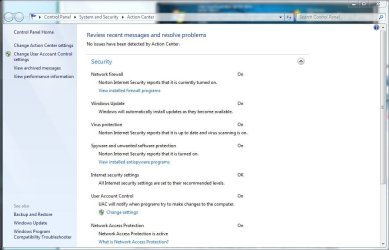
I just noticed it today for the first time in the action center. I have a fairly large "homegroup" setup
 

Attachments

  • setup.JPG
    setup.JPG
    37.9 KB · Views: 989

My Computer

Computer Manufacturer/Model Number
DELL
OS
WINDOWS 7 64-bit Ultimte
CPU
Quad Core 2
Motherboard
Dell
Memory
4 Gig
Graphics Card(s)
Nvidia 8600 GTS
Sound Card
on board
Monitor(s) Displays
22 inch HD
Hard Drives
500 gig
160 gig
Other Info
Windows experience rating of 5.9
for what is worth.......I found a way to turn this on the the "services" but I still didnt know why it is there at all.

I didn't think is was a hard question.....I stand corrected.
 

My Computer

Computer Manufacturer/Model Number
DELL
OS
WINDOWS 7 64-bit Ultimte
CPU
Quad Core 2
Motherboard
Dell
Memory
4 Gig
Graphics Card(s)
Nvidia 8600 GTS
Sound Card
on board
Monitor(s) Displays
22 inch HD
Hard Drives
500 gig
160 gig
Other Info
Windows experience rating of 5.9
I would have answered ... except I have never seen that particular prompt. *ever*. and I have run everything from a very vanilla install to a very crazy heavily modified install.

That is why I asked what you had done - since you aren't doing anything special at all, I cannot figure out how this would get turned off in the first place - unless you've installed something I haven't (Ad-Aware - I never use that anymore) or else you've made a modification that you do not remember (happens - a lot, actually) or else you are infected with Malware.

Glad you figured it out - FWIW, would you mind telling everyone else what you had to enable? At least then we can research why yours was disabled in the first place....
 

My Computers

System One System Two

  • Computer type
    PC/Desktop
    Computer Manufacturer/Model Number
    The Beast Model A (homebrew)
    OS
    Windows 11 21H2 Current build
    CPU
    AMD Ryzen 9 3950X
    Motherboard
    MSI MEG X570 GODLIKE
    Memory
    4 * 32 GB - Corsair Vengeance 3600 MHz
    Graphics Card(s)
    EVGA GeForce RTX 3080 Ti XC3 ULTRA GAMING (12G-P5-3955-KR)
    Sound Card
    Realtek® ALC1220 Codec
    Monitor(s) Displays
    2x Eve Spectrum ES07D03 4K Gaming Monitor (Matte) | Eve Spec
    Screen Resolution
    3x 3840 x 2160
    Hard Drives
    3x Samsung 980 Pro NVMe PCIe 4 M.2 2 TB SSD (MZ-V8P2T0B/AM) } 3x Sabrent Rocket NVMe 4.0 1 TB SSD
    PSU
    PC Power & Cooling’s Silencer Series 1050 Watt, 80 Plus Plat
    Case
    Fractal Design Define 7 XL Dark ATX Full Tower Case
    Cooling
    SteelSeries Apex Pro Wired Gaming Keyboard
    Keyboard
    SteelSeries Apex Pro
    Mouse
    Logitech MX Master 3S | MX Master 3 for business
    Internet Speed
    AT&T LightSpeed Gigabit Duplex Ftth
    Antivirus
    Windows Defender + MB 3
    Browser
    Nightly (default) + Firefox (stable),Chrome, Edge
  • Computer type
    PC/Desktop
    System Manufacturer/Model Number
    Dell Latitude E5470
    OS
    ChromeOS Flex Dev Channel (current)
    CPU
    Intel(R) Core(TM) i5-6300U CPU @ 2.40GHz, 2501 Mhz, 2 Core(s), 4 Logical Processor(s)
    Motherboard
    Dell
    Memory
    16 GB
    Graphics Card(s)
    Intel(R) HD Graphics 520
    Sound Card
    Intel(R) HD Graphics 520 + RealTek Audio
    Monitor(s) Displays
    Dell laptop display 15"
    Screen Resolution
    1920 * 1080
    Hard Drives
    Toshiba 128GB M.2 22300 drive
    INTEL Cherryville 520 Series SSDSC2CW180A 180 GB SATA III SSD
    PSU
    Dell
    Case
    Dell
    Cooling
    Dell
    Keyboard
    Dell
    Mouse
    Logitech MX Master 3S (shared w. Sys 1) | Dell TouchPad
    Internet Speed
    AT&T LightSpeed Gigabit Duplex Ftth
I would have answered ... except I have never seen that particular prompt. *ever*. and I have run everything from a very vanilla install to a very crazy heavily modified install.

That is why I asked what you had done - since you aren't doing anything special at all, I cannot figure out how this would get turned off in the first place - unless you've installed something I haven't (Ad-Aware - I never use that anymore) or else you've made a modification that you do not remember (happens - a lot, actually) or else you are infected with Malware.

Glad you figured it out - FWIW, would you mind telling everyone else what you had to enable? At least then we can research why yours was disabled in the first place....


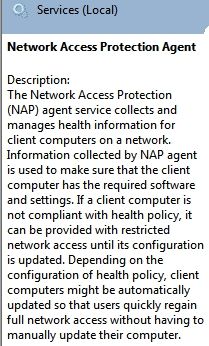
It was in the "services" under Network Access Protection agent.
Right click on it.
From there make sure it is set to Automatic.
From there click the login tab,
then Advanced tab,
then click FIND.
Select the the one that says NETWORK, put your network password in then apply.

After you might have to restart the service.
 

My Computer

Computer Manufacturer/Model Number
DELL
OS
WINDOWS 7 64-bit Ultimte
CPU
Quad Core 2
Motherboard
Dell
Memory
4 Gig
Graphics Card(s)
Nvidia 8600 GTS
Sound Card
on board
Monitor(s) Displays
22 inch HD
Hard Drives
500 gig
160 gig
Other Info
Windows experience rating of 5.9
NAP in Windows 7

You should probably read up on NAP. It serves absolutely no purpose if you are at home (in a normal setup). Therefore, it makes sense for it to be turned off by default, and enabling it will only serve to add complication in your network configuration and one more thing taking up resources on your PC.

In an enterprise/business environment, it is very usefully, and it if is turned on in the AD domain, it will have to be enabled for your to access the LAN.
 

My Computer

Computer Manufacturer/Model Number
Custom
OS
Windows 7 RC (7100)
CPU
AMD Phenom 9950 Quad-Core
Motherboard
ASUS M3A79-T Deluxe
Memory
8 Gigs DDR2 1066mhz (2x4)
Graphics Card(s)
GeForce 9600 GT 512MB
Monitor(s) Displays
Dell 2208WFP
Screen Resolution
1680 x 1050
Hard Drives
4 x 250GB 1 mirror, 1 stripe
PSU
Corsair 750W
Case
CoolerMaster RC-690-KKN1-GP
Internet Speed
13m x 5m
Other Info
This is my work system. I designed the IT department's PC's, all are like this. My home system is an Intel i7 based system with 6gigs of DDR trichannel ram, a LianLi aluminum case, and 3 500gb drives in a raid 5. It blows away my work PC. I built the work pc's in October '08, my home pc around Feb 09, and they ended up costing about the same!
Home Network?

I run a home network with many wireless devices and Wireless MAC Address Filtering.

But I also use my routers LAN to network my printer and a laptop with Windows XP SP3. Should I enable this service in this type of scenario?

I have not read up too much on NAP yet but if the answer is Yes, then would the the laptop also need a service started to ensure mutual protection?
 

Attachments

  • Action Center Security Setting.JPG
    Action Center Security Setting.JPG
    72.6 KB · Views: 203

My Computer

Computer type
PC/Desktop
Computer Manufacturer/Model Number
Custom Desktop PC
OS
Windows 7 / Windows 8.1
CPU
Devils Canyon i7-4790K @ 4.8 GHz ~ 1.33v
Motherboard
Asus Z97 Deluxe
Memory
Corsair Vengeance Pro PC3-19200 DDR3 2400MHz
Graphics Card(s)
EVGA GeForce GTX 980 SuperClocked ACX 2.0
Sound Card
Realtek ALC1150 8 channels
Monitor(s) Displays
BenQ XL2720Z 27"
Screen Resolution
1920 x 1080 @ 144Hz
Hard Drives
SSD1: 512GB Samsung 850 Pro
SSD2: 1TB Samsung 850 EVO
SSD3: 1TB Samsung 850 EVO
HDD: 4TB Western Digital Black
Backup: Western Digital My Book Duo 8TB
PSU
Corsair HX1000i / CyberPower CP1500PFCLCD PFC Sinewave UPS 1
Case
Corsair Graphite 780T
Cooling
Custom single loop liquid; CPU delidded; Aerocool DS Fans
Keyboard
Logitech G710 Cherry MX Blue
Mouse
LogitechG502 Proteus Core
Internet Speed
Download: 119MBs /Upload 39.12MBs via Optimum 101 Ultra
Antivirus
MYOB
Browser
Firefox
Other Info
Cooling: EK-Supremecy MX Waterblock, XSPC AX360 Radiator, Swiftech MCP655 Series 12VDC D5 Pump, EK-RES x3 250 Reservoir, Primochill Ice Intensified Coolant, 11x AerocoolDS fans, Primochill Primoflex Avanced LRT Tubing
How to turn on Windows 7 Network Access Protection?

You can turn it on, but you don't necessarily need to if you're on a home network. It's intended more for large business/ corporate/ intranet/ LAN networks.

By leaving it off you conserve resources as well. Nevertheless, for those of you that need it turned on, here's how you do it:
  • Browse to Start > type in "Services" > click on Services
  • Find Network Access Protection Agent in the list, right-click it, select "Properties," and under the "General" tab, under "Startup type," select "Automatic" and "OK." This should make NAP start with your PC. If you wish to start it right away, right-click on "Network Access Protection Agent" again, and select "Start."
 

My Computer

Computer Manufacturer/Model Number
hp
OS
windows 7 64 bit
You should probably read up on NAP. It serves absolutely no purpose if you are at home (in a normal setup). Therefore, it makes sense for it to be turned off by default.

bc439b42.jpg


I agree. NAP has long been disabled on my Win 7 x64 computer.

~Maxx~
.
da59fa57.png
 

My Computer

Computer Manufacturer/Model Number
HP HPE 270f
OS
Windows 7 x64 Home Premium
CPU
Intel Core i7 930 @ 2.8 Ghz Socket 1366 LGA
Motherboard
Pegatron Truckee v1.04E41
Memory
8 GB 1366 Mhz DDR3 (PC3-10700) RAM
Graphics Card(s)
ATI Radeon 5770 1 GB DDR5 RAM
Sound Card
Realtech High Definition
Monitor(s) Displays
32" Sony Bravia
Screen Resolution
1366 X 768
Hard Drives
Intel 25nm 120 GB Series 320 SSD HD Tune- 265 MBps Read/ 130 MBps Write

LaCie 1TB + 1TB RAID 0 eSATA Drive HD Tune- 160 MBps Read/ 90 MBps Write
Keyboard
Logitech Illuminated
Mouse
Logitech MX Revolution
Internet Speed
36.4 Mbps Maximum on a 37 Mbps Motorola SB501 Modem
This is obviously an old post, but I see no benefit to using NAP on a Home Network. If your network is basically a few computers, maybe an XBOX 360 or an iPod Touch/iPad, Sirius/XM, etc - DON'T BOTHER WASTING RESOURCES!

I see a lot of people enabling this just because they don't like to see that it's disabled under the Action Center. If you do not read up on what its purpose is, or how to ENFORCE the protection, you are really wasting time.
 
Last edited:

My Computer

Computer type
PC/Desktop
Computer Manufacturer/Model Number
Custom Desktop PC
OS
Windows 7 / Windows 8.1
CPU
Devils Canyon i7-4790K @ 4.8 GHz ~ 1.33v
Motherboard
Asus Z97 Deluxe
Memory
Corsair Vengeance Pro PC3-19200 DDR3 2400MHz
Graphics Card(s)
EVGA GeForce GTX 980 SuperClocked ACX 2.0
Sound Card
Realtek ALC1150 8 channels
Monitor(s) Displays
BenQ XL2720Z 27"
Screen Resolution
1920 x 1080 @ 144Hz
Hard Drives
SSD1: 512GB Samsung 850 Pro
SSD2: 1TB Samsung 850 EVO
SSD3: 1TB Samsung 850 EVO
HDD: 4TB Western Digital Black
Backup: Western Digital My Book Duo 8TB
PSU
Corsair HX1000i / CyberPower CP1500PFCLCD PFC Sinewave UPS 1
Case
Corsair Graphite 780T
Cooling
Custom single loop liquid; CPU delidded; Aerocool DS Fans
Keyboard
Logitech G710 Cherry MX Blue
Mouse
LogitechG502 Proteus Core
Internet Speed
Download: 119MBs /Upload 39.12MBs via Optimum 101 Ultra
Antivirus
MYOB
Browser
Firefox
Other Info
Cooling: EK-Supremecy MX Waterblock, XSPC AX360 Radiator, Swiftech MCP655 Series 12VDC D5 Pump, EK-RES x3 250 Reservoir, Primochill Ice Intensified Coolant, 11x AerocoolDS fans, Primochill Primoflex Avanced LRT Tubing
I had a similar problem, but in my situation I have created a VPN set up so I can VPN into my network away from home. I have set up a NAP environment for VPN clients. The only problem is that the clients connecting to the VPN are not domain members and therefore cannot download and implement the GPO settings needed.. Security centre and NAP service were enabled, but NAP still not working as the quarantine enforcement GPO was not in affect.

My solution to making NAP available and getting it to work for non domain computers was: on the client machine click start and the type NAPCLCFG.msc into the search bar and press enter. From the opening console select enforcement clients. on the right select the option that relates to your setup, e.g. mine was EAP Quarantine enforcement clients, right click and enable.

This worked for me almost immediately. Hope this helps.
 

My Computer

Computer type
PC/Desktop
Computer Manufacturer/Model Number
Custom AMD gaming build
OS
win7 x64 ultimate
CPU
AMD FX 5300 six core processsor
Motherboard
GA-78LMT-USB3
Memory
20GB PC3 Corsair
Graphics Card(s)
AMD Radeon R& 200 Series
Hard Drives
1TB Western digital
1TB External
Back
Top