Solved Network adapter not accepting drivers

AlterForm

New member
Local time
12:02 PM
Messages
5
I just upgraded my motherboard to a Gigabyte z170x-ud3. I cannot get it to connect via ethernet to my network (and thus the internet beyond that). This is an existing Windows 7 install.

  • I have run the driver installation disk included with the motherboard. When it attempts to install the PRO/100 drivers it complains "Cannot install driveres. No Intel(R) Adapters are present in this computer"
  • In the Device Manager, it reports my adapter as a generic "Ethernet Controller" and says no drivers are installed.
  • Letting windows "Search automatically for updated driver software" fails, it finds driver software "Intel(R) Ethernet Connection (2) 1219-V" but reports "A device attached to the system is not functioning"
  • I let the driver update scan the driver disk for software, it reports the same thing.
  • I had a standalone installer (PROsetup.exe?) from Intel's website that I misplaced and can't remember what it said, but it also failed.
  • msinfo32 reports no Problem Devices
  • I attached my dxdiag report to this post

And the most frustrating/encouraging part of it all, I was able to boot to an Ubuntu LiveUSB and the network adapter worked just fine there. So AFAICT this is not a hardware problem.
 

Attachments

My Computer

Computer type
PC/Desktop
Computer Manufacturer/Model Number
Custom Build
OS
Windows 7 Home Premium 64bit
CPU
Intel i5-6600K
Motherboard
Gigabyte z170x-ud3
Memory
GSkill Ripjaws 2x8GB
Graphics Card(s)
EVGA GTX 1080 FTW
Monitor(s) Displays
Acer Predator XB1
Screen Resolution
2560x1440
Hard Drives
500GB SSD Samsung 840 EVO (Boot)
- P0: Windows 7
1TB HDD WD(?)
- P0: Windows 7, ~720GB, old install
- P1: Ubuntu, ~200GB, old install
- P2: Ubuntu Swap, ~8GB
PSU
EVGA 850 GS
Case
CoolerMaster Storm Trooper
Cooling
CoolerMaster Hyper 212 EVO
Keyboard
Logitech K120
Mouse
Logitech G502
Internet Speed
100Mbps+
Antivirus
Avast
Browser
Chrome

My Computer

Computer type
PC/Desktop
Computer Manufacturer/Model Number
medionl/Aspire 6930G/acer x55a
OS
W7 home premium 32bit/W7HP 64bit/w10 tp insider ring
CPU
E5300 dual core
Motherboard
medion MS7366
Memory
3gb
Graphics Card(s)
Nvidia Geforce 7100 Nforce 630i
Monitor(s) Displays
avixc
Internet Speed
n (isp resticted to 72)
Antivirus
mse/pands
Browser
palemoon
Other Info
Belkin Fd7050 n USB using Railink RT2870 drivers, more upto date
Same result. "Cannot install drivers. No Intel(R) Adapters are present in this computer."
 

My Computer

Computer type
PC/Desktop
Computer Manufacturer/Model Number
Custom Build
OS
Windows 7 Home Premium 64bit
CPU
Intel i5-6600K
Motherboard
Gigabyte z170x-ud3
Memory
GSkill Ripjaws 2x8GB
Graphics Card(s)
EVGA GTX 1080 FTW
Monitor(s) Displays
Acer Predator XB1
Screen Resolution
2560x1440
Hard Drives
500GB SSD Samsung 840 EVO (Boot)
- P0: Windows 7
1TB HDD WD(?)
- P0: Windows 7, ~720GB, old install
- P1: Ubuntu, ~200GB, old install
- P2: Ubuntu Swap, ~8GB
PSU
EVGA 850 GS
Case
CoolerMaster Storm Trooper
Cooling
CoolerMaster Hyper 212 EVO
Keyboard
Logitech K120
Mouse
Logitech G502
Internet Speed
100Mbps+
Antivirus
Avast
Browser
Chrome
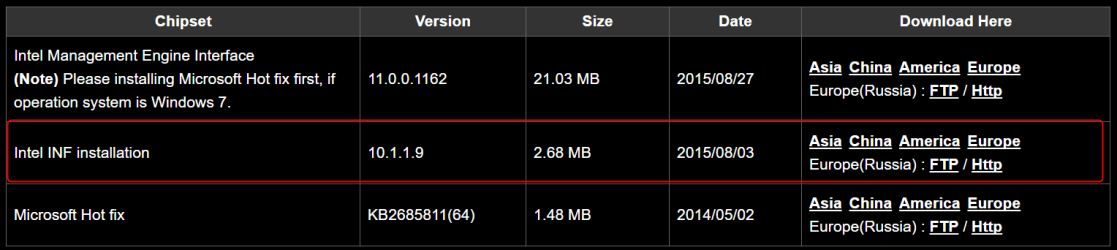
Have you tried installing or reinstalling the chipset driver?

GIGABYTE - Motherboard - Socket 1151 - GA-Z170X-UD3 (rev. 1.0)

2016-07-16_18h36_50.png

Then the driver from Gigabyte,

2016-07-16_18h40_44.png

I see odd outputs in the drivers, some say installed and some have nothing, you said this was an existing install, did you just move the HDD on to the new board?
 

My Computer

Computer type
PC/Desktop
Computer Manufacturer/Model Number
Self Built
OS
Win 10 Pro x64
CPU
Intel I5-2500K @3.3GHz
Motherboard
Asrock P67 Extreme4
Memory
16GB G.Skill Ripjaws X (4x4GB)
Graphics Card(s)
EVGA GeForce 750 Ti SC 2GB
Sound Card
ASUS Xonar DG 5.1 Channels 24-bit 96KHz PCI Interface Sound
Monitor(s) Displays
auria eq2367
Screen Resolution
1920 x 1080
Hard Drives
250GB Samsung 850 EVO SSD
1TB WD Blue
1TB Hitachi
PSU
SeaSonic X 650W 80 Plus Gold
Case
Corsair Obsidian 750D
Cooling
Corsair H60, Three 140mm case fans
Keyboard
Logitech Wireless Keyboard K520
Mouse
Logitech Wireless Mouse M310
Internet Speed
Wave Broadband ~ 100 dn 5 up
Antivirus
Windows Defender, Malwarebytes Premium
Browser
Edge, IE11, Chrome
Other Info
Laptop specs: HP g7-1365dx /
CPU: AMD A6-3420M APU with Radeon(tm) HD Graphics /
RAM: Crucial 8Gb (2x4Gb) /
SSD: Crucial M4-CT128M4SSD2 ATA Device/ FW 000F /
GFX: AMD Radeon HD 6520G /
OS: Windows 10 Pro x64
No luck with those either, derekimo.

Yes, I moved the hard drive to the new board as-is.
 

My Computer

Computer type
PC/Desktop
Computer Manufacturer/Model Number
Custom Build
OS
Windows 7 Home Premium 64bit
CPU
Intel i5-6600K
Motherboard
Gigabyte z170x-ud3
Memory
GSkill Ripjaws 2x8GB
Graphics Card(s)
EVGA GTX 1080 FTW
Monitor(s) Displays
Acer Predator XB1
Screen Resolution
2560x1440
Hard Drives
500GB SSD Samsung 840 EVO (Boot)
- P0: Windows 7
1TB HDD WD(?)
- P0: Windows 7, ~720GB, old install
- P1: Ubuntu, ~200GB, old install
- P2: Ubuntu Swap, ~8GB
PSU
EVGA 850 GS
Case
CoolerMaster Storm Trooper
Cooling
CoolerMaster Hyper 212 EVO
Keyboard
Logitech K120
Mouse
Logitech G502
Internet Speed
100Mbps+
Antivirus
Avast
Browser
Chrome
Yes, I moved the hard drive to the new board as-is.

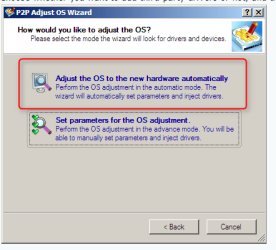
I'm pretty sure that's your problem, we have this tutorial that might help,

http://www.sevenforums.com/tutorials/292068-make-windows-7-bootable-after-motherboard-swap.html

I know the title says bootable but I think you might want to try using that tool and choosing this option at step 5,

2016-07-16_19h23_43.png

I thought you had a bunch of weird entries in your dxdiag, you have some from the old and some from the new.

There is a method to do what you did but you have to prepare for it ahead of time,

http://www.sevenforums.com/tutorials/135077-windows-7-installation-transfer-new-computer.html
 

My Computer

Computer type
PC/Desktop
Computer Manufacturer/Model Number
Self Built
OS
Win 10 Pro x64
CPU
Intel I5-2500K @3.3GHz
Motherboard
Asrock P67 Extreme4
Memory
16GB G.Skill Ripjaws X (4x4GB)
Graphics Card(s)
EVGA GeForce 750 Ti SC 2GB
Sound Card
ASUS Xonar DG 5.1 Channels 24-bit 96KHz PCI Interface Sound
Monitor(s) Displays
auria eq2367
Screen Resolution
1920 x 1080
Hard Drives
250GB Samsung 850 EVO SSD
1TB WD Blue
1TB Hitachi
PSU
SeaSonic X 650W 80 Plus Gold
Case
Corsair Obsidian 750D
Cooling
Corsair H60, Three 140mm case fans
Keyboard
Logitech Wireless Keyboard K520
Mouse
Logitech Wireless Mouse M310
Internet Speed
Wave Broadband ~ 100 dn 5 up
Antivirus
Windows Defender, Malwarebytes Premium
Browser
Edge, IE11, Chrome
Other Info
Laptop specs: HP g7-1365dx /
CPU: AMD A6-3420M APU with Radeon(tm) HD Graphics /
RAM: Crucial 8Gb (2x4Gb) /
SSD: Crucial M4-CT128M4SSD2 ATA Device/ FW 000F /
GFX: AMD Radeon HD 6520G /
OS: Windows 10 Pro x64
Yes, I moved the hard drive to the new board as-is.

I'm pretty sure that's your problem, we have this tutorial that might help,

http://www.sevenforums.com/tutorials/292068-make-windows-7-bootable-after-motherboard-swap.html

I know the title says bootable but I think you might want to try using that tool and choosing this option at step 5,

View attachment 389634

I thought you had a bunch of weird entries in your dxdiag, you have some from the old and some from the new.

There is a method to do what you did but you have to prepare for it ahead of time,

http://www.sevenforums.com/tutorials/135077-windows-7-installation-transfer-new-computer.html

Interesting; I had no idea that would be necessary.

That utility unfortunately does not seem to have fixed the problem. Since it seems that a fresh install should not have problems, I'm going to use some free space on my disk to test a fresh Windows 7 install. I'll report back with the results and if it looks good I can figure out what I need to back up before doing a full wipe+reinstall.
 

My Computer

Computer type
PC/Desktop
Computer Manufacturer/Model Number
Custom Build
OS
Windows 7 Home Premium 64bit
CPU
Intel i5-6600K
Motherboard
Gigabyte z170x-ud3
Memory
GSkill Ripjaws 2x8GB
Graphics Card(s)
EVGA GTX 1080 FTW
Monitor(s) Displays
Acer Predator XB1
Screen Resolution
2560x1440
Hard Drives
500GB SSD Samsung 840 EVO (Boot)
- P0: Windows 7
1TB HDD WD(?)
- P0: Windows 7, ~720GB, old install
- P1: Ubuntu, ~200GB, old install
- P2: Ubuntu Swap, ~8GB
PSU
EVGA 850 GS
Case
CoolerMaster Storm Trooper
Cooling
CoolerMaster Hyper 212 EVO
Keyboard
Logitech K120
Mouse
Logitech G502
Internet Speed
100Mbps+
Antivirus
Avast
Browser
Chrome
Yeah, your OS is setup and running on hardware specific drivers, you can't just change hardware and expect everything to be perfect.

Especially the motherboard, you were lucky because you can apparently boot and run your OS, some don't even get that.

That's what I would do, just clean install and be done with it.

Let us know how it goes.
 

My Computer

Computer type
PC/Desktop
Computer Manufacturer/Model Number
Self Built
OS
Win 10 Pro x64
CPU
Intel I5-2500K @3.3GHz
Motherboard
Asrock P67 Extreme4
Memory
16GB G.Skill Ripjaws X (4x4GB)
Graphics Card(s)
EVGA GeForce 750 Ti SC 2GB
Sound Card
ASUS Xonar DG 5.1 Channels 24-bit 96KHz PCI Interface Sound
Monitor(s) Displays
auria eq2367
Screen Resolution
1920 x 1080
Hard Drives
250GB Samsung 850 EVO SSD
1TB WD Blue
1TB Hitachi
PSU
SeaSonic X 650W 80 Plus Gold
Case
Corsair Obsidian 750D
Cooling
Corsair H60, Three 140mm case fans
Keyboard
Logitech Wireless Keyboard K520
Mouse
Logitech Wireless Mouse M310
Internet Speed
Wave Broadband ~ 100 dn 5 up
Antivirus
Windows Defender, Malwarebytes Premium
Browser
Edge, IE11, Chrome
Other Info
Laptop specs: HP g7-1365dx /
CPU: AMD A6-3420M APU with Radeon(tm) HD Graphics /
RAM: Crucial 8Gb (2x4Gb) /
SSD: Crucial M4-CT128M4SSD2 ATA Device/ FW 000F /
GFX: AMD Radeon HD 6520G /
OS: Windows 10 Pro x64
might just be its not connected properly try reseating it.

Roy
 

My Computer

Computer type
PC/Desktop
Computer Manufacturer/Model Number
medionl/Aspire 6930G/acer x55a
OS
W7 home premium 32bit/W7HP 64bit/w10 tp insider ring
CPU
E5300 dual core
Motherboard
medion MS7366
Memory
3gb
Graphics Card(s)
Nvidia Geforce 7100 Nforce 630i
Monitor(s) Displays
avixc
Internet Speed
n (isp resticted to 72)
Antivirus
mse/pands
Browser
palemoon
Other Info
Belkin Fd7050 n USB using Railink RT2870 drivers, more upto date
I highly recommend upgrading to Windows 10. :)
 

My Computer

OS
Windows 7 Professional 64bit
CPU
AMD Athlon II X3 440
Motherboard
ASUS M4A77TD
Memory
12.0 GB Dual-Channel DDR3 @ 669MHz
Graphics Card(s)
AMD Radeon HD 6850
Sound Card
AMD High Definition Audio Device
Monitor(s) Displays
Dell 317FP, Generic PnP Monitor
Screen Resolution
1920x1080
Hard Drives
112GB OCZ OCZ-AGIL ITY3 SATA Disk Device (SSD)
932GB Western Digital WDC WD10 01FALS-00E3A0 SATA Disk Device (SATA)
466GB Western Digital WDC WD50 01AALS-00L3B2 SATA Disk Device (SATA)
Case
ANTEC 300 ILLUSION
Cooling
CoolerMaster Hyper 212 plus
Other Info
I have two 4GB Corsair XMS3 modules and two 2GB Corsair XMS3 modules.
Update:

All's well after clean-ish install of Windows. There was an extra step involved though.

Windows 7's installer is apparently incompatible with the newer USB chipset on the Gigabyte board. I had to grab the Windows USB Installation Tool from GB's website to inject the proper drivers onto my install USB. (I actually tried Intel's utility first, but it failed to modify the USB)

Also, Windows was kind enough to drop all my files from the old install into a backup folder on the same drive (so, not a perfectly-clean freshly-formatted install). Spending an hour backing up a few things of value beforehand was definitely worth the peace of mind, though.

I highly recommend upgrading to Windows 10. :)

That's the plan, actually. Once I have W7 stable again I'll be making the jump to W10. :)


Thanks again for the help, especially derekimo for nailing the problem.
 

My Computer

Computer type
PC/Desktop
Computer Manufacturer/Model Number
Custom Build
OS
Windows 7 Home Premium 64bit
CPU
Intel i5-6600K
Motherboard
Gigabyte z170x-ud3
Memory
GSkill Ripjaws 2x8GB
Graphics Card(s)
EVGA GTX 1080 FTW
Monitor(s) Displays
Acer Predator XB1
Screen Resolution
2560x1440
Hard Drives
500GB SSD Samsung 840 EVO (Boot)
- P0: Windows 7
1TB HDD WD(?)
- P0: Windows 7, ~720GB, old install
- P1: Ubuntu, ~200GB, old install
- P2: Ubuntu Swap, ~8GB
PSU
EVGA 850 GS
Case
CoolerMaster Storm Trooper
Cooling
CoolerMaster Hyper 212 EVO
Keyboard
Logitech K120
Mouse
Logitech G502
Internet Speed
100Mbps+
Antivirus
Avast
Browser
Chrome
Glad you got it sorted, you're welcome. :)
 

My Computer

Computer type
PC/Desktop
Computer Manufacturer/Model Number
Self Built
OS
Win 10 Pro x64
CPU
Intel I5-2500K @3.3GHz
Motherboard
Asrock P67 Extreme4
Memory
16GB G.Skill Ripjaws X (4x4GB)
Graphics Card(s)
EVGA GeForce 750 Ti SC 2GB
Sound Card
ASUS Xonar DG 5.1 Channels 24-bit 96KHz PCI Interface Sound
Monitor(s) Displays
auria eq2367
Screen Resolution
1920 x 1080
Hard Drives
250GB Samsung 850 EVO SSD
1TB WD Blue
1TB Hitachi
PSU
SeaSonic X 650W 80 Plus Gold
Case
Corsair Obsidian 750D
Cooling
Corsair H60, Three 140mm case fans
Keyboard
Logitech Wireless Keyboard K520
Mouse
Logitech Wireless Mouse M310
Internet Speed
Wave Broadband ~ 100 dn 5 up
Antivirus
Windows Defender, Malwarebytes Premium
Browser
Edge, IE11, Chrome
Other Info
Laptop specs: HP g7-1365dx /
CPU: AMD A6-3420M APU with Radeon(tm) HD Graphics /
RAM: Crucial 8Gb (2x4Gb) /
SSD: Crucial M4-CT128M4SSD2 ATA Device/ FW 000F /
GFX: AMD Radeon HD 6520G /
OS: Windows 10 Pro x64
Back
Top