Network adapter not detected, drivers not re-installing, HELP!

JayJazmyn

New member
Local time
2:30 PM
Messages
3
Hi guys,
I have a pc and i'm having some issues with my network adapter.
When i try and find model, it says "System Product Name Desktop"
I'm currently running Windows 7 64bit, Core i5 750 2.67GHz
Motherboard; ASUS P7P55D LE (Intel DMI Host Bridge)
Graphics; AMD Radeon R7 200 Series (2GB)
RAM; 8192MB DDR3 SDRAM 1330
LAN port; 1 x LAN(RJ45) port

BTW, I purchased this PC as a refurbished PC almost a year ago and never had this problem. It's always been connected to the internet and always updated??
Everything happened after we capped our internet, i booted my pc when our internet reset and this problem started.
It had been asleep (not properly turned off) the day before we capped the internet as i was downloading stuff, then it was turned off and turned back on we had this problem.

My network adapter is built into my motherboard so i don't have a separate chip.
I don't have wireless, it's only connects via Ethernet cable.
Tried a few cables, all are fine (we have another computer running off Ethernet cables to test, but switched it back to wireless and all cables are working)
Went into Device manager, there is NO network adapters showing up what so ever.
Downloaded all new drivers through ASUS's site, all work except the LAN driver, in which it's says "The realtek network controller was not found. if deep sleep mode is enabled please plug the cable"
I've been reading forums, i've turned my PC power settings to High performance and tried re-installing drivers, still the same thing.
I've gone into BIOS and gone into "Onboard Devices Configuration" which says -
"Realtak LAN - enabled"
"LAN boot ROM - disabled"
I enabled "LAN boot ROM" and nothing has changed..
I have disabled "Realtek LAN", rebooted then enabled, rebooted and still no luck.
My internet thing in my task manager says "Not connected, No connections available."
I have pulled the back off of my pc and checked the motherboard, looks fine.
I have checked the connection LAN port is not broken, all is fine.
When i troubleshoot the problem it says -
"Install a driver for your network adapter,
Windows did not detect a properly installed network adapter. If you have a network adapter, please re-install the driver"
Yet re-installing the driver fails still!
I've tried turning my computer off and unplugging the power cord, waiting 10-20 minutes and still nothing.
Have ran Intel (R) Driver update Utility 2.4 - doesn't work as no connection to the internet.
Have also ran Driver Talet, which says Network Adapter not found.
 

My Computer

Computer type
PC/Desktop
Computer Manufacturer/Model Number
Unknown
OS
Windows 7 Ultimate x64
CPU
Intel Core i5 750 2.67GHz
Motherboard
Asus P7P55D LE (Intel DMI Host Bridge)
Memory
8192MB DDR3 SDRAM 1330
Graphics Card(s)
AMD Radeon R7 200 Series (2GB)
Hard Drives
1000GB HDD
Antivirus
Bitdefender 2016
Browser
Chrome
Hello and welcome Jay now mate I am just a bit confused s to where you got y=the LAN driver from - if you were using the Windows feature then it is pretty usellesss in my mind and I always go to the manufacturers for any driver where one can.

Now this is the driver you want https://www.asus.com/Motherboards/P7P55D_LE/HelpDesk_Download/ and what I do when I am stuck for installing any driver I jump on another computer and download it to a stick then install it from the stick to the machine you want up and running. I find the LAN driver the one that almost always presents as an issue when I cannot get onto the net.

Let us know how you go.
 

My Computer

Computer type
PC/Desktop
Computer Manufacturer/Model Number
Own build (new) Desk1 / Asus ROG Win 7 / Desk2 1st build
OS
Desk1 7 Home Prem / Desk2 10 Pro / Main lap Asus ROG 10 Pro 2 laptop Toshiba 7 Pro Asus P2520 7 & 10
CPU
Desk1 i5 3750K / Laptop i7 GTX 860M / Desk2 i5 2500
Motherboard
Desk1 Asus P877-V / Desk2 Gigabyte H67 UD3H / Laptop ?
Memory
Desk1 8GB (1866) / Desk2 16GB (1333) / Laptop 8Gb DDR3
Graphics Card(s)
Desk 1& 2NVidia GTX 650 & Laptops on board Intel
Sound Card
Desk 1 & 2 -XONAR DG Realtek High Def audio Laptop
Monitor(s) Displays
Desk 1 Benq HD 2450 / Desk2 Philips 24" / Laptop 17.5"
Screen Resolution
1920x1080 D1 & D2 & Laptop 1
Hard Drives
Desk1 Samsung 120GB 830 SSD
Asus ROG 256GB 850 Pro SSD
Desk2 Samsung 840 256 SSD
Toshiba 120GB EVO
PSU
Desk 1 Corsair HX 1050/ Laptop ? / Desk 2 Corsair HX 650
Case
Desk 1 Cooler HAF XM ? Toshiba laptop / Desk2 Coolermaster
Cooling
Fans on all Desk1 -2 Desk2 - all Coolermasters 5 Laptop ?
Keyboard
Desk 1 MS Sidewinder X6 Desk 2 MS Sidewinder X 4
Mouse
Desk 1&2 - Gigabyte MS 900 gamer - laptop - Logitec wireless
Internet Speed
ADSL2+
Other Info
One other Desktop (tester) and spare Toshba laptop both with SSD's
Running Kaspersky 2016 ISS on all machines config'd identically
Logitec audio stereo systems on each machine (x3)
Canon MG5250MFC
Router/modem TP-Link running WPA2SK
Hey there,That's where I've been getting my drivers from, I've been trying to install that exact driver and it comes up with ""The realtek network controller was not found. if deep sleep mode is enabled please plug the cable"
 

My Computer

Computer type
PC/Desktop
Computer Manufacturer/Model Number
Unknown
OS
Windows 7 Ultimate x64
CPU
Intel Core i5 750 2.67GHz
Motherboard
Asus P7P55D LE (Intel DMI Host Bridge)
Memory
8192MB DDR3 SDRAM 1330
Graphics Card(s)
AMD Radeon R7 200 Series (2GB)
Hard Drives
1000GB HDD
Antivirus
Bitdefender 2016
Browser
Chrome

My Computer

Computer type
PC/Desktop
Computer Manufacturer/Model Number
Own build (new) Desk1 / Asus ROG Win 7 / Desk2 1st build
OS
Desk1 7 Home Prem / Desk2 10 Pro / Main lap Asus ROG 10 Pro 2 laptop Toshiba 7 Pro Asus P2520 7 & 10
CPU
Desk1 i5 3750K / Laptop i7 GTX 860M / Desk2 i5 2500
Motherboard
Desk1 Asus P877-V / Desk2 Gigabyte H67 UD3H / Laptop ?
Memory
Desk1 8GB (1866) / Desk2 16GB (1333) / Laptop 8Gb DDR3
Graphics Card(s)
Desk 1& 2NVidia GTX 650 & Laptops on board Intel
Sound Card
Desk 1 & 2 -XONAR DG Realtek High Def audio Laptop
Monitor(s) Displays
Desk 1 Benq HD 2450 / Desk2 Philips 24" / Laptop 17.5"
Screen Resolution
1920x1080 D1 & D2 & Laptop 1
Hard Drives
Desk1 Samsung 120GB 830 SSD
Asus ROG 256GB 850 Pro SSD
Desk2 Samsung 840 256 SSD
Toshiba 120GB EVO
PSU
Desk 1 Corsair HX 1050/ Laptop ? / Desk 2 Corsair HX 650
Case
Desk 1 Cooler HAF XM ? Toshiba laptop / Desk2 Coolermaster
Cooling
Fans on all Desk1 -2 Desk2 - all Coolermasters 5 Laptop ?
Keyboard
Desk 1 MS Sidewinder X6 Desk 2 MS Sidewinder X 4
Mouse
Desk 1&2 - Gigabyte MS 900 gamer - laptop - Logitec wireless
Internet Speed
ADSL2+
Other Info
One other Desktop (tester) and spare Toshba laptop both with SSD's
Running Kaspersky 2016 ISS on all machines config'd identically
Logitec audio stereo systems on each machine (x3)
Canon MG5250MFC
Router/modem TP-Link running WPA2SK
Its probably hiding down the bottom in problem devices.
Note >>UN<< plug the cable when installing the driver, and Turn sleep OFF
Have you got a restore point prior to your problem?

Roy
 

My Computer

Computer type
PC/Desktop
Computer Manufacturer/Model Number
medionl/Aspire 6930G/acer x55a
OS
W7 home premium 32bit/W7HP 64bit/w10 tp insider ring
CPU
E5300 dual core
Motherboard
medion MS7366
Memory
3gb
Graphics Card(s)
Nvidia Geforce 7100 Nforce 630i
Monitor(s) Displays
avixc
Internet Speed
n (isp resticted to 72)
Antivirus
mse/pands
Browser
palemoon
Other Info
Belkin Fd7050 n USB using Railink RT2870 drivers, more upto date
Hey guys, disk checker wouldn't run. I'd start to run it, and something would flick up and close immediately. Scan now came up with nothing wrong. I've checked my device manager, no unknown or problem devices at all. Also i am currently running my pc on high performance mode. All i can see on my device manager is as follows
Computer
Disk drivers
display adapters
DVD/CD-ROM drivers
Human interface devices
IDA ATA/ATAPI controllers
keyboards
mouse and other pointing devices
monitors
portable devices
ports
processors
sound, video and game controllers
system devices
universal serial bus controllers
 

My Computer

Computer type
PC/Desktop
Computer Manufacturer/Model Number
Unknown
OS
Windows 7 Ultimate x64
CPU
Intel Core i5 750 2.67GHz
Motherboard
Asus P7P55D LE (Intel DMI Host Bridge)
Memory
8192MB DDR3 SDRAM 1330
Graphics Card(s)
AMD Radeon R7 200 Series (2GB)
Hard Drives
1000GB HDD
Antivirus
Bitdefender 2016
Browser
Chrome
Jay maybe obvious but did you try the chkdsk in safe mode??
 

My Computer

Computer type
PC/Desktop
Computer Manufacturer/Model Number
Own build (new) Desk1 / Asus ROG Win 7 / Desk2 1st build
OS
Desk1 7 Home Prem / Desk2 10 Pro / Main lap Asus ROG 10 Pro 2 laptop Toshiba 7 Pro Asus P2520 7 & 10
CPU
Desk1 i5 3750K / Laptop i7 GTX 860M / Desk2 i5 2500
Motherboard
Desk1 Asus P877-V / Desk2 Gigabyte H67 UD3H / Laptop ?
Memory
Desk1 8GB (1866) / Desk2 16GB (1333) / Laptop 8Gb DDR3
Graphics Card(s)
Desk 1& 2NVidia GTX 650 & Laptops on board Intel
Sound Card
Desk 1 & 2 -XONAR DG Realtek High Def audio Laptop
Monitor(s) Displays
Desk 1 Benq HD 2450 / Desk2 Philips 24" / Laptop 17.5"
Screen Resolution
1920x1080 D1 & D2 & Laptop 1
Hard Drives
Desk1 Samsung 120GB 830 SSD
Asus ROG 256GB 850 Pro SSD
Desk2 Samsung 840 256 SSD
Toshiba 120GB EVO
PSU
Desk 1 Corsair HX 1050/ Laptop ? / Desk 2 Corsair HX 650
Case
Desk 1 Cooler HAF XM ? Toshiba laptop / Desk2 Coolermaster
Cooling
Fans on all Desk1 -2 Desk2 - all Coolermasters 5 Laptop ?
Keyboard
Desk 1 MS Sidewinder X6 Desk 2 MS Sidewinder X 4
Mouse
Desk 1&2 - Gigabyte MS 900 gamer - laptop - Logitec wireless
Internet Speed
ADSL2+
Other Info
One other Desktop (tester) and spare Toshba laptop both with SSD's
Running Kaspersky 2016 ISS on all machines config'd identically
Logitec audio stereo systems on each machine (x3)
Canon MG5250MFC
Router/modem TP-Link running WPA2SK
Well according to your list, your missing the one you want
Network adapters.
so i suspect you have a problem device like i said earlier.

You could also check that your Bios and chipset driver are upto date
and for the moment turn sleep and hibernation modes off

You could also unplug the cable and the comp for at least 10 mins, been known to reset components. turn back on see if its in device manager.

Roy
 

Attachments

  • wifidrive.PNG
    wifidrive.PNG
    76.8 KB · Views: 12
Last edited:

My Computer

Computer type
PC/Desktop
Computer Manufacturer/Model Number
medionl/Aspire 6930G/acer x55a
OS
W7 home premium 32bit/W7HP 64bit/w10 tp insider ring
CPU
E5300 dual core
Motherboard
medion MS7366
Memory
3gb
Graphics Card(s)
Nvidia Geforce 7100 Nforce 630i
Monitor(s) Displays
avixc
Internet Speed
n (isp resticted to 72)
Antivirus
mse/pands
Browser
palemoon
Other Info
Belkin Fd7050 n USB using Railink RT2870 drivers, more upto date
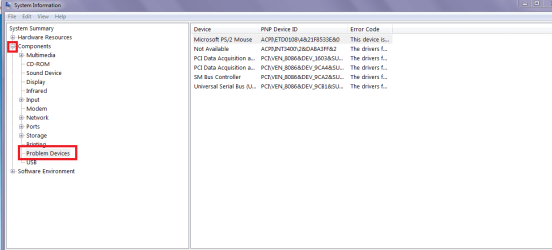
Jay mate try Start > type msinfo32 click on the result and open it out and look under components for Problem devices.
 

Attachments

  • MS.PNG
    MS.PNG
    54 KB · Views: 0

My Computer

Computer type
PC/Desktop
Computer Manufacturer/Model Number
Own build (new) Desk1 / Asus ROG Win 7 / Desk2 1st build
OS
Desk1 7 Home Prem / Desk2 10 Pro / Main lap Asus ROG 10 Pro 2 laptop Toshiba 7 Pro Asus P2520 7 & 10
CPU
Desk1 i5 3750K / Laptop i7 GTX 860M / Desk2 i5 2500
Motherboard
Desk1 Asus P877-V / Desk2 Gigabyte H67 UD3H / Laptop ?
Memory
Desk1 8GB (1866) / Desk2 16GB (1333) / Laptop 8Gb DDR3
Graphics Card(s)
Desk 1& 2NVidia GTX 650 & Laptops on board Intel
Sound Card
Desk 1 & 2 -XONAR DG Realtek High Def audio Laptop
Monitor(s) Displays
Desk 1 Benq HD 2450 / Desk2 Philips 24" / Laptop 17.5"
Screen Resolution
1920x1080 D1 & D2 & Laptop 1
Hard Drives
Desk1 Samsung 120GB 830 SSD
Asus ROG 256GB 850 Pro SSD
Desk2 Samsung 840 256 SSD
Toshiba 120GB EVO
PSU
Desk 1 Corsair HX 1050/ Laptop ? / Desk 2 Corsair HX 650
Case
Desk 1 Cooler HAF XM ? Toshiba laptop / Desk2 Coolermaster
Cooling
Fans on all Desk1 -2 Desk2 - all Coolermasters 5 Laptop ?
Keyboard
Desk 1 MS Sidewinder X6 Desk 2 MS Sidewinder X 4
Mouse
Desk 1&2 - Gigabyte MS 900 gamer - laptop - Logitec wireless
Internet Speed
ADSL2+
Other Info
One other Desktop (tester) and spare Toshba laptop both with SSD's
Running Kaspersky 2016 ISS on all machines config'd identically
Logitec audio stereo systems on each machine (x3)
Canon MG5250MFC
Router/modem TP-Link running WPA2SK
Back
Top