Network Card not working

kahitano08

New member
Local time
11:07 AM
Messages
4
I have upgraded my Sony Vaio CR510E laptop to windows 7 a long time ago. Just recently found out that my network card is not working. It can't get an IP ADdress. All I get is the private IP 169.254.255.245.

I tried installing driver for the old Vista OS and it didn't work. Tried installing from automatic windows detection and it doesn't work. I don't know what kind of network card I have. Does anyone have any suggestions?

Wifi is working fine.
 

My Computer

OS
Windows 7
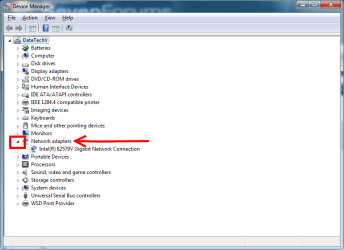
Welcome to Seven Forums. Go to Control Panel\All Control Panel Items\Device Manager and see if there is a yellow icon on Network Adapters.

Devmgr.png
If so right click the device, then update driver, Search Automatically.
 

My Computer

Computer type
PC/Desktop
Computer Manufacturer/Model Number
Home Built Desktop By DataTech
OS
Windows 7 Ultimate X64 SP1
CPU
Intel i5-2550K, Differing ~4.4-4.8GHz No built in GPU
Motherboard
ASUS P8Z68-V PRO/GEN3
Memory
16GB G.Skill Sniper 1866MHz @ 2133MHz 2x8GB
Graphics Card(s)
ASUS GTX650TIB-DC2OC-2GD5, (650TI Boost)
Sound Card
Onboard Realtek 5-1
Monitor(s) Displays
Samsung P2570HD
Screen Resolution
1920x1080
Hard Drives
Samsung 840 Pro 256GB SSD for OS, 500GB Seagate Constellation (Enterprise drive) for Data
PSU
Corsair HX650W
Case
Inwin Dragon Rider
Cooling
Hyper 212 EVO w/two Noctua fans, push-pull, @1300 RPM
Keyboard
E-Z Eyes, bright yellow keys with large characters
Mouse
steelseries SENSEI Laser Pro Gaming
Internet Speed
48-51Mbs Mbs down, 11 Mbs up Xfinity Cable
Antivirus
Norton Internet Security 2013
Browser
IE 10, Opera, Pale Moon if needed
Other Info
4 case fans, LG BluRay-RE, ASUS DVD-RW, Mr. Fusion power supply, 1.21 gigawatts.
Welcome to Seven Forums. Go to Control Panel\All Control Panel Items\Device Manager and see if there is a yellow icon on Network Adapters.

If so right click the device, then update driver, Search Automatically.

There's no yellow icon in there. I've tried clicking on update driver and it only says that I already have the latest driver installed.

And also, even if I set a static IP and gateway on the network adapter, it's not able to connect to the router (192.168.1.1)
 

My Computer

OS
Windows 7
First thing you should do is check hardware. That means router ports cable and the nic port on the back of your computer

Then ping the internals open command prompt and type the loopback " ping 127.0.0.1 " if your physically connected in the first step and you get losses here its a software issue. resetting tcpip might fix the issue it may also be a anti virus issue or something like that
 

My Computer

OS
Windows 7 Home Premium 64bit
First thing you should do is check hardware. That means router ports cable and the nic port on the back of your computer

Then ping the internals open command prompt and type the loopback " ping 127.0.0.1 " if your physically connected in the first step and you get losses here its a software issue. resetting tcpip might fix the issue it may also be a anti virus issue or something like that

So I connected the cable from laptop lan port to a lan port in the router, did a PING 127.0.0.1 and was able to ping successfully. I have already disabled antivirus.
 

My Computer

OS
Windows 7
Try the Device manager again and uninstall the adapter and delete the driver and reboot.
 

My Computer

Computer type
PC/Desktop
Computer Manufacturer/Model Number
Home Built Desktop By DataTech
OS
Windows 7 Ultimate X64 SP1
CPU
Intel i5-2550K, Differing ~4.4-4.8GHz No built in GPU
Motherboard
ASUS P8Z68-V PRO/GEN3
Memory
16GB G.Skill Sniper 1866MHz @ 2133MHz 2x8GB
Graphics Card(s)
ASUS GTX650TIB-DC2OC-2GD5, (650TI Boost)
Sound Card
Onboard Realtek 5-1
Monitor(s) Displays
Samsung P2570HD
Screen Resolution
1920x1080
Hard Drives
Samsung 840 Pro 256GB SSD for OS, 500GB Seagate Constellation (Enterprise drive) for Data
PSU
Corsair HX650W
Case
Inwin Dragon Rider
Cooling
Hyper 212 EVO w/two Noctua fans, push-pull, @1300 RPM
Keyboard
E-Z Eyes, bright yellow keys with large characters
Mouse
steelseries SENSEI Laser Pro Gaming
Internet Speed
48-51Mbs Mbs down, 11 Mbs up Xfinity Cable
Antivirus
Norton Internet Security 2013
Browser
IE 10, Opera, Pale Moon if needed
Other Info
4 case fans, LG BluRay-RE, ASUS DVD-RW, Mr. Fusion power supply, 1.21 gigawatts.
Back
Top