Solved Network connection after reboot

Sbrochew

New member
Hello. I suddenly developed a problem last night with connecting to my home network. I am not sure if it is a windows problem or not. I installed two Radeon RX480+ Black Edition video cards, Logitech G710+, and Logitech mouse. I was able to install the driver for the video cards but after installing and rebooting the PC would not connect to my home network.

The things I have done are:

-Rebooted the router (Verizon Fios Quantum)
-ipconfig....../flushdns, /release, /renew
-Checked for update on LAN driver (It was up to date)
-Uninstalled LAN driver and reinstalled using original mobo disk (The PC connected fine after this step until I rebooted again, then would not connect after reboot)
-Disabled LAN and then immediately enabled it (The PC connected fine after this step as well but once the computer is rebooted it will no longer connect)

So now I have no connection when I turn the PC on or after I reboot. If I disable LAN then enable it immediately I get the connection back. Anyone else seen this issue or have any idea what could be going on?
 

My Computer

Computer Manufacturer/Model Number
Self built
OS
Windows 7 Pro
CPU
AMD Phenom II x4 955 Black Edition
Motherboard
ASUS Crosshair III
Memory
4GB (2x2GB) DDR3 Kingston
Graphics Card(s)
XFX Radeon HD 4890
Sound Card
X-Xfi
Monitor(s) Displays
Sampo 17"
Hard Drives
WD 720GB and WD 320GB- both 7200 RPM
PSU
Cooler Master 600W Silent Pro
Case
Cooler Master HAF 932
Keyboard
Logitech cordless
Mouse
Logitech cordless
Internet Speed
20 mbs down
I would try setting your ip address if gives you in windows at the moment to be static, sounds like your router may be having issues reassigned you it each time automatically. When it does not connect does it give you a normal address of just a 169.x.x.x one? EDIT: so release and renew do not bring it back?
 

My Computer

Computer type
PC/Desktop
Computer Manufacturer/Model Number
Custom
OS
10 Pro x64
CPU
Ryzen 9 3900X
Motherboard
Asrock x370 Tachi
Memory
64GB(4x16GB) DDR4
Graphics Card(s)
EVGA 1080ti FTW3
Sound Card
ASUS Xonar Essence STX (V4 Bursons), ODAC rev B, NFB-11, O2
Monitor(s) Displays
3xASUS PB278Q/R, Optoma HD142X
Screen Resolution
3x1440p, 1080p
Hard Drives
512GB 850 EVO(OS, Programs)
4TB (Movies)
3TB (Downloads)
3TB (Programs)
1TB HDD (Games)
2x6TB R1 (videos)
PSU
AX760
Case
Fractal Define R5
Cooling
NH-D15S
Keyboard
Massdrop Ctrl with Box Navy's
Mouse
G903, Alioth XXL Mat
Internet Speed
280/40
Antivirus
MBAM, ESET
Browser
Canary 64 Bit
Other Info
I also own a Thinkpad P50 Xeon 4K, X220T, X1C5
I would try setting your ip address if gives you in windows at the moment to be static, sounds like your router may be having issues reassigned you it each time automatically. When it does not connect does it give you a normal address of just a 169.x.x.x one? EDIT: so release and renew do not bring it back?

No, release and renew does not allow it to reconnect. Only when I disable then enable LAN does it start working.
 

My Computer

Computer Manufacturer/Model Number
Self built
OS
Windows 7 Pro
CPU
AMD Phenom II x4 955 Black Edition
Motherboard
ASUS Crosshair III
Memory
4GB (2x2GB) DDR3 Kingston
Graphics Card(s)
XFX Radeon HD 4890
Sound Card
X-Xfi
Monitor(s) Displays
Sampo 17"
Hard Drives
WD 720GB and WD 320GB- both 7200 RPM
PSU
Cooler Master 600W Silent Pro
Case
Cooler Master HAF 932
Keyboard
Logitech cordless
Mouse
Logitech cordless
Internet Speed
20 mbs down
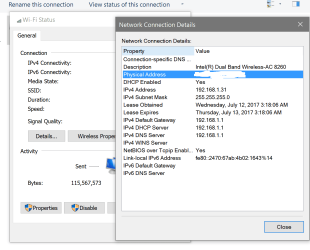
what is your Details info like this?
 

Attachments

  • info.PNG
    info.PNG
    98 KB · Views: 1

My Computer

Computer type
PC/Desktop
Computer Manufacturer/Model Number
Custom
OS
10 Pro x64
CPU
Ryzen 9 3900X
Motherboard
Asrock x370 Tachi
Memory
64GB(4x16GB) DDR4
Graphics Card(s)
EVGA 1080ti FTW3
Sound Card
ASUS Xonar Essence STX (V4 Bursons), ODAC rev B, NFB-11, O2
Monitor(s) Displays
3xASUS PB278Q/R, Optoma HD142X
Screen Resolution
3x1440p, 1080p
Hard Drives
512GB 850 EVO(OS, Programs)
4TB (Movies)
3TB (Downloads)
3TB (Programs)
1TB HDD (Games)
2x6TB R1 (videos)
PSU
AX760
Case
Fractal Define R5
Cooling
NH-D15S
Keyboard
Massdrop Ctrl with Box Navy's
Mouse
G903, Alioth XXL Mat
Internet Speed
280/40
Antivirus
MBAM, ESET
Browser
Canary 64 Bit
Other Info
I also own a Thinkpad P50 Xeon 4K, X220T, X1C5
Okay. I am at work right now but tonight I will get that info. Thanks for the help so far!
 

My Computer

Computer Manufacturer/Model Number
Self built
OS
Windows 7 Pro
CPU
AMD Phenom II x4 955 Black Edition
Motherboard
ASUS Crosshair III
Memory
4GB (2x2GB) DDR3 Kingston
Graphics Card(s)
XFX Radeon HD 4890
Sound Card
X-Xfi
Monitor(s) Displays
Sampo 17"
Hard Drives
WD 720GB and WD 320GB- both 7200 RPM
PSU
Cooler Master 600W Silent Pro
Case
Cooler Master HAF 932
Keyboard
Logitech cordless
Mouse
Logitech cordless
Internet Speed
20 mbs down
No problem look forward to your info.
 

My Computer

Computer type
PC/Desktop
Computer Manufacturer/Model Number
Custom
OS
10 Pro x64
CPU
Ryzen 9 3900X
Motherboard
Asrock x370 Tachi
Memory
64GB(4x16GB) DDR4
Graphics Card(s)
EVGA 1080ti FTW3
Sound Card
ASUS Xonar Essence STX (V4 Bursons), ODAC rev B, NFB-11, O2
Monitor(s) Displays
3xASUS PB278Q/R, Optoma HD142X
Screen Resolution
3x1440p, 1080p
Hard Drives
512GB 850 EVO(OS, Programs)
4TB (Movies)
3TB (Downloads)
3TB (Programs)
1TB HDD (Games)
2x6TB R1 (videos)
PSU
AX760
Case
Fractal Define R5
Cooling
NH-D15S
Keyboard
Massdrop Ctrl with Box Navy's
Mouse
G903, Alioth XXL Mat
Internet Speed
280/40
Antivirus
MBAM, ESET
Browser
Canary 64 Bit
Other Info
I also own a Thinkpad P50 Xeon 4K, X220T, X1C5
No problem look forward to your info.

Hello. Finally got a chance to log in tonight. Here are the specs:

troubleshoot_zpstxqxmpqk.png
[/URL][/IMG]

troubleshoot2_zpsvsq84xgq.png
[/URL][/IMG]

Looks normal to me but I could be missing something!
 

My Computer

Computer Manufacturer/Model Number
Self built
OS
Windows 7 Pro
CPU
AMD Phenom II x4 955 Black Edition
Motherboard
ASUS Crosshair III
Memory
4GB (2x2GB) DDR3 Kingston
Graphics Card(s)
XFX Radeon HD 4890
Sound Card
X-Xfi
Monitor(s) Displays
Sampo 17"
Hard Drives
WD 720GB and WD 320GB- both 7200 RPM
PSU
Cooler Master 600W Silent Pro
Case
Cooler Master HAF 932
Keyboard
Logitech cordless
Mouse
Logitech cordless
Internet Speed
20 mbs down
No problem look forward to your info.

So I solved the problem. Correction, I followed someone else's fix and the problem is now solved!

Turns out Bonjour was the problem. Evidently it is a program that installs along with programs like Adobe photoshop and iTunes. I installed Adobe CS3 several months ago which is most likely how Bonjour ended up on my system. I followed some steps to remove/disable Bonjour and the problem is gone.

I would like to thank you for taking the time to try and help! I really appreciate it rvcjew!!!
 

My Computer

Computer Manufacturer/Model Number
Self built
OS
Windows 7 Pro
CPU
AMD Phenom II x4 955 Black Edition
Motherboard
ASUS Crosshair III
Memory
4GB (2x2GB) DDR3 Kingston
Graphics Card(s)
XFX Radeon HD 4890
Sound Card
X-Xfi
Monitor(s) Displays
Sampo 17"
Hard Drives
WD 720GB and WD 320GB- both 7200 RPM
PSU
Cooler Master 600W Silent Pro
Case
Cooler Master HAF 932
Keyboard
Logitech cordless
Mouse
Logitech cordless
Internet Speed
20 mbs down

My Computer

Computer type
PC/Desktop
Computer Manufacturer/Model Number
Custom
OS
10 Pro x64
CPU
Ryzen 9 3900X
Motherboard
Asrock x370 Tachi
Memory
64GB(4x16GB) DDR4
Graphics Card(s)
EVGA 1080ti FTW3
Sound Card
ASUS Xonar Essence STX (V4 Bursons), ODAC rev B, NFB-11, O2
Monitor(s) Displays
3xASUS PB278Q/R, Optoma HD142X
Screen Resolution
3x1440p, 1080p
Hard Drives
512GB 850 EVO(OS, Programs)
4TB (Movies)
3TB (Downloads)
3TB (Programs)
1TB HDD (Games)
2x6TB R1 (videos)
PSU
AX760
Case
Fractal Define R5
Cooling
NH-D15S
Keyboard
Massdrop Ctrl with Box Navy's
Mouse
G903, Alioth XXL Mat
Internet Speed
280/40
Antivirus
MBAM, ESET
Browser
Canary 64 Bit
Other Info
I also own a Thinkpad P50 Xeon 4K, X220T, X1C5
Back
Top