Solved 5Ghz no connection after reboot

Traveler99

New member
Member
Local time
3:23 PM
Messages
22
Why is that?


Install driver. 5ghz can be connected. After restart pc. Can't connected. Wlan adapter is from TP Link. But that doesn't matter.


I know, there are 7 billion other threads about the same issue. Is it really impossible to connect to 5ghz wlan after a restart?


Yes I know. There is a troubleshoter in windows. It's the most useless feature ever invented. Is it a microsoft policy to reinstall the drivers after every reboot?


informenter-marker-2.png
 

My Computer

Computer type
Laptop
Computer Manufacturer/Model Number
Samsung
OS
Windows 7 Home Premium 64bit
CPU
i7 2630QM
Motherboard
Samsung RF409/509
Memory
2x4GB DDR3
Graphics Card(s)
Intel HD Graphics 3000 / nVidia GT540M
Sound Card
embedded
Monitor(s) Displays
embedded + Samsung 24inch
Antivirus
Avast Antivirus
Browser
Firefox 64bit
No, you shouldnt have to reinstall driver on every pc restart. Are you sure that you are reinstalling the right driver?

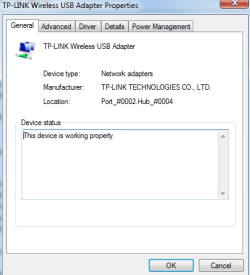
Open Device Manager and expand the Network Adaptor node so you can see its detail. Take a snapshot of device manager, and upload picture to this Forum thread, and we can take a look.

Also, what model of laptop do you have?
 

My Computer

Computer type
PC/Desktop
OS
Windows 7 x64, Vista x64, 8.1 smartphone
CPU
Intel E8400 65W 64-bit
Motherboard
Gigabyte EP45-UD3LR
Memory
DDR2 2 x 2GB, 1GB x 2
Graphics Card(s)
XFX Radeon HD5750
Sound Card
AMD High Definition Audio; Realtek High Definition Audio
Monitor(s) Displays
iiyama prolite X2377HDS
Screen Resolution
1920 x 1080
Hard Drives
500GB 7200 rpm Seagate ST3500413AS 16MB, 500GB 5400 rpm Toshiba MQ02ABF050H 32MB, 200GB 7200 rpm Seagate ST3200820AS 8MB, 2TB 7200 rpm Western Digital WD20EZRX 64MB
PSU
Enermax Liberty Modular
Case
Antec P193 Midi Tower
Keyboard
Mionix ZIBAL 60
Mouse
Razer USB 2.0 Diamondback Mouse or Huion Graphics Tablet
Browser
Internet Explorer, Lunascape, Firefox, Opera, Avast Safezone
Capture.png
Capture.png
No, you shouldnt have to reinstall driver on every pc restart. Are you sure that you are reinstalling the right driver?

Open Device Manager and expand the Network Adaptor node so you can see its detail. Take a snapshot of device manager, and upload picture to this Forum thread, and we can take a look.

Also, what model of laptop do you have?


Hi
Not sure if it that what you asked for. Notebook is a Samsung NP-RF510. I just took the device apart, changed the thermal paste, replaced the screen from an 8USD defect Samsung notebook I bought from Ebay and replaced the fan, ordered for 3USD in China, cleaned everything and reinstalled Win7. The notebook runs fast as it was brand new. This issue with 5Ghz wlan I had in the past already. I don't remember how I solved it. The internal wlan card has a Broadcom chipset. Since it is not 5GHz compatible I bought the TP-Link TP2 Archer wlan adapter and disabled the embedded wlan card in device manager.


I use the original driver from the Wlan adapter CD. Windows by itself is not able to find suitable driver.


Capture2.png
Capture.png

informenter-marker-2.png


Well, I don't know under which circumstances the pictures are showed. I see it in the post, but after save.....
informenter-marker-2.png


Funny thing: I just connected to 5GHz. It connected immediately. But I can't trust it. After wakeup from sleep or restart it will be gone again.
informenter-marker-2.png
 
Last edited:

My Computer

Computer type
Laptop
Computer Manufacturer/Model Number
Samsung
OS
Windows 7 Home Premium 64bit
CPU
i7 2630QM
Motherboard
Samsung RF409/509
Memory
2x4GB DDR3
Graphics Card(s)
Intel HD Graphics 3000 / nVidia GT540M
Sound Card
embedded
Monitor(s) Displays
embedded + Samsung 24inch
Antivirus
Avast Antivirus
Browser
Firefox 64bit

My Computer

Computer type
PC/Desktop
OS
Windows 7 x64, Vista x64, 8.1 smartphone
CPU
Intel E8400 65W 64-bit
Motherboard
Gigabyte EP45-UD3LR
Memory
DDR2 2 x 2GB, 1GB x 2
Graphics Card(s)
XFX Radeon HD5750
Sound Card
AMD High Definition Audio; Realtek High Definition Audio
Monitor(s) Displays
iiyama prolite X2377HDS
Screen Resolution
1920 x 1080
Hard Drives
500GB 7200 rpm Seagate ST3500413AS 16MB, 500GB 5400 rpm Toshiba MQ02ABF050H 32MB, 200GB 7200 rpm Seagate ST3200820AS 8MB, 2TB 7200 rpm Western Digital WD20EZRX 64MB
PSU
Enermax Liberty Modular
Case
Antec P193 Midi Tower
Keyboard
Mionix ZIBAL 60
Mouse
Razer USB 2.0 Diamondback Mouse or Huion Graphics Tablet
Browser
Internet Explorer, Lunascape, Firefox, Opera, Avast Safezone
Hello,

I cannot see your pictures. Please follow these instructions for your posting pictures to the forum:
:ar: Screenshots and Files - Upload and Post in Seven Forums

informenter-marker-2.png


Got it, Thanks.


When I switch the 5GHz channel on the router (for instance from 36 to 48), the Wlan adapter is able to connect to the 5GHz network again. After restart the notebook, it's not longer possible.


The 5GHz network is always visible. Sometimes Windows gives the message something like: Connecting to the network takes too long.


As I said, I did a clean install of my original Windows Home Premium license. Before it worked nicely. But I had the same issue Years ago. Unfortunately I can't remember what finally solved the problem.


I use 2 from these TP Link archer Wlan USB adapters. The other one works fine on an dekstop Win7 PC. So I tried the adapter from the PC on the notebook. But the problem remains.


Something happens when Windows gets restarted. Something changes. I also tried all USB ports.

informenter-marker-2.png


The broadcom wifi which is disabled is the internal built in wifi module. It is only 2.4GHz. That's was the reason I bought the 5GHz adapters.


Regarding to the drivers: Both TP Link adapters have the same model name. But, one of them is Hardware Version 1, and the other Hardware Version 2. I tried both drivers from the CDs they delivered with the adapter. Then I downloaded their last driver from their website. But still...same issue. To be clear: 2.4GHz works always. But not 5 GHz.

informenter-marker-2.png
 

Attachments

  • Capture2.PNG
    Capture2.PNG
    9.4 KB · Views: 14
  • Capture.PNG
    Capture.PNG
    3.2 KB · Views: 14

My Computer

Computer type
Laptop
Computer Manufacturer/Model Number
Samsung
OS
Windows 7 Home Premium 64bit
CPU
i7 2630QM
Motherboard
Samsung RF409/509
Memory
2x4GB DDR3
Graphics Card(s)
Intel HD Graphics 3000 / nVidia GT540M
Sound Card
embedded
Monitor(s) Displays
embedded + Samsung 24inch
Antivirus
Avast Antivirus
Browser
Firefox 64bit
Hi,

It could be 1) Power to USB device is failing on power up. In the Power Management Tab, try unchecking Allow the computer to turn off this device to save power.
2) Also, maybe USB device is not picking 5Ghz on start-up. In Advanced Tab, under Preferred Band, try selecting 5Ghz.
Reboot the computer and review the changes.
 

My Computer

Computer type
PC/Desktop
OS
Windows 7 x64, Vista x64, 8.1 smartphone
CPU
Intel E8400 65W 64-bit
Motherboard
Gigabyte EP45-UD3LR
Memory
DDR2 2 x 2GB, 1GB x 2
Graphics Card(s)
XFX Radeon HD5750
Sound Card
AMD High Definition Audio; Realtek High Definition Audio
Monitor(s) Displays
iiyama prolite X2377HDS
Screen Resolution
1920 x 1080
Hard Drives
500GB 7200 rpm Seagate ST3500413AS 16MB, 500GB 5400 rpm Toshiba MQ02ABF050H 32MB, 200GB 7200 rpm Seagate ST3200820AS 8MB, 2TB 7200 rpm Western Digital WD20EZRX 64MB
PSU
Enermax Liberty Modular
Case
Antec P193 Midi Tower
Keyboard
Mionix ZIBAL 60
Mouse
Razer USB 2.0 Diamondback Mouse or Huion Graphics Tablet
Browser
Internet Explorer, Lunascape, Firefox, Opera, Avast Safezone
Hi,

It could be 1) Power to USB device is failing on power up. In the Power Management Tab, try unchecking Allow the computer to turn off this device to save power.
2) Also, maybe USB device is not picking 5Ghz on start-up. In Advanced Tab, under Preferred Band, try selecting 5Ghz.
Reboot the computer and review the changes.


Thank you. Both steps I tried already. 5GHz is preferred. I tried even to disable 2.4 GHz completely.

informenter-marker-2.png
 

My Computer

Computer type
Laptop
Computer Manufacturer/Model Number
Samsung
OS
Windows 7 Home Premium 64bit
CPU
i7 2630QM
Motherboard
Samsung RF409/509
Memory
2x4GB DDR3
Graphics Card(s)
Intel HD Graphics 3000 / nVidia GT540M
Sound Card
embedded
Monitor(s) Displays
embedded + Samsung 24inch
Antivirus
Avast Antivirus
Browser
Firefox 64bit
Since two days, the issue is gone. It connects to thr 5GHz immediately after wake up and also after a reboot. I did nothing. So i have no idea why it works again.


informenter-marker-2.png
 

My Computer

Computer type
Laptop
Computer Manufacturer/Model Number
Samsung
OS
Windows 7 Home Premium 64bit
CPU
i7 2630QM
Motherboard
Samsung RF409/509
Memory
2x4GB DDR3
Graphics Card(s)
Intel HD Graphics 3000 / nVidia GT540M
Sound Card
embedded
Monitor(s) Displays
embedded + Samsung 24inch
Antivirus
Avast Antivirus
Browser
Firefox 64bit
Im having this issue as well, sometimes it works, sometimes i have to run the troubleshooting tool to get it to work.
 

My Computer

Computer type
PC/Desktop
OS
Windows 7 home premium
CPU
Intel core i5 4440
Motherboard
Asus h81m-k
Memory
Samsung 8gb ddr3
Graphics Card(s)
Asus gtx 1050
Monitor(s) Displays
Lg 27ea33
Hard Drives
Teamgroup gx2 512gb
PSU
Lenovo 400 watt
Case
Bitfenix nova
Browser
Microsoft edge
Back
Top