

Hi all
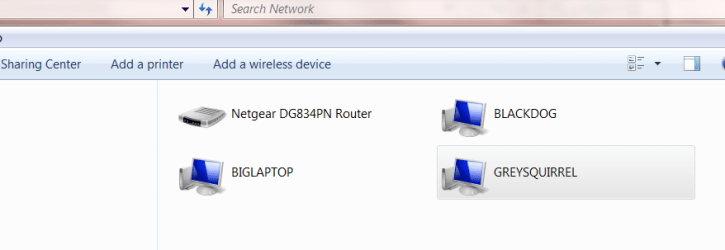
How can I get rid of Network discovery discovering "Non existant" computers - even AFTER a reboot
The computer BIGLAPTOP no longer exists on my network anymore (not even as a logged off or powered off Virtual Machine).
How do I remove it from Network discovery. In any case I shouldn't have to --surely Network Discovery should only be able to find computers STILL attached to the network - so if this mythical machine is still on the network WHERE IS IT.
Sometimes there's a problem of NOT FINDING connected machines but FINDING NON connected machines -- now thats strange.
(I'm running newly installed - clean) build 7100 x-64).
Cheers
jimbo
How can I get rid of Network discovery discovering "Non existant" computers - even AFTER a reboot
The computer BIGLAPTOP no longer exists on my network anymore (not even as a logged off or powered off Virtual Machine).
How do I remove it from Network discovery. In any case I shouldn't have to --surely Network Discovery should only be able to find computers STILL attached to the network - so if this mythical machine is still on the network WHERE IS IT.
Sometimes there's a problem of NOT FINDING connected machines but FINDING NON connected machines -- now thats strange.
(I'm running newly installed - clean) build 7100 x-64).
Cheers
jimbo
Attachments
My Computer
At a glance
Linux CENTOS 7 / various Windows OS'es and se...Intel i7 Intel i58GB, 16GBOn Motherboard
- Computer type
- PC/Desktop
- Computer Manufacturer/Model Number
- Custom built, several laptops HP/ASUS
- OS
- Linux CENTOS 7 / various Windows OS'es and servers
- CPU
- Intel i7 Intel i5
- Memory
- 8GB, 16GB
- Graphics Card(s)
- On Motherboard
- Sound Card
- Realtek HD audio
- Monitor(s) Displays
- Apple Cinema display, Samsung LCD
- Screen Resolution
- 1920 X 1080
- Hard Drives
- 4 X 1TB SATA
- Mouse
- Toshiba wireless laser
- Internet Speed
- > 20MB up
