
Network Folder Shortcut - Create

How to Create a "Network" Folder Shortcut in Windows 7

   Information
This will show you how to create or download a Network Folder shortcut that opens the Network folder.

   Note
The Network folder provides handy access to the computers and devices on your network. From there, you can see the contents of network computers and find shared files and folders. You can also view and install network devices, such as printers.

The Network folder is also available from the Navigation Pane in Windows Explorer.

EXAMPLE: Network folder
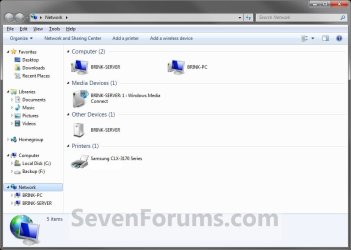
Network_Folder_example.jpg


OPTION ONE

To Download the "Network" folder Shortcut


1. Click on the download button below to download the file below.
Network_Folder.zip

Download


2. Click on Save, and save the .zip file to the desktop.

3. Open the .zip file and extract the Network folder shortcut to the desktop.

4. Right click on the Network folder shortcut, and click on Properties, General tab, and on the Unblock button. (See screenshot below)
NOTE: If you do not have a Unblock button under the General tab, then the shortcut is already unblocked and you can continue on to step 5.
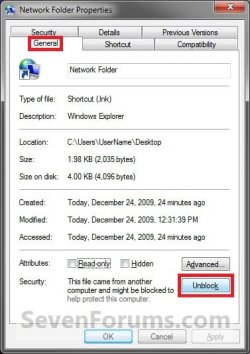
Unblock.jpg
5. You can now Pin to Taskbar or Pin to Start Menu this shortcut, assign a keyboard shortcut to it, or move it where you like for easy use.

6. When done, you can delete the downloaded .zip file on the desktop if you like, or save it to use again.


OPTION TWO

To Manually Create the "Network" folder Shortcut


1. Right click on a empty area on desktop, and click on New and Shortcut.

2. Copy and paste the location below into the location area, and click on the Next button. (See screenshot below)
%windir%\explorer.exe /e,::{F02C1A0D-BE21-4350-88B0-7367FC96EF3C}
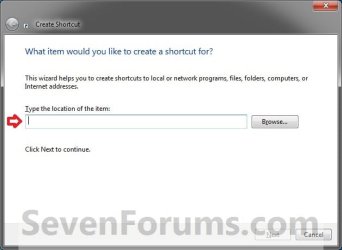
Step1.jpg
3. Type Network folder for the name, and click on the Finish button. (See screenshot below)
NOTE: You can name this anything you would like though.
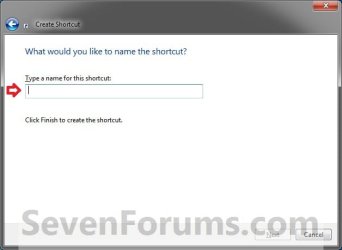
Step2.jpg
4. Right click on the new Network folder shortcut on the Desktop and click on Properties.

5. Click on the Shortcut tab, then click on the Change Icon button. (See screenshot below)
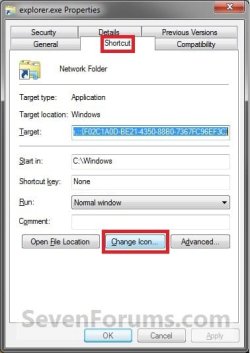
Step3.jpg
6. In the line under "Look for icons in this file", copy and paste in the location below and press Enter. (See screenshot below)
%windir%\System32\imageres.dll
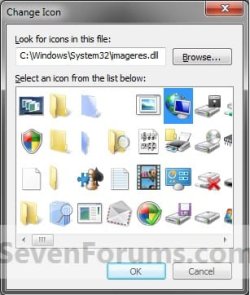
Step4.jpg
7. Select the icon highlighted in blue above and click on OK. (See screenshot above)
NOTE: You can use any icon that you would like instead though.

8. Click on OK. (See screenshot below)
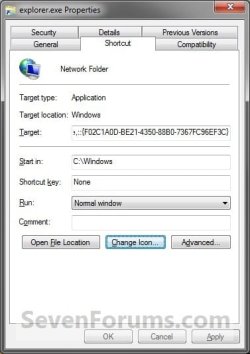
Step5.jpg
9. You can now Pin to Taskbar or Pin to Start Menu this shortcut, assign a keyboard shortcut to it, or move it where you like for easy use.
That's it,
Shawn


Attachments

Last edited:
Great Post

I was able to follow this post to create the Network Folder Shortcut

However, not being a Windows person I wondered where you got this string from
C:\Windows\explorer.exe /e,::{F02C1A0D-BE21-4350-88B0-7367FC96EF3C}

Thanks
 

My Computer

Computer Manufacturer/Model Number
Toshiba A505-S6-25
OS
Windows 7
CPU
2.2 gig
Motherboard
unk
Memory
4g
Graphics Card(s)
nvidia
Sound Card
unknown
Monitor(s) Displays
1
Hello JT, and welcome to Seven Forums.

The long number is the GUID number for the Network Folder in the registry CLSID key with the explorer command to open it.
 

My Computer

Computer type
PC/Desktop
Computer Manufacturer/Model Number
Self built custom
OS
64-bit Windows 11 Pro for Workstations
CPU
Intel i7-8700K OC'd to 5 GHz
Motherboard
ASUS ROG Maximus XI Formula Z390
Memory
64 GB (4x16GB) G.SKILL TridentZ RGB DDR4 3600 MHz
Graphics Card(s)
ASUS ROG-STRIX-GTX1080TI-O11G-GAMING
Sound Card
Integrated
Monitor(s) Displays
2 x Samsung Odyssey G7 27"
Screen Resolution
2560x1440
Hard Drives
1TB Samsung 990 PRO M.2,
4TB Samsung 990 PRO PRO M.2,
TerraMaster F8 SSD Plus NAS
PSU
Seasonic Prime Titanium 850W
Case
Thermaltake Core P3
Cooling
Corsair Hydro H115i
Keyboard
Logitech wireless K800
Mouse
Logitech MX Master 4
Internet Speed
2 Gb/s Download and 100 Mb/s Upload
Antivirus
Malwarebyte Anti-Malware Premium
Browser
Google Chrome
Other Info
Logitech Z625 speaker system,
Logitech BRIO 4K Pro webcam,
HP Color LaserJet Pro MFP M477fdn,
APC SMART-UPS RT 1000 XL - SURT1000XLI,
Galaxy S23 Plus phone
worked perfect

Thanks for that download...it worked perfect. I was finally able to pin my network folder to my taskbar.
 

My Computer

Computer Manufacturer/Model Number
dell 1525 inspiron laptop
OS
windows 7 home premium
CPU
intell dual core
Motherboard
?
Memory
3 gig
Hard Drives
300 gig
You're most welcome Electriclott. :)
 

My Computer

Computer type
PC/Desktop
Computer Manufacturer/Model Number
Self built custom
OS
64-bit Windows 11 Pro for Workstations
CPU
Intel i7-8700K OC'd to 5 GHz
Motherboard
ASUS ROG Maximus XI Formula Z390
Memory
64 GB (4x16GB) G.SKILL TridentZ RGB DDR4 3600 MHz
Graphics Card(s)
ASUS ROG-STRIX-GTX1080TI-O11G-GAMING
Sound Card
Integrated
Monitor(s) Displays
2 x Samsung Odyssey G7 27"
Screen Resolution
2560x1440
Hard Drives
1TB Samsung 990 PRO M.2,
4TB Samsung 990 PRO PRO M.2,
TerraMaster F8 SSD Plus NAS
PSU
Seasonic Prime Titanium 850W
Case
Thermaltake Core P3
Cooling
Corsair Hydro H115i
Keyboard
Logitech wireless K800
Mouse
Logitech MX Master 4
Internet Speed
2 Gb/s Download and 100 Mb/s Upload
Antivirus
Malwarebyte Anti-Malware Premium
Browser
Google Chrome
Other Info
Logitech Z625 speaker system,
Logitech BRIO 4K Pro webcam,
HP Color LaserJet Pro MFP M477fdn,
APC SMART-UPS RT 1000 XL - SURT1000XLI,
Galaxy S23 Plus phone
Re: Shortcuts to e.g. Control Panel

Better safe...
Use then environment variable, %WINDIR%, instead of hard-coding
'[DRIVE:][Windows] etc.

Not all users/installations have C: as boot drive!

-> %WINDIR%\explorer.exe /e,::{F02C1A0D-BE21-4350-88B0-7367FC96EF3C}

Sincerely,
Jens
 

My Computer

Computer Manufacturer/Model Number
Medion 8828
OS
XP Media Center/Vista Business/Win 7 Ultimate
CPU
I6750 @ 2.66 G
Yep. ;)
 

My Computer

Computer type
PC/Desktop
Computer Manufacturer/Model Number
Self built custom
OS
64-bit Windows 11 Pro for Workstations
CPU
Intel i7-8700K OC'd to 5 GHz
Motherboard
ASUS ROG Maximus XI Formula Z390
Memory
64 GB (4x16GB) G.SKILL TridentZ RGB DDR4 3600 MHz
Graphics Card(s)
ASUS ROG-STRIX-GTX1080TI-O11G-GAMING
Sound Card
Integrated
Monitor(s) Displays
2 x Samsung Odyssey G7 27"
Screen Resolution
2560x1440
Hard Drives
1TB Samsung 990 PRO M.2,
4TB Samsung 990 PRO PRO M.2,
TerraMaster F8 SSD Plus NAS
PSU
Seasonic Prime Titanium 850W
Case
Thermaltake Core P3
Cooling
Corsair Hydro H115i
Keyboard
Logitech wireless K800
Mouse
Logitech MX Master 4
Internet Speed
2 Gb/s Download and 100 Mb/s Upload
Antivirus
Malwarebyte Anti-Malware Premium
Browser
Google Chrome
Other Info
Logitech Z625 speaker system,
Logitech BRIO 4K Pro webcam,
HP Color LaserJet Pro MFP M477fdn,
APC SMART-UPS RT 1000 XL - SURT1000XLI,
Galaxy S23 Plus phone

My Computer

Computer type
PC/Desktop
Computer Manufacturer/Model Number
Custom
OS
Windows 7 Professional x64 Service Pack 1
CPU
i7-3770 Ivy, MSI OC genie OC'd (default)
Motherboard
Z68A-G43 (G3), MSI
Memory
Vengeance 2x4GB 2133MHz (OC'd)
Graphics Card(s)
GTX 650 Gainward
Monitor(s) Displays
BenQ E2200HD
Screen Resolution
1920x1080
Hard Drives
WD 1TB 64MB sATA; LC-Power LC-PRO-25WU; IT-350SA
PSU
LC7600v2.3
Case
ALTO winwin.rs/
Cooling
Stock / standard
Keyboard
Logitech Alto
Mouse
Genius DeathTaker
Internet Speed
25 (megabits / second) = 3125 KBps = (25.600/2.048)
Antivirus
Comodo
Browser
Mozilla
Other Info
http://valid.canardpc.com/mcdty0
Oh, btw., in the tutorial above: "Step3.jpg" is, actually, 95.2 KB (97,524 bytes), while this can be accomplished - as .PNG - somewhere close to 31.8 KB (32,604 bytes) && with *much* crispier image quality!..:)

*like, teh 2014-10-17_23-17-07.png

(While its .GIF would lead @ 15.9 KB (16,314 bytes) & also being transparent)

Edit: IDK, maybe something worth a look - considering the overall bandwidth; & more importantly, the EYES? :D

(Hihi)
 

My Computer

Computer type
PC/Desktop
Computer Manufacturer/Model Number
Custom
OS
Windows 7 Professional x64 Service Pack 1
CPU
i7-3770 Ivy, MSI OC genie OC'd (default)
Motherboard
Z68A-G43 (G3), MSI
Memory
Vengeance 2x4GB 2133MHz (OC'd)
Graphics Card(s)
GTX 650 Gainward
Monitor(s) Displays
BenQ E2200HD
Screen Resolution
1920x1080
Hard Drives
WD 1TB 64MB sATA; LC-Power LC-PRO-25WU; IT-350SA
PSU
LC7600v2.3
Case
ALTO winwin.rs/
Cooling
Stock / standard
Keyboard
Logitech Alto
Mouse
Genius DeathTaker
Internet Speed
25 (megabits / second) = 3125 KBps = (25.600/2.048)
Antivirus
Comodo
Browser
Mozilla
Other Info
http://valid.canardpc.com/mcdty0
Back
Top