Network/internet issue after bootup

salefin

New member
Local time
6:29 AM
Messages
12
Hi,

I'm having issues with my network / internet connection after bootup i.e. I have no internet connection after starting computer.
There is exclamation mark in network connection icon in task bar indicating limited or no connection. If I unblug & replug network caple on computer issue is fixed and connection works perfectly.
What could cause this issues and where I should start looking solution?

Thank you very much in advance.

Sauli
 

My Computer

OS
Windows 7 Ultimate
Hi,

I'm having issues with my network / internet connection after bootup i.e. I have no internet connection after starting computer.
There is exclamation mark in network connection icon in task bar indicating limited or no connection. If I unblug & replug network caple on computer issue is fixed and connection works perfectly.
What could cause this issues and where I should start looking solution?

Thank you very much in advance.

Sauli


Any chance we could get your system specs and network setup?


Ken J
 

My Computer

Computer Manufacturer/Model Number
HP Pavillion dv-7 1005 Tx
OS
Win 8 Release candidate 8400
CPU
[email protected]
Memory
4 gigs
Graphics Card(s)
Nvidia 9600M
Sound Card
HD built-in
Monitor(s) Displays
17" Wxga
Screen Resolution
1440x900
Cooling
none
Internet Speed
45Mb down 5Mb up
Sorry my bad!

Computer is connected to internet through ADSL modem/router.

Operating System :Windows 7 Ultimate 64-bit

Network:

You are connected to the internet
Connected through Realtek PCIe GBE Family Controller
IP Address 192.168.0.4
External IP Address xxx.xxx.x.xxx
Adapter Type Ethernet
WinInet Info
LAN Connection
Local system uses a local area network to connect to the Internet
Local system has RAS to connect to the Internet
Wi-Fi Info
Wi-Fi not enabled
WinHTTPInfo
WinHTTPSessionProxyType No proxy
Session Proxy
Session Proxy Bypass
Connect Retries 5
Connect Timeout 60000
HTTP Version HTTP 1.1
Max Connects Per 1.0 Servers INFINITE
Max Connects Per Servers INFINITE
Max HTTP automatic redirects 10
Max HTTP status continue 10
Send Timeout 30000
IEProxy Auto Detect No
IEProxy Auto Config
IEProxy
IEProxy Bypass
Default Proxy Config Access Type No proxy
Default Config Proxy
Default Config Proxy Bypass


Rest of the specs (probably make no different but....)

CPU
Intel Core i5 760 @ 2.80GHz 41 °C
Lynnfield 45nm Technology
RAM
8.0GB Dual-Channel DDR3 @ 666MHz (9-9-9-24)
Motherboard
Gigabyte Technology Co., Ltd. P55A-UD3R (Socket 1156)
Graphics
SyncMaster @ 1600x1200
Philips 170S4 @ 1280x1024
512MB GeForce GTS 250 (CardExpert Technology) 55 °C
ForceWare version 260.99
Hard Drives
488GB SAMSUNG SAMSUNG HD501LJ ATA Device (IDE) 31 °C
488GB Seagate ST3500418AS ATA Device (Unknown Interface) 35 °C
488GB Western Digital WDC WD5000AADS-00S9B0 ATA Device (IDE) 34 °C
Optical Drives
TSSTcorp CDDVDW SH-S223F ATA Device
Audio
Realtek High Definition Audio

Thanks!

Sauli
 

My Computer

OS
Windows 7 Ultimate
Hi,

I'm having issues with my network / internet connection after bootup i.e. I have no internet connection after starting computer.
There is exclamation mark in network connection icon in task bar indicating limited or no connection. If I unblug & replug network caple on computer issue is fixed and connection works perfectly.
What could cause this issues and where I should start looking solution?

Thank you very much in advance.

Sauli


Do you have a router? If so you should start by updating the firmware on your router.
 

My Computer

Computer type
PC/Desktop
Computer Manufacturer/Model Number
Home built
OS
Windows 7 Ult, Windows 8.1 Pro,
CPU
Q9650-4.275GHz, E8600 4.5GHz, E6750-3.8GHz
Motherboard
Evga 780i FTW
Memory
G.Skill PC2 9600 1200Mhz 5 5 5 15 2T
Graphics Card(s)
GTX480
Sound Card
Asus Xonar D2
Monitor(s) Displays
HannsG
Screen Resolution
1680X1050
Hard Drives
GSkill Phoenix Pro 120GB SSD
PSU
ThermalTake Toughpower 1000Watt modular
Case
ThermalTake XaserV
Cooling
Xigmatek S1283
Keyboard
Logitech G15
Mouse
Logitech G9
Internet Speed
T1
Hi,

I have updated ADSL/router firmware recently.

Sorry I forget to mention that this issues strated after uninstalling Zone Alarm (caused costant BSOD's) and installing Microsoft Security Essentials as recomended here in sevenforum by helpful members.

Thanks!
 

My Computer

OS
Windows 7 Ultimate
Hi,

I have updated ADSL/router firmware recently.

Sorry I forget to mention that this issues strated after uninstalling Zone Alarm (caused costant BSOD's) and installing Microsoft Security Essentials as recomended here in sevenforum by helpful members.

Thanks!

You might want to try the zone alarm removel tool, second link is the one. Lots of problems reported if you don't use the tool to uninstall zone alarm.
http://techdows.com/2009/09/download-zone-alarm-removal-tool.html
 

My Computer

Computer type
PC/Desktop
Computer Manufacturer/Model Number
Home built
OS
Windows 7 Ult, Windows 8.1 Pro,
CPU
Q9650-4.275GHz, E8600 4.5GHz, E6750-3.8GHz
Motherboard
Evga 780i FTW
Memory
G.Skill PC2 9600 1200Mhz 5 5 5 15 2T
Graphics Card(s)
GTX480
Sound Card
Asus Xonar D2
Monitor(s) Displays
HannsG
Screen Resolution
1680X1050
Hard Drives
GSkill Phoenix Pro 120GB SSD
PSU
ThermalTake Toughpower 1000Watt modular
Case
ThermalTake XaserV
Cooling
Xigmatek S1283
Keyboard
Logitech G15
Mouse
Logitech G9
Internet Speed
T1
Good advice chev65 :D
 

My Computer

Computer type
PC/Desktop
Computer Manufacturer/Model Number
Bruce ... somewhere in his 40's
OS
Windows 7 Ultimate 32bit SP1
CPU
Intel(R) Core(TM)2 Quad CPU @ 2.40GHz, 2400 MHz
Motherboard
INTEL/D975XBX2
Memory
4 GB
Graphics Card(s)
ATI Radeon HD 2600 Pro
Monitor(s) Displays
Samsung SyncMaster 914v
Screen Resolution
1280 x 1024
Hard Drives
2/500GB each ... ST3500630AS ATA Device.
One is not connected
PSU
Rocketfish 700 W
Case
G.Skill Gigabyte Chassis
Keyboard
Standard PS/2 Keyboard
Mouse
Microsoft PS/2 Mouse
Internet Speed
DSL
Antivirus
Avira Internet Security
Browser
IE 11
Other Info
ATI HDMI Audio
Thank guys but I did use use this removal tool.

Sauli
 

My Computer

OS
Windows 7 Ultimate
Thank guys but I did use use this removal tool.

Sauli

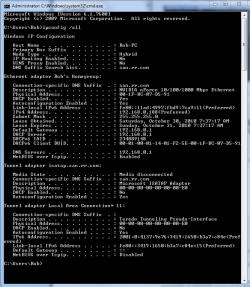
Try running this batch file which will reset winsock, reset the TCP/IP stack and release renew your IP.


After that if the problem isn't fixed can you post a screen shot of your ipconfig /all here like the picture below. Run the command when the connection isn't working. :)
 

Attachments

  • My ipconfig all.PNG
    My ipconfig all.PNG
    21.9 KB · Views: 9

My Computer

Computer type
PC/Desktop
Computer Manufacturer/Model Number
Home built
OS
Windows 7 Ult, Windows 8.1 Pro,
CPU
Q9650-4.275GHz, E8600 4.5GHz, E6750-3.8GHz
Motherboard
Evga 780i FTW
Memory
G.Skill PC2 9600 1200Mhz 5 5 5 15 2T
Graphics Card(s)
GTX480
Sound Card
Asus Xonar D2
Monitor(s) Displays
HannsG
Screen Resolution
1680X1050
Hard Drives
GSkill Phoenix Pro 120GB SSD
PSU
ThermalTake Toughpower 1000Watt modular
Case
ThermalTake XaserV
Cooling
Xigmatek S1283
Keyboard
Logitech G15
Mouse
Logitech G9
Internet Speed
T1
Thanks Chev!

I'll do as instructed and get back with results.

Sauli
 

My Computer

OS
Windows 7 Ultimate
Hi CHev,

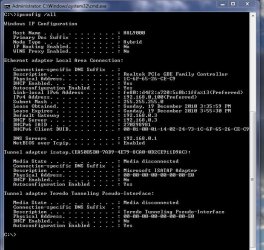
I did as you instructed and ran Reset Winsock Batch File but unfortunately it didn't help.
Here is screen capture from ipconfig /all

Thanks!

Sauli
moz-screenshot.png
 

Attachments

  • 2010-12-19_155548.jpg
    2010-12-19_155548.jpg
    75.2 KB · Views: 5

My Computer

OS
Windows 7 Ultimate
Hi CHev,

I did as you instructed and ran Reset Winsock Batch File but unfortunately it didn't help.
Here is screen capture from ipconfig /all

Thanks!

Sauli
moz-screenshot.png

Ok I see a problem with your default gateway. The DHCP server and gateway show up as 192.168.03, yet your DNS server is showing up as 192.168.0.1.

Normally the default gateway and DNS server show up as the same IP pointing to the router's default gateway, this allows you to obtain your DNS from the routers DNS settings.

The way it is now isn't normal. It's best to set the DNS servers in your routers control panel and have IPv4 set to obtain everything automatically, it should look like the picture below. :)

Can you check your IPv4 properties to make sure that nothing is typed there? It should be set to obtain everything automatically, click "advanced" to get to the third window.

I would also like to know which make model and version number of router you are using.
 

Attachments

  • IPv4 set to automatic.PNG
    IPv4 set to automatic.PNG
    69.8 KB · Views: 5

My Computer

Computer type
PC/Desktop
Computer Manufacturer/Model Number
Home built
OS
Windows 7 Ult, Windows 8.1 Pro,
CPU
Q9650-4.275GHz, E8600 4.5GHz, E6750-3.8GHz
Motherboard
Evga 780i FTW
Memory
G.Skill PC2 9600 1200Mhz 5 5 5 15 2T
Graphics Card(s)
GTX480
Sound Card
Asus Xonar D2
Monitor(s) Displays
HannsG
Screen Resolution
1680X1050
Hard Drives
GSkill Phoenix Pro 120GB SSD
PSU
ThermalTake Toughpower 1000Watt modular
Case
ThermalTake XaserV
Cooling
Xigmatek S1283
Keyboard
Logitech G15
Mouse
Logitech G9
Internet Speed
T1
Hi Chev,

I checked and all are in order i.e. IPv4 obtains evereything automatically...nothing typed in.

My Modem/Router is Netgear DG834.

Thanks!

SAuli
 

My Computer

OS
Windows 7 Ultimate
Back
Top