Network issues: no network at boot

daveshuck

New member
Local time
12:07 PM
Messages
2
I have 3 machines on my home network. I just updated to a new router. Two of the machines work well and one of them has no internet access at boot. I need to disable the adapter and trouble shoot the connection before it magically functions again. I have not had any issues with this computer until now. I have moved the connection on the new router to another port and it made no difference. As I can fix the connection from WIN7, I believe that it is something wrong with the OS.

Dave
 

My Computer

OS
Win7 Ultimate x64
Problems like this can almost always be solved by either updating the firmware on the router or finding a better more compatible network driver for the machine. I'd need more info on the router "brand and model number" and the machines specs to help you more with this problem.

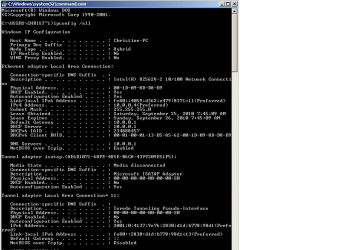
Perhaps an ipconfig /all screen shot would get us started on this problem?

There is nothing "wrong" with the OP system, it just seems that way to the less informed.
 

My Computer

Computer type
PC/Desktop
Computer Manufacturer/Model Number
Home built
OS
Windows 7 Ult, Windows 8.1 Pro,
CPU
Q9650-4.275GHz, E8600 4.5GHz, E6750-3.8GHz
Motherboard
Evga 780i FTW
Memory
G.Skill PC2 9600 1200Mhz 5 5 5 15 2T
Graphics Card(s)
GTX480
Sound Card
Asus Xonar D2
Monitor(s) Displays
HannsG
Screen Resolution
1680X1050
Hard Drives
GSkill Phoenix Pro 120GB SSD
PSU
ThermalTake Toughpower 1000Watt modular
Case
ThermalTake XaserV
Cooling
Xigmatek S1283
Keyboard
Logitech G15
Mouse
Logitech G9
Internet Speed
T1
Router: Netgear WGR614 v9 with latest firmware
Her Computer: Dell Inspiron 530 with latest microsoft updates and network drivers.

I have included screen shots of her IPCONFIG in its working and non-working states.

To be clear. The router is working. The network cable is working. Her hardware is working. I believe that there is something in her installation of the software that is not configured correctly that is not initializing the network stack correctly. That is what I meant by "wrong with the OS".

Thank you for you time.
 

Attachments

  • not-working.png
    not-working.png
    14.3 KB · Views: 9
  • working.png
    working.png
    16.4 KB · Views: 6

My Computer

OS
Win7 Ultimate x64
Dave, those ipconfig's certainly aren't correct. The default gateway is coming from the modem I believe because the default gateway for your router is suppposed to be 192.168.1.1 and the IP should be a variation of that default gateway, not 10.0.0.1, which is usually reserved for Cisco bussiness class routers. This usually means that there is a conflict between the modem and the router.

Are you sure that the problem machines isn't plugged into the WAN port on the router?

There are similar reports of this problem with your same model of router and apparently to fix it the modem needs to be set to bridge mode only.
http://forum1.netgear.com/showthread.php?t=35054

I would go through the router-modem set up procedure again because the address doesn't seem to be coming from the router at this point.
Wireless Setup - Netgear - WGR614 v9 (Netgear Firmware) | PcWinTech.com
 
Last edited:

My Computer

Computer type
PC/Desktop
Computer Manufacturer/Model Number
Home built
OS
Windows 7 Ult, Windows 8.1 Pro,
CPU
Q9650-4.275GHz, E8600 4.5GHz, E6750-3.8GHz
Motherboard
Evga 780i FTW
Memory
G.Skill PC2 9600 1200Mhz 5 5 5 15 2T
Graphics Card(s)
GTX480
Sound Card
Asus Xonar D2
Monitor(s) Displays
HannsG
Screen Resolution
1680X1050
Hard Drives
GSkill Phoenix Pro 120GB SSD
PSU
ThermalTake Toughpower 1000Watt modular
Case
ThermalTake XaserV
Cooling
Xigmatek S1283
Keyboard
Logitech G15
Mouse
Logitech G9
Internet Speed
T1
Back
Top