Network Location Stuck In Public Mode

Xeno Morph

New member
Member
Local time
6:29 AM
Messages
58
Location
Earth
1. Is this a wired or wireless connection issue? A: Both.
2.Internet Service Provider? A: Verizon.
3.What type of Broadband connection are you using? A: DSL.
4. Make and Model of your Modem and Router? A: Modem - Westell 6100G, Router - Linksys E2500.
5. Internet Security/Antivirus? A: ESET Smart Security 4

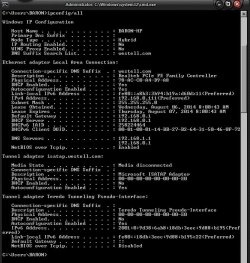
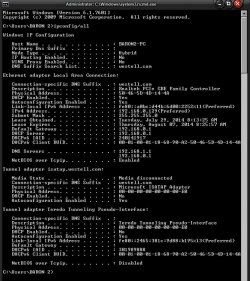
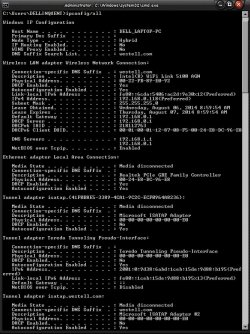
There are 3 images below of ip configuration for 2 pc's (wired) and 1 laptop (wireless)


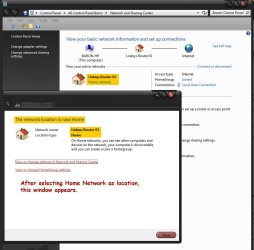
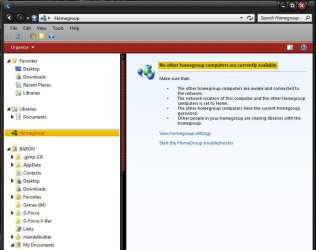
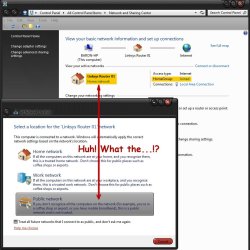
I have a desktop pc running Win 7 64bit and I can no longer share files within my "Home Network". Opened "Network and Sharing Center" to check the settings (refer to images) and, under "View Active Networks", it shows my router (Linksys 01) with network location as "Home Network" and I am joined. When I click on "Home Network" to open "Set Network Location" window, It shows that it is in "Public" mode, so I click on "Home Network" and close out the window. Back in "Network and Sharing Center", again it shows "Home Network". Again I click on "Home Network" to check and there it is, in "Public" mode again. In Windows Explorer, (see images) when I click on the Homegroup icon, it just shows "No other homegroup computers are currently available", I'm assuming because it's in "Public" mode. I have no problems accessing the internet though. Downloaded and ran "MSFixit Home Network - 50725", suggested in another thread. No luck with that.
I rebooted pc, reset modem, router and checked my firewall settings which are set in sharing mode. Made sure windows firewall was disabled since I'm using firewall in ESET Smart Security. Recheck "Network and Sharing Center" with same results, stuck in "Public" mode. Now I'm checking my 2 other computers on the network, 1 pc (wired) and 1 laptop (wireless) with the same identical issues existing, both are also stuck in "Public" mode. There are 2 more desktop pc's that I don't presently have access to at the moment. I'm not sure what else to do. It's like all 3 of my computers were set/reset in to "Public" mode and locked. I'm not very knowledgeable when it comes to networking. Could the issue originate from modem or router? If anyone has some insight regarding this issue, I would be very grateful for sharing your ideas or solutions. Thanks in advance.

Baron
 

Attachments
  • Scr_133.jpg
    Scr_133.jpg
    117.8 KB · Views: 2
  • Scr_132.jpg
    Scr_132.jpg
    95.4 KB · Views: 1
  • Scr_129.jpg
    Scr_129.jpg
    71.7 KB · Views: 1
  • Baron_pc.jpg
    Baron_pc.jpg
    84 KB · Views: 3
  • Baron2_pc.jpg
    Baron2_pc.jpg
    81.2 KB · Views: 0
  • Dell Laptop.jpg
    Dell Laptop.jpg
    100.3 KB · Views: 0
Last edited:

My Computer My Computer

Computer type
PC/Desktop
Computer Manufacturer/Model Number
CUSTOM BUILD
OS
Windows 7 Pro x64
CPU
AMD FX-8350 8-Core Black Edition, 4gHz, 125W
Motherboard
ASUS M5A99X EVO, AMD 990X/SB950 Chipset, UEFI BIOS, USB 3.0
Memory
CORSAIR: Vengence (2X8 GB) 16GB DDR3 1866mHz
Graphics Card(s)
NVIDIA: GeForce GTX 750 Ti, 1GB DDR5
Sound Card
Creative: Sound Blaster X-Fi Titanium
Monitor(s) Displays
NIXEUS 27"
Screen Resolution
2560 X 1440
Hard Drives
Seagate: SATA 2TB (internal)
Seagate: SATA 4TB (external)
PSU
NZXT HALE82 750W semi-modular
Case
NZXT PHANTOM, FANS 3x 200mm, 4x 120mm
Cooling
CORSAIR Hydro Series H80i High Performance Liquid CPU Cooler
Keyboard
AZIO (backlit keyboard)
Mouse
SENTEY Luminata Pro
Internet Speed
CABLE 100Mbps
Antivirus
ESET Smart Security
Browser
Firefox
Other Info
NZXT: APERTURE Card Reader w 2x USB 3,
NZXT: Custom Premium Cables
I by no means I'm I a network expert. I do have a thought until a expert comes along.

ESET Smart Security might have public network locked. Their might be a setting in that program you can change.
 

My Computer My Computer

Computer type
PC/Desktop
Computer Manufacturer/Model Number
Home made Desktop
OS
Windows 10 Pro. 64/ version 1709 Windows 7 Pro/64
CPU
Intel i7-6800K @ 4.3
Motherboard
ASUS X-99 Deluxe II
Memory
Corsair Platinum 16 gig @2400
Graphics Card(s)
EVGA GTX 1070 OC
Monitor(s) Displays
Asus 27" LED LCD/VE278Q
Screen Resolution
1920-1080 or 1280-720 HDMI
Hard Drives
INTEL SSD 730-240 Gb Sata 3.0/
PSU
EVGA Platium 1200W
Case
Phanteks Luxe Tempered Glass 8 fans/ one radiator
Cooling
XSPC/ Water Cooled CPU
Keyboard
Das 4 Professional
Mouse
Logitech M705/MX Anywhere 2-S
Internet Speed
100 mbits
Antivirus
Microsoft Security Essentials/ Malwarebytes Premium 3.0/ SAS
Browser
I.E. 11 default/Firefox/ ISP Time Warner Cable/Spectrum
Other Info
LG BluRay Burner/
Sound system-KLipsch-THX/
Icy Dock ssd Hot Swap bays.
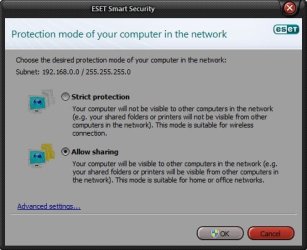
@Layback Bear, Thanks for your input. I was looking into that yesterday and found nothing obvious. I'm presently reading up on ESET's firewall settings.

EDIT: The image below shows protection mode ESET's firewall is in.
 

Attachments

  • Scr_134.jpg
    Scr_134.jpg
    26.9 KB · Views: 61
Last edited:

My Computer My Computer

Computer type
PC/Desktop
Computer Manufacturer/Model Number
CUSTOM BUILD
OS
Windows 7 Pro x64
CPU
AMD FX-8350 8-Core Black Edition, 4gHz, 125W
Motherboard
ASUS M5A99X EVO, AMD 990X/SB950 Chipset, UEFI BIOS, USB 3.0
Memory
CORSAIR: Vengence (2X8 GB) 16GB DDR3 1866mHz
Graphics Card(s)
NVIDIA: GeForce GTX 750 Ti, 1GB DDR5
Sound Card
Creative: Sound Blaster X-Fi Titanium
Monitor(s) Displays
NIXEUS 27"
Screen Resolution
2560 X 1440
Hard Drives
Seagate: SATA 2TB (internal)
Seagate: SATA 4TB (external)
PSU
NZXT HALE82 750W semi-modular
Case
NZXT PHANTOM, FANS 3x 200mm, 4x 120mm
Cooling
CORSAIR Hydro Series H80i High Performance Liquid CPU Cooler
Keyboard
AZIO (backlit keyboard)
Mouse
SENTEY Luminata Pro
Internet Speed
CABLE 100Mbps
Antivirus
ESET Smart Security
Browser
Firefox
Other Info
NZXT: APERTURE Card Reader w 2x USB 3,
NZXT: Custom Premium Cables
UPDATE:
In my original post there were 2 other pc's that I didn't have access to a that time. I got access to them and they too are stuck in "Public" mode. All the computers on the network are stuck in "Public" mode and can't be reset to "Home Network". I am completely baffled by this. Is there a networking guru out there? It has been 4 days and no help yet.
 

My Computer My Computer

Computer type
PC/Desktop
Computer Manufacturer/Model Number
CUSTOM BUILD
OS
Windows 7 Pro x64
CPU
AMD FX-8350 8-Core Black Edition, 4gHz, 125W
Motherboard
ASUS M5A99X EVO, AMD 990X/SB950 Chipset, UEFI BIOS, USB 3.0
Memory
CORSAIR: Vengence (2X8 GB) 16GB DDR3 1866mHz
Graphics Card(s)
NVIDIA: GeForce GTX 750 Ti, 1GB DDR5
Sound Card
Creative: Sound Blaster X-Fi Titanium
Monitor(s) Displays
NIXEUS 27"
Screen Resolution
2560 X 1440
Hard Drives
Seagate: SATA 2TB (internal)
Seagate: SATA 4TB (external)
PSU
NZXT HALE82 750W semi-modular
Case
NZXT PHANTOM, FANS 3x 200mm, 4x 120mm
Cooling
CORSAIR Hydro Series H80i High Performance Liquid CPU Cooler
Keyboard
AZIO (backlit keyboard)
Mouse
SENTEY Luminata Pro
Internet Speed
CABLE 100Mbps
Antivirus
ESET Smart Security
Browser
Firefox
Other Info
NZXT: APERTURE Card Reader w 2x USB 3,
NZXT: Custom Premium Cables
I will see if I can find someone for you.

Sorry it took so long.

I went back to the ranch and requested help.
Hang in there. They are all over the globe in different time zones.
 

My Computer My Computer

Computer type
PC/Desktop
Computer Manufacturer/Model Number
Home made Desktop
OS
Windows 10 Pro. 64/ version 1709 Windows 7 Pro/64
CPU
Intel i7-6800K @ 4.3
Motherboard
ASUS X-99 Deluxe II
Memory
Corsair Platinum 16 gig @2400
Graphics Card(s)
EVGA GTX 1070 OC
Monitor(s) Displays
Asus 27" LED LCD/VE278Q
Screen Resolution
1920-1080 or 1280-720 HDMI
Hard Drives
INTEL SSD 730-240 Gb Sata 3.0/
PSU
EVGA Platium 1200W
Case
Phanteks Luxe Tempered Glass 8 fans/ one radiator
Cooling
XSPC/ Water Cooled CPU
Keyboard
Das 4 Professional
Mouse
Logitech M705/MX Anywhere 2-S
Internet Speed
100 mbits
Antivirus
Microsoft Security Essentials/ Malwarebytes Premium 3.0/ SAS
Browser
I.E. 11 default/Firefox/ ISP Time Warner Cable/Spectrum
Other Info
LG BluRay Burner/
Sound system-KLipsch-THX/
Icy Dock ssd Hot Swap bays.

My Computer My Computer

Computer type
PC/Desktop
Computer Manufacturer/Model Number
Built 2/11/2011
OS
Windows 7 Pro-x64
CPU
i7-2600 3.4GHz - 3.8GHz Turbo
Motherboard
Intel DH67BL-B3
Memory
8Gb - 2x4GB, Muskin 991770 PC3-1333
Graphics Card(s)
Integrated Intel HD 2000
Sound Card
Integrated Intel 10.1 HD, RealTek ALC892
Monitor(s) Displays
Asus LCD VH222H, Haier HL24XSL2a
Screen Resolution
1920x1080, 1920x1080
Hard Drives
Crucial SSD C300-128Gb,
Western Digital WD5002AALX - 500Gb,
Western Digital WD7501AALS - 750Gb
PSU
Seasonic 650W 80+ Gold Modular
Case
Rosewill Defender
Cooling
Stock CPU, Four 120mm case fans, PCH fan added
Keyboard
Logitech EX100 Y-RBH94 Wireless
Mouse
Logitech EX100 M-RCE95 Wireless
Internet Speed
3.0/1.5 Mbs
Antivirus
Microsoft Security Essentials
Browser
Microsoft Internet Explorer 11
Other Info
Antec Veris Premier-Multimedia IR Station,
Cyber Accoustics-3602 Speakers,
AFT XM-5U Card Reader,
Hauppauge TV-HVR-2250,
Sony LX300 USB Turntable
Thanks Bear. Been busy all day today and this is the first chance I had to even sit at the pc, 8:30pm US west coast. I think I'm going to let it go until tomorrow.:sleepy: That way I'll have a clear head to start fresh in the morning. First thing, I think I'll call Verizon and have them walk me through the proper router settings to make sure everything is kosher. Once again, I appreciate your help.:)

Baron
 

My Computer My Computer

Computer type
PC/Desktop
Computer Manufacturer/Model Number
CUSTOM BUILD
OS
Windows 7 Pro x64
CPU
AMD FX-8350 8-Core Black Edition, 4gHz, 125W
Motherboard
ASUS M5A99X EVO, AMD 990X/SB950 Chipset, UEFI BIOS, USB 3.0
Memory
CORSAIR: Vengence (2X8 GB) 16GB DDR3 1866mHz
Graphics Card(s)
NVIDIA: GeForce GTX 750 Ti, 1GB DDR5
Sound Card
Creative: Sound Blaster X-Fi Titanium
Monitor(s) Displays
NIXEUS 27"
Screen Resolution
2560 X 1440
Hard Drives
Seagate: SATA 2TB (internal)
Seagate: SATA 4TB (external)
PSU
NZXT HALE82 750W semi-modular
Case
NZXT PHANTOM, FANS 3x 200mm, 4x 120mm
Cooling
CORSAIR Hydro Series H80i High Performance Liquid CPU Cooler
Keyboard
AZIO (backlit keyboard)
Mouse
SENTEY Luminata Pro
Internet Speed
CABLE 100Mbps
Antivirus
ESET Smart Security
Browser
Firefox
Other Info
NZXT: APERTURE Card Reader w 2x USB 3,
NZXT: Custom Premium Cables
@carwiz, Yea, that was one of my first attempts at solving this issue. Thanks anyway.
 

My Computer My Computer

Computer type
PC/Desktop
Computer Manufacturer/Model Number
CUSTOM BUILD
OS
Windows 7 Pro x64
CPU
AMD FX-8350 8-Core Black Edition, 4gHz, 125W
Motherboard
ASUS M5A99X EVO, AMD 990X/SB950 Chipset, UEFI BIOS, USB 3.0
Memory
CORSAIR: Vengence (2X8 GB) 16GB DDR3 1866mHz
Graphics Card(s)
NVIDIA: GeForce GTX 750 Ti, 1GB DDR5
Sound Card
Creative: Sound Blaster X-Fi Titanium
Monitor(s) Displays
NIXEUS 27"
Screen Resolution
2560 X 1440
Hard Drives
Seagate: SATA 2TB (internal)
Seagate: SATA 4TB (external)
PSU
NZXT HALE82 750W semi-modular
Case
NZXT PHANTOM, FANS 3x 200mm, 4x 120mm
Cooling
CORSAIR Hydro Series H80i High Performance Liquid CPU Cooler
Keyboard
AZIO (backlit keyboard)
Mouse
SENTEY Luminata Pro
Internet Speed
CABLE 100Mbps
Antivirus
ESET Smart Security
Browser
Firefox
Other Info
NZXT: APERTURE Card Reader w 2x USB 3,
NZXT: Custom Premium Cables

My Computer My Computer

Computer type
PC/Desktop
Computer Manufacturer/Model Number
Own build (new) Desk1 / Asus ROG Win 7 / Desk2 1st build
OS
Desk1 7 Home Prem / Desk2 10 Pro / Main lap Asus ROG 10 Pro 2 laptop Toshiba 7 Pro Asus P2520 7 & 10
CPU
Desk1 i5 3750K / Laptop i7 GTX 860M / Desk2 i5 2500
Motherboard
Desk1 Asus P877-V / Desk2 Gigabyte H67 UD3H / Laptop ?
Memory
Desk1 8GB (1866) / Desk2 16GB (1333) / Laptop 8Gb DDR3
Graphics Card(s)
Desk 1& 2NVidia GTX 650 & Laptops on board Intel
Sound Card
Desk 1 & 2 -XONAR DG Realtek High Def audio Laptop
Monitor(s) Displays
Desk 1 Benq HD 2450 / Desk2 Philips 24" / Laptop 17.5"
Screen Resolution
1920x1080 D1 & D2 & Laptop 1
Hard Drives
Desk1 Samsung 120GB 830 SSD
Asus ROG 256GB 850 Pro SSD
Desk2 Samsung 840 256 SSD
Toshiba 120GB EVO
PSU
Desk 1 Corsair HX 1050/ Laptop ? / Desk 2 Corsair HX 650
Case
Desk 1 Cooler HAF XM ? Toshiba laptop / Desk2 Coolermaster
Cooling
Fans on all Desk1 -2 Desk2 - all Coolermasters 5 Laptop ?
Keyboard
Desk 1 MS Sidewinder X6 Desk 2 MS Sidewinder X 4
Mouse
Desk 1&2 - Gigabyte MS 900 gamer - laptop - Logitec wireless
Internet Speed
ADSL2+
Other Info
One other Desktop (tester) and spare Toshba laptop both with SSD's
Running Kaspersky 2016 ISS on all machines config'd identically
Logitec audio stereo systems on each machine (x3)
Canon MG5250MFC
Router/modem TP-Link running WPA2SK
@ICit2lol,
Thanks for your input mate, but I tried that, (Downloaded and ran "MSFixit Home Network - 50725) and the manual fix, before I posted on this forum. Failed to resolve issue. Refer to my original post.
It seems as though nobody wants to touch this one.;):rolleyes: It's been 7 days now. I guess I'll just have to wait and see. Thanks again for your suggestion.

Baron
 

My Computer My Computer

Computer type
PC/Desktop
Computer Manufacturer/Model Number
CUSTOM BUILD
OS
Windows 7 Pro x64
CPU
AMD FX-8350 8-Core Black Edition, 4gHz, 125W
Motherboard
ASUS M5A99X EVO, AMD 990X/SB950 Chipset, UEFI BIOS, USB 3.0
Memory
CORSAIR: Vengence (2X8 GB) 16GB DDR3 1866mHz
Graphics Card(s)
NVIDIA: GeForce GTX 750 Ti, 1GB DDR5
Sound Card
Creative: Sound Blaster X-Fi Titanium
Monitor(s) Displays
NIXEUS 27"
Screen Resolution
2560 X 1440
Hard Drives
Seagate: SATA 2TB (internal)
Seagate: SATA 4TB (external)
PSU
NZXT HALE82 750W semi-modular
Case
NZXT PHANTOM, FANS 3x 200mm, 4x 120mm
Cooling
CORSAIR Hydro Series H80i High Performance Liquid CPU Cooler
Keyboard
AZIO (backlit keyboard)
Mouse
SENTEY Luminata Pro
Internet Speed
CABLE 100Mbps
Antivirus
ESET Smart Security
Browser
Firefox
Other Info
NZXT: APERTURE Card Reader w 2x USB 3,
NZXT: Custom Premium Cables
There has been 332 people read your post. The right member just hasn't seen it yet to offer help.
Your post isn't being forgotten. Just seems that no one so far knows the answer.
 

My Computer My Computer

Computer type
PC/Desktop
Computer Manufacturer/Model Number
Home made Desktop
OS
Windows 10 Pro. 64/ version 1709 Windows 7 Pro/64
CPU
Intel i7-6800K @ 4.3
Motherboard
ASUS X-99 Deluxe II
Memory
Corsair Platinum 16 gig @2400
Graphics Card(s)
EVGA GTX 1070 OC
Monitor(s) Displays
Asus 27" LED LCD/VE278Q
Screen Resolution
1920-1080 or 1280-720 HDMI
Hard Drives
INTEL SSD 730-240 Gb Sata 3.0/
PSU
EVGA Platium 1200W
Case
Phanteks Luxe Tempered Glass 8 fans/ one radiator
Cooling
XSPC/ Water Cooled CPU
Keyboard
Das 4 Professional
Mouse
Logitech M705/MX Anywhere 2-S
Internet Speed
100 mbits
Antivirus
Microsoft Security Essentials/ Malwarebytes Premium 3.0/ SAS
Browser
I.E. 11 default/Firefox/ ISP Time Warner Cable/Spectrum
Other Info
LG BluRay Burner/
Sound system-KLipsch-THX/
Icy Dock ssd Hot Swap bays.

My Computer My Computer

Computer type
PC/Desktop
Computer Manufacturer/Model Number
Own build (new) Desk1 / Asus ROG Win 7 / Desk2 1st build
OS
Desk1 7 Home Prem / Desk2 10 Pro / Main lap Asus ROG 10 Pro 2 laptop Toshiba 7 Pro Asus P2520 7 & 10
CPU
Desk1 i5 3750K / Laptop i7 GTX 860M / Desk2 i5 2500
Motherboard
Desk1 Asus P877-V / Desk2 Gigabyte H67 UD3H / Laptop ?
Memory
Desk1 8GB (1866) / Desk2 16GB (1333) / Laptop 8Gb DDR3
Graphics Card(s)
Desk 1& 2NVidia GTX 650 & Laptops on board Intel
Sound Card
Desk 1 & 2 -XONAR DG Realtek High Def audio Laptop
Monitor(s) Displays
Desk 1 Benq HD 2450 / Desk2 Philips 24" / Laptop 17.5"
Screen Resolution
1920x1080 D1 & D2 & Laptop 1
Hard Drives
Desk1 Samsung 120GB 830 SSD
Asus ROG 256GB 850 Pro SSD
Desk2 Samsung 840 256 SSD
Toshiba 120GB EVO
PSU
Desk 1 Corsair HX 1050/ Laptop ? / Desk 2 Corsair HX 650
Case
Desk 1 Cooler HAF XM ? Toshiba laptop / Desk2 Coolermaster
Cooling
Fans on all Desk1 -2 Desk2 - all Coolermasters 5 Laptop ?
Keyboard
Desk 1 MS Sidewinder X6 Desk 2 MS Sidewinder X 4
Mouse
Desk 1&2 - Gigabyte MS 900 gamer - laptop - Logitec wireless
Internet Speed
ADSL2+
Other Info
One other Desktop (tester) and spare Toshba laptop both with SSD's
Running Kaspersky 2016 ISS on all machines config'd identically
Logitec audio stereo systems on each machine (x3)
Canon MG5250MFC
Router/modem TP-Link running WPA2SK
Great find ICit2lol. It just might do the trick.
 

My Computer My Computer

Computer type
PC/Desktop
Computer Manufacturer/Model Number
Home made Desktop
OS
Windows 10 Pro. 64/ version 1709 Windows 7 Pro/64
CPU
Intel i7-6800K @ 4.3
Motherboard
ASUS X-99 Deluxe II
Memory
Corsair Platinum 16 gig @2400
Graphics Card(s)
EVGA GTX 1070 OC
Monitor(s) Displays
Asus 27" LED LCD/VE278Q
Screen Resolution
1920-1080 or 1280-720 HDMI
Hard Drives
INTEL SSD 730-240 Gb Sata 3.0/
PSU
EVGA Platium 1200W
Case
Phanteks Luxe Tempered Glass 8 fans/ one radiator
Cooling
XSPC/ Water Cooled CPU
Keyboard
Das 4 Professional
Mouse
Logitech M705/MX Anywhere 2-S
Internet Speed
100 mbits
Antivirus
Microsoft Security Essentials/ Malwarebytes Premium 3.0/ SAS
Browser
I.E. 11 default/Firefox/ ISP Time Warner Cable/Spectrum
Other Info
LG BluRay Burner/
Sound system-KLipsch-THX/
Icy Dock ssd Hot Swap bays.
Hi

Long shot but I'm sure that I've experienced this issue myself in the past. I'm sure that I deleted the network adapter in device manager and uninstalled the driver, then re-installed it.

Not sure why it happened but this worked for me...

Regards
UKMedia
 

My Computer My Computer

Computer Manufacturer/Model Number
Self Build
OS
Windows 7 Ultimate 64Bit (SP 1)
CPU
Intel Core i7 4770K OC
Motherboard
ASUS Maximus VII Ranger
Memory
32GB 1600Mhz DDR3
Graphics Card(s)
MSI GTX580 Twin Frozr II/OC and NVIDIA GTX 970
Sound Card
On-Board and Soundblaster Recon 3 D headset
Monitor(s) Displays
x2 Flat screen 21" LG displays + x1 LG W2363D (3D)
Hard Drives
5 internal Hard Drives:
1 x WD 120GB Solid State
4 x WD 1TB (CAVIAR BLACK 1TB 32MB 7200 SATA) as Raid 5 array
PSU
Dark Power Pro 10 1200W
Case
CoolerMaster HAF 932 Case - Black
Cooling
Thermaltake Contac21 cooler
Keyboard
Cyborg
Mouse
Razor Mamba
Internet Speed
0.5 Mb - (Benefits of rural location!) & 24 MB Sat
Antivirus
MSE
Other Info
Teaming 2 GB network connection to Wired 1GB switch.
Connected to 37TB (Raid 5) of network storage on a wired 1GB lan.
(Mixture of internal hard drives, 1TB, 2TB, 4TB & 16TB Terastations)
Hi

Long shot but I'm sure that I've experienced this issue myself in the past. I'm sure that I deleted the network adapter in device manager and uninstalled the driver, then re-installed it.

Not sure why it happened but this worked for me...

Regards
UKMedia
Good idea and I think the more we crack on with this the more likely we are going to find something.
Sometimes it is a bit like not seeing the wood for the trees:p
 

My Computer My Computer

Computer type
PC/Desktop
Computer Manufacturer/Model Number
Own build (new) Desk1 / Asus ROG Win 7 / Desk2 1st build
OS
Desk1 7 Home Prem / Desk2 10 Pro / Main lap Asus ROG 10 Pro 2 laptop Toshiba 7 Pro Asus P2520 7 & 10
CPU
Desk1 i5 3750K / Laptop i7 GTX 860M / Desk2 i5 2500
Motherboard
Desk1 Asus P877-V / Desk2 Gigabyte H67 UD3H / Laptop ?
Memory
Desk1 8GB (1866) / Desk2 16GB (1333) / Laptop 8Gb DDR3
Graphics Card(s)
Desk 1& 2NVidia GTX 650 & Laptops on board Intel
Sound Card
Desk 1 & 2 -XONAR DG Realtek High Def audio Laptop
Monitor(s) Displays
Desk 1 Benq HD 2450 / Desk2 Philips 24" / Laptop 17.5"
Screen Resolution
1920x1080 D1 & D2 & Laptop 1
Hard Drives
Desk1 Samsung 120GB 830 SSD
Asus ROG 256GB 850 Pro SSD
Desk2 Samsung 840 256 SSD
Toshiba 120GB EVO
PSU
Desk 1 Corsair HX 1050/ Laptop ? / Desk 2 Corsair HX 650
Case
Desk 1 Cooler HAF XM ? Toshiba laptop / Desk2 Coolermaster
Cooling
Fans on all Desk1 -2 Desk2 - all Coolermasters 5 Laptop ?
Keyboard
Desk 1 MS Sidewinder X6 Desk 2 MS Sidewinder X 4
Mouse
Desk 1&2 - Gigabyte MS 900 gamer - laptop - Logitec wireless
Internet Speed
ADSL2+
Other Info
One other Desktop (tester) and spare Toshba laptop both with SSD's
Running Kaspersky 2016 ISS on all machines config'd identically
Logitec audio stereo systems on each machine (x3)
Canon MG5250MFC
Router/modem TP-Link running WPA2SK
I would like to apologize to everyone for my disappearing.:o I was so frustrated:banghead: and discouraged:( that I needed to take a time-out and focus on some other issues that needed attention. Didn't realize 2 weeks had gone by.:confused:

I followed up on the other link that ICit2lol provided Automated Fix for Windows 7 Network Connections Stuck in Public Mode
Unfortunately that link ultimately led me to the same MS site where I got the the "Fixit" utility that I spoke of in my original post.:( Sadly, it didn't resolve the issue. I very much appreciate the effort though.

I will try UKMedia's suggestion next. I will post back results this evening.

Once again, I appreciate all of your time and effort.


Baron
http://news.softpedia.com/news/Auto...Connections-Stuck-in-Public-Mode-214873.shtml
 

My Computer My Computer

Computer type
PC/Desktop
Computer Manufacturer/Model Number
CUSTOM BUILD
OS
Windows 7 Pro x64
CPU
AMD FX-8350 8-Core Black Edition, 4gHz, 125W
Motherboard
ASUS M5A99X EVO, AMD 990X/SB950 Chipset, UEFI BIOS, USB 3.0
Memory
CORSAIR: Vengence (2X8 GB) 16GB DDR3 1866mHz
Graphics Card(s)
NVIDIA: GeForce GTX 750 Ti, 1GB DDR5
Sound Card
Creative: Sound Blaster X-Fi Titanium
Monitor(s) Displays
NIXEUS 27"
Screen Resolution
2560 X 1440
Hard Drives
Seagate: SATA 2TB (internal)
Seagate: SATA 4TB (external)
PSU
NZXT HALE82 750W semi-modular
Case
NZXT PHANTOM, FANS 3x 200mm, 4x 120mm
Cooling
CORSAIR Hydro Series H80i High Performance Liquid CPU Cooler
Keyboard
AZIO (backlit keyboard)
Mouse
SENTEY Luminata Pro
Internet Speed
CABLE 100Mbps
Antivirus
ESET Smart Security
Browser
Firefox
Other Info
NZXT: APERTURE Card Reader w 2x USB 3,
NZXT: Custom Premium Cables
No need to apologise mate no one can be everywhere at once - well my ex never understood that principle LOL!!

UK's suggestion sounds quite logical and as I posted earlier it is just a matter of working through different fixes. Me I have problems with the Fixit feature to be honest it has not worked more than it has for me in the past.

Keep us up to speed mate. :)
 

My Computer My Computer

Computer type
PC/Desktop
Computer Manufacturer/Model Number
Own build (new) Desk1 / Asus ROG Win 7 / Desk2 1st build
OS
Desk1 7 Home Prem / Desk2 10 Pro / Main lap Asus ROG 10 Pro 2 laptop Toshiba 7 Pro Asus P2520 7 & 10
CPU
Desk1 i5 3750K / Laptop i7 GTX 860M / Desk2 i5 2500
Motherboard
Desk1 Asus P877-V / Desk2 Gigabyte H67 UD3H / Laptop ?
Memory
Desk1 8GB (1866) / Desk2 16GB (1333) / Laptop 8Gb DDR3
Graphics Card(s)
Desk 1& 2NVidia GTX 650 & Laptops on board Intel
Sound Card
Desk 1 & 2 -XONAR DG Realtek High Def audio Laptop
Monitor(s) Displays
Desk 1 Benq HD 2450 / Desk2 Philips 24" / Laptop 17.5"
Screen Resolution
1920x1080 D1 & D2 & Laptop 1
Hard Drives
Desk1 Samsung 120GB 830 SSD
Asus ROG 256GB 850 Pro SSD
Desk2 Samsung 840 256 SSD
Toshiba 120GB EVO
PSU
Desk 1 Corsair HX 1050/ Laptop ? / Desk 2 Corsair HX 650
Case
Desk 1 Cooler HAF XM ? Toshiba laptop / Desk2 Coolermaster
Cooling
Fans on all Desk1 -2 Desk2 - all Coolermasters 5 Laptop ?
Keyboard
Desk 1 MS Sidewinder X6 Desk 2 MS Sidewinder X 4
Mouse
Desk 1&2 - Gigabyte MS 900 gamer - laptop - Logitec wireless
Internet Speed
ADSL2+
Other Info
One other Desktop (tester) and spare Toshba laptop both with SSD's
Running Kaspersky 2016 ISS on all machines config'd identically
Logitec audio stereo systems on each machine (x3)
Canon MG5250MFC
Router/modem TP-Link running WPA2SK
@ICit2lol,
Me I have problems with the Fixit feature to be honest it has not worked more than it has for me in the past.
Not the first time I've used the MS "Fixit" utilities and, I can't say that they have ever resolved any issues/problems for me.

@UKMedia,
1. I understand uninstalling the network drivers and reinstalling them. Just wanted to clarify something. When you say "delete the adapter", do you mean uninstall or go in to registry and delete entry?

Baron
 

My Computer My Computer

Computer type
PC/Desktop
Computer Manufacturer/Model Number
CUSTOM BUILD
OS
Windows 7 Pro x64
CPU
AMD FX-8350 8-Core Black Edition, 4gHz, 125W
Motherboard
ASUS M5A99X EVO, AMD 990X/SB950 Chipset, UEFI BIOS, USB 3.0
Memory
CORSAIR: Vengence (2X8 GB) 16GB DDR3 1866mHz
Graphics Card(s)
NVIDIA: GeForce GTX 750 Ti, 1GB DDR5
Sound Card
Creative: Sound Blaster X-Fi Titanium
Monitor(s) Displays
NIXEUS 27"
Screen Resolution
2560 X 1440
Hard Drives
Seagate: SATA 2TB (internal)
Seagate: SATA 4TB (external)
PSU
NZXT HALE82 750W semi-modular
Case
NZXT PHANTOM, FANS 3x 200mm, 4x 120mm
Cooling
CORSAIR Hydro Series H80i High Performance Liquid CPU Cooler
Keyboard
AZIO (backlit keyboard)
Mouse
SENTEY Luminata Pro
Internet Speed
CABLE 100Mbps
Antivirus
ESET Smart Security
Browser
Firefox
Other Info
NZXT: APERTURE Card Reader w 2x USB 3,
NZXT: Custom Premium Cables
Hi

Delete the Network Adaptor in device manger and select remove driver, download the latest driver first :)

Regards
UKMedia
 

My Computer My Computer

Computer Manufacturer/Model Number
Self Build
OS
Windows 7 Ultimate 64Bit (SP 1)
CPU
Intel Core i7 4770K OC
Motherboard
ASUS Maximus VII Ranger
Memory
32GB 1600Mhz DDR3
Graphics Card(s)
MSI GTX580 Twin Frozr II/OC and NVIDIA GTX 970
Sound Card
On-Board and Soundblaster Recon 3 D headset
Monitor(s) Displays
x2 Flat screen 21" LG displays + x1 LG W2363D (3D)
Hard Drives
5 internal Hard Drives:
1 x WD 120GB Solid State
4 x WD 1TB (CAVIAR BLACK 1TB 32MB 7200 SATA) as Raid 5 array
PSU
Dark Power Pro 10 1200W
Case
CoolerMaster HAF 932 Case - Black
Cooling
Thermaltake Contac21 cooler
Keyboard
Cyborg
Mouse
Razor Mamba
Internet Speed
0.5 Mb - (Benefits of rural location!) & 24 MB Sat
Antivirus
MSE
Other Info
Teaming 2 GB network connection to Wired 1GB switch.
Connected to 37TB (Raid 5) of network storage on a wired 1GB lan.
(Mixture of internal hard drives, 1TB, 2TB, 4TB & 16TB Terastations)
@UKMedia,
D/L drivers, but I'm having trouble finding an option to delete the adapter in device manager (wouldn't be the first time I missed something:rolleyes:). I'll attach some print screen images showing what I tried with my next post.

Baron
 

My Computer My Computer

Computer type
PC/Desktop
Computer Manufacturer/Model Number
CUSTOM BUILD
OS
Windows 7 Pro x64
CPU
AMD FX-8350 8-Core Black Edition, 4gHz, 125W
Motherboard
ASUS M5A99X EVO, AMD 990X/SB950 Chipset, UEFI BIOS, USB 3.0
Memory
CORSAIR: Vengence (2X8 GB) 16GB DDR3 1866mHz
Graphics Card(s)
NVIDIA: GeForce GTX 750 Ti, 1GB DDR5
Sound Card
Creative: Sound Blaster X-Fi Titanium
Monitor(s) Displays
NIXEUS 27"
Screen Resolution
2560 X 1440
Hard Drives
Seagate: SATA 2TB (internal)
Seagate: SATA 4TB (external)
PSU
NZXT HALE82 750W semi-modular
Case
NZXT PHANTOM, FANS 3x 200mm, 4x 120mm
Cooling
CORSAIR Hydro Series H80i High Performance Liquid CPU Cooler
Keyboard
AZIO (backlit keyboard)
Mouse
SENTEY Luminata Pro
Internet Speed
CABLE 100Mbps
Antivirus
ESET Smart Security
Browser
Firefox
Other Info
NZXT: APERTURE Card Reader w 2x USB 3,
NZXT: Custom Premium Cables
Back
Top