Network Location Stuck In Public Mode

No probs Baron, I wasn't clear in my terminology.

Expand the the Networks Adapters group within Device Manager and select 'Uninstall' and then ensure 'Delete the driver software for this device' is selected in the following dialogue.

Once this has completed, please select 'Scan for hardware changes' under the 'Action' menu.

Regards
UKMedia
 

My Computer My Computer

At a glance

Windows 7 Ultimate 64Bit (SP 1)Intel Core i7 4770K OC32GB 1600Mhz DDR3MSI GTX580 Twin Frozr II/OC and NVIDIA GTX 970
Computer Manufacturer/Model Number
Self Build
OS
Windows 7 Ultimate 64Bit (SP 1)
CPU
Intel Core i7 4770K OC
Motherboard
ASUS Maximus VII Ranger
Memory
32GB 1600Mhz DDR3
Graphics Card(s)
MSI GTX580 Twin Frozr II/OC and NVIDIA GTX 970
Sound Card
On-Board and Soundblaster Recon 3 D headset
Monitor(s) Displays
x2 Flat screen 21" LG displays + x1 LG W2363D (3D)
Hard Drives
5 internal Hard Drives:
1 x WD 120GB Solid State
4 x WD 1TB (CAVIAR BLACK 1TB 32MB 7200 SATA) as Raid 5 array
PSU
Dark Power Pro 10 1200W
Case
CoolerMaster HAF 932 Case - Black
Cooling
Thermaltake Contac21 cooler
Keyboard
Cyborg
Mouse
Razor Mamba
Internet Speed
0.5 Mb - (Benefits of rural location!) & 24 MB Sat
Antivirus
MSE
Other Info
Teaming 2 GB network connection to Wired 1GB switch.
Connected to 37TB (Raid 5) of network storage on a wired 1GB lan.
(Mixture of internal hard drives, 1TB, 2TB, 4TB & 16TB Terastations)
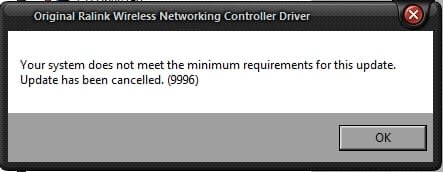
Ok, I see that now. I was just confused:confused::rolleyes:. Uninstalling is deleting the driver. So after uninstalling/deleting driver/drivers, my attempt at installing the the new drivers was unsuccessful. I keep getting this error message, stating computer doesn't meet system requirements. The pc is an HPE-500y that I upgraded a few years ago with nVidia 450GTS graphics card and X-FI Titanium audio card. I don't understand why I'm getting this error message.:( I'll go back to the HP site this evening and double check that I d/l the correct drivers. I'm posting from my other pc for now.

Baron
 

Attachments

  • Scr_163.jpg
    Scr_163.jpg
    11.2 KB · Views: 21

My Computer My Computer

At a glance

Windows 7 Pro x64AMD FX-8350 8-Core Black Edition, 4gHz, 125WCORSAIR: Vengence (2X8 GB) 16GB DDR3 1866mHzNVIDIA: GeForce GTX 750 Ti, 1GB DDR5
Computer type
PC/Desktop
Computer Manufacturer/Model Number
CUSTOM BUILD
OS
Windows 7 Pro x64
CPU
AMD FX-8350 8-Core Black Edition, 4gHz, 125W
Motherboard
ASUS M5A99X EVO, AMD 990X/SB950 Chipset, UEFI BIOS, USB 3.0
Memory
CORSAIR: Vengence (2X8 GB) 16GB DDR3 1866mHz
Graphics Card(s)
NVIDIA: GeForce GTX 750 Ti, 1GB DDR5
Sound Card
Creative: Sound Blaster X-Fi Titanium
Monitor(s) Displays
NIXEUS 27"
Screen Resolution
2560 X 1440
Hard Drives
Seagate: SATA 2TB (internal)
Seagate: SATA 4TB (external)
PSU
NZXT HALE82 750W semi-modular
Case
NZXT PHANTOM, FANS 3x 200mm, 4x 120mm
Cooling
CORSAIR Hydro Series H80i High Performance Liquid CPU Cooler
Keyboard
AZIO (backlit keyboard)
Mouse
SENTEY Luminata Pro
Internet Speed
CABLE 100Mbps
Antivirus
ESET Smart Security
Browser
Firefox
Other Info
NZXT: APERTURE Card Reader w 2x USB 3,
NZXT: Custom Premium Cables
Now that board Baron does it come with one of those little screw on wireless adaptor modules - my Z77 board came with one - don't use it but it did require a secondary driver.

Now the network adaptor you nee is this one Motherboards - M5A99X EVO - ASUS

Tell me if I have back about face and I cannot find that particular driver on the Realtek site either:(
 

My Computer My Computer

At a glance

Desk1 7 Home Prem / Desk2 10 Pro / Main lap A...Desk1 i5 3750K / Laptop i7 GTX 860M / Desk2 i...Desk1 8GB (1866) / Desk2 16GB (1333) / Laptop...Desk 1& 2NVidia GTX 650 & Laptops on board Intel
Computer type
PC/Desktop
Computer Manufacturer/Model Number
Own build (new) Desk1 / Asus ROG Win 7 / Desk2 1st build
OS
Desk1 7 Home Prem / Desk2 10 Pro / Main lap Asus ROG 10 Pro 2 laptop Toshiba 7 Pro Asus P2520 7 & 10
CPU
Desk1 i5 3750K / Laptop i7 GTX 860M / Desk2 i5 2500
Motherboard
Desk1 Asus P877-V / Desk2 Gigabyte H67 UD3H / Laptop ?
Memory
Desk1 8GB (1866) / Desk2 16GB (1333) / Laptop 8Gb DDR3
Graphics Card(s)
Desk 1& 2NVidia GTX 650 & Laptops on board Intel
Sound Card
Desk 1 & 2 -XONAR DG Realtek High Def audio Laptop
Monitor(s) Displays
Desk 1 Benq HD 2450 / Desk2 Philips 24" / Laptop 17.5"
Screen Resolution
1920x1080 D1 & D2 & Laptop 1
Hard Drives
Desk1 Samsung 120GB 830 SSD
Asus ROG 256GB 850 Pro SSD
Desk2 Samsung 840 256 SSD
Toshiba 120GB EVO
PSU
Desk 1 Corsair HX 1050/ Laptop ? / Desk 2 Corsair HX 650
Case
Desk 1 Cooler HAF XM ? Toshiba laptop / Desk2 Coolermaster
Cooling
Fans on all Desk1 -2 Desk2 - all Coolermasters 5 Laptop ?
Keyboard
Desk 1 MS Sidewinder X6 Desk 2 MS Sidewinder X 4
Mouse
Desk 1&2 - Gigabyte MS 900 gamer - laptop - Logitec wireless
Internet Speed
ADSL2+
Other Info
One other Desktop (tester) and spare Toshba laptop both with SSD's
Running Kaspersky 2016 ISS on all machines config'd identically
Logitec audio stereo systems on each machine (x3)
Canon MG5250MFC
Router/modem TP-Link running WPA2SK
Ok, I see that now. I was just confused:confused::rolleyes:. Uninstalling is deleting the driver. So after uninstalling/deleting driver/drivers, my attempt at installing the the new drivers was unsuccessful. I keep getting this error message, stating computer doesn't meet system requirements. The pc is an HPE-500y that I upgraded a few years ago with nVidia 450GTS graphics card and X-FI Titanium audio card. I don't understand why I'm getting this error message.:( I'll go back to the HP site this evening and double check that I d/l the correct drivers. I'm posting from my other pc for now.

Baron

Hi Baron

Have you tried to Scan for Hardware changes and allow auto search?

Regards
UKMedia
 

My Computer My Computer

At a glance

Windows 7 Ultimate 64Bit (SP 1)Intel Core i7 4770K OC32GB 1600Mhz DDR3MSI GTX580 Twin Frozr II/OC and NVIDIA GTX 970
Computer Manufacturer/Model Number
Self Build
OS
Windows 7 Ultimate 64Bit (SP 1)
CPU
Intel Core i7 4770K OC
Motherboard
ASUS Maximus VII Ranger
Memory
32GB 1600Mhz DDR3
Graphics Card(s)
MSI GTX580 Twin Frozr II/OC and NVIDIA GTX 970
Sound Card
On-Board and Soundblaster Recon 3 D headset
Monitor(s) Displays
x2 Flat screen 21" LG displays + x1 LG W2363D (3D)
Hard Drives
5 internal Hard Drives:
1 x WD 120GB Solid State
4 x WD 1TB (CAVIAR BLACK 1TB 32MB 7200 SATA) as Raid 5 array
PSU
Dark Power Pro 10 1200W
Case
CoolerMaster HAF 932 Case - Black
Cooling
Thermaltake Contac21 cooler
Keyboard
Cyborg
Mouse
Razor Mamba
Internet Speed
0.5 Mb - (Benefits of rural location!) & 24 MB Sat
Antivirus
MSE
Other Info
Teaming 2 GB network connection to Wired 1GB switch.
Connected to 37TB (Raid 5) of network storage on a wired 1GB lan.
(Mixture of internal hard drives, 1TB, 2TB, 4TB & 16TB Terastations)
To save ploughing back have you opened Device Manager as well any yellow triangles?

To se what you have installed try this

Using HW Info general components

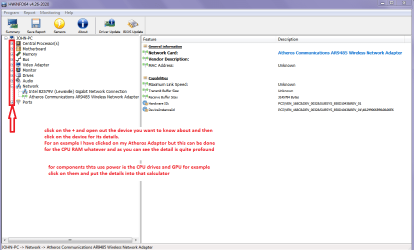
DownloadHW Info and pick the right bit version - HWiNFO, HWiNFO32/64 - Download - (copy andpaste this site into the search bar) If you do not need the running informationin the smaller right hand panel close it. In the left hand window click on the+ for the individual device groupings and they will open out to the variouscomponents.

Goon opening out further until you get to the device itself. click on it and itwill highlight. In the right hand window there will be a very detaileddescription of that device as in brand, speeds model number etc etc These arevery detailed and are just what is needed for searching for drivers etc.

Seemy pic for an example - in this I have opened out one my components and then highlighted one of the one you need andyou can see the detail.
 

Attachments

  • HW INFO DEVICES.PNG
    HW INFO DEVICES.PNG
    32.3 KB · Views: 1

My Computer My Computer

At a glance

Desk1 7 Home Prem / Desk2 10 Pro / Main lap A...Desk1 i5 3750K / Laptop i7 GTX 860M / Desk2 i...Desk1 8GB (1866) / Desk2 16GB (1333) / Laptop...Desk 1& 2NVidia GTX 650 & Laptops on board Intel
Computer type
PC/Desktop
Computer Manufacturer/Model Number
Own build (new) Desk1 / Asus ROG Win 7 / Desk2 1st build
OS
Desk1 7 Home Prem / Desk2 10 Pro / Main lap Asus ROG 10 Pro 2 laptop Toshiba 7 Pro Asus P2520 7 & 10
CPU
Desk1 i5 3750K / Laptop i7 GTX 860M / Desk2 i5 2500
Motherboard
Desk1 Asus P877-V / Desk2 Gigabyte H67 UD3H / Laptop ?
Memory
Desk1 8GB (1866) / Desk2 16GB (1333) / Laptop 8Gb DDR3
Graphics Card(s)
Desk 1& 2NVidia GTX 650 & Laptops on board Intel
Sound Card
Desk 1 & 2 -XONAR DG Realtek High Def audio Laptop
Monitor(s) Displays
Desk 1 Benq HD 2450 / Desk2 Philips 24" / Laptop 17.5"
Screen Resolution
1920x1080 D1 & D2 & Laptop 1
Hard Drives
Desk1 Samsung 120GB 830 SSD
Asus ROG 256GB 850 Pro SSD
Desk2 Samsung 840 256 SSD
Toshiba 120GB EVO
PSU
Desk 1 Corsair HX 1050/ Laptop ? / Desk 2 Corsair HX 650
Case
Desk 1 Cooler HAF XM ? Toshiba laptop / Desk2 Coolermaster
Cooling
Fans on all Desk1 -2 Desk2 - all Coolermasters 5 Laptop ?
Keyboard
Desk 1 MS Sidewinder X6 Desk 2 MS Sidewinder X 4
Mouse
Desk 1&2 - Gigabyte MS 900 gamer - laptop - Logitec wireless
Internet Speed
ADSL2+
Other Info
One other Desktop (tester) and spare Toshba laptop both with SSD's
Running Kaspersky 2016 ISS on all machines config'd identically
Logitec audio stereo systems on each machine (x3)
Canon MG5250MFC
Router/modem TP-Link running WPA2SK
Ok, so I double checked to be sure I d/l the correct drivers, which I did, but I d/l them again in case the package got corrupted during the first d/l. I get the same error message during install process.

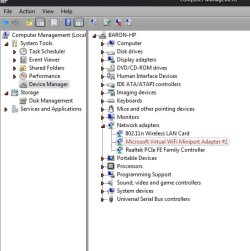
Device Manager screenshot taken before I removed drivers. No yellow triangles. When I scanned for hardware changes, it reinstalled old drivers, plus I got this MS Virtual Wi-Fi Miniport Adapter, which I have to assume is for my new cell phone. Last time I had a cell phone the screens weren't color yet.:rolleyes: Now that I'm thinking about it, it occurs to me that the issue I'm having, (stuck in public mode) happened around the same time I got my cell phone.:huh: Could it be that this might have something to do with issue?
I'll check out that software link. Thanks guys.

Baron
 

Attachments

  • Scr_165.jpg
    Scr_165.jpg
    40.4 KB · Views: 11
  • Scr_161.jpg
    Scr_161.jpg
    105.8 KB · Views: 1

My Computer My Computer

At a glance

Windows 7 Pro x64AMD FX-8350 8-Core Black Edition, 4gHz, 125WCORSAIR: Vengence (2X8 GB) 16GB DDR3 1866mHzNVIDIA: GeForce GTX 750 Ti, 1GB DDR5
Computer type
PC/Desktop
Computer Manufacturer/Model Number
CUSTOM BUILD
OS
Windows 7 Pro x64
CPU
AMD FX-8350 8-Core Black Edition, 4gHz, 125W
Motherboard
ASUS M5A99X EVO, AMD 990X/SB950 Chipset, UEFI BIOS, USB 3.0
Memory
CORSAIR: Vengence (2X8 GB) 16GB DDR3 1866mHz
Graphics Card(s)
NVIDIA: GeForce GTX 750 Ti, 1GB DDR5
Sound Card
Creative: Sound Blaster X-Fi Titanium
Monitor(s) Displays
NIXEUS 27"
Screen Resolution
2560 X 1440
Hard Drives
Seagate: SATA 2TB (internal)
Seagate: SATA 4TB (external)
PSU
NZXT HALE82 750W semi-modular
Case
NZXT PHANTOM, FANS 3x 200mm, 4x 120mm
Cooling
CORSAIR Hydro Series H80i High Performance Liquid CPU Cooler
Keyboard
AZIO (backlit keyboard)
Mouse
SENTEY Luminata Pro
Internet Speed
CABLE 100Mbps
Antivirus
ESET Smart Security
Browser
Firefox
Other Info
NZXT: APERTURE Card Reader w 2x USB 3,
NZXT: Custom Premium Cables
Last edited:

My Computer My Computer

At a glance

Windows 7 Pro x64AMD FX-8350 8-Core Black Edition, 4gHz, 125WCORSAIR: Vengence (2X8 GB) 16GB DDR3 1866mHzNVIDIA: GeForce GTX 750 Ti, 1GB DDR5
Computer type
PC/Desktop
Computer Manufacturer/Model Number
CUSTOM BUILD
OS
Windows 7 Pro x64
CPU
AMD FX-8350 8-Core Black Edition, 4gHz, 125W
Motherboard
ASUS M5A99X EVO, AMD 990X/SB950 Chipset, UEFI BIOS, USB 3.0
Memory
CORSAIR: Vengence (2X8 GB) 16GB DDR3 1866mHz
Graphics Card(s)
NVIDIA: GeForce GTX 750 Ti, 1GB DDR5
Sound Card
Creative: Sound Blaster X-Fi Titanium
Monitor(s) Displays
NIXEUS 27"
Screen Resolution
2560 X 1440
Hard Drives
Seagate: SATA 2TB (internal)
Seagate: SATA 4TB (external)
PSU
NZXT HALE82 750W semi-modular
Case
NZXT PHANTOM, FANS 3x 200mm, 4x 120mm
Cooling
CORSAIR Hydro Series H80i High Performance Liquid CPU Cooler
Keyboard
AZIO (backlit keyboard)
Mouse
SENTEY Luminata Pro
Internet Speed
CABLE 100Mbps
Antivirus
ESET Smart Security
Browser
Firefox
Other Info
NZXT: APERTURE Card Reader w 2x USB 3,
NZXT: Custom Premium Cables
I was thinking last night that we have been focusing all our attention on one individual pc, when in fact every pc/laptop on this network is experiencing the same issue. My custom system, my laptop, the system I am presently on, and 2 other pc's in different rooms in the house, are all stuck in "Public Mode". If one gets stuck in "Public Mode", how is it that every other pc on network has the same issue?:confused: Doesn't make sense.:rolleyes::confused: Could one network setting on a pc effect the network settings on other pc's on the network? One would have to set each pc on the network to "Public Mode" individually. Right?:huh: :( :banghead::banghead::banghead::banghead:

Baron
 

My Computer My Computer

At a glance

Windows 7 Pro x64AMD FX-8350 8-Core Black Edition, 4gHz, 125WCORSAIR: Vengence (2X8 GB) 16GB DDR3 1866mHzNVIDIA: GeForce GTX 750 Ti, 1GB DDR5
Computer type
PC/Desktop
Computer Manufacturer/Model Number
CUSTOM BUILD
OS
Windows 7 Pro x64
CPU
AMD FX-8350 8-Core Black Edition, 4gHz, 125W
Motherboard
ASUS M5A99X EVO, AMD 990X/SB950 Chipset, UEFI BIOS, USB 3.0
Memory
CORSAIR: Vengence (2X8 GB) 16GB DDR3 1866mHz
Graphics Card(s)
NVIDIA: GeForce GTX 750 Ti, 1GB DDR5
Sound Card
Creative: Sound Blaster X-Fi Titanium
Monitor(s) Displays
NIXEUS 27"
Screen Resolution
2560 X 1440
Hard Drives
Seagate: SATA 2TB (internal)
Seagate: SATA 4TB (external)
PSU
NZXT HALE82 750W semi-modular
Case
NZXT PHANTOM, FANS 3x 200mm, 4x 120mm
Cooling
CORSAIR Hydro Series H80i High Performance Liquid CPU Cooler
Keyboard
AZIO (backlit keyboard)
Mouse
SENTEY Luminata Pro
Internet Speed
CABLE 100Mbps
Antivirus
ESET Smart Security
Browser
Firefox
Other Info
NZXT: APERTURE Card Reader w 2x USB 3,
NZXT: Custom Premium Cables
@ICit2lol
Now the network adaptor you nee is this one Motherboards - M5A99X EVO - ASUS
That MB is in my custom built system. The one we've been talking about is HP Pavlion Elite HPE-500y. It Has Foxxcon MB.

Baron
Oops sorry mate I get a bit confused sometimes as I head for the specs if I come in late on the thread or have not been on too many threads at once or return late any case - sorry.

Now networking problems are always but always nightmares to me (and a lot of others I guess) and I on the whole like to have the offending machine in my hot little hands when working on them.

Now if every machine is stuck on Public I am wondering if it is a modem / router issue?? Again a very convoluted device to work with for me and I am reckoning that 2XG is the member who could fix this as she is up there with networking.

If you like I could drop her a PM and ask her to take a look at this??
 

My Computer My Computer

At a glance

Desk1 7 Home Prem / Desk2 10 Pro / Main lap A...Desk1 i5 3750K / Laptop i7 GTX 860M / Desk2 i...Desk1 8GB (1866) / Desk2 16GB (1333) / Laptop...Desk 1& 2NVidia GTX 650 & Laptops on board Intel
Computer type
PC/Desktop
Computer Manufacturer/Model Number
Own build (new) Desk1 / Asus ROG Win 7 / Desk2 1st build
OS
Desk1 7 Home Prem / Desk2 10 Pro / Main lap Asus ROG 10 Pro 2 laptop Toshiba 7 Pro Asus P2520 7 & 10
CPU
Desk1 i5 3750K / Laptop i7 GTX 860M / Desk2 i5 2500
Motherboard
Desk1 Asus P877-V / Desk2 Gigabyte H67 UD3H / Laptop ?
Memory
Desk1 8GB (1866) / Desk2 16GB (1333) / Laptop 8Gb DDR3
Graphics Card(s)
Desk 1& 2NVidia GTX 650 & Laptops on board Intel
Sound Card
Desk 1 & 2 -XONAR DG Realtek High Def audio Laptop
Monitor(s) Displays
Desk 1 Benq HD 2450 / Desk2 Philips 24" / Laptop 17.5"
Screen Resolution
1920x1080 D1 & D2 & Laptop 1
Hard Drives
Desk1 Samsung 120GB 830 SSD
Asus ROG 256GB 850 Pro SSD
Desk2 Samsung 840 256 SSD
Toshiba 120GB EVO
PSU
Desk 1 Corsair HX 1050/ Laptop ? / Desk 2 Corsair HX 650
Case
Desk 1 Cooler HAF XM ? Toshiba laptop / Desk2 Coolermaster
Cooling
Fans on all Desk1 -2 Desk2 - all Coolermasters 5 Laptop ?
Keyboard
Desk 1 MS Sidewinder X6 Desk 2 MS Sidewinder X 4
Mouse
Desk 1&2 - Gigabyte MS 900 gamer - laptop - Logitec wireless
Internet Speed
ADSL2+
Other Info
One other Desktop (tester) and spare Toshba laptop both with SSD's
Running Kaspersky 2016 ISS on all machines config'd identically
Logitec audio stereo systems on each machine (x3)
Canon MG5250MFC
Router/modem TP-Link running WPA2SK
@ICit2lol,
Oops sorry mate I get a bit confused sometimes...
Hey, no worries. I've been confused ever since this problem started. I'm not as patient with myself as I used to be, so I'm at the point now where I start throwing things.;)
If you like I could drop her a PM and ask her to take a look at this??
Getting a fresh perspective on this would be outstanding! Thanks again for your input.:)

Baron
 

My Computer My Computer

At a glance

Windows 7 Pro x64AMD FX-8350 8-Core Black Edition, 4gHz, 125WCORSAIR: Vengence (2X8 GB) 16GB DDR3 1866mHzNVIDIA: GeForce GTX 750 Ti, 1GB DDR5
Computer type
PC/Desktop
Computer Manufacturer/Model Number
CUSTOM BUILD
OS
Windows 7 Pro x64
CPU
AMD FX-8350 8-Core Black Edition, 4gHz, 125W
Motherboard
ASUS M5A99X EVO, AMD 990X/SB950 Chipset, UEFI BIOS, USB 3.0
Memory
CORSAIR: Vengence (2X8 GB) 16GB DDR3 1866mHz
Graphics Card(s)
NVIDIA: GeForce GTX 750 Ti, 1GB DDR5
Sound Card
Creative: Sound Blaster X-Fi Titanium
Monitor(s) Displays
NIXEUS 27"
Screen Resolution
2560 X 1440
Hard Drives
Seagate: SATA 2TB (internal)
Seagate: SATA 4TB (external)
PSU
NZXT HALE82 750W semi-modular
Case
NZXT PHANTOM, FANS 3x 200mm, 4x 120mm
Cooling
CORSAIR Hydro Series H80i High Performance Liquid CPU Cooler
Keyboard
AZIO (backlit keyboard)
Mouse
SENTEY Luminata Pro
Internet Speed
CABLE 100Mbps
Antivirus
ESET Smart Security
Browser
Firefox
Other Info
NZXT: APERTURE Card Reader w 2x USB 3,
NZXT: Custom Premium Cables
ok mate I will PM her and see what she can take a look and see. I will be very surprised if she cannot work it out.
John
 

My Computer My Computer

At a glance

Desk1 7 Home Prem / Desk2 10 Pro / Main lap A...Desk1 i5 3750K / Laptop i7 GTX 860M / Desk2 i...Desk1 8GB (1866) / Desk2 16GB (1333) / Laptop...Desk 1& 2NVidia GTX 650 & Laptops on board Intel
Computer type
PC/Desktop
Computer Manufacturer/Model Number
Own build (new) Desk1 / Asus ROG Win 7 / Desk2 1st build
OS
Desk1 7 Home Prem / Desk2 10 Pro / Main lap Asus ROG 10 Pro 2 laptop Toshiba 7 Pro Asus P2520 7 & 10
CPU
Desk1 i5 3750K / Laptop i7 GTX 860M / Desk2 i5 2500
Motherboard
Desk1 Asus P877-V / Desk2 Gigabyte H67 UD3H / Laptop ?
Memory
Desk1 8GB (1866) / Desk2 16GB (1333) / Laptop 8Gb DDR3
Graphics Card(s)
Desk 1& 2NVidia GTX 650 & Laptops on board Intel
Sound Card
Desk 1 & 2 -XONAR DG Realtek High Def audio Laptop
Monitor(s) Displays
Desk 1 Benq HD 2450 / Desk2 Philips 24" / Laptop 17.5"
Screen Resolution
1920x1080 D1 & D2 & Laptop 1
Hard Drives
Desk1 Samsung 120GB 830 SSD
Asus ROG 256GB 850 Pro SSD
Desk2 Samsung 840 256 SSD
Toshiba 120GB EVO
PSU
Desk 1 Corsair HX 1050/ Laptop ? / Desk 2 Corsair HX 650
Case
Desk 1 Cooler HAF XM ? Toshiba laptop / Desk2 Coolermaster
Cooling
Fans on all Desk1 -2 Desk2 - all Coolermasters 5 Laptop ?
Keyboard
Desk 1 MS Sidewinder X6 Desk 2 MS Sidewinder X 4
Mouse
Desk 1&2 - Gigabyte MS 900 gamer - laptop - Logitec wireless
Internet Speed
ADSL2+
Other Info
One other Desktop (tester) and spare Toshba laptop both with SSD's
Running Kaspersky 2016 ISS on all machines config'd identically
Logitec audio stereo systems on each machine (x3)
Canon MG5250MFC
Router/modem TP-Link running WPA2SK
Hi Xeno,

I've been called to jump in, if you don't mind of course. Although, can't promise that I'll be able to provide great results but definitely will work hard on resolving your issue. :D

Was there any changes in your network? i.e. New router or modem?

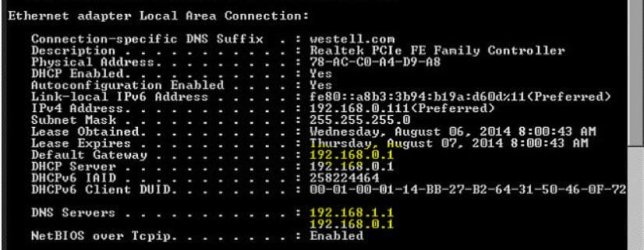
I've noticed that your DNS servers are: 192.168.1.1 and 192.168.0.1 - coming from your Westell Modem and Linksys according from the ipconfig/all output that you've posted.

Verizon requires changing the Modem into a Bridge mode when connecting a 3rd party router. Can you please verify your current setup? Changing your Westell 6100 modem to Bridge Mode | Highspeed Internet | Residential Support | Verizon

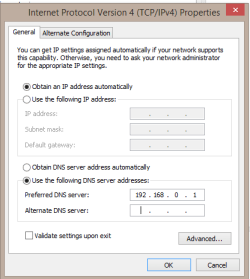
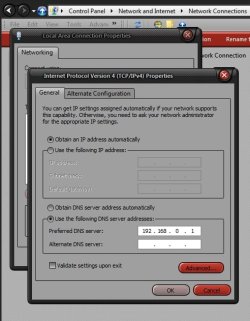
A test - Please manually assign the DNS in either your LAN or WLAN settings of one computer for now, use 192.168.0.1, see if you can change the Public network.
How to Assign a Static IP Address in Windows 7, 8, XP, or Vista
It should look similar to the image below.

Another update of your progress will be appreciated.
 

Attachments

  • DNS -manually assigned.PNG
    DNS -manually assigned.PNG
    8.1 KB · Views: 14
Last edited:

My Computer My Computer

At a glance

Win7 & Win8 64bitIntel i5
Computer Manufacturer/Model Number
Lenovo Desktop/Samsung Laptop
OS
Win7 & Win8 64bit
CPU
Intel i5
Internet Speed
Charter-20 Mbps
Antivirus
Avast
Browser
FF, IE9 and Chrome
Ok, awesome! Thanks for taking the time to take a look at what is becoming my nightmare.:confused:

Was there any changes in your network? i.e. New router or modem?
No new hardware. Last thing I replaced was the router, 2, maybe 3 years ago.

Verizon requires changing the Modem into a Bridge mode when connecting a 3rd party router. Can you please verify your current setup? Changing your Westell 6100 modem to Bridge Mode | Highspeed Internet | Residential Support | Verizon
I'll get back to you tomorrow on the modem with some screen shots of the settings.

A test - Please manually assign the DNS in either your LAN or WLAN settings of one computer for now, use 192.168.0.1, see if you can change the Public network.
How to Assign a Static IP Address in Windows 7, 8, XP, or Vista
It should look similar to the image below.
I'll also have an answer for this tomorrow.

Thank you again for your help.

Baron
 

My Computer My Computer

At a glance

Windows 7 Pro x64AMD FX-8350 8-Core Black Edition, 4gHz, 125WCORSAIR: Vengence (2X8 GB) 16GB DDR3 1866mHzNVIDIA: GeForce GTX 750 Ti, 1GB DDR5
Computer type
PC/Desktop
Computer Manufacturer/Model Number
CUSTOM BUILD
OS
Windows 7 Pro x64
CPU
AMD FX-8350 8-Core Black Edition, 4gHz, 125W
Motherboard
ASUS M5A99X EVO, AMD 990X/SB950 Chipset, UEFI BIOS, USB 3.0
Memory
CORSAIR: Vengence (2X8 GB) 16GB DDR3 1866mHz
Graphics Card(s)
NVIDIA: GeForce GTX 750 Ti, 1GB DDR5
Sound Card
Creative: Sound Blaster X-Fi Titanium
Monitor(s) Displays
NIXEUS 27"
Screen Resolution
2560 X 1440
Hard Drives
Seagate: SATA 2TB (internal)
Seagate: SATA 4TB (external)
PSU
NZXT HALE82 750W semi-modular
Case
NZXT PHANTOM, FANS 3x 200mm, 4x 120mm
Cooling
CORSAIR Hydro Series H80i High Performance Liquid CPU Cooler
Keyboard
AZIO (backlit keyboard)
Mouse
SENTEY Luminata Pro
Internet Speed
CABLE 100Mbps
Antivirus
ESET Smart Security
Browser
Firefox
Other Info
NZXT: APERTURE Card Reader w 2x USB 3,
NZXT: Custom Premium Cables
No worries, we'll be on stand by. :D
 

My Computer My Computer

At a glance

Win7 & Win8 64bitIntel i5
Computer Manufacturer/Model Number
Lenovo Desktop/Samsung Laptop
OS
Win7 & Win8 64bit
CPU
Intel i5
Internet Speed
Charter-20 Mbps
Antivirus
Avast
Browser
FF, IE9 and Chrome
Verizon requires changing the Modem into a Bridge mode when connecting a 3rd party router. Can you please verify your current setup?
Ok, not sure but I think this is what you wanted to see...
A test - Please manually assign the DNS in either your LAN or WLAN settings of one computer for now, use 192.168.0.1, see if you can change the Public network.
Unfortunately, I couldn't get it out of "Public Mode" after the change. That's assuming I followed instructions correctly. (see bottom image) Should I change setting back the way it was? Thanks again.

Baron

Scr_169.jpg
 
Last edited by a moderator:

My Computer My Computer

At a glance

Windows 7 Pro x64AMD FX-8350 8-Core Black Edition, 4gHz, 125WCORSAIR: Vengence (2X8 GB) 16GB DDR3 1866mHzNVIDIA: GeForce GTX 750 Ti, 1GB DDR5
Computer type
PC/Desktop
Computer Manufacturer/Model Number
CUSTOM BUILD
OS
Windows 7 Pro x64
CPU
AMD FX-8350 8-Core Black Edition, 4gHz, 125W
Motherboard
ASUS M5A99X EVO, AMD 990X/SB950 Chipset, UEFI BIOS, USB 3.0
Memory
CORSAIR: Vengence (2X8 GB) 16GB DDR3 1866mHz
Graphics Card(s)
NVIDIA: GeForce GTX 750 Ti, 1GB DDR5
Sound Card
Creative: Sound Blaster X-Fi Titanium
Monitor(s) Displays
NIXEUS 27"
Screen Resolution
2560 X 1440
Hard Drives
Seagate: SATA 2TB (internal)
Seagate: SATA 4TB (external)
PSU
NZXT HALE82 750W semi-modular
Case
NZXT PHANTOM, FANS 3x 200mm, 4x 120mm
Cooling
CORSAIR Hydro Series H80i High Performance Liquid CPU Cooler
Keyboard
AZIO (backlit keyboard)
Mouse
SENTEY Luminata Pro
Internet Speed
CABLE 100Mbps
Antivirus
ESET Smart Security
Browser
Firefox
Other Info
NZXT: APERTURE Card Reader w 2x USB 3,
NZXT: Custom Premium Cables
Thanks for the images provided.

Can you please try to access your Modem and Router by using the Gateway IP?
http://192.168.1.1

http://192.168.0.1

Please leave the configuration as is from your Modem/Router but change the DNS back to Obtain DNS automatically.

Also, click on the Start button and type cmd, up to the top right right on the cmd and run as an Administrator.
How to run the dos command prompt (cmd.exe) as an administrator

Lets ping the 2 Gateway IPs from the command prompt, type: ping 192.168.1.1, when it's done type ping 192.168.0.1, please post the results.
Should I change setting back the way it was? Thanks again
 

My Computer My Computer

At a glance

Win7 & Win8 64bitIntel i5
Computer Manufacturer/Model Number
Lenovo Desktop/Samsung Laptop
OS
Win7 & Win8 64bit
CPU
Intel i5
Internet Speed
Charter-20 Mbps
Antivirus
Avast
Browser
FF, IE9 and Chrome
Can you please try to access your Modem and Router by using the Gateway IP?
http://192.168.1.1

http://192.168.0.1
Do you mean from my browser? If so...
192.168.1.1 gets me access to modem.
192.168.0.1 is a different story. Asks for username and password. Tried default admin for user and password for password. No luck.
If you meant something else could you be more specific. Sorry but I'm not very knowledgeable when it comes to networking and the terminology.

Please leave the configuration as is from your Modem/Router but change the DNS back to Obtain DNS automatically.
OK.

I'll post the ping results tomorrow.

Thank you again. I very much appreciate you taking time to help me with this.

Baron
 

My Computer My Computer

At a glance

Windows 7 Pro x64AMD FX-8350 8-Core Black Edition, 4gHz, 125WCORSAIR: Vengence (2X8 GB) 16GB DDR3 1866mHzNVIDIA: GeForce GTX 750 Ti, 1GB DDR5
Computer type
PC/Desktop
Computer Manufacturer/Model Number
CUSTOM BUILD
OS
Windows 7 Pro x64
CPU
AMD FX-8350 8-Core Black Edition, 4gHz, 125W
Motherboard
ASUS M5A99X EVO, AMD 990X/SB950 Chipset, UEFI BIOS, USB 3.0
Memory
CORSAIR: Vengence (2X8 GB) 16GB DDR3 1866mHz
Graphics Card(s)
NVIDIA: GeForce GTX 750 Ti, 1GB DDR5
Sound Card
Creative: Sound Blaster X-Fi Titanium
Monitor(s) Displays
NIXEUS 27"
Screen Resolution
2560 X 1440
Hard Drives
Seagate: SATA 2TB (internal)
Seagate: SATA 4TB (external)
PSU
NZXT HALE82 750W semi-modular
Case
NZXT PHANTOM, FANS 3x 200mm, 4x 120mm
Cooling
CORSAIR Hydro Series H80i High Performance Liquid CPU Cooler
Keyboard
AZIO (backlit keyboard)
Mouse
SENTEY Luminata Pro
Internet Speed
CABLE 100Mbps
Antivirus
ESET Smart Security
Browser
Firefox
Other Info
NZXT: APERTURE Card Reader w 2x USB 3,
NZXT: Custom Premium Cables
You did good Xeno. ;)

So that it will be easier for us to further look into issue (I know...I know...it's taking ages.... :rolleyes:), I have posted a snip of your ipconfig/all output.

192.168.1.1 gets me access to modem. << Modem's IP Address
192.168.0.1 is a different story. << Router's IP Address

Please verify your current setup and if the Ethernet cables are plugged in to the right ports.
http://www.ehow.com/how_8386908_connect-verizon-westell-6100g-modem.html

Test your connection after and try accessing the router's IP address again: http://192.168.0.1.
Try the default Login User name: admin
Password: none or blank or admin

If the issue persist, please do a Power Cycle.

If you can't still access the router's IP address after the Power Cycle process, you'll have to reset your router (not the Westell Modem) to the factory default setting. Here's How.

Verizon Support site has some very helpful guides on how to add/setup your third party router.
http://www.verizon.com/Support/Resi...ed/networking/setup/questionsthree/123887.htm
 

Attachments

  • LAN-2 gateways.JPG
    LAN-2 gateways.JPG
    50.5 KB · Views: 0

My Computer My Computer

At a glance

Win7 & Win8 64bitIntel i5
Computer Manufacturer/Model Number
Lenovo Desktop/Samsung Laptop
OS
Win7 & Win8 64bit
CPU
Intel i5
Internet Speed
Charter-20 Mbps
Antivirus
Avast
Browser
FF, IE9 and Chrome
Ok. Quick update.
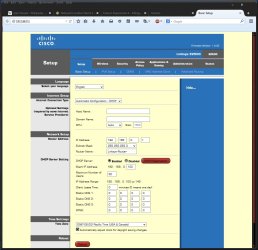
I managed to access the 192.168.0.1 (router) through the Cisco Router program I installed when I first got the router a couple of years ago. Anyway, this wasn't deliberate. I just got lucky and found Password info. So I think this is what you wanted to see... I hope. Still need to do the ping test yet. Likely tonight. I sincerely appreciate your help. I feel as though I have some direction now, thanks to ICit2lol for sending you my way.

Baron
 

Attachments

  • Scr_170.jpg
    Scr_170.jpg
    97.2 KB · Views: 2

My Computer My Computer

At a glance

Windows 7 Pro x64AMD FX-8350 8-Core Black Edition, 4gHz, 125WCORSAIR: Vengence (2X8 GB) 16GB DDR3 1866mHzNVIDIA: GeForce GTX 750 Ti, 1GB DDR5
Computer type
PC/Desktop
Computer Manufacturer/Model Number
CUSTOM BUILD
OS
Windows 7 Pro x64
CPU
AMD FX-8350 8-Core Black Edition, 4gHz, 125W
Motherboard
ASUS M5A99X EVO, AMD 990X/SB950 Chipset, UEFI BIOS, USB 3.0
Memory
CORSAIR: Vengence (2X8 GB) 16GB DDR3 1866mHz
Graphics Card(s)
NVIDIA: GeForce GTX 750 Ti, 1GB DDR5
Sound Card
Creative: Sound Blaster X-Fi Titanium
Monitor(s) Displays
NIXEUS 27"
Screen Resolution
2560 X 1440
Hard Drives
Seagate: SATA 2TB (internal)
Seagate: SATA 4TB (external)
PSU
NZXT HALE82 750W semi-modular
Case
NZXT PHANTOM, FANS 3x 200mm, 4x 120mm
Cooling
CORSAIR Hydro Series H80i High Performance Liquid CPU Cooler
Keyboard
AZIO (backlit keyboard)
Mouse
SENTEY Luminata Pro
Internet Speed
CABLE 100Mbps
Antivirus
ESET Smart Security
Browser
Firefox
Other Info
NZXT: APERTURE Card Reader w 2x USB 3,
NZXT: Custom Premium Cables
Good job Xeno!

Please don't forget to ping the router's IP address, it is very important. Also, what type of network security do you have in placed? WEP, WPA or WPA2?

Can you do a Power Cycle and see if there's an improvement?
How to Power Cycle Your Broadband Devices | Tech Support Forum

If power cycle didn't help...... have you by any chance try deleting your network setup then re-create and choose the location type that you wish?


1. Open the Network and Sharing Center by clicking Start, type Network and Sharing Center and press Enter
2. Below where it says View your active networks, click on the picture (Globe, Building, Bench, House...ect)
3. Move the Set Network Properties window out of the way, but leave it open. (You'll need it in a minute, but at a time when it's otherwise inaccessible.)
4. Back on the Network and Sharing Center page, click the Change adapter settings link (in the left pane).
5. In the Network Connections window, highlight the network adapter through which you get your Internet.
6. Click the Disable this network device button above. Wait a couple of seconds for the connection to reflect the change by turning grey.
7. Return to the Set Network Location window you opened in step #2, and click the Merge or delete network locations link at the bottom.
8. Highlight the entries you wish to remove and then click Delete. (If there's more than one, you can delete them all)
9. When you're done, close the Merge or Delete Network Locations window and then close the Set Network Properties window.
10. Return to the Network Connections window, and with the disabled network adapter still highlighted from step #5, click the Enable this network device button
11. After a 10-15 second delay, your Internet should now be working again.
ICit2lol is cool! :cool:
 

My Computer My Computer

At a glance

Win7 & Win8 64bitIntel i5
Computer Manufacturer/Model Number
Lenovo Desktop/Samsung Laptop
OS
Win7 & Win8 64bit
CPU
Intel i5
Internet Speed
Charter-20 Mbps
Antivirus
Avast
Browser
FF, IE9 and Chrome
Back
Top