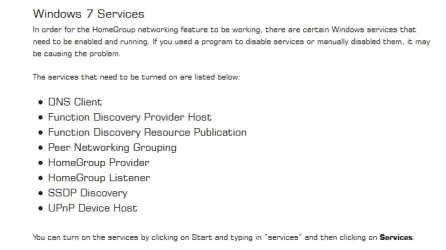
Network Location Stuck In Public Mode

Good job Xeno!
You can call me Baron.

type of network security do you have in placed? WEP, WPA or WPA2?
:huh:Huh...what...WEP, WPA...:confused: I haven't a clue. Can I find out on that Cisco Router page?

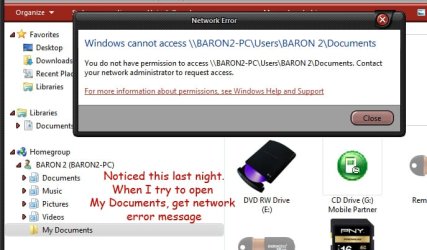
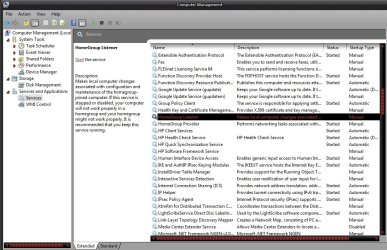
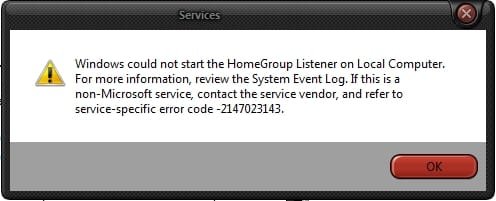
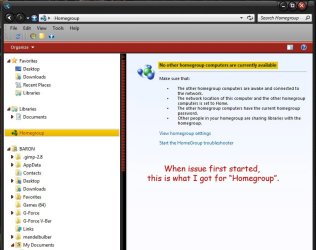
Before I forget I want to mention that, when this issue first started, there was nothing under the "Homegroup" heading in Win Expl. As of last night I can see my other pc under the "Homegroup" heading. (the one I used to share files with) but I still can't access it. See images plus error message below.

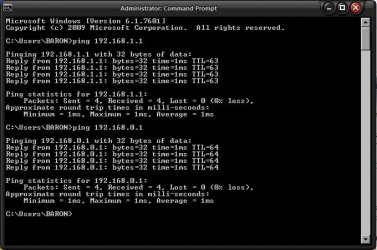
Here's the screenshot of ping tests.

I'll do the power cycle thing after I submit this, and post back tomorrow.

BTW: I noticed the SoCal. What part?
 

Attachments
  • Scr_129.jpg
    Scr_129.jpg
    79.2 KB · Views: 0
  • Scr_175.jpg
    Scr_175.jpg
    64.3 KB · Views: 20
  • Scr_174.jpg
    Scr_174.jpg
    52.6 KB · Views: 20

My Computer My Computer

At a glance

Windows 7 Pro x64AMD FX-8350 8-Core Black Edition, 4gHz, 125WCORSAIR: Vengence (2X8 GB) 16GB DDR3 1866mHzNVIDIA: GeForce GTX 750 Ti, 1GB DDR5
Computer type
PC/Desktop
Computer Manufacturer/Model Number
CUSTOM BUILD
OS
Windows 7 Pro x64
CPU
AMD FX-8350 8-Core Black Edition, 4gHz, 125W
Motherboard
ASUS M5A99X EVO, AMD 990X/SB950 Chipset, UEFI BIOS, USB 3.0
Memory
CORSAIR: Vengence (2X8 GB) 16GB DDR3 1866mHz
Graphics Card(s)
NVIDIA: GeForce GTX 750 Ti, 1GB DDR5
Sound Card
Creative: Sound Blaster X-Fi Titanium
Monitor(s) Displays
NIXEUS 27"
Screen Resolution
2560 X 1440
Hard Drives
Seagate: SATA 2TB (internal)
Seagate: SATA 4TB (external)
PSU
NZXT HALE82 750W semi-modular
Case
NZXT PHANTOM, FANS 3x 200mm, 4x 120mm
Cooling
CORSAIR Hydro Series H80i High Performance Liquid CPU Cooler
Keyboard
AZIO (backlit keyboard)
Mouse
SENTEY Luminata Pro
Internet Speed
CABLE 100Mbps
Antivirus
ESET Smart Security
Browser
Firefox
Other Info
NZXT: APERTURE Card Reader w 2x USB 3,
NZXT: Custom Premium Cables
Hi Baron,

Can you please try accessing \\Baron2-PC\C$, also... instead of Baron2-PC, try the IP Address of the Baron2-PC so that will be \\192.168.0.X\C$

The wireless network security can be found from your Linksys settings in the Security Tab.

Added:
I'd suggest for you to also click on "Start the HomeGroup troubleshooter" (it's on the first screen capture) if you have not tried this yet. I think that there are more concerns going on in your network setup.

Worst case, you might have to redo your network setup. :rolleyes:

L.A. County - close to Disneyland, Universal Studios, Angels and Dodgers Stadium. ;)
BTW: I noticed the SoCal. What part?
 
Last edited:

My Computer My Computer

At a glance

Win7 & Win8 64bitIntel i5
Computer Manufacturer/Model Number
Lenovo Desktop/Samsung Laptop
OS
Win7 & Win8 64bit
CPU
Intel i5
Internet Speed
Charter-20 Mbps
Antivirus
Avast
Browser
FF, IE9 and Chrome
Was able to do the power cycling of modem and router last night. Twice for good measure, with no luck, although I had never had lost my internet connection. In fact, power cycling was one of the first things I tried to remedy this before I posted here. Still can't get out of "Public Mode":confused::(
Can you please try accessing \\Baron2-PC\C$, also... instead of Baron2-PC, try the IP Address of the Baron2-PC so that will be \\192.168.0.X\C$
I'm little confused. Do you mean type 192.168.0.X\C$ at the cmd prompt, or in browser address bar? What is the X\C$ for? Do you want me to do this on the Baron2-PC or Baron-PC (the one I'm on now)? Could you explain a little more? Thank you.

Baron

San Bernardino.:rolleyes:;) It's really sweltering out here right now.:hot::hot:
 

My Computer My Computer

At a glance

Windows 7 Pro x64AMD FX-8350 8-Core Black Edition, 4gHz, 125WCORSAIR: Vengence (2X8 GB) 16GB DDR3 1866mHzNVIDIA: GeForce GTX 750 Ti, 1GB DDR5
Computer type
PC/Desktop
Computer Manufacturer/Model Number
CUSTOM BUILD
OS
Windows 7 Pro x64
CPU
AMD FX-8350 8-Core Black Edition, 4gHz, 125W
Motherboard
ASUS M5A99X EVO, AMD 990X/SB950 Chipset, UEFI BIOS, USB 3.0
Memory
CORSAIR: Vengence (2X8 GB) 16GB DDR3 1866mHz
Graphics Card(s)
NVIDIA: GeForce GTX 750 Ti, 1GB DDR5
Sound Card
Creative: Sound Blaster X-Fi Titanium
Monitor(s) Displays
NIXEUS 27"
Screen Resolution
2560 X 1440
Hard Drives
Seagate: SATA 2TB (internal)
Seagate: SATA 4TB (external)
PSU
NZXT HALE82 750W semi-modular
Case
NZXT PHANTOM, FANS 3x 200mm, 4x 120mm
Cooling
CORSAIR Hydro Series H80i High Performance Liquid CPU Cooler
Keyboard
AZIO (backlit keyboard)
Mouse
SENTEY Luminata Pro
Internet Speed
CABLE 100Mbps
Antivirus
ESET Smart Security
Browser
Firefox
Other Info
NZXT: APERTURE Card Reader w 2x USB 3,
NZXT: Custom Premium Cables
Let's start from Baron2-PC. Log on as a user with an Admin permission, Click on the Start button :orb: and in the run box type \\192.168.0.111\C$ press enter after. From Baron-HP computer, do the same but type \\192.168.0.111\C$.
The C$ is a hidden local disk drive. You'd put a $ sign if you want it hid from your network. You may do this to any of your shared drives/folders, i.e. BaronDocs$
I'm little confused. Do you mean type 192.168.0.X\C$ at the cmd prompt, or in browser address bar? What is the X\C$ for? Do you want me to do this on the Baron2-PC or Baron-PC (the one I'm on now)? Could you explain a little more? Thank you.
I'm not too far away from you... LOL.... you're right it's over 100 degrees right now.
 

My Computer My Computer

At a glance

Win7 & Win8 64bitIntel i5
Computer Manufacturer/Model Number
Lenovo Desktop/Samsung Laptop
OS
Win7 & Win8 64bit
CPU
Intel i5
Internet Speed
Charter-20 Mbps
Antivirus
Avast
Browser
FF, IE9 and Chrome
Hi 2xg
Just got in. Had to drive to San Diego this weekend. I'm beat.:sleepy: No time on pc. Have something for you tomorrow. Thanks for explaining a bit more. I understand now.:)

Baron
 

My Computer My Computer

At a glance

Windows 7 Pro x64AMD FX-8350 8-Core Black Edition, 4gHz, 125WCORSAIR: Vengence (2X8 GB) 16GB DDR3 1866mHzNVIDIA: GeForce GTX 750 Ti, 1GB DDR5
Computer type
PC/Desktop
Computer Manufacturer/Model Number
CUSTOM BUILD
OS
Windows 7 Pro x64
CPU
AMD FX-8350 8-Core Black Edition, 4gHz, 125W
Motherboard
ASUS M5A99X EVO, AMD 990X/SB950 Chipset, UEFI BIOS, USB 3.0
Memory
CORSAIR: Vengence (2X8 GB) 16GB DDR3 1866mHz
Graphics Card(s)
NVIDIA: GeForce GTX 750 Ti, 1GB DDR5
Sound Card
Creative: Sound Blaster X-Fi Titanium
Monitor(s) Displays
NIXEUS 27"
Screen Resolution
2560 X 1440
Hard Drives
Seagate: SATA 2TB (internal)
Seagate: SATA 4TB (external)
PSU
NZXT HALE82 750W semi-modular
Case
NZXT PHANTOM, FANS 3x 200mm, 4x 120mm
Cooling
CORSAIR Hydro Series H80i High Performance Liquid CPU Cooler
Keyboard
AZIO (backlit keyboard)
Mouse
SENTEY Luminata Pro
Internet Speed
CABLE 100Mbps
Antivirus
ESET Smart Security
Browser
Firefox
Other Info
NZXT: APERTURE Card Reader w 2x USB 3,
NZXT: Custom Premium Cables
Hi 2xg,
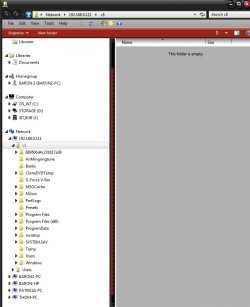
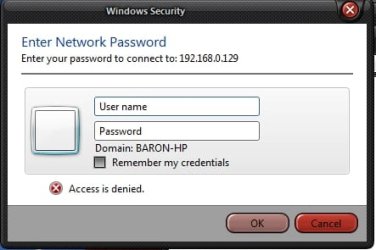
Ok, I entered \\192.168.0.111\C$, which is the IPv4 address assigned to Baron-PC, the one I'm on now, in the "Run" boxand hit enter. (see Win Expl image) Repeated process on the Baron2-PC (IPv4 192.168.0.127), and typed \\192.168.0.111\C$ in "Run" box and hit enter. This time it asked for network password. (see next image) Entered what I thought was password but...well,... you know.:cry: Just for shits and giggles, I entered \\192.168.0.127\C$ on Baron2-PC, which is assigned to it, hit enter and it opened Win Expl to the c$ folder on Baron2-PC, just like the other one. Next went to Baron-PC and typed \\192.168.0.127\C$ and... yes, you guessed it...wants a password.:rolleyes: I hope I didn't make it sound too confusing.Anyway, the pw I used was the one I use to log on to network with, like for instance a touch phone or pad, (wireless because never have to use pw if I'm hardwired ie: ethernet cable). I don't know if I should have used a different pw or what. Don't even know/remember if I ever setup a pw for... I'm still confused:confused:

114 degrees today...in the shade.:hot::hot::hot:

BTW, thanks so very much for taking the time to help me.
 

Attachments

  • Scr_179.jpg
    Scr_179.jpg
    65.8 KB · Views: 0
  • Scr_180.jpg
    Scr_180.jpg
    18.4 KB · Views: 13

My Computer My Computer

At a glance

Windows 7 Pro x64AMD FX-8350 8-Core Black Edition, 4gHz, 125WCORSAIR: Vengence (2X8 GB) 16GB DDR3 1866mHzNVIDIA: GeForce GTX 750 Ti, 1GB DDR5
Computer type
PC/Desktop
Computer Manufacturer/Model Number
CUSTOM BUILD
OS
Windows 7 Pro x64
CPU
AMD FX-8350 8-Core Black Edition, 4gHz, 125W
Motherboard
ASUS M5A99X EVO, AMD 990X/SB950 Chipset, UEFI BIOS, USB 3.0
Memory
CORSAIR: Vengence (2X8 GB) 16GB DDR3 1866mHz
Graphics Card(s)
NVIDIA: GeForce GTX 750 Ti, 1GB DDR5
Sound Card
Creative: Sound Blaster X-Fi Titanium
Monitor(s) Displays
NIXEUS 27"
Screen Resolution
2560 X 1440
Hard Drives
Seagate: SATA 2TB (internal)
Seagate: SATA 4TB (external)
PSU
NZXT HALE82 750W semi-modular
Case
NZXT PHANTOM, FANS 3x 200mm, 4x 120mm
Cooling
CORSAIR Hydro Series H80i High Performance Liquid CPU Cooler
Keyboard
AZIO (backlit keyboard)
Mouse
SENTEY Luminata Pro
Internet Speed
CABLE 100Mbps
Antivirus
ESET Smart Security
Browser
Firefox
Other Info
NZXT: APERTURE Card Reader w 2x USB 3,
NZXT: Custom Premium Cables
Baron, I would suggest for you to create a new User Account on both computers with the same User Names and Passwords, also with Admin rights. Also, I have sent you a Private Message (PM).

Ray
PS... I came across this Thread where I jumped in and an OP posted that his issue has been resolved, see if it might be of helped to you.
 
Last edited:

My Computer My Computer

At a glance

Win7 & Win8 64bitIntel i5
Computer Manufacturer/Model Number
Lenovo Desktop/Samsung Laptop
OS
Win7 & Win8 64bit
CPU
Intel i5
Internet Speed
Charter-20 Mbps
Antivirus
Avast
Browser
FF, IE9 and Chrome
Baron, I would suggest for you to create a new User Account on both computers with the same User Names and Passwords, also with Admin rights. Also, I have sent you a Private Message (PM).
You are talking about creating new network account. Right? There are 2 other pc's besides my 2 that don't belong to me, that are connected to network. Will creating new network accounts for my pc's affect those in any way, or will they be unaffected? This issue I have, not being able to share files between pc's, is not an issue for them. Do you see what I mean? :confused:

I came across this Thread where I jumped in and an OP posted that his issue has been resolved, see if it might be of helped to you.
Do you have a link to that thread so I can check it out?

Also, I will check my PM's.

Thanks again for your assistance.
Baron
 

My Computer My Computer

At a glance

Windows 7 Pro x64AMD FX-8350 8-Core Black Edition, 4gHz, 125WCORSAIR: Vengence (2X8 GB) 16GB DDR3 1866mHzNVIDIA: GeForce GTX 750 Ti, 1GB DDR5
Computer type
PC/Desktop
Computer Manufacturer/Model Number
CUSTOM BUILD
OS
Windows 7 Pro x64
CPU
AMD FX-8350 8-Core Black Edition, 4gHz, 125W
Motherboard
ASUS M5A99X EVO, AMD 990X/SB950 Chipset, UEFI BIOS, USB 3.0
Memory
CORSAIR: Vengence (2X8 GB) 16GB DDR3 1866mHz
Graphics Card(s)
NVIDIA: GeForce GTX 750 Ti, 1GB DDR5
Sound Card
Creative: Sound Blaster X-Fi Titanium
Monitor(s) Displays
NIXEUS 27"
Screen Resolution
2560 X 1440
Hard Drives
Seagate: SATA 2TB (internal)
Seagate: SATA 4TB (external)
PSU
NZXT HALE82 750W semi-modular
Case
NZXT PHANTOM, FANS 3x 200mm, 4x 120mm
Cooling
CORSAIR Hydro Series H80i High Performance Liquid CPU Cooler
Keyboard
AZIO (backlit keyboard)
Mouse
SENTEY Luminata Pro
Internet Speed
CABLE 100Mbps
Antivirus
ESET Smart Security
Browser
Firefox
Other Info
NZXT: APERTURE Card Reader w 2x USB 3,
NZXT: Custom Premium Cables

Attachments

  • Scr_184.jpg
    Scr_184.jpg
    26.8 KB · Views: 0
  • Scr_183.jpg
    Scr_183.jpg
    132.4 KB · Views: 0
  • Scr_182.jpg
    Scr_182.jpg
    16.3 KB · Views: 7

My Computer My Computer

At a glance

Windows 7 Pro x64AMD FX-8350 8-Core Black Edition, 4gHz, 125WCORSAIR: Vengence (2X8 GB) 16GB DDR3 1866mHzNVIDIA: GeForce GTX 750 Ti, 1GB DDR5
Computer type
PC/Desktop
Computer Manufacturer/Model Number
CUSTOM BUILD
OS
Windows 7 Pro x64
CPU
AMD FX-8350 8-Core Black Edition, 4gHz, 125W
Motherboard
ASUS M5A99X EVO, AMD 990X/SB950 Chipset, UEFI BIOS, USB 3.0
Memory
CORSAIR: Vengence (2X8 GB) 16GB DDR3 1866mHz
Graphics Card(s)
NVIDIA: GeForce GTX 750 Ti, 1GB DDR5
Sound Card
Creative: Sound Blaster X-Fi Titanium
Monitor(s) Displays
NIXEUS 27"
Screen Resolution
2560 X 1440
Hard Drives
Seagate: SATA 2TB (internal)
Seagate: SATA 4TB (external)
PSU
NZXT HALE82 750W semi-modular
Case
NZXT PHANTOM, FANS 3x 200mm, 4x 120mm
Cooling
CORSAIR Hydro Series H80i High Performance Liquid CPU Cooler
Keyboard
AZIO (backlit keyboard)
Mouse
SENTEY Luminata Pro
Internet Speed
CABLE 100Mbps
Antivirus
ESET Smart Security
Browser
Firefox
Other Info
NZXT: APERTURE Card Reader w 2x USB 3,
NZXT: Custom Premium Cables
Hi Baron,

I believe that there's a lot more going on with your home network, have you read the PM that I sent you? It might be of helped.

Ray
 

My Computer My Computer

At a glance

Win7 & Win8 64bitIntel i5
Computer Manufacturer/Model Number
Lenovo Desktop/Samsung Laptop
OS
Win7 & Win8 64bit
CPU
Intel i5
Internet Speed
Charter-20 Mbps
Antivirus
Avast
Browser
FF, IE9 and Chrome
Back
Top