Network Password

Vengeful

New member
Hey people,

At my place of work, there are of course user names and passwords, so I set an initial password, now after 30 days it asks for a new password. So i found that quite interesting, I've had to change my 26 character pass to 29 characters, sigh, anyway, so I consulted the Net first and the Windows Help

How to disable automatic machine account password changes

and they said that,

  1. Start Registry Editor. To do so, click Start, click Run, type regedit in the Open box, and then click OK.
  2. Locate and then click the following registry subkey:HKEY_LOCAL_MACHINE\SYSTEM\CurrentControlSet\Services\Netlogon\Parameters
  3. In the right pane, click the DisablePasswordChange entry.
  4. On the Edit menu, click Modify.
  5. In the Value data box, type a value of 1, and then click OK.
  6. Quit Registry Editor.
That seemed to work when I booted up my Laptop at HOME, but when I booted up the Laptop WHEN connected to the OFFICE NETWORK, it demanded me to change my password....

Is there a way out of this, as well as delete the history of passwords thats stored on the machine???:geek::geek::geek:
 

My Computer

OS
Windows 7 Ultimate x64
CPU
Intel Core 2 Duo
Memory
2 Gigs RAM DDR4
Graphics Card(s)
Nvidia 9500 GT
Monitor(s) Displays
Samsung 23' LCD
Hard Drives
Samsung 160Gig SATA (Primary)
Samsung 500Gig SATA (Storage)
This setting is controlled by your system administrator via his domain controller. You will not be able to get around his security settings as long as you are using his domain. You can play around with some security options via your local machine, but this sounds like he set the settings on the server.;)

The policy's will re-run on re-boot. You can test your success by typing GPUPDATE in your run diag & hitting enter.
 

My Computer

Computer Manufacturer/Model Number
Asus
OS
Seven ultimate 32bit
CPU
Core2Duo E5700
Motherboard
Asus p5qlem
Memory
3GB DDR2
Graphics Card(s)
HD5670
Sound Card
Onboard
Monitor(s) Displays
Philips 18.5 widescreen
Screen Resolution
Depends
Hard Drives
500GB Samsung 7200RPM
PSU
500w Sparta
Case
Aerocool
Cooling
Standard + 2x 40's inserted
Keyboard
Multimedia
Mouse
Genius
Internet Speed
10meg.
Click Start and select Control Panel.
Double click Administrative Tools.
Double click Local Security Policy.
Expand Account Policies and select Password Policy.
In the details pane, double click Maximum password age.
Use the arrow and set the value
Click OK.

You can try this locally, if you have permission.:cool:
 

My Computer

Computer Manufacturer/Model Number
Asus
OS
Seven ultimate 32bit
CPU
Core2Duo E5700
Motherboard
Asus p5qlem
Memory
3GB DDR2
Graphics Card(s)
HD5670
Sound Card
Onboard
Monitor(s) Displays
Philips 18.5 widescreen
Screen Resolution
Depends
Hard Drives
500GB Samsung 7200RPM
PSU
500w Sparta
Case
Aerocool
Cooling
Standard + 2x 40's inserted
Keyboard
Multimedia
Mouse
Genius
Internet Speed
10meg.
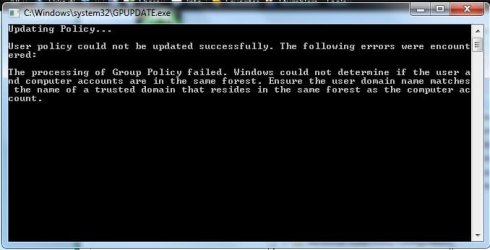
Yeah, Unsafe, can't adjust policies, should've thought about that, of course the Domain controller would.... sigh.... funny enough the attached error came up in GPUPDATE. Anyway thanks
 

Attachments

  • GPUPDATE.jpg
    GPUPDATE.jpg
    57.3 KB · Views: 9

My Computer

OS
Windows 7 Ultimate x64
CPU
Intel Core 2 Duo
Memory
2 Gigs RAM DDR4
Graphics Card(s)
Nvidia 9500 GT
Monitor(s) Displays
Samsung 23' LCD
Hard Drives
Samsung 160Gig SATA (Primary)
Samsung 500Gig SATA (Storage)
Hi,

Your system administrator will have set this up using Group Policies, which you probably do not have permission to access/change as mentioned by Smurf. The rules of the forum state that we cannot help someone bypass a system/network security (e.g. password) for which they don't have permission, so you are probably better off checking with your work IT administrator whether this setting can be altered.

Regards,
Golden
 

My Computer

Computer type
PC/Desktop
Computer Manufacturer/Model Number
Golden Mk. I.4
OS
Windows 10 Pro x64 ; Xubuntu x64
CPU
Intel i7 860 @ 2.80 GHz O/C'ed to 4.0GHz
Motherboard
Gigabyte P55A-UD3R Rev.1. Award BIOS F13
Memory
16GB Corsair Vengance DDR3 @ 661 MHz Dual Channel (9-9-9-24)
Graphics Card(s)
EVGA NVidia GTX 560 1024MB
Sound Card
Realtek Integrated
Monitor(s) Displays
Dual Samsung SyncMaster 2494HS
Screen Resolution
1920*1080 and 1920*1080
Hard Drives
1*Samsung 840 EVO 120GB SSD;
1*OCZ Vertex 2 60GB SSD;
2*Samsung F3 SpinPoint 1TB in RAID0;
1*Samsung F1 SpinPoint 1TB;
2*Western Digital 1TB External USB 3.0
1*Western Digital 500GB External USB 3.0
1*Seagate 500GB External USB 2.0
PSU
Thermaltake ToughPower QFan 750W
Case
Thermaltake Element S VK60001W2Z
Cooling
Corsair H60 Water Cooling, 2*230mm and 2*80mm case fans
Keyboard
Logitech G110
Mouse
Logitech MX518
Back
Top