network performance slow transfers

Niels37

New member
Local time
7:25 PM
Messages
5
Location
Netherlands
Hi all,

I have a notebook Toshiba a200.
Since i installed win7 32 or 64 ( it doesn't matter currently 32 bit) i've been having problems with transfering files from my desktop pc ( win7 64) to my notebook. Speed is sooooo slow!! it doenst matter what is do. search google, performed actions mentioned there.

my transfer speeds are no more then 200Kb/s, before this i got speeds at 20mb/s

Anyone having suggestions? I'm pretty desperate now. A new install doesn't work either. Also tried update realtek drivers even tried drivers from realtek, still no result.

grtz Niels
 

My Computer

Computer Manufacturer/Model Number
Toshiba a200 psa6ae
OS
windows 7
CPU
intel7100
Memory
2 Gb
Graphics Card(s)
ati HD2600
Sound Card
realtek
Monitor(s) Displays
truebrite toshiba (notebook)
Hard Drives
1 x 320Gb
PSU
adapter
Case
notebook
Hi all,

I have a notebook Toshiba a200.
Since i installed win7 32 or 64 ( it doesn't matter currently 32 bit) i've been having problems with transfering files from my desktop pc ( win7 64) to my notebook. Speed is sooooo slow!! it doenst matter what is do. search google, performed actions mentioned there.

my transfer speeds are no more then 200Kb/s, before this i got speeds at 20mb/s

Anyone having suggestions? I'm pretty desperate now. A new install doesn't work either. Also tried update realtek drivers even tried drivers from realtek, still no result.

grtz Niels


Are you running "homegroup"? Homegroup sometimes experiences slow transfers and drop outs. If you are you should change to workgroup model.

Let us know if you need help

Ken
 

My Computer

Computer Manufacturer/Model Number
HP Pavillion dv-7 1005 Tx
OS
Win 8 Release candidate 8400
CPU
[email protected]
Memory
4 gigs
Graphics Card(s)
Nvidia 9600M
Sound Card
HD built-in
Monitor(s) Displays
17" Wxga
Screen Resolution
1440x900
Cooling
none
Internet Speed
45Mb down 5Mb up
I'm running homegroup aswel as workgroup as i find easier to share through workgroup . But now you mentioned this .........i''l take a look at this as soon i'm off work.
BTW english isn't my native language as you can notice ;-) I'm Dutch.
Thx for your reply!
Niels
 

My Computer

Computer Manufacturer/Model Number
Toshiba a200 psa6ae
OS
windows 7
CPU
intel7100
Memory
2 Gb
Graphics Card(s)
ati HD2600
Sound Card
realtek
Monitor(s) Displays
truebrite toshiba (notebook)
Hard Drives
1 x 320Gb
PSU
adapter
Case
notebook
I don't recommend using both at the same time - I'd turn off homegroups and just use workgroups.
 

My Computer

Computer Manufacturer/Model Number
Dell XPS 15 L502x
OS
Windows 7 Ultimate x64 SP1
CPU
Core i7-2670QM
Memory
8GB DDR3 PC3-10600
Graphics Card(s)
Intel HD Graphics 3000 + GeForce GT 540M
Screen Resolution
1920x1080
Hard Drives
1TB 5400RPM Seagate
I'm running homegroup aswel as workgroup as i find easier to share through workgroup . But now you mentioned this .........i''l take a look at this as soon i'm off work.
BTW english isn't my native language as you can notice ;-) I'm Dutch.
Thx for your reply!
Niels
\

Niels

Your english is fine. I am sure its better than my Dutch I can assure you. Homegrouop works better in mixed environments, uses IPv4, and is not prone to the IPv6 problems.

Let us know if you need help


Ken
 

My Computer

Computer Manufacturer/Model Number
HP Pavillion dv-7 1005 Tx
OS
Win 8 Release candidate 8400
CPU
[email protected]
Memory
4 gigs
Graphics Card(s)
Nvidia 9600M
Sound Card
HD built-in
Monitor(s) Displays
17" Wxga
Screen Resolution
1440x900
Cooling
none
Internet Speed
45Mb down 5Mb up
Niels

Your english is fine. I am sure its better than my Dutch I can assure you. Homegrouop works better in mixed environments, uses IPv4, and is not prone to the IPv6 problems.

Let us know if you need help


Ken

Ken - did you mean to say that workgroups work better in mixed environments?
 

My Computer

Computer Manufacturer/Model Number
Dell XPS 15 L502x
OS
Windows 7 Ultimate x64 SP1
CPU
Core i7-2670QM
Memory
8GB DDR3 PC3-10600
Graphics Card(s)
Intel HD Graphics 3000 + GeForce GT 540M
Screen Resolution
1920x1080
Hard Drives
1TB 5400RPM Seagate
Hi All,

Now i have a workgroup only ( name of workgroup = workgroep, as the other 3 desktop pc ( 1 with win7 64 and 2 with win7 32).
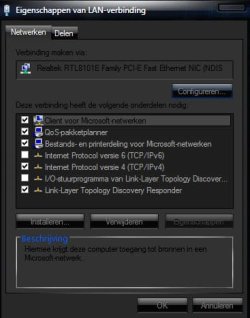
I disabled ipv6 aswell in/ou layer driver link layer as this is responsible for networkbandwith.
I did make progress , i can copy now with max 1,2 Mb . But still it is not normal!!

I wonder why i have to disable ipv6 , as this all enabled on the desktop's.
I'll try in a minute to change ( again) my networkdrivers.

What else can i do? Please see some snapshots i've taken. If u want more info with or without pics let me know!!

thx Niels
 

Attachments

  • detail of driver.jpg
    detail of driver.jpg
    39.7 KB · Views: 29
  • details of computer.jpg
    details of computer.jpg
    31.4 KB · Views: 18
  • device manager.jpg
    device manager.jpg
    330 KB · Views: 29
  • properties of network 2.jpg
    properties of network 2.jpg
    51.7 KB · Views: 20
  • properties of network.jpg
    properties of network.jpg
    55.1 KB · Views: 17

My Computer

Computer Manufacturer/Model Number
Toshiba a200 psa6ae
OS
windows 7
CPU
intel7100
Memory
2 Gb
Graphics Card(s)
ati HD2600
Sound Card
realtek
Monitor(s) Displays
truebrite toshiba (notebook)
Hard Drives
1 x 320Gb
PSU
adapter
Case
notebook
in your advanced network properties tab, can you click speed and duplex? Set it to the maximum speed allowed with full duplex.

flow control and link layer discovery shouldn't be causing this degradation
 

My Computer

OS
7 Pro
This happens to me when I'm sending over big files to another computer, the rate per second degrades. After it's done, it has it's normal speed as I'm well to known. I think it's normal.
 

My Computer

Computer Manufacturer/Model Number
Gateway KAV60
OS
Windows 7 Home Premium 32-bit
Memory
2 GB
Screen Resolution
1024x600
Hard Drives
250 GB HDD
Internet Speed
Time Warner Cable/Road Runner
Other Info
Intel Atom processor N270
Multi-in-1 card reader
802.11b/g
NO optical drive
NO WWAN
NO Bluetooth
The only time I had a dropout due to filesize was related to the NIC driver. Have you checked for any updated drivers recently?
 

My Computer

Computer Manufacturer/Model Number
Dell XPS 15 L502x
OS
Windows 7 Ultimate x64 SP1
CPU
Core i7-2670QM
Memory
8GB DDR3 PC3-10600
Graphics Card(s)
Intel HD Graphics 3000 + GeForce GT 540M
Screen Resolution
1920x1080
Hard Drives
1TB 5400RPM Seagate
I already updated my driver and yesterday i gave it one more try. AND..........with succes. I took a driver from toshiba sit ( which i already tried btw) . My speed with copying went from 800Kb/s to 9,6 Mb/s. Although i find it not enough it's much better.it was a driver vista 32bit.
Ofcourse i set all the changes which i made to properties of nic to normal and speed remains 9,6 Mb/s.
Now i'm gonna try to get it working with win7 64 bit and a vista 64 driver from toshiba.

btw i find it strange that a driver from realtek themself is not working propperly and the one from toshiba works.
I'll appreciate your help!! THX

i'll keep you all posted !!

As soon as i finish ( hopefully without problems ) i'll link to the drivers i used so someone else can benefit too
 

My Computer

Computer Manufacturer/Model Number
Toshiba a200 psa6ae
OS
windows 7
CPU
intel7100
Memory
2 Gb
Graphics Card(s)
ati HD2600
Sound Card
realtek
Monitor(s) Displays
truebrite toshiba (notebook)
Hard Drives
1 x 320Gb
PSU
adapter
Case
notebook
Quite often a laptop will work better with the drivers provided by the laptop manufacturer. Newer drivers from the hardware vendor aren't always better. You might want to download and install all of the A200 drivers from Toshiba.
 

My Computer

Computer Manufacturer/Model Number
Dell XPS 15 L502x
OS
Windows 7 Ultimate x64 SP1
CPU
Core i7-2670QM
Memory
8GB DDR3 PC3-10600
Graphics Card(s)
Intel HD Graphics 3000 + GeForce GT 540M
Screen Resolution
1920x1080
Hard Drives
1TB 5400RPM Seagate
Back
Top