Network problems

visy199

Sony Ericsson Modder
Power User
Local time
2:50 PM
Messages
193
Location
RO
[Fixed] Network problems

I have Windows Seven 7600 and i'm trying to share files with a XP SP2 machine!
Problems:
-XP machine can see Seven machine but can't access shared folders!
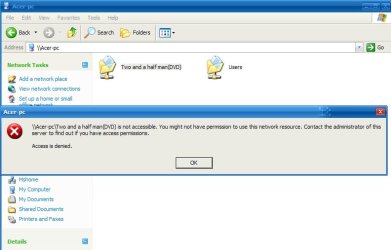
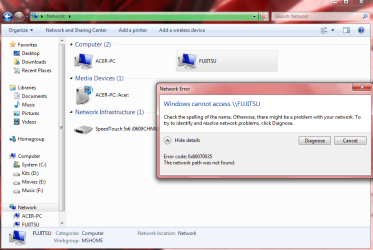
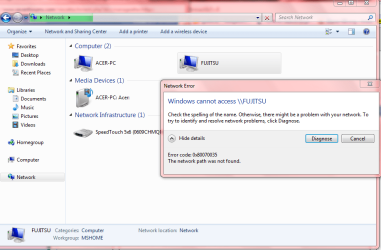
-Seven machine can see XP machine but when i'm tryng to see shared folders it gives me an error(see on screenshot)
-Network map doesn't work(see screenshot)
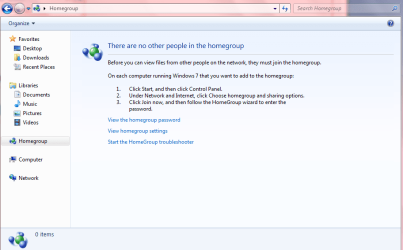
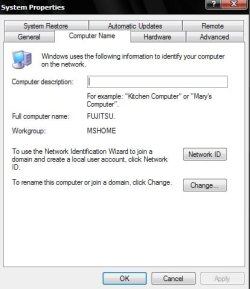
-Both machines have same workgroup MSHOME but when i go to homegroup it says there is no people in the homegroup!(see on screenshots)

Other info:
Before i couldn't turn network discovery on,every time i was set it to on he was going to off so I searched on this forum(great forum) and finally i was able to turn it on,maybe others have this problem so there what i did:i go to start=>run=>services.msc and i turned on(also i switched them to automatic startup) these services DNS Client, Function Discovery Resource Publication, SSDP Discovery, and UPnP Device Host services.
IPv6 currently is enabled!

Good job with the forum,hope someone have some solutions for me!
 

Attachments
  • Capture1.PNG
    Capture1.PNG
    44.1 KB · Views: 54
  • Capture.PNG
    Capture.PNG
    16.6 KB · Views: 27
  • Capture3.PNG
    Capture3.PNG
    23.3 KB · Views: 32
  • Capture2.PNG
    Capture2.PNG
    19.7 KB · Views: 26
  • Capture4.PNG
    Capture4.PNG
    22.6 KB · Views: 27
  • Capture5.PNG
    Capture5.PNG
    12.5 KB · Views: 25
  • 2009-07-31_00013.jpg
    2009-07-31_00013.jpg
    37.7 KB · Views: 30
Last edited:

My Computer

Computer Manufacturer/Model Number
Fujitsu Siemens
OS
XP SP2
CPU
Intel Celeron D 3.07 GHz
Motherboard
/
Memory
1GB
Graphics Card(s)
Nvidia GeForce 6200 SE 256mb
Sound Card
Realtek
Monitor(s) Displays
17 "
Screen Resolution
1280x1024
Hard Drives
160GB
Internet Speed
2mb
Still waiting for an answer if someone have any solutions!

Thanks!
 

My Computer

Computer Manufacturer/Model Number
Fujitsu Siemens
OS
XP SP2
CPU
Intel Celeron D 3.07 GHz
Motherboard
/
Memory
1GB
Graphics Card(s)
Nvidia GeForce 6200 SE 256mb
Sound Card
Realtek
Monitor(s) Displays
17 "
Screen Resolution
1280x1024
Hard Drives
160GB
Internet Speed
2mb
Still waiting for an answer if someone have any solutions!

Thanks!

visy, is it a workgroup, or a homegroup called "workgroup"?. Is the xp in a workgroup, and the win 7 in a homegroup?

can you ping from xp>win 7, and win 7>xp

Ken
 

My Computer

Computer Manufacturer/Model Number
HP Pavillion dv-7 1005 Tx
OS
Win 8 Release candidate 8400
CPU
[email protected]
Memory
4 gigs
Graphics Card(s)
Nvidia 9600M
Sound Card
HD built-in
Monitor(s) Displays
17" Wxga
Screen Resolution
1440x900
Cooling
none
Internet Speed
45Mb down 5Mb up
I was just setting this up the other day so I could share network files between my XP machines and my Win7 machines.

I had to run the network setup wizard in XP first, then click the allow sharing files option when it gets to the end.

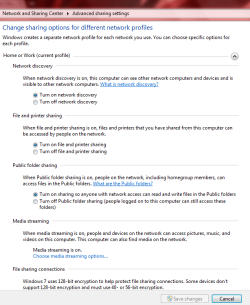
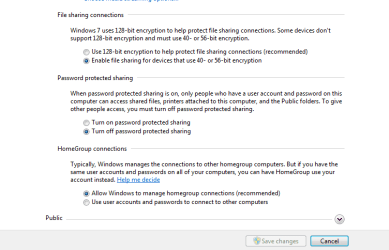
For Win7, you need to make sure that everything is set up to share files on both the home network and also the public network. You need to click on the public arrow at the bottom of the page to enable public sharing. Looks like this.
 

Attachments

  • network sharing public.PNG
    network sharing public.PNG
    38 KB · Views: 54
  • network sharing enabled.PNG
    network sharing enabled.PNG
    39 KB · Views: 57

My Computer

Computer type
PC/Desktop
Computer Manufacturer/Model Number
Home built
OS
Windows 7 Ult, Windows 8.1 Pro,
CPU
Q9650-4.275GHz, E8600 4.5GHz, E6750-3.8GHz
Motherboard
Evga 780i FTW
Memory
G.Skill PC2 9600 1200Mhz 5 5 5 15 2T
Graphics Card(s)
GTX480
Sound Card
Asus Xonar D2
Monitor(s) Displays
HannsG
Screen Resolution
1680X1050
Hard Drives
GSkill Phoenix Pro 120GB SSD
PSU
ThermalTake Toughpower 1000Watt modular
Case
ThermalTake XaserV
Cooling
Xigmatek S1283
Keyboard
Logitech G15
Mouse
Logitech G9
Internet Speed
T1
Homegroup is not the same as workgroup.
 

My Computer

OS
7264x64/7260x86
visy, is it a workgroup, or a homegroup called "workgroup"?. Is the xp in a workgroup, and the win 7 in a homegroup?

can you ping from xp>win 7, and win 7>xp

Ken

No,both have same Workgroup :MSHOME,when i go on Windows Seven to homegroup it says there is no other people in the homegroup!

I modified security options so now i can acces files of Seven machine but Seven machine still can't access Xp files!
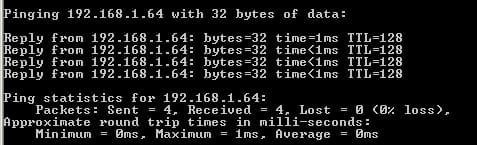
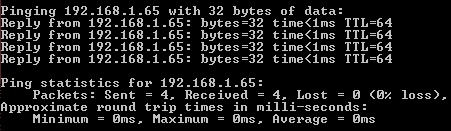
First screenshot it's XP pinging result,second is Seven pinging result!

Some way i Seven machine can see XP machine but still can't access it!(see screenshot)

Thanks for reply,hope i can fix the problem!
 

Attachments

  • 2009-08-02_00015.jpg
    2009-08-02_00015.jpg
    18.5 KB · Views: 12
  • Capture1.PNG
    Capture1.PNG
    1.6 KB · Views: 11
  • Capture.PNG
    Capture.PNG
    8.5 KB · Views: 9

My Computer

Computer Manufacturer/Model Number
Fujitsu Siemens
OS
XP SP2
CPU
Intel Celeron D 3.07 GHz
Motherboard
/
Memory
1GB
Graphics Card(s)
Nvidia GeForce 6200 SE 256mb
Sound Card
Realtek
Monitor(s) Displays
17 "
Screen Resolution
1280x1024
Hard Drives
160GB
Internet Speed
2mb
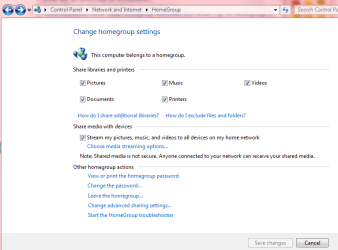
Thats because in order to use homegroups you need to share libraries.

The easy way to do this is outlined in my first post. I've been sharing with my XP machine and Win7 since day one without problems.
 

Attachments

  • homegroup and libraries.PNG
    homegroup and libraries.PNG
    3.4 KB · Views: 49

My Computer

Computer type
PC/Desktop
Computer Manufacturer/Model Number
Home built
OS
Windows 7 Ult, Windows 8.1 Pro,
CPU
Q9650-4.275GHz, E8600 4.5GHz, E6750-3.8GHz
Motherboard
Evga 780i FTW
Memory
G.Skill PC2 9600 1200Mhz 5 5 5 15 2T
Graphics Card(s)
GTX480
Sound Card
Asus Xonar D2
Monitor(s) Displays
HannsG
Screen Resolution
1680X1050
Hard Drives
GSkill Phoenix Pro 120GB SSD
PSU
ThermalTake Toughpower 1000Watt modular
Case
ThermalTake XaserV
Cooling
Xigmatek S1283
Keyboard
Logitech G15
Mouse
Logitech G9
Internet Speed
T1
vissy

Im thinking you have a workgroup called mshome (on xp) and a homegroup called mshome ( on win 7). They are different. you can change the homegroup to a workgroup. open hetwork and sharing and either create a new connection using the workplace instead of homegroup or click on your existing homegroup and change it to workplace.

Ken
 
Last edited:

My Computer

Computer Manufacturer/Model Number
HP Pavillion dv-7 1005 Tx
OS
Win 8 Release candidate 8400
CPU
[email protected]
Memory
4 gigs
Graphics Card(s)
Nvidia 9600M
Sound Card
HD built-in
Monitor(s) Displays
17" Wxga
Screen Resolution
1440x900
Cooling
none
Internet Speed
45Mb down 5Mb up
I was just setting this up the other day so I could share network files between my XP machines and my Win7 machines.

I had to run the network setup wizard in XP first, then click the allow sharing files option when it gets to the end.

For Win7, you need to make sure that everything is set up to share files on both the home network and also the public network. You need to click on the public arrow at the bottom of the page to enable public sharing. Looks like this.

I switch settings same at you,rebooted both machines and the modem but situation is the same!
Thanks
 

My Computer

Computer Manufacturer/Model Number
Fujitsu Siemens
OS
XP SP2
CPU
Intel Celeron D 3.07 GHz
Motherboard
/
Memory
1GB
Graphics Card(s)
Nvidia GeForce 6200 SE 256mb
Sound Card
Realtek
Monitor(s) Displays
17 "
Screen Resolution
1280x1024
Hard Drives
160GB
Internet Speed
2mb
Are both computers in the same workgroup (look on the xp box)?

Ken
 

My Computer

Computer Manufacturer/Model Number
HP Pavillion dv-7 1005 Tx
OS
Win 8 Release candidate 8400
CPU
[email protected]
Memory
4 gigs
Graphics Card(s)
Nvidia 9600M
Sound Card
HD built-in
Monitor(s) Displays
17" Wxga
Screen Resolution
1440x900
Cooling
none
Internet Speed
45Mb down 5Mb up
vissy

Im thinking you have a workgroup called mshome (on xp) and a homegroup called mshome ( on win 7). They are different. you can change the homegroup to a workgroup. open hetwork and sharing and either create a new connection using the workplace instead of homegroup or click on your existing homegroup and change it to workplace.

Ken
I switched to Work network and see on screenshot what says on homegroup!

Are both computers in the same workgroup (look on the xp box)?

Ken
Watch the screenshots!
 

Attachments

  • Capture.PNG
    Capture.PNG
    18.1 KB · Views: 24
  • 2009-08-02_00016.jpg
    2009-08-02_00016.jpg
    24.3 KB · Views: 18
  • Capture1.PNG
    Capture1.PNG
    14 KB · Views: 15

My Computer

Computer Manufacturer/Model Number
Fujitsu Siemens
OS
XP SP2
CPU
Intel Celeron D 3.07 GHz
Motherboard
/
Memory
1GB
Graphics Card(s)
Nvidia GeForce 6200 SE 256mb
Sound Card
Realtek
Monitor(s) Displays
17 "
Screen Resolution
1280x1024
Hard Drives
160GB
Internet Speed
2mb
Other suggestions?
 

My Computer

Computer Manufacturer/Model Number
Fujitsu Siemens
OS
XP SP2
CPU
Intel Celeron D 3.07 GHz
Motherboard
/
Memory
1GB
Graphics Card(s)
Nvidia GeForce 6200 SE 256mb
Sound Card
Realtek
Monitor(s) Displays
17 "
Screen Resolution
1280x1024
Hard Drives
160GB
Internet Speed
2mb
Other suggestions?

visy

From the looks of it. Seven and xp are shared correctly and you can access files one way. I wonder if it could be the AV (KIS) or is there something else Im Missing. Anybody Have ideas?

Ken
 

My Computer

Computer Manufacturer/Model Number
HP Pavillion dv-7 1005 Tx
OS
Win 8 Release candidate 8400
CPU
[email protected]
Memory
4 gigs
Graphics Card(s)
Nvidia 9600M
Sound Card
HD built-in
Monitor(s) Displays
17" Wxga
Screen Resolution
1440x900
Cooling
none
Internet Speed
45Mb down 5Mb up
visy

From the looks of it. Seven and xp are shared correctly and you can access files one way. I wonder if it could be the AV (KIS) or is there something else Im Missing. Anybody Have ideas?

Ken

Thanks for your help but still don't work properly!
I disabled KIS on seven and on XP i disabled Avira firewall!
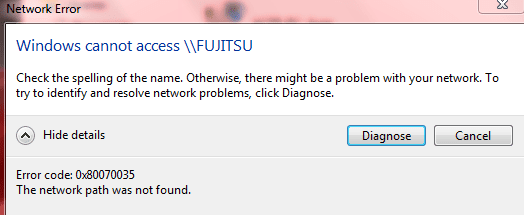
I can access Seven machine files from Xp machine,when I try from Seven machine i can see now XP machine but it gives me error when i try to access files,watch the screenshot!

Like zigzag says:
Anybody Have ideas?
 

Attachments

  • Capture.PNG
    Capture.PNG
    49.8 KB · Views: 15

My Computer

Computer Manufacturer/Model Number
Fujitsu Siemens
OS
XP SP2
CPU
Intel Celeron D 3.07 GHz
Motherboard
/
Memory
1GB
Graphics Card(s)
Nvidia GeForce 6200 SE 256mb
Sound Card
Realtek
Monitor(s) Displays
17 "
Screen Resolution
1280x1024
Hard Drives
160GB
Internet Speed
2mb
Thanks for your help but still don't work properly!
I disabled KIS on seven and on XP i disabled Avira firewall!
I can access Seven machine files from Xp machine,when I try from Seven machine i can see now XP machine but it gives me error when i try to access files,watch the screenshot!

Like zigzag says:

Hey visy

that same error code was cured in the vista64 forums here error 0x80070035 - Vista Forums

It is a permissions error. If all else fails set all the permissions back to default and try it again

Ken
 

My Computer

Computer Manufacturer/Model Number
HP Pavillion dv-7 1005 Tx
OS
Win 8 Release candidate 8400
CPU
[email protected]
Memory
4 gigs
Graphics Card(s)
Nvidia 9600M
Sound Card
HD built-in
Monitor(s) Displays
17" Wxga
Screen Resolution
1440x900
Cooling
none
Internet Speed
45Mb down 5Mb up
Hey visy

that same error code was cured in the vista64 forums here error 0x80070035 - Vista Forums

It is a permissions error. If all else fails set all the permissions back to default and try it again

Ken

How to switch them to default?
First time when i installed Seven Build 7600 network worked well but i think my brother messed things up but i don't know what!
 

My Computer

Computer Manufacturer/Model Number
Fujitsu Siemens
OS
XP SP2
CPU
Intel Celeron D 3.07 GHz
Motherboard
/
Memory
1GB
Graphics Card(s)
Nvidia GeForce 6200 SE 256mb
Sound Card
Realtek
Monitor(s) Displays
17 "
Screen Resolution
1280x1024
Hard Drives
160GB
Internet Speed
2mb
How to switch them to default?
First time when i installed Seven Build 7600 network worked well but i think my brother messed things up but i don't know what!

visy

The easiest way to make sure they are reset back to default is frankly to re-install clean. Im sure you could work thru the perms' and reset them back but you might just miss one or two and they still might not work.

Ken
 

My Computer

Computer Manufacturer/Model Number
HP Pavillion dv-7 1005 Tx
OS
Win 8 Release candidate 8400
CPU
[email protected]
Memory
4 gigs
Graphics Card(s)
Nvidia 9600M
Sound Card
HD built-in
Monitor(s) Displays
17" Wxga
Screen Resolution
1440x900
Cooling
none
Internet Speed
45Mb down 5Mb up
visy

The easiest way to make sure they are reset back to default is frankly to re-install clean. Im sure you could work thru the perms' and reset them back but you might just miss one or two and they still might not work.

Ken

I can't do that,i will take long time to reinstall all my programs,drivers and other stuff!
If it's nothing i can do i will my usb stick to transfer files from XP to Seven!

Thanks for support!
 

My Computer

Computer Manufacturer/Model Number
Fujitsu Siemens
OS
XP SP2
CPU
Intel Celeron D 3.07 GHz
Motherboard
/
Memory
1GB
Graphics Card(s)
Nvidia GeForce 6200 SE 256mb
Sound Card
Realtek
Monitor(s) Displays
17 "
Screen Resolution
1280x1024
Hard Drives
160GB
Internet Speed
2mb
I fixed the problem thanks to squonksc,you're amazing!
The problem was TCP/IP NetBIOS Helper service,it was disabled,just enable that service on both machines and everything will work fine!
 

My Computer

Computer Manufacturer/Model Number
Fujitsu Siemens
OS
XP SP2
CPU
Intel Celeron D 3.07 GHz
Motherboard
/
Memory
1GB
Graphics Card(s)
Nvidia GeForce 6200 SE 256mb
Sound Card
Realtek
Monitor(s) Displays
17 "
Screen Resolution
1280x1024
Hard Drives
160GB
Internet Speed
2mb
I fixed the problem thanks to squonksc,you're amazing!
The problem was TCP/IP NetBIOS Helper service,it was disabled,just enable that service on both machines and everything will work fine!

Have to add to this, that setting the right permissions on the disks and shares is also important.
Also setting passwords on each computer account is vital.

The easiest way is to set permissions is on the whole partition.
Then all folders and subfolders will carry the same permissions.

I also want to point out the difference between share permissions and security permissons.

Best practice for shares is to set to everyone and full permissions.
This will in no way affect the actual files and folders, only the share itself.

In the security tab you set the permissions for the actual folders and files.

If you don't want people in your network to accidently edit or delete the folders or files, set the permissions to "read and execute", "show content" and "read", but not "write" and "full permission".

If you yourself want to be able to edit or delete files and folders in the share,
but not the other users, you will have to create an account for each individual or for a group which is more practical.

You can set permissions per account or per group, and you can make the proper exceptions at folder level.

This will save you the hassle of setting the permissions per folder which can take forever.

NTFS security is a vast and complicated matter.

If people are interested I might be inclined to write a tutorial on it.
 

My Computer

OS
Win7 Build 7600 x86
CPU
Pentium II 300MHz
Motherboard
Asus
Memory
32mb EDO RAM
Graphics Card(s)
Diamond Viper
Sound Card
Soundblaster 16
Monitor(s) Displays
14" AOC CRT 16K color
Screen Resolution
800x600
Hard Drives
300mb Quantum fireball
PSU
110 Watts
Cooling
Passive
Keyboard
Trust Ergonomic
Mouse
Generic
Internet Speed
256K u 128K d
Back
Top