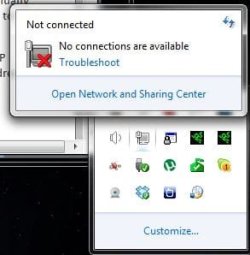
So i'm having an issue connecting my desktop to my home network for file sharing. My Desktop is connected to the internet like so: Desktop ->(Ethernet cable)-> Uverse 2wire router -> Internet.
I have no issues with my internet connection, and in fact I am posting this from my desktop now. Windows Network Diagnostics finds no issues when I run the trouble shooter. and when I try to connect to a home group it refers me to the network issue.
This issue has plagued me for about 6 months now. I have talked to Uverse tech support, and many of my friends who are into computers and have gotten no answers. Computer is running windows 7 SP1 and again the router is the Uverse 2wire router
How can I make my desktop available for network sharing?
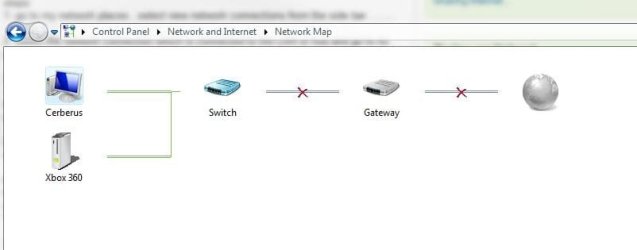
Also here is a screenshot of the network map according to this computer
I have no issues with my internet connection, and in fact I am posting this from my desktop now. Windows Network Diagnostics finds no issues when I run the trouble shooter. and when I try to connect to a home group it refers me to the network issue.
This issue has plagued me for about 6 months now. I have talked to Uverse tech support, and many of my friends who are into computers and have gotten no answers. Computer is running windows 7 SP1 and again the router is the Uverse 2wire router
How can I make my desktop available for network sharing?
Also here is a screenshot of the network map according to this computer
Attachments
My Computer
At a glance
Windows 7 ProfesionalIntel i5 7508 Gig 1333 DDR3XFX XXX HD 5870
- Computer Manufacturer/Model Number
- Custom
- OS
- Windows 7 Profesional
- CPU
- Intel i5 750
- Motherboard
- Gigabyte UD2
- Memory
- 8 Gig 1333 DDR3
- Graphics Card(s)
- XFX XXX HD 5870
- Monitor(s) Displays
- 3 ASUS 22" LCD
- Hard Drives
- 1TB LaCie External drive
500 GB Western Digital Black Drive
80 GB Intel X25-M SSD
- PSU
- Corsair 650 Watt
- Case
- NZXT Tempest Evo
- Cooling
- Air cooling/Corsair H-50