Network starting slow after some programs

Somacruz

New member
Local time
2:05 PM
Messages
37
Location
Sweden
Hello SevenForums!

Been looking around this issue for a bit but well, now decided to ask myself.

After I got my SSD (THANK GOD), my computer now starts so quick that the network driver.. or if it is the driver.. starts after some programs, I'll explain the problems with some programs I have.

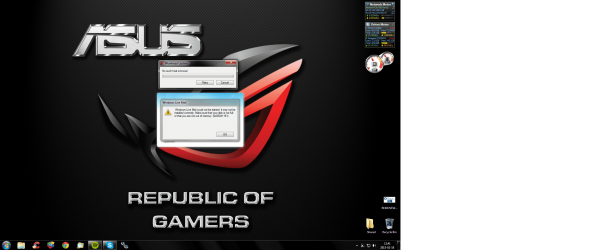
Programs like Wowhead Client says "No such host is known", OneDrive requires me to log in because there's no internet for that small second and Windows Live Mail fails to launch because I have no internet. If I start them again after, they launch perfectly fine, because then my internet is up and my computer registers it.

I have tried to reinstall my network drivers from Asus website without any luck of change, and my IP is static set at the moment, but had problems even when it was on automatic.

A solution I kind of found was to put an easy password onto my account, as the internet starts at login screen. My current solution is to stop Mail from autostarting and manually starting it, as with Wowhead Client I can just press Retry. OneDrive.. well.. I have to login again, over and over.

I really hope someone can help me with this issue, if there is a fix for it, or if I'll just have to live with it.
 

My Computer

Computer type
PC/Desktop
Computer Manufacturer/Model Number
Custom build
OS
Windows 7 Ultimate x64
CPU
Intel Core i5 4440
Motherboard
ASUSTeK B85M-G
Memory
Corsair Vengeance LP 8x2 1600MHz
Graphics Card(s)
ASUS GeForce GTX 750
Sound Card
Motherboard Realtek
Monitor(s) Displays
BenQ GL2450 (DVI-D), HP Compaq LA2205WG (VGA)
Screen Resolution
1920x1080, 1680x1050
Hard Drives
A-DATA SP900 128GB SSD
Seagate Barracuda 500GB 7200RPM HDD
PSU
Antec VP550 550W
Case
Fractal Design Core 1000
Cooling
Default Intel Fan, Front Chassi Fan, GPU Fan
Keyboard
Mad Cats v5
Mouse
Mad Catz R.A.T. 3
Internet Speed
30Mbps
Antivirus
Avast! Antivirus
Browser
Google Chrome
Welcome to Seven Forums,

Did you have this issue before you have upgraded your hard drive? It seems odd though. Have you tried using a different User Profile? If you don't have one, create a new User Account from your Control Panel and see if the issue persist.
 

My Computer

Computer Manufacturer/Model Number
Lenovo Desktop/Samsung Laptop
OS
Win7 & Win8 64bit
CPU
Intel i5
Internet Speed
Charter-20 Mbps
Antivirus
Avast
Browser
FF, IE9 and Chrome
I had no problems with it before, no, not when I only had a hard drive installed. I have tested around with two user accounts as I was pretty much copying settings completely when I unlocked the true Admin account, with 0 difference to it. I have also heard sites talking about this being a common issue when having an SSD... for some.
 

My Computer

Computer type
PC/Desktop
Computer Manufacturer/Model Number
Custom build
OS
Windows 7 Ultimate x64
CPU
Intel Core i5 4440
Motherboard
ASUSTeK B85M-G
Memory
Corsair Vengeance LP 8x2 1600MHz
Graphics Card(s)
ASUS GeForce GTX 750
Sound Card
Motherboard Realtek
Monitor(s) Displays
BenQ GL2450 (DVI-D), HP Compaq LA2205WG (VGA)
Screen Resolution
1920x1080, 1680x1050
Hard Drives
A-DATA SP900 128GB SSD
Seagate Barracuda 500GB 7200RPM HDD
PSU
Antec VP550 550W
Case
Fractal Design Core 1000
Cooling
Default Intel Fan, Front Chassi Fan, GPU Fan
Keyboard
Mad Cats v5
Mouse
Mad Catz R.A.T. 3
Internet Speed
30Mbps
Antivirus
Avast! Antivirus
Browser
Google Chrome
What Security programs are you running? Have you tried disabling it?
 

My Computer

Computer Manufacturer/Model Number
Lenovo Desktop/Samsung Laptop
OS
Win7 & Win8 64bit
CPU
Intel i5
Internet Speed
Charter-20 Mbps
Antivirus
Avast
Browser
FF, IE9 and Chrome
I actually have not.. I'll try that tomorrow as it's quite late for me right now. Thanks for that tip. I'm using Avast! Antivirus as a security program, and AdwCleaner which only runs if I tell it to, to clean up Spyware/Browser viruses.
 

My Computer

Computer type
PC/Desktop
Computer Manufacturer/Model Number
Custom build
OS
Windows 7 Ultimate x64
CPU
Intel Core i5 4440
Motherboard
ASUSTeK B85M-G
Memory
Corsair Vengeance LP 8x2 1600MHz
Graphics Card(s)
ASUS GeForce GTX 750
Sound Card
Motherboard Realtek
Monitor(s) Displays
BenQ GL2450 (DVI-D), HP Compaq LA2205WG (VGA)
Screen Resolution
1920x1080, 1680x1050
Hard Drives
A-DATA SP900 128GB SSD
Seagate Barracuda 500GB 7200RPM HDD
PSU
Antec VP550 550W
Case
Fractal Design Core 1000
Cooling
Default Intel Fan, Front Chassi Fan, GPU Fan
Keyboard
Mad Cats v5
Mouse
Mad Catz R.A.T. 3
Internet Speed
30Mbps
Antivirus
Avast! Antivirus
Browser
Google Chrome
I just tried permanently disabling Avast! Antivirus and rebooted, and nope, no change. This is the issues still there (with Skype also stopped working but unsure if related).
 

Attachments

  • Untitled.png
    Untitled.png
    641.1 KB · Views: 5

My Computer

Computer type
PC/Desktop
Computer Manufacturer/Model Number
Custom build
OS
Windows 7 Ultimate x64
CPU
Intel Core i5 4440
Motherboard
ASUSTeK B85M-G
Memory
Corsair Vengeance LP 8x2 1600MHz
Graphics Card(s)
ASUS GeForce GTX 750
Sound Card
Motherboard Realtek
Monitor(s) Displays
BenQ GL2450 (DVI-D), HP Compaq LA2205WG (VGA)
Screen Resolution
1920x1080, 1680x1050
Hard Drives
A-DATA SP900 128GB SSD
Seagate Barracuda 500GB 7200RPM HDD
PSU
Antec VP550 550W
Case
Fractal Design Core 1000
Cooling
Default Intel Fan, Front Chassi Fan, GPU Fan
Keyboard
Mad Cats v5
Mouse
Mad Catz R.A.T. 3
Internet Speed
30Mbps
Antivirus
Avast! Antivirus
Browser
Google Chrome
Can you try a Clean boot?

Also, please post your ipconfig/all output for review.

Is this happening on both wired and wireless connection?
 

My Computer

Computer Manufacturer/Model Number
Lenovo Desktop/Samsung Laptop
OS
Win7 & Win8 64bit
CPU
Intel i5
Internet Speed
Charter-20 Mbps
Antivirus
Avast
Browser
FF, IE9 and Chrome
Posting the ipconfig/all here now, will test a clean boot as soon as I can.
 

Attachments

My Computer

Computer type
PC/Desktop
Computer Manufacturer/Model Number
Custom build
OS
Windows 7 Ultimate x64
CPU
Intel Core i5 4440
Motherboard
ASUSTeK B85M-G
Memory
Corsair Vengeance LP 8x2 1600MHz
Graphics Card(s)
ASUS GeForce GTX 750
Sound Card
Motherboard Realtek
Monitor(s) Displays
BenQ GL2450 (DVI-D), HP Compaq LA2205WG (VGA)
Screen Resolution
1920x1080, 1680x1050
Hard Drives
A-DATA SP900 128GB SSD
Seagate Barracuda 500GB 7200RPM HDD
PSU
Antec VP550 550W
Case
Fractal Design Core 1000
Cooling
Default Intel Fan, Front Chassi Fan, GPU Fan
Keyboard
Mad Cats v5
Mouse
Mad Catz R.A.T. 3
Internet Speed
30Mbps
Antivirus
Avast! Antivirus
Browser
Google Chrome
Thanks for the output, it looks good. If clean boot didn't help, you might want to assign Public DNS e.g. Google.

Edit: I'd also uninstall Avast by using the removal tool, reinstall if Avast is not the culprit.
 
Last edited:

My Computer

Computer Manufacturer/Model Number
Lenovo Desktop/Samsung Laptop
OS
Win7 & Win8 64bit
CPU
Intel i5
Internet Speed
Charter-20 Mbps
Antivirus
Avast
Browser
FF, IE9 and Chrome
Gonna start today by uninstalling Avast and try, and reinstall if there's no difference. Then try a clean boot.
 

My Computer

Computer type
PC/Desktop
Computer Manufacturer/Model Number
Custom build
OS
Windows 7 Ultimate x64
CPU
Intel Core i5 4440
Motherboard
ASUSTeK B85M-G
Memory
Corsair Vengeance LP 8x2 1600MHz
Graphics Card(s)
ASUS GeForce GTX 750
Sound Card
Motherboard Realtek
Monitor(s) Displays
BenQ GL2450 (DVI-D), HP Compaq LA2205WG (VGA)
Screen Resolution
1920x1080, 1680x1050
Hard Drives
A-DATA SP900 128GB SSD
Seagate Barracuda 500GB 7200RPM HDD
PSU
Antec VP550 550W
Case
Fractal Design Core 1000
Cooling
Default Intel Fan, Front Chassi Fan, GPU Fan
Keyboard
Mad Cats v5
Mouse
Mad Catz R.A.T. 3
Internet Speed
30Mbps
Antivirus
Avast! Antivirus
Browser
Google Chrome
Update: Without Avast, no change was made, still problems. With selective boot I chose to only boot Wowhead_Client.exe and Windows Live Mail, the two ones I have trouble with. Mail started fine but Wowhead_Client still came with "No such host known" cause the internet.
 

My Computer

Computer type
PC/Desktop
Computer Manufacturer/Model Number
Custom build
OS
Windows 7 Ultimate x64
CPU
Intel Core i5 4440
Motherboard
ASUSTeK B85M-G
Memory
Corsair Vengeance LP 8x2 1600MHz
Graphics Card(s)
ASUS GeForce GTX 750
Sound Card
Motherboard Realtek
Monitor(s) Displays
BenQ GL2450 (DVI-D), HP Compaq LA2205WG (VGA)
Screen Resolution
1920x1080, 1680x1050
Hard Drives
A-DATA SP900 128GB SSD
Seagate Barracuda 500GB 7200RPM HDD
PSU
Antec VP550 550W
Case
Fractal Design Core 1000
Cooling
Default Intel Fan, Front Chassi Fan, GPU Fan
Keyboard
Mad Cats v5
Mouse
Mad Catz R.A.T. 3
Internet Speed
30Mbps
Antivirus
Avast! Antivirus
Browser
Google Chrome
Sorry, been busy today... Do you have the latest Windows Updates installed? Did you also try assigning Public DNS'es?
 

My Computer

Computer Manufacturer/Model Number
Lenovo Desktop/Samsung Laptop
OS
Win7 & Win8 64bit
CPU
Intel i5
Internet Speed
Charter-20 Mbps
Antivirus
Avast
Browser
FF, IE9 and Chrome
Quickly set up Google's public DNS and restarted, still the same issue so nope, did not work.
And yes, I got the latest Windows Updates, got it to search and install automaticly and I often check in on it to look for optional updates.
 

My Computer

Computer type
PC/Desktop
Computer Manufacturer/Model Number
Custom build
OS
Windows 7 Ultimate x64
CPU
Intel Core i5 4440
Motherboard
ASUSTeK B85M-G
Memory
Corsair Vengeance LP 8x2 1600MHz
Graphics Card(s)
ASUS GeForce GTX 750
Sound Card
Motherboard Realtek
Monitor(s) Displays
BenQ GL2450 (DVI-D), HP Compaq LA2205WG (VGA)
Screen Resolution
1920x1080, 1680x1050
Hard Drives
A-DATA SP900 128GB SSD
Seagate Barracuda 500GB 7200RPM HDD
PSU
Antec VP550 550W
Case
Fractal Design Core 1000
Cooling
Default Intel Fan, Front Chassi Fan, GPU Fan
Keyboard
Mad Cats v5
Mouse
Mad Catz R.A.T. 3
Internet Speed
30Mbps
Antivirus
Avast! Antivirus
Browser
Google Chrome
I wonder if uninstalling/reinstalling the problematic Apps would help, try one or two for now.

It won't hurt to do sfc /scannow and also disk check
 

My Computer

Computer Manufacturer/Model Number
Lenovo Desktop/Samsung Laptop
OS
Win7 & Win8 64bit
CPU
Intel i5
Internet Speed
Charter-20 Mbps
Antivirus
Avast
Browser
FF, IE9 and Chrome
I have reinstalled the computer a few times in the past and nothing have changed it, and reinstalled WLM a few times cause other issues so I doubt, but will try. Disk check I have done in the past too, to make sure when reinstalling my disks were working properly, will do the sfc though so hang with me, will post results when it's done.
 
Last edited:

My Computer

Computer type
PC/Desktop
Computer Manufacturer/Model Number
Custom build
OS
Windows 7 Ultimate x64
CPU
Intel Core i5 4440
Motherboard
ASUSTeK B85M-G
Memory
Corsair Vengeance LP 8x2 1600MHz
Graphics Card(s)
ASUS GeForce GTX 750
Sound Card
Motherboard Realtek
Monitor(s) Displays
BenQ GL2450 (DVI-D), HP Compaq LA2205WG (VGA)
Screen Resolution
1920x1080, 1680x1050
Hard Drives
A-DATA SP900 128GB SSD
Seagate Barracuda 500GB 7200RPM HDD
PSU
Antec VP550 550W
Case
Fractal Design Core 1000
Cooling
Default Intel Fan, Front Chassi Fan, GPU Fan
Keyboard
Mad Cats v5
Mouse
Mad Catz R.A.T. 3
Internet Speed
30Mbps
Antivirus
Avast! Antivirus
Browser
Google Chrome
The sfc came with:
Windows Resource Protection found corrupt files but was unable to fix some of them.

Details are included in the CBS.Log windir\Logs\CBS\CBS.log. For example

C:\Windows\Logs\CBS\CBS.log

I kept getting internal server error when trying to upload it and posting the logs text so, I'll upload the .txt file as soon as possible.
 

My Computer

Computer type
PC/Desktop
Computer Manufacturer/Model Number
Custom build
OS
Windows 7 Ultimate x64
CPU
Intel Core i5 4440
Motherboard
ASUSTeK B85M-G
Memory
Corsair Vengeance LP 8x2 1600MHz
Graphics Card(s)
ASUS GeForce GTX 750
Sound Card
Motherboard Realtek
Monitor(s) Displays
BenQ GL2450 (DVI-D), HP Compaq LA2205WG (VGA)
Screen Resolution
1920x1080, 1680x1050
Hard Drives
A-DATA SP900 128GB SSD
Seagate Barracuda 500GB 7200RPM HDD
PSU
Antec VP550 550W
Case
Fractal Design Core 1000
Cooling
Default Intel Fan, Front Chassi Fan, GPU Fan
Keyboard
Mad Cats v5
Mouse
Mad Catz R.A.T. 3
Internet Speed
30Mbps
Antivirus
Avast! Antivirus
Browser
Google Chrome
Issue was the file size, so posting it in a .rar file.
 

My Computer

Computer type
PC/Desktop
Computer Manufacturer/Model Number
Custom build
OS
Windows 7 Ultimate x64
CPU
Intel Core i5 4440
Motherboard
ASUSTeK B85M-G
Memory
Corsair Vengeance LP 8x2 1600MHz
Graphics Card(s)
ASUS GeForce GTX 750
Sound Card
Motherboard Realtek
Monitor(s) Displays
BenQ GL2450 (DVI-D), HP Compaq LA2205WG (VGA)
Screen Resolution
1920x1080, 1680x1050
Hard Drives
A-DATA SP900 128GB SSD
Seagate Barracuda 500GB 7200RPM HDD
PSU
Antec VP550 550W
Case
Fractal Design Core 1000
Cooling
Default Intel Fan, Front Chassi Fan, GPU Fan
Keyboard
Mad Cats v5
Mouse
Mad Catz R.A.T. 3
Internet Speed
30Mbps
Antivirus
Avast! Antivirus
Browser
Google Chrome
Let me do more research on your issue. In the meantime, we can wait for others to jump in and provide their feedback.

Edit: I asked for assistance, someone that knows more about SSDs. Please hang in there.
 
Last edited:

My Computer

Computer Manufacturer/Model Number
Lenovo Desktop/Samsung Laptop
OS
Win7 & Win8 64bit
CPU
Intel i5
Internet Speed
Charter-20 Mbps
Antivirus
Avast
Browser
FF, IE9 and Chrome
Compare the install you did with the perfect install compiled in Clean Reinstall Windows 7, particularly how drivers are best handled in the first driver-complete OS.

If you still have the HD install and like it then have you tried cloning it to the SSD (even to another partition) to compare with HD performance? A good program is Macrium Imaging - Windows 7 Help Forums .

I would test your SSD using the maker's diagnostics. If necessary ask their included Tech Support to help you do this. We regularly see bad SSD's here.

I always encourage a Clean Boot with nothing other than AV and sync in msconfig>Startup and >Services after Hiding All MS Services. This gives best performance.
 
Last edited:
Hello Somacruz, may I ask a few questions? Unfortunately, I do not have an A Data SSD, but I have about 13 or 14 other ones. So, I am familiar with them. One thing you will find with an SSD is that they are so fast, programs do not need to be or should be in startup. I have nothing except my anti virus and Windows sidebar in startup. That does not mean they won't work. It just means they will only start when you want them to. I really know nothing about your WowHead_Client, but I did just Google it. According to them What I found was here Wowhead Client - Wowhead. My wife has a similar problem with Windows Mail on her laptop. She has to wait until the Internet has initialized and started. Then it will work fine. I was wondering if that may work for you and your mail client and your WOW client. Just make a shortcut on your desktop and once your internet has started, start the programs. Just hold down the Windows key (the one with the flag on it) and press R. In the search box type msconfig and click on the startup tab. Uncheck everything except your Avira and the Windows Sidebar (your gadgets). It should ask for a reboot. After the reboot you will start the programs manually when you are ready.

Do you have a tool box for your Adata SSD? If so, please use it and make sure it is configured correctly. If not, it seem like it should be as everything else seems to run fine. Some Ethernet and wireless adaptors seem to take longer than others to start. Nothing that connects to the internet will work until the Ethernet/Wireless Adaptor starts. Try that and see if it works. If your WowHead_Client still will not connect, it must be in the configuration of it. Please check that if you have problems. You may also interested in these FAQ (Frequently Asked Questions - Wowhead) I believe it says once you start to upload data you have to wait for up to 48 hours until your client is approved.
 

My Computers

System One System Two

  • Computer type
    PC/Desktop
    Computer Manufacturer/Model Number
    ALWAYS UNDER CONSTRUCTION
    OS
    Windows 11 Pro
    CPU
    Ryzen 9 5900X
    Motherboard
    Asus X570 Crosshair Viii Hero
    Memory
    32GB G Skill DDR4-3600
    Graphics Card(s)
    EVGA RTX 3080 FTW 3 Ultra
    Sound Card
    On Board/Sennheiser PC37X Headset
    Monitor(s) Displays
    3 X Asus 27"
    Screen Resolution
    2560x1440
    Hard Drives
    2 X 1 TB NVME drives
    PSU
    EVGA 850
    Case
    Phanteks Eclipse P400A
    Cooling
    EVGA 280 AIO
    Keyboard
    Logitech G510s/ Logitech G13
    Mouse
    Logitech G502
    Internet Speed
    24/1
    Antivirus
    ESET/MBAM Pro/SAS Pro
    Browser
    Chrome/ Firefox/ Edge
  • Computer type
    Laptop
    System Manufacturer/Model Number
    Dell 16 Plus
    OS
    Windows 11 Pro
    CPU
    Intel Ultra 9 288V
    Memory
    32 GB LPDDR5X 8533
    Monitor(s) Displays
    16" Mini-LED HDR600 Touch 90 Hz
    Screen Resolution
    2560X1600
    Hard Drives
    1 TB NVME
Back
Top