Unable to install some programs, sfc /scannow stuck at starting

bori02082014

New member
Local time
11:34 PM
Messages
8
I have been having problem to install programs for my laptop. My laptop is Windows 7 Pro with 64 bit. I checked online and there is a guide to use cmd and "sfc /scannow" to fix the problem. It came out as:
"Windows Resource Protection could not start the repair service". I tried to run services.msc, and check "Windows Modules Installer" and ensure that the service is started. When I check the status, it reads as "Starting" but never "Started". I also run in cmd "net start trustedinstaller", and it said "The service is starting or stopping. Please try again later."

Is the problem of unable to installing programs due to "Windows Modules Installer"? Also to note my computer has been unable to shut down. It stucks at the Shutdown screen with the circle keeps running. I waited overnight but still unable to shutdown. But if I started my computer in Safe Mode or if I started my computer and don't log in to any account, I'm able to shutdown in a few min. Is there a way to what cause the shudown error? I already tried system restore but last time it failed both in safe mode and normal mode.

I've also scanned using Malwarebytes and found no problem.
 
Last edited:

My Computer My Computer

At a glance

Microsoft Windows 7 Professional 64-bit 7601 ...Intel(R) Core(TM) i5-3320M CPU @ 2.60GHz8.00 GBIntel(R) HD Graphics 4000
Computer type
PC/Desktop
Computer Manufacturer/Model Number
Lenovo T430S
OS
Microsoft Windows 7 Professional 64-bit 7601 Multiprocessor Free Service Pack 1
CPU
Intel(R) Core(TM) i5-3320M CPU @ 2.60GHz
Motherboard
LENOVO 2355D64
Memory
8.00 GB
Graphics Card(s)
Intel(R) HD Graphics 4000
Sound Card
(1) Intel(R) Display Audio (2) Realtek High Definition Aud
Screen Resolution
1600 x 900 x 32 bits (4294967296 colors) @ 50 Hz
Hard Drives
HGST HTS725050A7E630

My Computer My Computer

At a glance

Win 10 x64, Linux Lite, Win 7 x64, BlackArch,...
Computer type
PC/Desktop
Computer Manufacturer/Model Number
HP Desktop & Compaq Laptop
OS
Win 10 x64, Linux Lite, Win 7 x64, BlackArch, & Kali
Hard Drives
Samsung 850 Pro 256Gb,
Hitachi HDD 1Tb,
Crucial MX SSD 250Gb
Segate 3Tb USB 3.0 Ext. Backup HDD
Internet Speed
150Mbps dn, 20Mbps up
Antivirus
Avast Free, Malwarebytes Anti-Exploit & Anti-Ransomware
Browser
Firefox, Chrome, Opera, & VPN
I already updated System Info automatically. I tried running SURTx64 tool but has been running on "Searching for updates in the computer..." for at least 30 min with the green bar keeps moving continuously.

NOTE: Indexing in my computer is not active. When I checked services.msc, "Windows Search" status: "Starting". But it never got to started. Maybe I need to resolve with the indexing issues first? When I want to search files such as docs from Start, unable to. And also my AVG antivirus has been stuck at 10% scanning my computer for few hours. Although Malwarebytes able to finished scanning my computer. I've tried to rebuild the indexing option, but after clicking the rebuild didn't see any windows pop out or cmd program running.
 
Last edited:

My Computer My Computer

At a glance

Microsoft Windows 7 Professional 64-bit 7601 ...Intel(R) Core(TM) i5-3320M CPU @ 2.60GHz8.00 GBIntel(R) HD Graphics 4000
Computer type
PC/Desktop
Computer Manufacturer/Model Number
Lenovo T430S
OS
Microsoft Windows 7 Professional 64-bit 7601 Multiprocessor Free Service Pack 1
CPU
Intel(R) Core(TM) i5-3320M CPU @ 2.60GHz
Motherboard
LENOVO 2355D64
Memory
8.00 GB
Graphics Card(s)
Intel(R) HD Graphics 4000
Sound Card
(1) Intel(R) Display Audio (2) Realtek High Definition Aud
Screen Resolution
1600 x 900 x 32 bits (4294967296 colors) @ 50 Hz
Hard Drives
HGST HTS725050A7E630
Patience please! Read my footer! ;)
Temporarily shut down your AVG
Run SURT, wait for it to complete, if there are numerous issues, it takes a while.
Then post CheckSUR.log
 

My Computer My Computer

At a glance

Win 10 x64, Linux Lite, Win 7 x64, BlackArch,...
Computer type
PC/Desktop
Computer Manufacturer/Model Number
HP Desktop & Compaq Laptop
OS
Win 10 x64, Linux Lite, Win 7 x64, BlackArch, & Kali
Hard Drives
Samsung 850 Pro 256Gb,
Hitachi HDD 1Tb,
Crucial MX SSD 250Gb
Segate 3Tb USB 3.0 Ext. Backup HDD
Internet Speed
150Mbps dn, 20Mbps up
Antivirus
Avast Free, Malwarebytes Anti-Exploit & Anti-Ransomware
Browser
Firefox, Chrome, Opera, & VPN
I will try leaving it on for the whole day for the link you gave. It is a Windows Update Standalone Installer. (Windows6.1-KB947821-v34-x64.msu). And thanks for the response. :)
 

My Computer My Computer

At a glance

Microsoft Windows 7 Professional 64-bit 7601 ...Intel(R) Core(TM) i5-3320M CPU @ 2.60GHz8.00 GBIntel(R) HD Graphics 4000
Computer type
PC/Desktop
Computer Manufacturer/Model Number
Lenovo T430S
OS
Microsoft Windows 7 Professional 64-bit 7601 Multiprocessor Free Service Pack 1
CPU
Intel(R) Core(TM) i5-3320M CPU @ 2.60GHz
Motherboard
LENOVO 2355D64
Memory
8.00 GB
Graphics Card(s)
Intel(R) HD Graphics 4000
Sound Card
(1) Intel(R) Display Audio (2) Realtek High Definition Aud
Screen Resolution
1600 x 900 x 32 bits (4294967296 colors) @ 50 Hz
Hard Drives
HGST HTS725050A7E630
Hi bori02082014,


It does appear that something else is processing


Trusted Installer
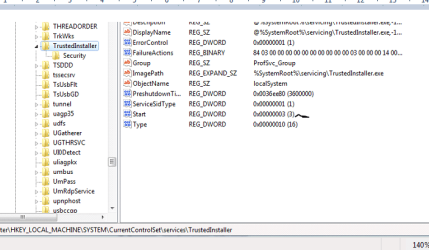
can you check if yours is this, see screenshot.

AVG
unfortunately dissabling it wil not stop a currently processing scan, you will need to uninstall it via safe mode using thier uninstaller

Roy
 

Attachments

  • tivalue.PNG
    tivalue.PNG
    39.8 KB · Views: 15

My Computer My Computer

At a glance

W7 home premium 32bit/W7HP 64bit/w10 tp insid...E5300 dual core3gbNvidia Geforce 7100 Nforce 630i
Computer type
PC/Desktop
Computer Manufacturer/Model Number
medionl/Aspire 6930G/acer x55a
OS
W7 home premium 32bit/W7HP 64bit/w10 tp insider ring
CPU
E5300 dual core
Motherboard
medion MS7366
Memory
3gb
Graphics Card(s)
Nvidia Geforce 7100 Nforce 630i
Monitor(s) Displays
avixc
Internet Speed
n (isp resticted to 72)
Antivirus
mse/pands
Browser
palemoon
Other Info
Belkin Fd7050 n USB using Railink RT2870 drivers, more upto date
I've checked TrustedInstaller Start value is the same as above 0x00000003 (3). When I double click to open the Value data: 3 and the base is in Hexadecimal.

For the "Windows Update Standalone Installer", I've waited for at least 6 hours and still waiting for the it to finish. I have also disable AVG beforehand.

To summarise the problem of my laptop:
1) Unable to Shutdown properly in Normal mode (waited overnight and still not shutting down, stuck at screen where the blue circle keeps moving. But in Safe Mode or when I didn't login to my user account able to Shutdown properly in a few min.
2) Unable to install or uninstall some programs. I tried to run services.msc, and check "Windows Modules Installer" and ensure that the service is started. When I check the status, it reads as "Starting" but never "Started".
3) Indexing isn't active and can't turn it on. At the screen of indexing, no folders listed. When trying to rebuild, there is no response. In services.msc, "Windows Search" status: "Starting". But it never got to "Started".
4) Tried running "sfc /scannow" to fix the problem. It came out as:
"Windows Resource Protection could not start the repair service".
5) Malwarebytes finished scanning with no problem. But AVG unable to finish the scan as it is stucked at processing at 10%.

Any troubleshoot? Seems my computers got a lot of problem.
 

My Computer My Computer

At a glance

Microsoft Windows 7 Professional 64-bit 7601 ...Intel(R) Core(TM) i5-3320M CPU @ 2.60GHz8.00 GBIntel(R) HD Graphics 4000
Computer type
PC/Desktop
Computer Manufacturer/Model Number
Lenovo T430S
OS
Microsoft Windows 7 Professional 64-bit 7601 Multiprocessor Free Service Pack 1
CPU
Intel(R) Core(TM) i5-3320M CPU @ 2.60GHz
Motherboard
LENOVO 2355D64
Memory
8.00 GB
Graphics Card(s)
Intel(R) HD Graphics 4000
Sound Card
(1) Intel(R) Display Audio (2) Realtek High Definition Aud
Screen Resolution
1600 x 900 x 32 bits (4294967296 colors) @ 50 Hz
Hard Drives
HGST HTS725050A7E630
Thanks again for your input torchwood!

bori02082014, please post WindowsUpdate.log location: C:\Windows

& try running sfc /scannow and SURT from safe mode!

If sfc /scannow completes, unzip and run below batch file and post log sfcdetails.txt which will appear on your Desktop.
View attachment SFC_Details_to_Desktop.zip

If SURT completes post CheckSUR.log
C:\Windows\Logs\CBS\CheckSUR.log
 
Last edited:

My Computer My Computer

At a glance

Win 10 x64, Linux Lite, Win 7 x64, BlackArch,...
Computer type
PC/Desktop
Computer Manufacturer/Model Number
HP Desktop & Compaq Laptop
OS
Win 10 x64, Linux Lite, Win 7 x64, BlackArch, & Kali
Hard Drives
Samsung 850 Pro 256Gb,
Hitachi HDD 1Tb,
Crucial MX SSD 250Gb
Segate 3Tb USB 3.0 Ext. Backup HDD
Internet Speed
150Mbps dn, 20Mbps up
Antivirus
Avast Free, Malwarebytes Anti-Exploit & Anti-Ransomware
Browser
Firefox, Chrome, Opera, & VPN
I've attached the WindowsUpdate.log.


When running sfc /scannow, the response is:


"Windows Resource Protection could not start the repair service."


I tried running SURTx64 tool. Popped out:


"Installer encountered an error: 0x8007043c


This service cannot be started in Safe Mode"
 

My Computer My Computer

At a glance

Microsoft Windows 7 Professional 64-bit 7601 ...Intel(R) Core(TM) i5-3320M CPU @ 2.60GHz8.00 GBIntel(R) HD Graphics 4000
Computer type
PC/Desktop
Computer Manufacturer/Model Number
Lenovo T430S
OS
Microsoft Windows 7 Professional 64-bit 7601 Multiprocessor Free Service Pack 1
CPU
Intel(R) Core(TM) i5-3320M CPU @ 2.60GHz
Motherboard
LENOVO 2355D64
Memory
8.00 GB
Graphics Card(s)
Intel(R) HD Graphics 4000
Sound Card
(1) Intel(R) Display Audio (2) Realtek High Definition Aud
Screen Resolution
1600 x 900 x 32 bits (4294967296 colors) @ 50 Hz
Hard Drives
HGST HTS725050A7E630
Please download and run SevenForums
Reset_Windows_Update_Full.bat
All windows update components will be reset and reregsitered, the software distribution folder will be renamed SoftwareDistribution.bak
Try Win Update again please.
 

My Computer My Computer

At a glance

Win 10 x64, Linux Lite, Win 7 x64, BlackArch,...
Computer type
PC/Desktop
Computer Manufacturer/Model Number
HP Desktop & Compaq Laptop
OS
Win 10 x64, Linux Lite, Win 7 x64, BlackArch, & Kali
Hard Drives
Samsung 850 Pro 256Gb,
Hitachi HDD 1Tb,
Crucial MX SSD 250Gb
Segate 3Tb USB 3.0 Ext. Backup HDD
Internet Speed
150Mbps dn, 20Mbps up
Antivirus
Avast Free, Malwarebytes Anti-Exploit & Anti-Ransomware
Browser
Firefox, Chrome, Opera, & VPN
Back
Top