Network usage causes high DPC Latency

octane097

New member
Local time
11:25 AM
Messages
35
Hey everyone,

Happy New Year :)

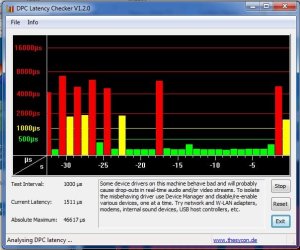
After about 24 hours of booting my computer, I have seen my DPC Latency spike tremendously. At first, I thought this was an issue with my network card (since disabling it would drop DPC Latency), so I bought a new card. The problem didn't go away, so I realized it was something else. High DPC Latency is a problem since it causes audio and video lag.

As I troubleshooted the issue, I have realized the spikes were caused from network activity. For example, when I am seeding [not necessarily uploading] many torrents or am loading a website, it shoots up.

See below for a before and after screenshot respectively.

Does anyone know what may cause this and how I could prevent it?

Thanks in advance for your help,
Dan
 

Attachments

  • dpc1.jpg
    dpc1.jpg
    56.2 KB · Views: 239
  • dpc2.jpg
    dpc2.jpg
    50.2 KB · Views: 168

My Computer

OS
Windows 7 64bit
CPU
Intel Core 2 Duo E8400 Wolfdale 3.0GHz LGA 775
Motherboard
GIGABYTE GA-EP45C-UD3R LGA 775 Intel P45
Memory
G.SKILL 4GB (2 x 2GB) 240-Pin DDR2 SDRAM DDR2 1066
Graphics Card(s)
EVGA 320-P2-N811-AR GeForce 8800 GTS 320MB
Sound Card
Onboard Realtek
interesting tool, mine is mostly green with the odd yellow.

but my green is not stable and low, its hovering between 90 and 350, and I read others who consider 90 to be the max they expect. Some above 500 every 10-20 seconds as well.
 

My Computer

Computer type
PC/Desktop
Computer Manufacturer/Model Number
home built
OS
windows 8.1 Pro x64
CPU
intel i5 4670k @ 4.3ghz
Motherboard
asus z87-plus
Memory
16 gig ram ddr3 @ 1600 corsair vengeance
Graphics Card(s)
evga 970 GTX 4 GIG FTW ACX 2.0
Sound Card
asus xonar D2X
Monitor(s) Displays
benq gw2765ht
Screen Resolution
2560x1440
Hard Drives
Samsung 850 pro SSD 512gig - boot device wooosh
WD black cavalier 640gig WD6401AALS
Seagate 500gig ST3500630AS
WD 2TB Green WDC20EARS
2 x WD Red 3TB WD30EFRX
Samsung 750gig HD753LG - on asmedia controller
PSU
coolermaster silent pro 600watt modular
Case
fractal define R4
Cooling
artic freezer i30, 3 case fans
Keyboard
microsoft business ps2 keyboard
Mouse
microsoft optical black mouse
Internet Speed
80/20 FTTC SkyBB
Antivirus
Nod32 AV v8, HitmanProAlert, SRP, System Hardening
Browser
Chrome x64
Other Info
Intel controller is in AHCI mode currently using IaSTOR 12.8.0.1016 drivers
turn of the power management options through OS and bios & NIC (wireless and wired)

Onboard nic will cause lag but only through initialization
Power savings programs / settings will cause this as well.
 
Last edited:

My Computer

OS
7 Pro

My Computer

Computer Manufacturer/Model Number
Custom built machine
OS
W7 x64
CPU
Intel Q9300 2.5Ghz Quad LGA775 (Would like Q9650)
Motherboard
Gigabyte GA-EP45T-UD3R (F6 Bios)
Memory
4Gb OCZ Gold 1,333Mhz
Graphics Card(s)
Palit HD4850 O/C Sonic 512Mb DDR3, Dual DViD's
Sound Card
Azalia to twin Samson 50w Studio Monitors
Monitor(s) Displays
Twin Dell (E-IPS) U2311H 23.6" Screens
Screen Resolution
1920 x 1080 @ 60Hz
Hard Drives
Crucial M4 SSD, archives on twin Western Digital Caviar Black WD2002FAEX, 2TB, 7200rpm HDD's, Samsung Ritemaster CD/DVD Burner...
PSU
OCZ 600w
Case
Lian-Li PC8 acoustifoamed' aluminium tower
Cooling
Scythe 140mm Zipang
Keyboard
Cherry PS/2 custom model
Mouse
Lenovo USB laser "Thinkpad" Mouse
Internet Speed
ADSL2+ @14Mbps downstream & Cat6 Gigabit Ethernet
Antivirus
NOD32
Browser
Opera
Other Info
Silicon Dust HD Homerun Dual FTA (Ethernet) TV Tuners, Dray Tek Vigor 2850Vn router and 8x HP Gigabit Switch. Lian-Li CR26 Card Reader, Canon MF4430 iSensys laser printer/scanner.
You might also want to check to see if you have the "Standard Floppy Controller" enabled through your Device Manager, that seems to be causing DPC latency as well.
 

My Computer

OS
7 Pro
DPC latency issues can really mess up things like TV Tuners.

Usually the peaks are caused by mal-performing drivers, the question is that it's not easy to determine which ones - or even whether any virtual drivers could be guilty, I get my PC right up into the red and it causes dipixellation and blocky abhorrences in WMC...

It's been so far, totally insurmountable. I've grown so sick of it that I'm thinking of blowing a wad on a network TV tuner in lieu of what's in my system specs :zip:
 

My Computer

Computer Manufacturer/Model Number
Custom built machine
OS
W7 x64
CPU
Intel Q9300 2.5Ghz Quad LGA775 (Would like Q9650)
Motherboard
Gigabyte GA-EP45T-UD3R (F6 Bios)
Memory
4Gb OCZ Gold 1,333Mhz
Graphics Card(s)
Palit HD4850 O/C Sonic 512Mb DDR3, Dual DViD's
Sound Card
Azalia to twin Samson 50w Studio Monitors
Monitor(s) Displays
Twin Dell (E-IPS) U2311H 23.6" Screens
Screen Resolution
1920 x 1080 @ 60Hz
Hard Drives
Crucial M4 SSD, archives on twin Western Digital Caviar Black WD2002FAEX, 2TB, 7200rpm HDD's, Samsung Ritemaster CD/DVD Burner...
PSU
OCZ 600w
Case
Lian-Li PC8 acoustifoamed' aluminium tower
Cooling
Scythe 140mm Zipang
Keyboard
Cherry PS/2 custom model
Mouse
Lenovo USB laser "Thinkpad" Mouse
Internet Speed
ADSL2+ @14Mbps downstream & Cat6 Gigabit Ethernet
Antivirus
NOD32
Browser
Opera
Other Info
Silicon Dust HD Homerun Dual FTA (Ethernet) TV Tuners, Dray Tek Vigor 2850Vn router and 8x HP Gigabit Switch. Lian-Li CR26 Card Reader, Canon MF4430 iSensys laser printer/scanner.
turn of the power management options through OS and bios & NIC (wireless and wired)

Onboard nic will cause lag but only through initialization
Power savings programs / settings will cause this as well.

Thanks for the response dude -

I have "High Performance" chosen under power options in win7 and have turned off all power management stuff in my BIOS. Do you know how to do this through the NIC?
 

My Computer

OS
Windows 7 64bit
CPU
Intel Core 2 Duo E8400 Wolfdale 3.0GHz LGA 775
Motherboard
GIGABYTE GA-EP45C-UD3R LGA 775 Intel P45
Memory
G.SKILL 4GB (2 x 2GB) 240-Pin DDR2 SDRAM DDR2 1066
Graphics Card(s)
EVGA 320-P2-N811-AR GeForce 8800 GTS 320MB
Sound Card
Onboard Realtek
I wonder if interrupt moderation available on good nic's helps dpc latency, I believe there is a link.

In terms of multimedia performance I get pop's in my sound but I believe this is down to bad windows 7 creative x-fi drivers rather than DPC latency as I get no spikes when they occur. Also I had alot of apps open when running the monitor, I really should have done it it after a reboot with nothing loaded.
 

My Computer

Computer type
PC/Desktop
Computer Manufacturer/Model Number
home built
OS
windows 8.1 Pro x64
CPU
intel i5 4670k @ 4.3ghz
Motherboard
asus z87-plus
Memory
16 gig ram ddr3 @ 1600 corsair vengeance
Graphics Card(s)
evga 970 GTX 4 GIG FTW ACX 2.0
Sound Card
asus xonar D2X
Monitor(s) Displays
benq gw2765ht
Screen Resolution
2560x1440
Hard Drives
Samsung 850 pro SSD 512gig - boot device wooosh
WD black cavalier 640gig WD6401AALS
Seagate 500gig ST3500630AS
WD 2TB Green WDC20EARS
2 x WD Red 3TB WD30EFRX
Samsung 750gig HD753LG - on asmedia controller
PSU
coolermaster silent pro 600watt modular
Case
fractal define R4
Cooling
artic freezer i30, 3 case fans
Keyboard
microsoft business ps2 keyboard
Mouse
microsoft optical black mouse
Internet Speed
80/20 FTTC SkyBB
Antivirus
Nod32 AV v8, HitmanProAlert, SRP, System Hardening
Browser
Chrome x64
Other Info
Intel controller is in AHCI mode currently using IaSTOR 12.8.0.1016 drivers
Update: When I exit utorrent and restart it, DPC Latency goes back to manageable levels. I think that after about 24 hours of seeding 150 torrents the latency goes crazy. Does this make sense?
 

My Computer

OS
Windows 7 64bit
CPU
Intel Core 2 Duo E8400 Wolfdale 3.0GHz LGA 775
Motherboard
GIGABYTE GA-EP45C-UD3R LGA 775 Intel P45
Memory
G.SKILL 4GB (2 x 2GB) 240-Pin DDR2 SDRAM DDR2 1066
Graphics Card(s)
EVGA 320-P2-N811-AR GeForce 8800 GTS 320MB
Sound Card
Onboard Realtek
after 24 hours of seeding, I think anything could happen ;)
 

My Computer

OS
7 Pro
I have the same problem (and I'm not using any torrent or otherwise high network usage program). After a day or so, DPC latency creeps up and causes noise in my sound card. After system startup, latency is in the green levels, but after running a day or so, it's perpetually running in the red. If I then disable the network adapter (NIC), latency immediately drops to green levels. However, if I then enable the network adapter, it immediately spikes perpetually into the red. I have to reboot to reset the condition so that it's running in the green (so that I can listen to music without horrible crackles and stutters).

I also tried swapping the network adapter but I have exactly the same issue with both network adapters.

It took me many hours of troubleshooting just to get to the point where I can see the issue using the DPC Latency Checker (after swapping several sound cards, video cards and such). This is driving me nuts!

Thanks bundles for any suggestions!!
 
Last edited:

My Computer

Computer Manufacturer/Model Number
Custom
OS
Windows 7
CPU
Intel Core2 Quad 2330
Motherboard
P5QL PRO
Memory
8 GB
Graphics Card(s)
GeForce GT 220 1024 PCI-E
Sound Card
Realtek High def
I've tried several NICS and clearly some are worse than others, but they all eventually show DPC latency spikes and therefore affect the audio.
What is the commonality that causes this? I've never had this problem in any other OS. Is it a problem in Windows 7? Or should I be looking at my Motherboard?

Please help! This is driving me crazy! I can't listen to music, unless I reboot first.

:cry:
 

My Computer

Computer Manufacturer/Model Number
Custom
OS
Windows 7
CPU
Intel Core2 Quad 2330
Motherboard
P5QL PRO
Memory
8 GB
Graphics Card(s)
GeForce GT 220 1024 PCI-E
Sound Card
Realtek High def
All I can say is, I feel your pain :(
 

My Computer

OS
Windows 7 64bit
CPU
Intel Core 2 Duo E8400 Wolfdale 3.0GHz LGA 775
Motherboard
GIGABYTE GA-EP45C-UD3R LGA 775 Intel P45
Memory
G.SKILL 4GB (2 x 2GB) 240-Pin DDR2 SDRAM DDR2 1066
Graphics Card(s)
EVGA 320-P2-N811-AR GeForce 8800 GTS 320MB
Sound Card
Onboard Realtek
What if you obtain a red bar once in a while, is that bad too?
 

My Computer

Computer type
PC/Desktop
Computer Manufacturer/Model Number
Custom Build
OS
Microsoft Windows 7 Ultimate 64 bits 7601 Multiprocessor Free Service Pack 1
CPU
Intel(R) Core(TM) i7-3770K CPU @ 3.50GHz
Motherboard
ASUSTeK Computer INC. P8Z68-V PRO GEN3
Memory
8.00 GB
Graphics Card(s)
NVIDIA GeForce GTX 670
Sound Card
Omega Striker
Monitor(s) Displays
Viewsonic vx2250wm
Screen Resolution
1920 x 1080 x 32 bits (4294967296 colors) @ 60 Hz
Hard Drives
V9CPETXT
Seagate 1TB.
PSU
Corsair Gold Series AX850
Case
nvidia 690 advanced II
Cooling
Air
An occasional spike might not cause noticable distortion. I usually only hear the noise when I get a group of spikes together. Then it's reboot time.
 

My Computer

Computer Manufacturer/Model Number
Custom
OS
Windows 7
CPU
Intel Core2 Quad 2330
Motherboard
P5QL PRO
Memory
8 GB
Graphics Card(s)
GeForce GT 220 1024 PCI-E
Sound Card
Realtek High def
An occasional spike might not cause noticable distortion. I usually only hear the noise when I get a group of spikes together. Then it's reboot time.

thanks for your answer you are very kind.
 

My Computer

Computer type
PC/Desktop
Computer Manufacturer/Model Number
Custom Build
OS
Microsoft Windows 7 Ultimate 64 bits 7601 Multiprocessor Free Service Pack 1
CPU
Intel(R) Core(TM) i7-3770K CPU @ 3.50GHz
Motherboard
ASUSTeK Computer INC. P8Z68-V PRO GEN3
Memory
8.00 GB
Graphics Card(s)
NVIDIA GeForce GTX 670
Sound Card
Omega Striker
Monitor(s) Displays
Viewsonic vx2250wm
Screen Resolution
1920 x 1080 x 32 bits (4294967296 colors) @ 60 Hz
Hard Drives
V9CPETXT
Seagate 1TB.
PSU
Corsair Gold Series AX850
Case
nvidia 690 advanced II
Cooling
Air
I see this is not exactly a fresh thread, but even with a lot of DPC latency issues out there being documented, it seems that tracking down the cuase is a science in itself! I've never had any issues until I installed my new gigabyte GTX 460 - along with which came a new driver (1st version for this card). Now, I've been having issues when playing back music and, as it would appear, surfing the net and using keyboard. Yup, that's right - that's the only 'reproduceable' cuase... Need Foobar2000 open, along with a browser (IE, Chrome, FF, doesn't matter), and I have to be typing or clicking, and then the popping sounds start left and right. Stop typing, and it's all under control. Now, the interesting part is that nothing else changed in my system but the video card and its driver. All other stuff (hardware and software) are all the same as before and I had no issues at all - zero! Odd eh?
 

My Computer

OS
Windows 7 Professional x64
CPU
AMD Phenom II 940BE @3.6
Motherboard
Gigabyte GA-MA770-UD3 (Rev 2.1)
Memory
4x2GB G.Skill PC2-8000
Graphics Card(s)
Gigabyte GTX 460 1gb (GV-N460OC-1GI)
Sound Card
x-Fi XtremeGamer
Monitor(s) Displays
Samsung T240
Screen Resolution
1920x1200 (native)
Hard Drives
G.SKILL Phoenix Pro 60GB SSD
Samsung & Western Digital 5Tb total
PSU
Corsair 650TX
Case
Antec Three Hundred
Cooling
Air cooling all the way!
Internet Speed
Teksavvy (DSL)
I've tried many drivers and swapped ALL components out of my system and I see the same issue.
Installed the Codec lite pack .
Disabled speaker effects (enhancements).
Twiddled with every imaginable setting in the Sound panel in Windows 7
Turned off Aero to use a basic theme
Uninstalled any energy saving software by the mobo manufacturer (asus)
Reset the BIOS to the factory default settings.
Flashed the system BIOS to several different versions.
Reinstalled the operating system from ground up.


swapped several different sound cards, internal and external.
swapped several different nics.
Swapped the Video Card.
I even swapped the MoBo with a similar model.

The only think I haven't swapped is the CPU and Power supply. Neither seem likely culprits for a sound problem.

The only thing that affects the popping is a reboot, which resolves it for a few hours, or disabling the network adapter, which resolves the issue 100%, but I sort of need network access.

It sure seems inherent to Windows 7.
 

My Computer

Computer Manufacturer/Model Number
Custom
OS
Windows 7
CPU
Intel Core2 Quad 2330
Motherboard
P5QL PRO
Memory
8 GB
Graphics Card(s)
GeForce GT 220 1024 PCI-E
Sound Card
Realtek High def
DarrylGittins - I'm curious, what network adapter do you have (model) and which driver version do you have installed. It's pretty clear that if disabling it resolves the issue 100%, then that's what is causing the issue (sorry, I know that sounds cheeky but I'm not being a smart-a**). Anyway, give us the details about the adapter. Thanks.
 

My Computer

OS
Windows 7 Professional x64
CPU
AMD Phenom II 940BE @3.6
Motherboard
Gigabyte GA-MA770-UD3 (Rev 2.1)
Memory
4x2GB G.Skill PC2-8000
Graphics Card(s)
Gigabyte GTX 460 1gb (GV-N460OC-1GI)
Sound Card
x-Fi XtremeGamer
Monitor(s) Displays
Samsung T240
Screen Resolution
1920x1200 (native)
Hard Drives
G.SKILL Phoenix Pro 60GB SSD
Samsung & Western Digital 5Tb total
PSU
Corsair 650TX
Case
Antec Three Hundred
Cooling
Air cooling all the way!
Internet Speed
Teksavvy (DSL)
Back
Top