Networking Problem, Please Help!

mattjones16

New member
Local time
1:46 PM
Messages
10
For as long as I can remember, my system tray network icon has said "Not Connected--connections are available" when I hover over it. I am, however, connected to the internet. Recently this has caused more problems for me. Since my computer seems to think I'm not connected, it won't let me set up a Homegroup. I've tried to set up Windows Media Center on my Xbox 360 but it can't find my laptop. In addition, my VPN does not show up on the list of available connections.
 

My Computer

OS
Windows 7 build 7057
Hey MattJones16

That's quite a list of stuff!

Network - Are you sure that it's the right icon telling you connections are available? Is it the 'Ramped Wireless Strength Bars' or the 'Computer Monitor w/ Network Jack' icon that is giving you this message? Just want to be sure you aren't picking up on an unplugged WIRED network status that might be displaying by accident. AFter re-reading, perhaps the icon you are hovering over IS YOUR VPN Network Icon... That makes more sense.

Perhaps you need to uninstall/reinstall the VPN - See what the icons do as a result of uninstalling, then reinstall with hopefully a good installation.

All Versions of Windows 7 support VPN connections. You do need to have the correct settings for your remote site. Have you talked to the Admin at the remote site? Or are YOU the admin at the 'remote site'...

XBox Media Center - WoW - I am falling behind :) The couple of articles I have found seem to think this may be a really ... educating task, and that it might take a bit of time... Better get the network part dialed in first.
Keep us posted...
 

My Computer

Computer Manufacturer/Model Number
Custom Creation
OS
Windows 7 Pro, Vista Business, Vista Ultimate, Windows XP
CPU
Core 2 Extreme
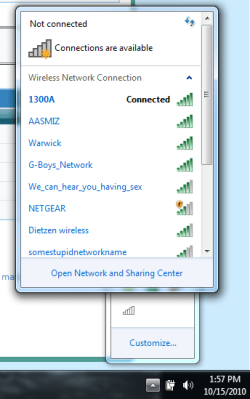
It does show the ramped bars. Sometimes it looks like it's connected and other times it has the little yellow star on top of the bars to show it's not connected. Either way, it is actually connected but it specifically says "not connected" when I hover over the icon. When I click it, it gives a list of wireless connections but doesn't include my VPN (I'm a college student and the VPN allows me to connect to the Virginia Tech network so I can download software when I'm off campus).

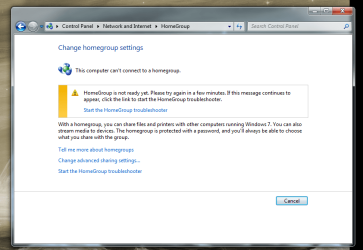
In addition, it won't let me set up a homegroup. When I click "Homegroup" in the "Network and Internet" section of the control panel it says "This computer can't connect to a homegroup" and "Homegroup is not ready yet. Please try again in a few minutes." The troubleshooter doesn't help either.

I'll try and attach some screen caps to this post.
 

Attachments

  • network screen cap.png
    network screen cap.png
    133.9 KB · Views: 18
  • screen cap.png
    screen cap.png
    145.3 KB · Views: 49

My Computer

OS
Windows 7 build 7057
Most likely the VPN you have installed is causing this problem to occur.
 

My Computer

Computer type
PC/Desktop
Computer Manufacturer/Model Number
Home built
OS
Windows 7 Ult, Windows 8.1 Pro,
CPU
Q9650-4.275GHz, E8600 4.5GHz, E6750-3.8GHz
Motherboard
Evga 780i FTW
Memory
G.Skill PC2 9600 1200Mhz 5 5 5 15 2T
Graphics Card(s)
GTX480
Sound Card
Asus Xonar D2
Monitor(s) Displays
HannsG
Screen Resolution
1680X1050
Hard Drives
GSkill Phoenix Pro 120GB SSD
PSU
ThermalTake Toughpower 1000Watt modular
Case
ThermalTake XaserV
Cooling
Xigmatek S1283
Keyboard
Logitech G15
Mouse
Logitech G9
Internet Speed
T1
Then how do I uninstall the VPN?

Did you install any type of VPN software like shrew? I would think you can remove the VPN software by going to add-remove programs. Control panel>catagory view>programs,uninstall a program then find the VPN software on the list.

Are you sure that the time/date settings are correct on this machine?
 

My Computer

Computer type
PC/Desktop
Computer Manufacturer/Model Number
Home built
OS
Windows 7 Ult, Windows 8.1 Pro,
CPU
Q9650-4.275GHz, E8600 4.5GHz, E6750-3.8GHz
Motherboard
Evga 780i FTW
Memory
G.Skill PC2 9600 1200Mhz 5 5 5 15 2T
Graphics Card(s)
GTX480
Sound Card
Asus Xonar D2
Monitor(s) Displays
HannsG
Screen Resolution
1680X1050
Hard Drives
GSkill Phoenix Pro 120GB SSD
PSU
ThermalTake Toughpower 1000Watt modular
Case
ThermalTake XaserV
Cooling
Xigmatek S1283
Keyboard
Logitech G15
Mouse
Logitech G9
Internet Speed
T1
No. I just followed the instructions on my school's website to set one up in Windows.
 

My Computer

OS
Windows 7 build 7057
Are you sure that the time/date settings are correct on this machine?

Good question - and checking his Wireless screen shot I can see that the date is right, not sure about time...

Homegroups must be setup by someone - are you connecting to an existing Homegroup? or starting your own...

My experience with Homegroups was not wonderful. I simply reverted to the "old way" we did it in Vista/XP with Network Sharing. Works excellent, and research shows that it's faster too!

So - do you really need a homegoup?
 

My Computer

Computer Manufacturer/Model Number
Custom Creation
OS
Windows 7 Pro, Vista Business, Vista Ultimate, Windows XP
CPU
Core 2 Extreme

My Computer

Computer type
PC/Desktop
Computer Manufacturer/Model Number
Home built
OS
Windows 7 Ult, Windows 8.1 Pro,
CPU
Q9650-4.275GHz, E8600 4.5GHz, E6750-3.8GHz
Motherboard
Evga 780i FTW
Memory
G.Skill PC2 9600 1200Mhz 5 5 5 15 2T
Graphics Card(s)
GTX480
Sound Card
Asus Xonar D2
Monitor(s) Displays
HannsG
Screen Resolution
1680X1050
Hard Drives
GSkill Phoenix Pro 120GB SSD
PSU
ThermalTake Toughpower 1000Watt modular
Case
ThermalTake XaserV
Cooling
Xigmatek S1283
Keyboard
Logitech G15
Mouse
Logitech G9
Internet Speed
T1
Are you sure that the time/date settings are correct on this machine?

Good question - and checking his Wireless screen shot I can see that the date is right, not sure about time...

Homegroups must be setup by someone - are you connecting to an existing Homegroup? or starting your own...

My experience with Homegroups was not wonderful. I simply reverted to the "old way" we did it in Vista/XP with Network Sharing. Works excellent, and research shows that it's faster too!

So - do you really need a homegoup?

That is because Homegroups is only made to work with Windows 7 machines. I can assure you that it works absolutely perfectly and is easy to use. Although I'm only working on the connection problem for now.

This document from Msoft shows you how to down level share using Homegroups with other types of Op systems. Download the .xps document if you want to learn more.
Download details: Windows 7 & HomeGroup: Sharing with Windows XP, Windows Vista, and other operating systems
 

My Computer

Computer type
PC/Desktop
Computer Manufacturer/Model Number
Home built
OS
Windows 7 Ult, Windows 8.1 Pro,
CPU
Q9650-4.275GHz, E8600 4.5GHz, E6750-3.8GHz
Motherboard
Evga 780i FTW
Memory
G.Skill PC2 9600 1200Mhz 5 5 5 15 2T
Graphics Card(s)
GTX480
Sound Card
Asus Xonar D2
Monitor(s) Displays
HannsG
Screen Resolution
1680X1050
Hard Drives
GSkill Phoenix Pro 120GB SSD
PSU
ThermalTake Toughpower 1000Watt modular
Case
ThermalTake XaserV
Cooling
Xigmatek S1283
Keyboard
Logitech G15
Mouse
Logitech G9
Internet Speed
T1
This Technet post talks about the problem, further down the page Novac shows way to resolve the problem but I can't say for certain what is causing it.

Windows 7 states I'm not connected to any networks when in fact I am connected to my wireless network??

No, Novak's thing didn't help. My laptop says the service is already running. I even tried stopping it and restarting it. Nothing.

My main problem is that I can't link my laptop and Xbox 360 to use Windows Media Center. I think all of the other connection problems (like not being able to create/join a Homegroup) are related.

If any one has any other possible solutions or questions I'll be happy to grab more screencaps if they'll help.
 

My Computer

OS
Windows 7 build 7057
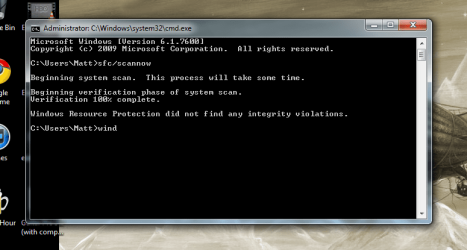
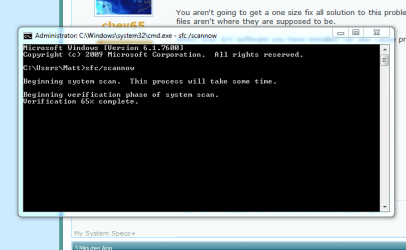
Great, try typing sfc /scannow into your command prompt and hit "enter" , let it scan for file problems and report back what it finds.

You aren't going to get a one size fix all solution to this problem but the file scan may show us that some files aren't where they are supposed to be.

Which ever A/V software you have installed can also cause problems like this.
 

My Computer

Computer type
PC/Desktop
Computer Manufacturer/Model Number
Home built
OS
Windows 7 Ult, Windows 8.1 Pro,
CPU
Q9650-4.275GHz, E8600 4.5GHz, E6750-3.8GHz
Motherboard
Evga 780i FTW
Memory
G.Skill PC2 9600 1200Mhz 5 5 5 15 2T
Graphics Card(s)
GTX480
Sound Card
Asus Xonar D2
Monitor(s) Displays
HannsG
Screen Resolution
1680X1050
Hard Drives
GSkill Phoenix Pro 120GB SSD
PSU
ThermalTake Toughpower 1000Watt modular
Case
ThermalTake XaserV
Cooling
Xigmatek S1283
Keyboard
Logitech G15
Mouse
Logitech G9
Internet Speed
T1
Running that scan now...
I have Microsoft Security Essentials and Symantec Antivirus. Symantec I got through my school, I think it's basically the same exact thing as Norton AV but branded differently.
 

My Computer

OS
Windows 7 build 7057
Looks like that scan didn't find anything.
 

Attachments

  • scan complete.png
    scan complete.png
    177.7 KB · Views: 26
  • scan.png
    scan.png
    49.9 KB · Views: 18

My Computer

OS
Windows 7 build 7057
Thats good it past the file check.

I would definately uninstall the Symantic A/V and see if anything changes.
 

My Computer

Computer type
PC/Desktop
Computer Manufacturer/Model Number
Home built
OS
Windows 7 Ult, Windows 8.1 Pro,
CPU
Q9650-4.275GHz, E8600 4.5GHz, E6750-3.8GHz
Motherboard
Evga 780i FTW
Memory
G.Skill PC2 9600 1200Mhz 5 5 5 15 2T
Graphics Card(s)
GTX480
Sound Card
Asus Xonar D2
Monitor(s) Displays
HannsG
Screen Resolution
1680X1050
Hard Drives
GSkill Phoenix Pro 120GB SSD
PSU
ThermalTake Toughpower 1000Watt modular
Case
ThermalTake XaserV
Cooling
Xigmatek S1283
Keyboard
Logitech G15
Mouse
Logitech G9
Internet Speed
T1
That is because Homegroups is only made to work with Windows 7 machines. I can assure you that it works absolutely perfectly and is easy to use. Although I'm only working on the connection problem for now.

This document from Msoft shows you how to down level share using Homegroups with other types of Op systems. Download the .xps document if you want to learn more.
Download details: Windows 7 & HomeGroup: Sharing with Windows XP, Windows Vista, and other operating systems

Hey Chevy65,
We will agree to disagree on Windows Homegroups for now... :D

I understand that it's easy for folks who don't 'do networking' to get things running.

I have found it to be much faster and easier to not use homegroups.

I like to access what I like to access, not the 'default'.

The encryption ads overhead and can slow file transfers...

I always knew it wasn't for me, but could not quantify the actual reasons...

Then I got this article this AM -
Simple Change In Settings Pumps Up Win7 Networks

It's a good read, and well done!

I fully admit that HomeGroups have their place. Just not sure what that place is at this time! :p

Sure wonder if it will help connecting an XBox 360!!! I will be reading your article later tonight!

TIA for the Link to HomeGroups! Perhaps it will help me see the light...

Patrick
 

My Computer

Computer Manufacturer/Model Number
Custom Creation
OS
Windows 7 Pro, Vista Business, Vista Ultimate, Windows XP
CPU
Core 2 Extreme
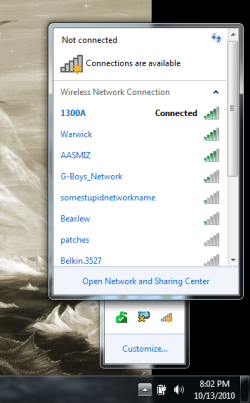
I uninstalled Symantec, still not working. The logo in the system tray shows the ramped bars, but now without the yellow star on top. It still thinks it's not connected though. I'm posting screen caps so you can see what I mean.
 

Attachments

  • Untitled.png
    Untitled.png
    19.7 KB · Views: 206
  • Untitled1.png
    Untitled1.png
    45.2 KB · Views: 2

My Computer

OS
Windows 7 build 7057
Matt, have you tried going to "manage wireless connections" to delate the profile for this connection? If not you should try doing that.

Go to the Network and Sharing Center then upper left to "manage wireless connections" Delate the profile for your current wireless connection then create a new one by using the manual connection set up in Windows 7. Retype in your SSID and password and see if it makes any difference.
 

My Computer

Computer type
PC/Desktop
Computer Manufacturer/Model Number
Home built
OS
Windows 7 Ult, Windows 8.1 Pro,
CPU
Q9650-4.275GHz, E8600 4.5GHz, E6750-3.8GHz
Motherboard
Evga 780i FTW
Memory
G.Skill PC2 9600 1200Mhz 5 5 5 15 2T
Graphics Card(s)
GTX480
Sound Card
Asus Xonar D2
Monitor(s) Displays
HannsG
Screen Resolution
1680X1050
Hard Drives
GSkill Phoenix Pro 120GB SSD
PSU
ThermalTake Toughpower 1000Watt modular
Case
ThermalTake XaserV
Cooling
Xigmatek S1283
Keyboard
Logitech G15
Mouse
Logitech G9
Internet Speed
T1
Back
Top