
You are using an out of date browser. It may not display this or other websites correctly.
You should upgrade or use an alternative browser.
You should upgrade or use an alternative browser.
Networking (to file share) between Windows 7 and Windows XP
- Thread starter AquiloNow
- Start date
i'm downloading right now!!!
My Computer
At a glance
win 7 64Intel Core2Quad Q95508GB Corsair XMS2ATI Radeon 4890 1GB
- Computer Manufacturer/Model Number
- ...me
- OS
- win 7 64
- CPU
- Intel Core2Quad Q9550
- Motherboard
- Asus P5Q DELUXE
- Memory
- 8GB Corsair XMS2
- Graphics Card(s)
- ATI Radeon 4890 1GB
- Sound Card
- built-in
- Monitor(s) Displays
- Samsung SyncMaster 226bw
- Screen Resolution
- 1680 X 1050
- Hard Drives
- 3 X 500, 3 X 1000, 1 X 1.5
- PSU
- Corsair TX750
- Case
- Coolermaster Stacker 830 Black
- Cooling
- Zalman 9700 LED
- Keyboard
- Microsoft Wired
- Mouse
- Microsoft Laser 8000
- Internet Speed
- 24kbps (in theory) usually up to 8kbps
I did the upgrade (not a clean install) but it did not fixed the sharing problem.
In fact now i have no internet at all.
In fact now i have no internet at all.
My Computer
At a glance
win 7 64Intel Core2Quad Q95508GB Corsair XMS2ATI Radeon 4890 1GB
- Computer Manufacturer/Model Number
- ...me
- OS
- win 7 64
- CPU
- Intel Core2Quad Q9550
- Motherboard
- Asus P5Q DELUXE
- Memory
- 8GB Corsair XMS2
- Graphics Card(s)
- ATI Radeon 4890 1GB
- Sound Card
- built-in
- Monitor(s) Displays
- Samsung SyncMaster 226bw
- Screen Resolution
- 1680 X 1050
- Hard Drives
- 3 X 500, 3 X 1000, 1 X 1.5
- PSU
- Corsair TX750
- Case
- Coolermaster Stacker 830 Black
- Cooling
- Zalman 9700 LED
- Keyboard
- Microsoft Wired
- Mouse
- Microsoft Laser 8000
- Internet Speed
- 24kbps (in theory) usually up to 8kbps
I did the upgrade (not a clean install) but it did not fixed the sharing problem.
In fact now i have no internet at all.
And that is why i do a clean install, clean install of 32 bit and 64 bit here and both working fine.
My Computer
At a glance
Win 7
- OS
- Win 7
- Local time
- 4:04 PM
- Messages
- 137
For all the people having trouble with this on build 7057 you might be interested to know this problem is fixed in build 7068.
Any indication of what the problem was?
My Computer
At a glance
7 x64 + XP Pro x86Undervolted T9900 3.06 GHz Core2Duo4GB DDR3 1066MHzNVIDIA 9800M GTS 1GB DDR3 1066 MHz
- Computer Manufacturer/Model Number
- Gateway P7801
- OS
- 7 x64 + XP Pro x86
- CPU
- Undervolted T9900 3.06 GHz Core2Duo
- Memory
- 4GB DDR3 1066MHz
- Graphics Card(s)
- NVIDIA 9800M GTS 1GB DDR3 1066 MHz
- Monitor(s) Displays
- 17" WUXGA
- Screen Resolution
- 1920x1200
- Hard Drives
- 32GB Patriot V2 SSD w/ Hyperfast
- PSU
- 9-cell Lithium Ion
- Keyboard
- Logitech Classic
- Mouse
- Logitech MX310
- Internet Speed
- slow AT&T
- Other Info
- Nlited XP x86 (540MB C:) locked with EWF
For all the people having trouble with this on build 7057 you might be interested to know this problem is fixed in build 7068.
Any indication of what the problem was?
To sum things up here are the problems related to build 7057
1. XP can not access shares on windows 7 C: drive
2. Windows 7 can not browse XP machines but UNC paths work
My Computer
At a glance
Win 7
- OS
- Win 7
So it was a bug with build 7057!!!.. I wouldnt have known except by reading through this forum just today  . *phew*...i tried everything and hadnt worked...
. *phew*...i tried everything and hadnt worked...My Computer
At a glance
Windows 2003, Windows XP Pro, Windows 72GBAsus 3650 512MB
- OS
- Windows 2003, Windows XP Pro, Windows 7
- Motherboard
- Asus M3A Pro
- Memory
- 2GB
- Graphics Card(s)
- Asus 3650 512MB
- Sound Card
- Creative Audigy ZS 2
- Monitor(s) Displays
- Asus 19" VW193T
- Screen Resolution
- 1440x900
- Internet Speed
- ADSL2+ (sync 14MB)
And that is why i do a clean install, clean install of 32 bit and 64 bit here and both working fine.
Is it possible that my network problem has to do with the nvidia chip & not with the installation?
In the Network and Sharing Center, it keeps showing 2 connections.
a) Network, Home Network (with the house as the symbol)
b) Unidentified Network (with the bench as the symbol)
This has happen also in the 7057, but not in the 7048
In the 7048, is showed only the (a) Home network and both the internet & the sharing was working like a charm with NO intervention by me whatsoever..
With the upgrade to 7057 it started to show the (a) & (b) connections and then i had no internet.
Then i started to alter the settings as suggested in this thread and in other similar ones, and sometimes it showed only (a) and i had internet, or both and i had nothing.
Now it does the same, i try the setting that i have tried with the 7057, but i have yet to see internet connection.
I have installed the driver from nvidia (181.71 geforce win 7 64b beta)
And by the way this and all the previous installations was 64b...
My Computer
At a glance
win 7 64Intel Core2Quad Q95508GB Corsair XMS2ATI Radeon 4890 1GB
- Computer Manufacturer/Model Number
- ...me
- OS
- win 7 64
- CPU
- Intel Core2Quad Q9550
- Motherboard
- Asus P5Q DELUXE
- Memory
- 8GB Corsair XMS2
- Graphics Card(s)
- ATI Radeon 4890 1GB
- Sound Card
- built-in
- Monitor(s) Displays
- Samsung SyncMaster 226bw
- Screen Resolution
- 1680 X 1050
- Hard Drives
- 3 X 500, 3 X 1000, 1 X 1.5
- PSU
- Corsair TX750
- Case
- Coolermaster Stacker 830 Black
- Cooling
- Zalman 9700 LED
- Keyboard
- Microsoft Wired
- Mouse
- Microsoft Laser 8000
- Internet Speed
- 24kbps (in theory) usually up to 8kbps
Is it possible that my network problem has to do with the nvidia chip & not with the installation?
In the Network and Sharing Center, it keeps showing 2 connections.
a) Network, Home Network (with the house as the symbol)
b) Unidentified Network (with the bench as the symbol)
This has happen also in the 7057, but not in the 7048
In the 7048, is showed only the (a) Home network and both the internet & the sharing was working like a charm with NO intervention by me whatsoever..
With the upgrade to 7057 it started to show the (a) & (b) connections and then i had no internet.
Then i started to alter the settings as suggested in this thread and in other similar ones, and sometimes it showed only (a) and i had internet, or both and i had nothing.
Now it does the same, i try the setting that i have tried with the 7057, but i have yet to see internet connection.
I have installed the driver from nvidia (181.71 geforce win 7 64b beta)
And by the way this and all the previous installations was 64b...
First off this has nothing to do with any network adapters, it is a bug in build 7057. A clean install of build 7068 32 bit or 64 bit will fix this problem. Second "nvidia (181.71 geforce win 7 64b beta)" is a video driver not a network driver, open device manager and look at the network adapters and get the drivers for those (you may have more than one).
My Computer
At a glance
Win 7
- OS
- Win 7
ok, found one solution to have at least internet.
I went to Network Connections > Local Area Connection 2 > properties > unchecked IPv6 & IPv4 > ok
I now have internet, but no network with my XP machine.
I went to Network Connections > Local Area Connection 2 > properties > unchecked IPv6 & IPv4 > ok
I now have internet, but no network with my XP machine.
My Computer
At a glance
win 7 64Intel Core2Quad Q95508GB Corsair XMS2ATI Radeon 4890 1GB
- Computer Manufacturer/Model Number
- ...me
- OS
- win 7 64
- CPU
- Intel Core2Quad Q9550
- Motherboard
- Asus P5Q DELUXE
- Memory
- 8GB Corsair XMS2
- Graphics Card(s)
- ATI Radeon 4890 1GB
- Sound Card
- built-in
- Monitor(s) Displays
- Samsung SyncMaster 226bw
- Screen Resolution
- 1680 X 1050
- Hard Drives
- 3 X 500, 3 X 1000, 1 X 1.5
- PSU
- Corsair TX750
- Case
- Coolermaster Stacker 830 Black
- Cooling
- Zalman 9700 LED
- Keyboard
- Microsoft Wired
- Mouse
- Microsoft Laser 8000
- Internet Speed
- 24kbps (in theory) usually up to 8kbps
I now have internet, but no network with my XP machine.
I will say it again.
To sum things up here are the problems related to build 7057
1. XP can not access shares on windows 7 C: drive
2. Windows 7 can not browse XP machines but UNC paths work
You will not get 1 and 2 too work as long as you stay on build 7057.
My Computer
At a glance
Win 7
- OS
- Win 7
Yup Yup, thanks.
Just before i hit new install, the networking abilities came back somehow!
I now have internet & network with my xp machine!
Just before i hit new install, the networking abilities came back somehow!
I now have internet & network with my xp machine!
My Computer
At a glance
win 7 64Intel Core2Quad Q95508GB Corsair XMS2ATI Radeon 4890 1GB
- Computer Manufacturer/Model Number
- ...me
- OS
- win 7 64
- CPU
- Intel Core2Quad Q9550
- Motherboard
- Asus P5Q DELUXE
- Memory
- 8GB Corsair XMS2
- Graphics Card(s)
- ATI Radeon 4890 1GB
- Sound Card
- built-in
- Monitor(s) Displays
- Samsung SyncMaster 226bw
- Screen Resolution
- 1680 X 1050
- Hard Drives
- 3 X 500, 3 X 1000, 1 X 1.5
- PSU
- Corsair TX750
- Case
- Coolermaster Stacker 830 Black
- Cooling
- Zalman 9700 LED
- Keyboard
- Microsoft Wired
- Mouse
- Microsoft Laser 8000
- Internet Speed
- 24kbps (in theory) usually up to 8kbps
My XP machine does not show up in the "Network" list. Vista machines do show up normally. When I open the XP machine with a UNC path, it works and then the XP machine also shows up in the network neighborhood - however, only until I reboot Win7. This happens to me in build 7057 and 7068 (both x64, clean installs)! So actually build 7068 does not seem to fix the network issues...
Regards!
Regards!
My Computer
At a glance
Win7
- OS
- Win7
1. XP can not access shares on windows 7 C: drive
2. Windows 7 can not browse XP machines but UNC paths work
You will not get 1 and 2 too work as long as you stay on build 7057.
Well, I have build 7000, and I'm having the same problem.
- I can see XP Computer under W7, but can't access them.
- I can see W7 Computer in XP, and even access it to see the shared folders, but when I try to access them I get a message saying I don't have permission to see it.

My Computer
At a glance
Windows XP Pro SP3
- OS
- Windows XP Pro SP3
Ok, must be one hell of a bug. A few minutes ago I finally got access to my XP files (withouth changing any settings), and even copied one of them. I go to the XP PC, but I still can't get access to the W7 files. I go back to the W7 Computer, and still get access to the XP files.
I close the window, open a new one, and the XP Comp shows under Network, but when I try to access it I get an error... WTF?!? :shock:
I close the window, open a new one, and the XP Comp shows under Network, but when I try to access it I get an error... WTF?!? :shock:
My Computer
At a glance
Windows XP Pro SP3
- OS
- Windows XP Pro SP3

torrentg
New member
- Local time
- 7:04 PM
- Messages
- 5,747
If you feel like it, you could try installing the netbeui protocol on all machines on the network, and then disable netbios in the Local Area Connection settings (you see it when you right click the tray icon.) It actually performs better, is more secure from people trying to enumerate your shares etc...too.
This is for XP, but it's very much the same for Vista and 7 (folder locations specifically). You could find the files needed many places easily on the net as well.
How to install NetBEUI on Windows XP
If you need me to explain the steps in greater detail, let me know.
What is netBEUI? >>>
http://searchenterprisedesktop.techtarget.com/sDefinition/0,,sid192_gci212632,00.html
This is for XP, but it's very much the same for Vista and 7 (folder locations specifically). You could find the files needed many places easily on the net as well.
How to install NetBEUI on Windows XP
If you need me to explain the steps in greater detail, let me know.
What is netBEUI? >>>
http://searchenterprisedesktop.techtarget.com/sDefinition/0,,sid192_gci212632,00.html
My Computer
At a glance
7600.20510 x86P4 550 3.4 GHz HT running at 3.5 GHzOCZ 2 GB(2x1GB) DDR400mHz running @ 414 mHzHIS Radeon HD 3850 IceQ 3 Turbo HDMI Dual DL-...
- Computer Manufacturer/Model Number
- self built
- OS
- 7600.20510 x86
- CPU
- P4 550 3.4 GHz HT running at 3.5 GHz
- Motherboard
- MSI PM8M3-V (MS-7211 v1.x) Micro-ATX mainboard
- Memory
- OCZ 2 GB(2x1GB) DDR400mHz running @ 414 mHz
- Graphics Card(s)
- HIS Radeon HD 3850 IceQ 3 Turbo HDMI Dual DL-DVI AGP
- Sound Card
- MOTU Traveler firewire studio interface 192 kHz 24 bit
- Monitor(s) Displays
- 22" widescreen Acer X223W LCD, 17" Compaq P75 CRT
- Screen Resolution
- 1680x1050 and 1280x1024
- Hard Drives
- SATA I x2 WD, 400 GB and 120 GB, SATA 2 WD Caviar Black 1 TB
- PSU
- 350W generic
- Case
- Cybertronpc, it glows blue
- Cooling
- stock cpu fan, Ice-Q 3 gpu and system, many case fans
- Keyboard
- Logitch Classical Keyboard 200
- Mouse
- Logitech Mediaplay cordless
- Internet Speed
- 1792/448 kbits/sec
- Other Info
- SATA II PCI fake RAID adapter, 1 GB Readyboost, original ATI Remote Wonder (even works with WMC perfectly), Logitech Rumblepad 2 game controller x2
- Local time
- 4:04 PM
- Messages
- 137
Did anybody with this problem check their nodetype?
Those are the symptoms, not the problem. I want to know what was actually wrong. What they changed to fix the problem.
To sum things up here are the problems related to build 7057
1. XP can not access shares on windows 7 C: drive
2. Windows 7 can not browse XP machines but UNC paths work
Those are the symptoms, not the problem. I want to know what was actually wrong. What they changed to fix the problem.
My Computer
At a glance
7 x64 + XP Pro x86Undervolted T9900 3.06 GHz Core2Duo4GB DDR3 1066MHzNVIDIA 9800M GTS 1GB DDR3 1066 MHz
- Computer Manufacturer/Model Number
- Gateway P7801
- OS
- 7 x64 + XP Pro x86
- CPU
- Undervolted T9900 3.06 GHz Core2Duo
- Memory
- 4GB DDR3 1066MHz
- Graphics Card(s)
- NVIDIA 9800M GTS 1GB DDR3 1066 MHz
- Monitor(s) Displays
- 17" WUXGA
- Screen Resolution
- 1920x1200
- Hard Drives
- 32GB Patriot V2 SSD w/ Hyperfast
- PSU
- 9-cell Lithium Ion
- Keyboard
- Logitech Classic
- Mouse
- Logitech MX310
- Internet Speed
- slow AT&T
- Other Info
- Nlited XP x86 (540MB C:) locked with EWF
Those are the symptoms, not the problem. I want to know what was actually wrong. What they changed to fix the problem.To sum things up here are the problems related to build 7057
1. XP can not access shares on windows 7 C: drive
2. Windows 7 can not browse XP machines but UNC paths work
Well you would have to ask microsoft that and i don't think they will say.
Oh and node type was 1 on both XP and 7
My Computer
At a glance
Win 7
- OS
- Win 7
Hi Guys.
First post so sorry if this has already been covered but i wanted to let you know that build 7068 seems to have fixed my network issues.
I can now see all my network devices in my Network, this includes 2 XP pro boxes and my media streamer.
Plus i can access all from the same place.
Dave.
EDIT: Ok, i can see at least one person is using 7068 here and its not working correctly for him. I dont have the same problem although i did loose all my other devices once but after a few re boots its not happened since.
First post so sorry if this has already been covered but i wanted to let you know that build 7068 seems to have fixed my network issues.
I can now see all my network devices in my Network, this includes 2 XP pro boxes and my media streamer.
Plus i can access all from the same place.
Dave.
EDIT: Ok, i can see at least one person is using 7068 here and its not working correctly for him. I dont have the same problem although i did loose all my other devices once but after a few re boots its not happened since.
Last edited:
My Computer
At a glance
windows 7 HP 64bitAMD Athlon 64 X2 Dual Core 5600+ 2.80GHz4GBAsus ATI Radeon EAH2600XT HTDP Silent 256MB G...
- OS
- windows 7 HP 64bit
- CPU
- AMD Athlon 64 X2 Dual Core 5600+ 2.80GHz
- Motherboard
- Asus M2N-SLI Deluxe
- Memory
- 4GB
- Graphics Card(s)
- Asus ATI Radeon EAH2600XT HTDP Silent 256MB GDDR3 HDTV/Dual
- Sound Card
- M-Audio 24/96
- Monitor(s) Displays
- DELL 23" widescreen monitor
- Screen Resolution
- 1920x 1080
- Hard Drives
- 3 x Samsung F1 Spinpoint
- Case
- Antec Quiet Mini Tower Case
- Keyboard
- Latest slim Apple keyboard
- Internet Speed
- 5MB/s (50mb/s virgin broadband)
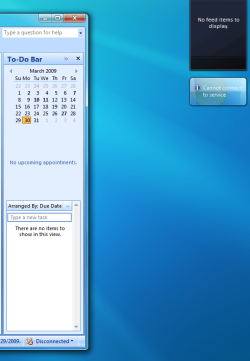
I"ll take this a bit further. I have a fresh build of 7068, test network is all W2K8. I can access the Internet (this post) and I can browse shares.
I cannot reach my Exchange 2007 server via the Outlook client, nor can gadgets reach the Internet (see attached png file).
To confuse things more, I did an in-place upgrade of a different machine from Vista->7048->7068, this machine does not show this problem.
Something is wacky.
I cannot reach my Exchange 2007 server via the Outlook client, nor can gadgets reach the Internet (see attached png file).
To confuse things more, I did an in-place upgrade of a different machine from Vista->7048->7068, this machine does not show this problem.
Something is wacky.
Attachments
My Computer
At a glance
Windows 7
- OS
- Windows 7
Similar threads
- Replies
- 4
- Views
- 6K

- Replies
- 0
- Views
- 879
- Replies
- 6
- Views
- 2K
- Replies
- 4
- Views
- 4K

- Replies
- 10
- Views
- 4K
