Networking (to file share) between Windows 7 and Windows XP

!! strange behavior !!

so when you (try) to share the root you got the error : xxxxx is not accessible....

but if you create a new folder like "c:\test" you share it (named here test)

then when you connect \\192.168.1.5\test he open directly the folder !! without asking any password ! and you have full access !! (read,write,delete !) hooo gosh i hope this will be fixed in final release..
of course i have checked if i was not have the password recorded in
User account\manage network passwrod
---

work for any folder (no password asked !!)
 

My Computer My Computer

At a glance

XP & Seven
OS
XP & Seven
Thats also what i was getting.
After my post above i set the security defaults back on three shared folders and again get the error message. changed it again and all is well.

Very strange but at least there are work arounds.

Dave.
 

My Computer My Computer

At a glance

windows 7 HP 64bitAMD Athlon 64 X2 Dual Core 5600+ 2.80GHz4GBAsus ATI Radeon EAH2600XT HTDP Silent 256MB G...
OS
windows 7 HP 64bit
CPU
AMD Athlon 64 X2 Dual Core 5600+ 2.80GHz
Motherboard
Asus M2N-SLI Deluxe
Memory
4GB
Graphics Card(s)
Asus ATI Radeon EAH2600XT HTDP Silent 256MB GDDR3 HDTV/Dual
Sound Card
M-Audio 24/96
Monitor(s) Displays
DELL 23" widescreen monitor
Screen Resolution
1920x 1080
Hard Drives
3 x Samsung F1 Spinpoint
Case
Antec Quiet Mini Tower Case
Keyboard
Latest slim Apple keyboard
Internet Speed
5MB/s (50mb/s virgin broadband)
This si strange. I can now access almost any file on my W7 box from XP but just right clicking the folder, gong to Share with/ Specific people and adding everyone.
Im wondering if because ive already allowed "Everyone" full access in security this is now the default for this user.
Oh well, at least it works for me.

Dave.
 

My Computer My Computer

At a glance

windows 7 HP 64bitAMD Athlon 64 X2 Dual Core 5600+ 2.80GHz4GBAsus ATI Radeon EAH2600XT HTDP Silent 256MB G...
OS
windows 7 HP 64bit
CPU
AMD Athlon 64 X2 Dual Core 5600+ 2.80GHz
Motherboard
Asus M2N-SLI Deluxe
Memory
4GB
Graphics Card(s)
Asus ATI Radeon EAH2600XT HTDP Silent 256MB GDDR3 HDTV/Dual
Sound Card
M-Audio 24/96
Monitor(s) Displays
DELL 23" widescreen monitor
Screen Resolution
1920x 1080
Hard Drives
3 x Samsung F1 Spinpoint
Case
Antec Quiet Mini Tower Case
Keyboard
Latest slim Apple keyboard
Internet Speed
5MB/s (50mb/s virgin broadband)
!! strange behavior !!

so when you (try) to share the root you got the error : xxxxx is not accessible....

but if you create a new folder like "c:\test" you share it (named here test)

then when you connect \\192.168.1.5\test he open directly the folder !! without asking any password ! and you have full access !! (read,write,delete !) hooo gosh i hope this will be fixed in final release..
of course i have checked if i was not have the password recorded in
User account\manage network passwrod
---

work for any folder (no password asked !!)
~my misstake...
he ask for password (i test with another PC) but my XP SP2 was retain my creditendial..

but still get the error for the root. (not the default share $ i know i wont working, but a created share on root dont work..)
 

My Computer My Computer

At a glance

XP & Seven
OS
XP & Seven
It might not ask for a user/pass if the account you are connecting from uses the same exact user/pass as the remote machine. Yeah, setting everyone as the security option always seems to fix this problem for lots of people, even in Vista/XP.
 

My Computer My Computer

At a glance

7600.20510 x86P4 550 3.4 GHz HT running at 3.5 GHzOCZ 2 GB(2x1GB) DDR400mHz running @ 414 mHzHIS Radeon HD 3850 IceQ 3 Turbo HDMI Dual DL-...
Computer Manufacturer/Model Number
self built
OS
7600.20510 x86
CPU
P4 550 3.4 GHz HT running at 3.5 GHz
Motherboard
MSI PM8M3-V (MS-7211 v1.x) Micro-ATX mainboard
Memory
OCZ 2 GB(2x1GB) DDR400mHz running @ 414 mHz
Graphics Card(s)
HIS Radeon HD 3850 IceQ 3 Turbo HDMI Dual DL-DVI AGP
Sound Card
MOTU Traveler firewire studio interface 192 kHz 24 bit
Monitor(s) Displays
22" widescreen Acer X223W LCD, 17" Compaq P75 CRT
Screen Resolution
1680x1050 and 1280x1024
Hard Drives
SATA I x2 WD, 400 GB and 120 GB, SATA 2 WD Caviar Black 1 TB
PSU
350W generic
Case
Cybertronpc, it glows blue
Cooling
stock cpu fan, Ice-Q 3 gpu and system, many case fans
Keyboard
Logitch Classical Keyboard 200
Mouse
Logitech Mediaplay cordless
Internet Speed
1792/448 kbits/sec
Other Info
SATA II PCI fake RAID adapter, 1 GB Readyboost, original ATI Remote Wonder (even works with WMC perfectly), Logitech Rumblepad 2 game controller x2
Not sure why this perennial problem keeps appearing

Windows 7 X-64 Build 7068

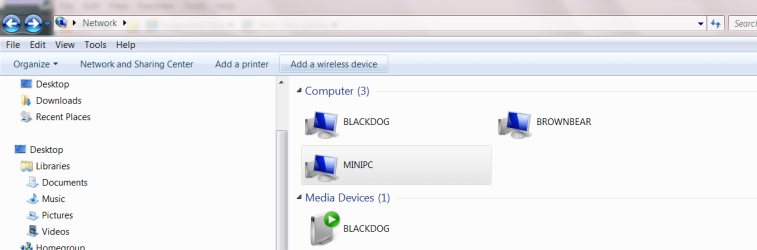
Network map -- Three -- MINIPC RUNNING windows XP, BROWNBEAR running Windows XP PRO 64 Bit and BLACKDOG running Windows 7 X-64 build 7068. Map shown from BLACKDOG.

MINIPC is connected via Wireless card, BROWNBEAR via wired LAN

No probs.

Just ensure Network discover is on (W7) and the Windows XP computers allow connections through their firewalls -- run the network setup on the windows XP machines.

Cheers
jimbo
 

Attachments

  • network.png
    network.png
    33.5 KB · Views: 200

My Computer My Computer

At a glance

Linux CENTOS 7 / various Windows OS'es and se...Intel i7 Intel i58GB, 16GBOn Motherboard
Computer type
PC/Desktop
Computer Manufacturer/Model Number
Custom built, several laptops HP/ASUS
OS
Linux CENTOS 7 / various Windows OS'es and servers
CPU
Intel i7 Intel i5
Memory
8GB, 16GB
Graphics Card(s)
On Motherboard
Sound Card
Realtek HD audio
Monitor(s) Displays
Apple Cinema display, Samsung LCD
Screen Resolution
1920 X 1080
Hard Drives
4 X 1TB SATA
Mouse
Toshiba wireless laser
Internet Speed
> 20MB up
sometimes just running the "Network Setup wizard" in XP again will fix sharing issues. I had a network glitch on my XP laptop and I just ran the Network set up again and all worked fine. I use windows firewall... it automatically configures itself for networking/sharing. makes things easier for me :)

and just like jimbo45 suggested... make sure network discovery is enabled.
 

My Computer My Computer

At a glance

Windows 7Athlon 64x2 5600+ dual core2GBATI Radeon 4350 512 MB
Computer Manufacturer/Model Number
Custom built
OS
Windows 7
CPU
Athlon 64x2 5600+ dual core
Motherboard
Biostar A770+
Memory
2GB
Graphics Card(s)
ATI Radeon 4350 512 MB
Sound Card
Onboard Realtek HD
Hard Drives
Seagate 500 GB SATA
Keyboard
Logitech Wireless
Mouse
Logitech Wireless
until now upgrade (not clean install) from 7057 to 7068 has solve my networking & internet problems!
 

My Computer My Computer

At a glance

win 7 64Intel Core2Quad Q95508GB Corsair XMS2ATI Radeon 4890 1GB
Computer Manufacturer/Model Number
...me
OS
win 7 64
CPU
Intel Core2Quad Q9550
Motherboard
Asus P5Q DELUXE
Memory
8GB Corsair XMS2
Graphics Card(s)
ATI Radeon 4890 1GB
Sound Card
built-in
Monitor(s) Displays
Samsung SyncMaster 226bw
Screen Resolution
1680 X 1050
Hard Drives
3 X 500, 3 X 1000, 1 X 1.5
PSU
Corsair TX750
Case
Coolermaster Stacker 830 Black
Cooling
Zalman 9700 LED
Keyboard
Microsoft Wired
Mouse
Microsoft Laser 8000
Internet Speed
24kbps (in theory) usually up to 8kbps
i can"t resolve this issue . i have win 7 build 7068 (wirless laptop) an winxp sp3 (desktop wired pc). i put both computer in the same workgroup. both are connected throu a router. when i try to acces the laptop from pc i get this error "logon failure : user account restriction. posible reasons are blank passwords not allowed, logon hour restrictions , or a policy restriction has been enforced'". when i try to acces the pc from laptop i get a window that tell me to enter a network password with username.
the problem is that i don't have any password , the desktop pc and the laptop don"t have password. how can i solve that?
 

My Computer My Computer

At a glance

Windows 7 UltimateAMD Turion (tm) 64 x2 Mobile Technology TL-58...2048 MBNVIDIA GeForce 8600M GS (512 MB)
Computer Manufacturer/Model Number
Acer Aspire 5520G
OS
Windows 7 Ultimate
CPU
AMD Turion (tm) 64 x2 Mobile Technology TL-58 1,90 Ghz
Motherboard
Acer Aspire 5520
Memory
2048 MB
Graphics Card(s)
NVIDIA GeForce 8600M GS (512 MB)
Sound Card
Realtek High Definition Audio Controller
Monitor(s) Displays
Generic PnP Monitor
Screen Resolution
1280 x 800
Hard Drives
Drive #1 - WDC WD3200BEVT-11ZCT0 (320 GB)
Drive #2 (external) - Hitachi HTS542516K9SA00 (160 GB)
Case
Laptop
Keyboard
Microsoft eHome MCIR 109 Keyboard
Mouse
Synaptics PS/2 Port TouchPad
Internet Speed
GOOD
Other Info
Laptop Acer Aspire 5520G
Sorry if this has been covered but...

Win XP SP2, Win 7 x64, both wired. Trying to access files on the XP box. I set everything up and it kind of works, but only the first folder I set to share in XP. All subsequent folders give me "Windows cannot access \\xp name\dir" "You do not have permission to access \\xp name\dir. Contact your admin blah, blah, blah."

I have all permissions selected on the XP directories I'm trying to access and the first one selected works fine, I'm able to play audio files from XP on 7.

Any ideas?

Also, is there anyway to share an entire drive? I tried to share them in XP but they never even showed up in 7. These are probably dumb questions but this is the first time I've ever done any of this. Apologies in advance.
 

My Computer My Computer

At a glance

7x64
OS
7x64
i can"t resolve this issue . i have win 7 build 7068 (wirless laptop) an winxp sp3 (desktop wired pc). i put both computer in the same workgroup. both are connected throu a router. when i try to acces the laptop from pc i get this error "logon failure : user account restriction. posible reasons are blank passwords not allowed, logon hour restrictions , or a policy restriction has been enforced'". when i try to acces the pc from laptop i get a window that tell me to enter a network password with username.
the problem is that i don't have any password , the desktop pc and the laptop don"t have password. how can i solve that?

Well, you gotta have a password for an account in order for the server to allow access to it across the lan. Set one for each account you will be sharing from. To do this, go to control panel, then while viewing large or small icons, choose user accounts. Then create a password for this account, or something similar to it.

This is a security measure by MS.

If you still want your computer to boot into the account without manually typing a password, go to start menu. In the search box, type netplwiz. Hit enter. Then uncheck the box for "users must enter a user name and password to use this computer.' Hit apply. Enter the password twice. Ok your way out and done.
 

My Computer My Computer

At a glance

7600.20510 x86P4 550 3.4 GHz HT running at 3.5 GHzOCZ 2 GB(2x1GB) DDR400mHz running @ 414 mHzHIS Radeon HD 3850 IceQ 3 Turbo HDMI Dual DL-...
Computer Manufacturer/Model Number
self built
OS
7600.20510 x86
CPU
P4 550 3.4 GHz HT running at 3.5 GHz
Motherboard
MSI PM8M3-V (MS-7211 v1.x) Micro-ATX mainboard
Memory
OCZ 2 GB(2x1GB) DDR400mHz running @ 414 mHz
Graphics Card(s)
HIS Radeon HD 3850 IceQ 3 Turbo HDMI Dual DL-DVI AGP
Sound Card
MOTU Traveler firewire studio interface 192 kHz 24 bit
Monitor(s) Displays
22" widescreen Acer X223W LCD, 17" Compaq P75 CRT
Screen Resolution
1680x1050 and 1280x1024
Hard Drives
SATA I x2 WD, 400 GB and 120 GB, SATA 2 WD Caviar Black 1 TB
PSU
350W generic
Case
Cybertronpc, it glows blue
Cooling
stock cpu fan, Ice-Q 3 gpu and system, many case fans
Keyboard
Logitch Classical Keyboard 200
Mouse
Logitech Mediaplay cordless
Internet Speed
1792/448 kbits/sec
Other Info
SATA II PCI fake RAID adapter, 1 GB Readyboost, original ATI Remote Wonder (even works with WMC perfectly), Logitech Rumblepad 2 game controller x2
Sorry if this has been covered but...

Win XP SP2, Win 7 x64, both wired. Trying to access files on the XP box. I set everything up and it kind of works, but only the first folder I set to share in XP. All subsequent folders give me "Windows cannot access \\xp name\dir" "You do not have permission to access \\xp name\dir. Contact your admin blah, blah, blah."

I have all permissions selected on the XP directories I'm trying to access and the first one selected works fine, I'm able to play audio files from XP on 7.

Any ideas?

Also, is there anyway to share an entire drive? I tried to share them in XP but they never even showed up in 7. These are probably dumb questions but this is the first time I've ever done any of this. Apologies in advance.

In XP, try setting the folders that will not share to "everyone" for permissions. First you've got to take the check box off for "enable simple file sharing (recommended)" when you open my computer. Then go to (by memory here so it may be wrong) view, folder options.

You share an entire drive just like any other folder. By default, Windows is sharing all the drives as hidden. Your C:\ is being shared as C$, D:\ as D$ etc...for all non-removable media....i.e. hard disks. You can not even disable this if you wanted. Well, you could but a reboot always shares again as hidden unless you use a batch file to start up with your pc.

To see what you are currently sharing from a machine, open an elevated command prompt (cmd in search box on start menu) and type in it "net share" without quotation marks and hit enter.
 

My Computer My Computer

At a glance

7600.20510 x86P4 550 3.4 GHz HT running at 3.5 GHzOCZ 2 GB(2x1GB) DDR400mHz running @ 414 mHzHIS Radeon HD 3850 IceQ 3 Turbo HDMI Dual DL-...
Computer Manufacturer/Model Number
self built
OS
7600.20510 x86
CPU
P4 550 3.4 GHz HT running at 3.5 GHz
Motherboard
MSI PM8M3-V (MS-7211 v1.x) Micro-ATX mainboard
Memory
OCZ 2 GB(2x1GB) DDR400mHz running @ 414 mHz
Graphics Card(s)
HIS Radeon HD 3850 IceQ 3 Turbo HDMI Dual DL-DVI AGP
Sound Card
MOTU Traveler firewire studio interface 192 kHz 24 bit
Monitor(s) Displays
22" widescreen Acer X223W LCD, 17" Compaq P75 CRT
Screen Resolution
1680x1050 and 1280x1024
Hard Drives
SATA I x2 WD, 400 GB and 120 GB, SATA 2 WD Caviar Black 1 TB
PSU
350W generic
Case
Cybertronpc, it glows blue
Cooling
stock cpu fan, Ice-Q 3 gpu and system, many case fans
Keyboard
Logitch Classical Keyboard 200
Mouse
Logitech Mediaplay cordless
Internet Speed
1792/448 kbits/sec
Other Info
SATA II PCI fake RAID adapter, 1 GB Readyboost, original ATI Remote Wonder (even works with WMC perfectly), Logitech Rumblepad 2 game controller x2
In XP, try setting the folders that will not share to "everyone" for permissions. First you've got to take the check box off for "enable simple file sharing (recommended)" when you open my computer. Then go to (by memory here so it may be wrong) view, folder options.

You share an entire drive just like any other folder. By default, Windows is sharing all the drives as hidden. Your C:\ is being shared as C$, D:\ as D$ etc...for all non-removable media....i.e. hard disks. You can not even disable this if you wanted. Well, you could but a reboot always shares again as hidden unless you use a batch file to start up with your pc.

To see what you are currently sharing from a machine, open an elevated command prompt (cmd in search box on start menu) and type in it "net share" without quotation marks and hit enter.

Hi, thanks for the quick reply.

All folders I'm trying to share are set to everyone and simple file sharing is not selected.

As for the full drives, they show up on my XP box as shared but are not at all visible in Win 7. The only things that show up are the individual folders I selected, the first of which is the only one I can access.

So confused. 8(
 

My Computer My Computer

At a glance

7x64
OS
7x64
Try setting the security on these folders to allow everyone. Even though mine were shared i had to change the security as well.
That worked for me.
 

My Computer My Computer

At a glance

windows 7 HP 64bitAMD Athlon 64 X2 Dual Core 5600+ 2.80GHz4GBAsus ATI Radeon EAH2600XT HTDP Silent 256MB G...
OS
windows 7 HP 64bit
CPU
AMD Athlon 64 X2 Dual Core 5600+ 2.80GHz
Motherboard
Asus M2N-SLI Deluxe
Memory
4GB
Graphics Card(s)
Asus ATI Radeon EAH2600XT HTDP Silent 256MB GDDR3 HDTV/Dual
Sound Card
M-Audio 24/96
Monitor(s) Displays
DELL 23" widescreen monitor
Screen Resolution
1920x 1080
Hard Drives
3 x Samsung F1 Spinpoint
Case
Antec Quiet Mini Tower Case
Keyboard
Latest slim Apple keyboard
Internet Speed
5MB/s (50mb/s virgin broadband)
i solve one of my problem. i can acces my pc (wired with xp sp3 ) from my laptop (wireless). the answer is here Error message: "Not enough server storage is available to process this command" . now i have only one problem i canț''T access my laptop from my pc . i get the follow message "logon failure:user account restriction. possible reason are blank password not allowed, logon hour restrictions or a policy restriction has been enforced. "
i don"t have passowrd on my laptop and i don'"t wanna put one so i keep looking for an answer. if i find one i will post in here. who want to help me plz do
 

My Computer My Computer

At a glance

Windows 7 UltimateAMD Turion (tm) 64 x2 Mobile Technology TL-58...2048 MBNVIDIA GeForce 8600M GS (512 MB)
Computer Manufacturer/Model Number
Acer Aspire 5520G
OS
Windows 7 Ultimate
CPU
AMD Turion (tm) 64 x2 Mobile Technology TL-58 1,90 Ghz
Motherboard
Acer Aspire 5520
Memory
2048 MB
Graphics Card(s)
NVIDIA GeForce 8600M GS (512 MB)
Sound Card
Realtek High Definition Audio Controller
Monitor(s) Displays
Generic PnP Monitor
Screen Resolution
1280 x 800
Hard Drives
Drive #1 - WDC WD3200BEVT-11ZCT0 (320 GB)
Drive #2 (external) - Hitachi HTS542516K9SA00 (160 GB)
Case
Laptop
Keyboard
Microsoft eHome MCIR 109 Keyboard
Mouse
Synaptics PS/2 Port TouchPad
Internet Speed
GOOD
Other Info
Laptop Acer Aspire 5520G
phew! 10 pages on this simple problem?

no need for netbeui, just need passwords on the user accounts.... its THAT easy ppl
 

My Computer My Computer

At a glance

XP/win7 x86 build 7127Athlon64 X2 DUAL 4200+ 2.21ghz2GB Dual Chan DDR2 CorsairNvidia 6800GT
Computer Manufacturer/Model Number
CUSTOM
OS
XP/win7 x86 build 7127
CPU
Athlon64 X2 DUAL 4200+ 2.21ghz
Motherboard
ASUS K8 PRO SLI
Memory
2GB Dual Chan DDR2 Corsair
Graphics Card(s)
Nvidia 6800GT
Sound Card
nvidia
Monitor(s) Displays
19' LCD
Screen Resolution
1280x1024
Hard Drives
WD 250, 2x500, 2x1TB IDE/USB
WD 250 SATA (system)
SEAGATE 120 Sata
PSU
coolermaster 450
Case
SUPERFLOWER
Cooling
1 HDD bay fan, 5x80mm Case Fans, AEROGATE II Fan/Temp
Keyboard
MS wireless
Mouse
MS Wireless
Internet Speed
fassssssssst
""If you still want your computer to boot into the account without manually typing a password, go to start menu. In the search box, type netplwiz. Hit enter. Then uncheck the box for "users must enter a user name and password to use this computer.' Hit apply. Enter the password twice. Ok your way out and done.""
10x solved in this way, but in xp wasn"t in this way with user account an password. good job with the option not to enter a password when log in (uncheck the box for "users must enter a user name and password to use this computer)
one more question ; in xp when you share a folder appear a hand over the folder to know that the folder is shared. i don"t see any sign over the icon folder in win 7 to know that the folder is shared. do you?
another question : if i don"t wanna a sher a folder how can i switch from shared to not to be share??
 
Last edited:

My Computer My Computer

At a glance

Windows 7 UltimateAMD Turion (tm) 64 x2 Mobile Technology TL-58...2048 MBNVIDIA GeForce 8600M GS (512 MB)
Computer Manufacturer/Model Number
Acer Aspire 5520G
OS
Windows 7 Ultimate
CPU
AMD Turion (tm) 64 x2 Mobile Technology TL-58 1,90 Ghz
Motherboard
Acer Aspire 5520
Memory
2048 MB
Graphics Card(s)
NVIDIA GeForce 8600M GS (512 MB)
Sound Card
Realtek High Definition Audio Controller
Monitor(s) Displays
Generic PnP Monitor
Screen Resolution
1280 x 800
Hard Drives
Drive #1 - WDC WD3200BEVT-11ZCT0 (320 GB)
Drive #2 (external) - Hitachi HTS542516K9SA00 (160 GB)
Case
Laptop
Keyboard
Microsoft eHome MCIR 109 Keyboard
Mouse
Synaptics PS/2 Port TouchPad
Internet Speed
GOOD
Other Info
Laptop Acer Aspire 5520G
In Windows 7 instead of a hand its a little square icon with a picture of 2 people when a folder is shared

Right click and either go to Share (If Simple Folder Sharing is enabled [Tools - Folder Options - View Tab - Down at the bottom]) or go to Properties and then to the Sharing Tab/Share button. You can also check the Security tab and make sure that "Everyone" has no access (Not there), or change to the limited access setting or your choice.
 

My Computer My Computer

At a glance

7 x64 + XP Pro x86Undervolted T9900 3.06 GHz Core2Duo4GB DDR3 1066MHzNVIDIA 9800M GTS 1GB DDR3 1066 MHz
Computer Manufacturer/Model Number
Gateway P7801
OS
7 x64 + XP Pro x86
CPU
Undervolted T9900 3.06 GHz Core2Duo
Memory
4GB DDR3 1066MHz
Graphics Card(s)
NVIDIA 9800M GTS 1GB DDR3 1066 MHz
Monitor(s) Displays
17" WUXGA
Screen Resolution
1920x1200
Hard Drives
32GB Patriot V2 SSD w/ Hyperfast
PSU
9-cell Lithium Ion
Keyboard
Logitech Classic
Mouse
Logitech MX310
Internet Speed
slow AT&T
Other Info
Nlited XP x86 (540MB C:) locked with EWF
no need for netbeui

True...no "need." But it does offer better security as I said (because it is much more rarely used) and for some reason, there is no way I could ever get 10 to 11 megabytes per second between machines on my router (DI-624) without it. At least to me, it is tons more efficient.
 

My Computer My Computer

At a glance

7600.20510 x86P4 550 3.4 GHz HT running at 3.5 GHzOCZ 2 GB(2x1GB) DDR400mHz running @ 414 mHzHIS Radeon HD 3850 IceQ 3 Turbo HDMI Dual DL-...
Computer Manufacturer/Model Number
self built
OS
7600.20510 x86
CPU
P4 550 3.4 GHz HT running at 3.5 GHz
Motherboard
MSI PM8M3-V (MS-7211 v1.x) Micro-ATX mainboard
Memory
OCZ 2 GB(2x1GB) DDR400mHz running @ 414 mHz
Graphics Card(s)
HIS Radeon HD 3850 IceQ 3 Turbo HDMI Dual DL-DVI AGP
Sound Card
MOTU Traveler firewire studio interface 192 kHz 24 bit
Monitor(s) Displays
22" widescreen Acer X223W LCD, 17" Compaq P75 CRT
Screen Resolution
1680x1050 and 1280x1024
Hard Drives
SATA I x2 WD, 400 GB and 120 GB, SATA 2 WD Caviar Black 1 TB
PSU
350W generic
Case
Cybertronpc, it glows blue
Cooling
stock cpu fan, Ice-Q 3 gpu and system, many case fans
Keyboard
Logitch Classical Keyboard 200
Mouse
Logitech Mediaplay cordless
Internet Speed
1792/448 kbits/sec
Other Info
SATA II PCI fake RAID adapter, 1 GB Readyboost, original ATI Remote Wonder (even works with WMC perfectly), Logitech Rumblepad 2 game controller x2
I just loaded version 7077, and the problem is solved. All the computers and shared folders show up...

Thanks for all the tips and tricks,

Cajun
 

My Computer My Computer

At a glance

xp
OS
xp
Back
Top