- Local time
- 9:25 AM
- Messages
- 512
I've just added a new Seagate 2TB drive to my 64bit W7 system, because I was getting low on storage space, but I'm not sure I've done it properly.
I used Disk Management to format the drive (MBR, my motherboard doesn't have UEFI) and it took around 3 hours. But afterwards, reading about it on the Internet, it seems that I should have partitioned the drive first.
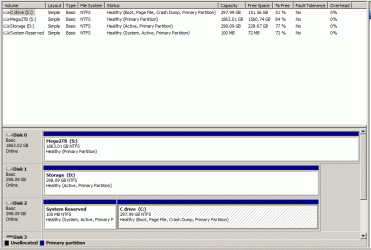
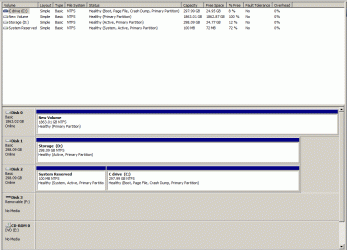
The attached gif shows the current state of the system. As you can see, the New Volume has no drive letter, and doesn't show up in 'My Computer'.
The drive's 'Right Click' options are:
Mark partition as active
Change drive letter and paths
Format
Okay, I guess I could use the Change drive letter and paths option to allocate a drive letter and a label, but what about the Mark partition as active option? Isn't that intended only for a bootable\system drive? I'm pretty sure I read that here on the W7 forum.
But how does that jell with my D drive (see the gif) which is also shown as 'Active', even though it has no OS on it?
Advice please
I used Disk Management to format the drive (MBR, my motherboard doesn't have UEFI) and it took around 3 hours. But afterwards, reading about it on the Internet, it seems that I should have partitioned the drive first.
The attached gif shows the current state of the system. As you can see, the New Volume has no drive letter, and doesn't show up in 'My Computer'.
The drive's 'Right Click' options are:
Mark partition as active
Change drive letter and paths
Format
Okay, I guess I could use the Change drive letter and paths option to allocate a drive letter and a label, but what about the Mark partition as active option? Isn't that intended only for a bootable\system drive? I'm pretty sure I read that here on the W7 forum.
But how does that jell with my D drive (see the gif) which is also shown as 'Active', even though it has no OS on it?
Advice please
Attachments
My Computer
At a glance
Win7 Ultimate SP1Intel Core i5 9400 Coffee Lake 14nm16G DDR4NVidia GeForce GTX 960
- Computer type
- PC/Desktop
- Computer Manufacturer/Model Number
- My build
- OS
- Win7 Ultimate SP1
- CPU
- Intel Core i5 9400 Coffee Lake 14nm
- Motherboard
- Asus Prime H310M-E R2.0 (LGA1151)
- Memory
- 16G DDR4
- Graphics Card(s)
- NVidia GeForce GTX 960
- Sound Card
- Realtek High Definition Audio (mobo)
- Monitor(s) Displays
- Asus PA248 24" 16:10 format
- Screen Resolution
- 1920x1200@59Hz
- Hard Drives
- 1863GB Seagate ST2000DM
3726GB Seagate ST4000DM
1863GB Seagate ST2000DM
6TB Seagate
465GB NVMe Samsung SSD 970
- PSU
- 750G2
- Case
- Tower
- Cooling
- Standard
- Keyboard
- USB
- Mouse
- USB
- Internet Speed
- 920Mbs/480Mbs
- Antivirus
- Malwarebytes
- Browser
- Firefox