New Build CPU temp?

77273GU

New member
Power User
Local time
10:08 PM
Messages
62
Hello, Built the system in my specs today. I'm using the stock cooler. I bought an H60 but it was missing hardware so that will be going on soon hopefully. When I sit BiOS, haven't installed 7 yet, the cpu temp is 52c with a MB temp of 22. Is this high for the 1st start and will it get better after use? Should I get some new thermal paste or will this be OK until I get the hardware for the H60?

Dont know how I screwed up the cooler, set it on, push the 4 pins in an X pattern and its on. :confused:
 

My Computer

Computer type
PC/Desktop
Computer Manufacturer/Model Number
Born on date-10-7-2011
OS
Windows 7 Home Premium 64bit
CPU
Intel Core i5-2500 K
Motherboard
Asus P8Z68-V Bios 0902
Memory
8GB J Skill- F312800CLD-8GBXM
Graphics Card(s)
Saphire 6870 & Intel HD 3000
Sound Card
Realtek HD Audio
Monitor(s) Displays
Asus VE258Q
Screen Resolution
1920 X 1080
Hard Drives
64g Crucial M4 SSD, 750g WD Caviar Black
PSU
Corsair TX 650 V2
Case
Corsair Carbide 400R
Cooling
Corsair H60
Keyboard
CM Storm Trigger Cherry Blues
Mouse
Logitech G500, G700
its not bad but it is a bit high for that CPU Model have you ensured that the thermal paste was applied correctly and that the cooler is firmly attached? (there should be no real movement in the cooler if you wobble it) and is the fan spinning (stupid question i know but with the 1155 series CPU i ran one without a heat sink and it only hit 90 degrees Celsius and was mostly stable)
 

My Computer

Computer Manufacturer/Model Number
Yours Truly
OS
Windows 7 Ultimate x64
CPU
Intel Core i5-2300
Motherboard
Gigabyte
Memory
8GB
Graphics Card(s)
Palit GTX 460
Sound Card
Onboard
Monitor(s) Displays
Asus 21Inch
Hard Drives
3 500GB In Raid-0 Split into 3 Partitions
PSU
NRP-MC8D2, 800W, 80+ Bronze, Modular
Case
Silverstone Raven RV-01
Cooling
Stock
Keyboard
Logitech G15
Mouse
Logitech Laser Mouse
Internet Speed
7.2MB/ps
Hello, Built the system in my specs today. I'm using the stock cooler. I bought an H60 but it was missing hardware so that will be going on soon hopefully. When I sit BiOS, haven't installed 7 yet, the cpu temp is 52c with a MB temp of 22. Is this high for the 1st start and will it get better after use? Should I get some new thermal paste or will this be OK until I get the hardware for the H60?

Dont know how I screwed up the cooler, set it on, push the 4 pins in an X pattern and its on. :confused:

Whilst temps do stabilise after initial use, 52C is too high for a system at idle. There are dozens, if not hundreds of threads here about CPU and system temps being too high.

I think most would agree that good airflow through the case is one of the critical factors. The right amount of paste and solid contact across the surface of the cpu die being another.

But rather than repeat the execellent support provided by many on these forums perhaps you could do a search here. There are lots of things you can try.

I had similar problems. Perhaps you could start here http://www.sevenforums.com/hardware-devices/136494-good-cooler-i7-920-oc-3.html#post1173018

or here
http://www.sevenforums.com/performance-maintenance/150785-i7950-tj-cooling-problems.html#post1293939

good luck
 

My Computer

Computer type
PC/Desktop
Computer Manufacturer/Model Number
Home Made
OS
Linux Mint 17 Cinnamon | Win 7 Ult x64
CPU
Intel I7-3770K @ 4.2ghz
Motherboard
ASRock Extreme 4
Memory
32GB G-Skill C10Q
Graphics Card(s)
EVGA GTX 670 2GB SC
Sound Card
Creative Fatality ExtremeGamer
Monitor(s) Displays
LG E2742V x 2
Screen Resolution
1920x1080
Hard Drives
256GB Vertex 4 SSD
2TB Seagate ST2000DM001
1TB Seagate ST1000DM003
PSU
Corsair HX 650
Case
HAF 932 advanced
Cooling
Corsair H100i liquid cooler
Keyboard
Logitech Wireless
Mouse
Logitech Wireless
Internet Speed
OptusNet NBN 100/40
Antivirus
Malwarebytes
Browser
Firefox 30
Other Info
Router: Sagemcom F@st 3846 Crippled by Optus.
Agree with the case ventilation comments etc. I found the stock cooler inadequate for my liking on my i7 2600k. A relatively low cost Hyper 212+ reduces temperatures by 15 Celsius or more.
With a Motherboard at 25 Celsius my highest core is less than 30 C. Under Prime95 load or heavy Handbrake video encode the max core temp is ~50 C.

So I think I'd get your other cooler on and you should see a big difference.
By the way I used artic silver 5 compound and followed their instructions on their website.
 

My Computer

Computer type
PC/Desktop
Computer Manufacturer/Model Number
Own build
OS
Windows 7x64 Home Premium SP1
CPU
Intel i7 2600k
Motherboard
ASUS P8Z68 Deluxe
Memory
G.Skill Ripjaws (DDR3-1600) 2x4GB
Graphics Card(s)
Nvidia GeForce GTS 450; Intel HD Graphics 3000(GT2+)
Monitor(s) Displays
Dell Ultrasharp IPS panel U2311H, Samsung SyncMaster P2350
Screen Resolution
1920x1080
Hard Drives
Samsung 850 Pro SSD 256GB, Samsung SSD 840 120GB, Seagates 1TB Barracuda ST31000528AS x2
PSU
Seasonic M12II 520W
Case
Lian Li Lancool PC-K60
Cooling
Case: 1x120mm, 3x140mm CPU: Hyper 212+
Keyboard
Logitech MK520 (wireless)
Mouse
Logitech MK520
Internet Speed
6-7 Mbps
Antivirus
Norton Security Premium, Malwarebytes on 2 (MSE on 3rd PC)
Browser
FireFox
Other Info
Audio: Logitech Z523 2.1
Thanks for the replies. I knew 53c was high before I posted, I was just hoping this was OK at 1st start and would stabilize after a break in period. Guess not. :(

I used the thermal paste that came with the cooler, Ill order some now.

The temps were with an open case. For intake I have 2 120mm in front and 1 120mm side. For exhaust I have 2 140mm top.
 

My Computer

Computer type
PC/Desktop
Computer Manufacturer/Model Number
Born on date-10-7-2011
OS
Windows 7 Home Premium 64bit
CPU
Intel Core i5-2500 K
Motherboard
Asus P8Z68-V Bios 0902
Memory
8GB J Skill- F312800CLD-8GBXM
Graphics Card(s)
Saphire 6870 & Intel HD 3000
Sound Card
Realtek HD Audio
Monitor(s) Displays
Asus VE258Q
Screen Resolution
1920 X 1080
Hard Drives
64g Crucial M4 SSD, 750g WD Caviar Black
PSU
Corsair TX 650 V2
Case
Corsair Carbide 400R
Cooling
Corsair H60
Keyboard
CM Storm Trigger Cherry Blues
Mouse
Logitech G500, G700
If you need help, her are the instructions from artic silver 5
here is a video that shows another good method with an aftermarket CPU Cooler.


My Computers

System One System Two

  • Computer type
    PC/Desktop
    Computer Manufacturer/Model Number
    ALWAYS UNDER CONSTRUCTION
    OS
    Windows 11 Pro
    CPU
    Ryzen 9 5900X
    Motherboard
    Asus X570 Crosshair Viii Hero
    Memory
    32GB G Skill DDR4-3600
    Graphics Card(s)
    EVGA RTX 3080 FTW 3 Ultra
    Sound Card
    On Board/Sennheiser PC37X Headset
    Monitor(s) Displays
    3 X Asus 27"
    Screen Resolution
    2560x1440
    Hard Drives
    2 X 1 TB NVME drives
    PSU
    EVGA 850
    Case
    Phanteks Eclipse P400A
    Cooling
    EVGA 280 AIO
    Keyboard
    Logitech G510s/ Logitech G13
    Mouse
    Logitech G502
    Internet Speed
    24/1
    Antivirus
    ESET/MBAM Pro/SAS Pro
    Browser
    Chrome/ Firefox/ Edge
  • Computer type
    Laptop
    System Manufacturer/Model Number
    Dell 16 Plus
    OS
    Windows 11 Pro
    CPU
    Intel Ultra 9 288V
    Memory
    32 GB LPDDR5X 8533
    Monitor(s) Displays
    16" Mini-LED HDR600 Touch 90 Hz
    Screen Resolution
    2560X1600
    Hard Drives
    1 TB NVME
@essenbe Thats what I ordered, picked up some DECMiflex fan filters also.
 

My Computer

Computer type
PC/Desktop
Computer Manufacturer/Model Number
Born on date-10-7-2011
OS
Windows 7 Home Premium 64bit
CPU
Intel Core i5-2500 K
Motherboard
Asus P8Z68-V Bios 0902
Memory
8GB J Skill- F312800CLD-8GBXM
Graphics Card(s)
Saphire 6870 & Intel HD 3000
Sound Card
Realtek HD Audio
Monitor(s) Displays
Asus VE258Q
Screen Resolution
1920 X 1080
Hard Drives
64g Crucial M4 SSD, 750g WD Caviar Black
PSU
Corsair TX 650 V2
Case
Corsair Carbide 400R
Cooling
Corsair H60
Keyboard
CM Storm Trigger Cherry Blues
Mouse
Logitech G500, G700
I ran the stock cooler on an i5-2500 for a while. My CPU idle temps were never above the high 30s.

That's in a warm room (around 80 F or 26 C) with a closed case.

So you are at least 10 degrees high, I'd say.

You say the temps were with an open case. Temps might be lower with a closed case assuming the case has decent fans and airflow.

Likewise, you might gain a couple of degrees with Arctic Silver.

I'd be more suspicious of a heatsink that was not quite seated. That 4 pin mounting setup can be fussy and frustrating--even more so with a third party cooler.

You also might find things run cooler when Windows is installed.
 

My Computer

Computer type
PC/Desktop
Computer Manufacturer/Model Number
Ignatz Special; 4 speed manual gearbox; factory air conditioning; one of one
OS
Windows 7 Home Premium SP1, 64-bit
CPU
Intel Skylake i5-6600K, not overclocked
Motherboard
AsRock Z170M Extreme 4, micro ATX
Memory
8 GB HyperX DDR4-2666 (2 x 4 GB)
Graphics Card(s)
none; graphics are integrated on CPU
Sound Card
onboard: Realtek ALC1150; external: USB Behringer UF0-202
Monitor(s) Displays
Dell S2340M 23 inch IPS
Screen Resolution
1600 x 900
Hard Drives
System: Crucial MX100 series SSD, 128 GB;
Data: Samsung Spinpoint 103SJ, 1 TB;
Backup: WD Caviar Green WD30EZRX-00D8PB0, 3 TB
PSU
Rosewill SilentNight 500 watt fanless, semi-modular
Case
Antec Solo II
Cooling
Noctua NH-U12S; Noctua F12 intake, Noctua S12A exhaust
Keyboard
Microsoft 200 6JH-00001 USB
Mouse
Dell or Microsoft optical wired; USB
Antivirus
Microsoft Security Essentials and Malwarebytes Premium
Browser
Pale Moon
Other Info
All fans PWM; speeds at idle: CPU circa 500 rpm; intake circa 600 rpm; exhaust circa 600 rpm; CPU temps 27 idle and 47 C load in a warm room (27 C/81 F) when running Intel Extreme Tuning Utility stress test.
Dont know how I screwed up the cooler, set it on, push the 4 pins in an X pattern and its on. :confused:

Going by your specs, your case has a "motherboard cutout".
Take a look at the back......you should be able to see if the stock cooler push pins are catching.
 

My Computer

Computer type
PC/Desktop
Computer Manufacturer/Model Number
Custom Build
OS
Windows 7 Home Premium 64 bit
CPU
Intel Core i7-4790
Motherboard
GA-Z87X-D3H
Memory
G.SKILL 8GB (2 x 4GB) DDR3 F3-10666CL9D-8GBNT
Graphics Card(s)
AMD Radeon R7 250
Sound Card
Realtek ALC892
Monitor(s) Displays
Samsung UN32EH5000, Dell 1703FPT
Screen Resolution
1920 x 1080, 1280 x 1024
Hard Drives
WD5003AZEX
WD10EZEX
Samsung HD103SJ
Samsung 128 GB 840 PRO
PSU
SeaSonic M12II SS-500GM
Case
Fractal Design Define R4
Cooling
Zalman CNPS9900ALED
Keyboard
Logitech K800
Mouse
Logitech M705
Internet Speed
16 Mbps
Antivirus
Avast
Browser
Firefox
Other Info
Bose Companion 2 Multimedia Speakers
I would go to the articsilver website for instructions on application of the thermal paste. I used their recommendation of a thin line (not a "grain of rice" in the centre) along the centre of the i7 cores in my case.
I also used high purity isopropyl alcohol for cleaning which should be readily available and cheaper than their cleaners.
 

My Computer

Computer type
PC/Desktop
Computer Manufacturer/Model Number
Own build
OS
Windows 7x64 Home Premium SP1
CPU
Intel i7 2600k
Motherboard
ASUS P8Z68 Deluxe
Memory
G.Skill Ripjaws (DDR3-1600) 2x4GB
Graphics Card(s)
Nvidia GeForce GTS 450; Intel HD Graphics 3000(GT2+)
Monitor(s) Displays
Dell Ultrasharp IPS panel U2311H, Samsung SyncMaster P2350
Screen Resolution
1920x1080
Hard Drives
Samsung 850 Pro SSD 256GB, Samsung SSD 840 120GB, Seagates 1TB Barracuda ST31000528AS x2
PSU
Seasonic M12II 520W
Case
Lian Li Lancool PC-K60
Cooling
Case: 1x120mm, 3x140mm CPU: Hyper 212+
Keyboard
Logitech MK520 (wireless)
Mouse
Logitech MK520
Internet Speed
6-7 Mbps
Antivirus
Norton Security Premium, Malwarebytes on 2 (MSE on 3rd PC)
Browser
FireFox
Other Info
Audio: Logitech Z523 2.1
You say its 52C in the bios in your 1st post.

Normally the temperature is different by around 10C by the time you get into windows. I know mine is.

Cheers

Paul.

Edited to add: I just checked mine. It's a pretty cool day here so temps are low but in the bios my temp is 39C and in windows its 27C
 

My Computer

OS
Windows 7 Professional 64 bit
  • Like
Reactions: mjf
Missed that one Paulpicks21. The temps from just sitting in my AUSUS UEFI BIOS are a lot higher. I guess it may be because the BIOS is running the CPU quite hard??????
 

My Computer

Computer type
PC/Desktop
Computer Manufacturer/Model Number
Own build
OS
Windows 7x64 Home Premium SP1
CPU
Intel i7 2600k
Motherboard
ASUS P8Z68 Deluxe
Memory
G.Skill Ripjaws (DDR3-1600) 2x4GB
Graphics Card(s)
Nvidia GeForce GTS 450; Intel HD Graphics 3000(GT2+)
Monitor(s) Displays
Dell Ultrasharp IPS panel U2311H, Samsung SyncMaster P2350
Screen Resolution
1920x1080
Hard Drives
Samsung 850 Pro SSD 256GB, Samsung SSD 840 120GB, Seagates 1TB Barracuda ST31000528AS x2
PSU
Seasonic M12II 520W
Case
Lian Li Lancool PC-K60
Cooling
Case: 1x120mm, 3x140mm CPU: Hyper 212+
Keyboard
Logitech MK520 (wireless)
Mouse
Logitech MK520
Internet Speed
6-7 Mbps
Antivirus
Norton Security Premium, Malwarebytes on 2 (MSE on 3rd PC)
Browser
FireFox
Other Info
Audio: Logitech Z523 2.1
Something like that yeah, I think it could be that none of the things like Speedstep are active until you reach windows.


Edited to add: I would expect when the OP has installed windows he will see temps of around 40C which in turn may drop more over the next few days as the thermal paste cures.
 
Last edited:

My Computer

OS
Windows 7 Professional 64 bit
A lot of good info thanks. I was going to wait until Mon or Tues when I received the AS5 to install 7 and set up everything but after reading today Ill give it a go this weekend. Time permitting.

@p5bdkw, Thats the first thing I checked. They are sticking through and the tops of the pins are all aligned the same.

@mjf, I checked out the web site and thats the method Ill use.

@Paulpicks21, Now thats some good news. I was hoping it would be something along those lines.

Glad I didnt take the cooler off.
 

My Computer

Computer type
PC/Desktop
Computer Manufacturer/Model Number
Born on date-10-7-2011
OS
Windows 7 Home Premium 64bit
CPU
Intel Core i5-2500 K
Motherboard
Asus P8Z68-V Bios 0902
Memory
8GB J Skill- F312800CLD-8GBXM
Graphics Card(s)
Saphire 6870 & Intel HD 3000
Sound Card
Realtek HD Audio
Monitor(s) Displays
Asus VE258Q
Screen Resolution
1920 X 1080
Hard Drives
64g Crucial M4 SSD, 750g WD Caviar Black
PSU
Corsair TX 650 V2
Case
Corsair Carbide 400R
Cooling
Corsair H60
Keyboard
CM Storm Trigger Cherry Blues
Mouse
Logitech G500, G700
  • Like
Reactions: JMH
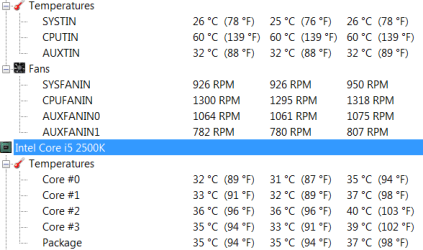
Update, I installed 7 today and checked the temps with SIW. All cores were in in the low 30c range. :cool:

Temps.PNG

What is the CPUTIN temp? Thats at 60c.

Thanks again
 

My Computer

Computer type
PC/Desktop
Computer Manufacturer/Model Number
Born on date-10-7-2011
OS
Windows 7 Home Premium 64bit
CPU
Intel Core i5-2500 K
Motherboard
Asus P8Z68-V Bios 0902
Memory
8GB J Skill- F312800CLD-8GBXM
Graphics Card(s)
Saphire 6870 & Intel HD 3000
Sound Card
Realtek HD Audio
Monitor(s) Displays
Asus VE258Q
Screen Resolution
1920 X 1080
Hard Drives
64g Crucial M4 SSD, 750g WD Caviar Black
PSU
Corsair TX 650 V2
Case
Corsair Carbide 400R
Cooling
Corsair H60
Keyboard
CM Storm Trigger Cherry Blues
Mouse
Logitech G500, G700
I don't know but mine always reads 62C so for me I'm assuming it isn't a valid sensor reading....I could be wrong.

Edit: sometimes it can flash up to 127C momentarily....I ignore it.
 
Last edited:

My Computer

Computer type
PC/Desktop
Computer Manufacturer/Model Number
Own build
OS
Windows 7x64 Home Premium SP1
CPU
Intel i7 2600k
Motherboard
ASUS P8Z68 Deluxe
Memory
G.Skill Ripjaws (DDR3-1600) 2x4GB
Graphics Card(s)
Nvidia GeForce GTS 450; Intel HD Graphics 3000(GT2+)
Monitor(s) Displays
Dell Ultrasharp IPS panel U2311H, Samsung SyncMaster P2350
Screen Resolution
1920x1080
Hard Drives
Samsung 850 Pro SSD 256GB, Samsung SSD 840 120GB, Seagates 1TB Barracuda ST31000528AS x2
PSU
Seasonic M12II 520W
Case
Lian Li Lancool PC-K60
Cooling
Case: 1x120mm, 3x140mm CPU: Hyper 212+
Keyboard
Logitech MK520 (wireless)
Mouse
Logitech MK520
Internet Speed
6-7 Mbps
Antivirus
Norton Security Premium, Malwarebytes on 2 (MSE on 3rd PC)
Browser
FireFox
Other Info
Audio: Logitech Z523 2.1
Back
Top