New Computer, BSOD in windows 7

pubbe

New member
Local time
6:36 AM
Messages
4
Hi
I bought a new computer and started getting lots of bluescreens. I did a memtest and got lots of errors, so I sent back my ram. Today I got some new ram, and I still get bluescreens and memtest errors. I think the bluescreen I got was different from the ones I got last time though. I would really appreciate if anyone can have a look at the dump file for me, cause I'm not really that good with it myself.

My computer setup is:
Motherboard: ASUS pQ5 SE2, P45, Socket-775
Processor: Intel Core 2 Quad Q9550 2.83GHz, 1333MHz
Graphics card: XFX Geforce GTS 250 1GB Physx CUDA
RAM: Corsair TWIN2X PC6400C4DHX DDR2 4GB kit
w/2x 2GB XMS2-6400 dimm's CL4-4-4-12 800MHz, DHX

Only got one BSOD so far, simply for the reason that I don't really get them while at desktop, only when I'm playing games. Put the .dmp in a rar and attached it. Like I said, any help is greatly appreciated!
 

My Computer

OS
Windows 7 64bit
if anyone could please analyze the dump file for me, that would be great ;) I've tried to do it myself, but failed cause I'm pretty new to this. If you need more info please tell me. I really appreciate it if someone could spare the time.
 

My Computer

OS
Windows 7 64bit
if anyone could please analyze the dump file for me, that would be great ;) I've tried to do it myself, but failed cause I'm pretty new to this. If you need more info please tell me. I really appreciate it if someone could spare the time.

Pubbe

I took a quick look at it and afd.sys caused it. ita part of the tcpip stack. Hl2.exe (a steam file) was involved. the way it looks to me the game (hl2.exe) made a request to the server (tcpip) incorrectly corrpting the memory pool

things you can do: A couple of the drivers are fairly old. I would reinstalling the wifi/lan driver.

From the looks of it I wonder: are you overclocking? are you having a heat issue in CPU/GPU? check temps
I would also run a system file check to verify and fix system files. Its run by going to seach and typing cmd>right click run as admin>sfc scannow

Microsoft (R) Windows Debugger Version 6.11.0001.404 X86
Copyright (c) Microsoft Corporation. All rights reserved.


Loading Dump File [C:\Users\K\Desktop\101609-29328-01.dmp]
Mini Kernel Dump File: Only registers and stack trace are available

Symbol search path is: SRV*d:\symbols*Symbol information
Executable search path is:
Windows 7 Kernel Version 7600 MP (4 procs) Free x64
Product: WinNt, suite: TerminalServer SingleUserTS
Built by: 7600.16385.amd64fre.win7_rtm.090713-1255
Machine Name:
Kernel base = 0xfffff800`02861000 PsLoadedModuleList = 0xfffff800`02a9ee50
Debug session time: Fri Oct 16 10:08:17.350 2009 (GMT-4)
System Uptime: 0 days 2:13:33.301
Loading Kernel Symbols
...............................................................
................................................................
................
Loading User Symbols
Loading unloaded module list
.......
*******************************************************************************
* *
* Bugcheck Analysis *
* *
*******************************************************************************

Use !analyze -v to get detailed debugging information.

BugCheck C5, {fffff8807fcd3d18, 2, 0, fffff80002a059bb}

Probably caused by : afd.sys ( afd!AfdPollGetInfo+21 )

Followup: MachineOwner
---------

2: kd> !analyze -v
*******************************************************************************
* *
* Bugcheck Analysis *
* *
*******************************************************************************

DRIVER_CORRUPTED_EXPOOL (c5)
An attempt was made to access a pageable (or completely invalid) address at an
interrupt request level (IRQL) that is too high. This is
caused by drivers that have corrupted the system poo
l. Run the driver
verifier against any new (or suspect) drivers, and if that doesn't turn up
the culprit, then use gflags to enable special pool.
Arguments:
Arg1: fffff8807fcd3d18, memory referenced
Arg2: 0000000000000002, IRQL
Arg3: 0000000000000000, value 0 = read operation, 1 = write operation
Arg4: fffff80002a059bb, address which referenced memory

Debugging Details:
------------------


BUGCHECK_STR: 0xC5_2

CURRENT_IRQL: 2

FAULTING_IP:
nt!ExAllocatePoolWithTag+5eb
fffff800`02a059bb 4c8ba42408010000 mov r12,qword ptr [rsp+108h]

CUSTOMER_CRASH_COUNT: 1

DEFAULT_BUCKET_ID: VISTA_DRIVER_FAULT

PROCESS_NAME: hl2.exe


STACK_COMMAND: kb

FOLLOWUP_IP:
afd!AfdPollGetInfo+21
fffff880`02c93371 488903 mov qword ptr [rbx],rax

SYMBOL_STACK_INDEX: 5

SYMBOL_NAME: afd!AfdPollGetInfo+21

FOLLOWUP_NAME: MachineOwner

MODULE_NAME: afd

IMAGE_NAME: afd.sys

DEBUG_FLR_IMAGE_TIMESTAMP: 4a5bc184

FAILURE_BUCKET_ID: X64_0xC5_2_afd!AfdPollGetInfo+21

BUCKET_ID: X64_0xC5_2_afd!AfdPollGetInfo+21

Followup: MachineOwner
---------
 

My Computer

Computer Manufacturer/Model Number
HP Pavillion dv-7 1005 Tx
OS
Win 8 Release candidate 8400
CPU
[email protected]
Memory
4 gigs
Graphics Card(s)
Nvidia 9600M
Sound Card
HD built-in
Monitor(s) Displays
17" Wxga
Screen Resolution
1440x900
Cooling
none
Internet Speed
45Mb down 5Mb up
Thank you so much.

I will try to install some new drivers then.

No, I'm not overclocking, although I did try to set some different volt values in bios for my RAM before I sent the old RAM back in and got new ones. I set the values to what they recommended at the corsair forum.

Do you think maybe there could be something wrong with my components?

Again, thanks for the help
 

My Computer

OS
Windows 7 64bit
Thank you so much.

I will try to install some new drivers then.

No, I'm not overclocking, although I did try to set some different volt values in bios for my RAM before I sent the old RAM back in and got new ones. I set the values to what they recommended at the corsair forum.

Do you think maybe there could be something wrong with my components?

Again, thanks for the help
\
Pubbe

I would also run a memory test by downloading memtestx86 and running it overnight. if you keep having problems you might want to put the voltages back to default.

good luck
 

My Computer

Computer Manufacturer/Model Number
HP Pavillion dv-7 1005 Tx
OS
Win 8 Release candidate 8400
CPU
[email protected]
Memory
4 gigs
Graphics Card(s)
Nvidia 9600M
Sound Card
HD built-in
Monitor(s) Displays
17" Wxga
Screen Resolution
1440x900
Cooling
none
Internet Speed
45Mb down 5Mb up
If you're getting memory errors from the memory test, then there's an issue with either the memory or the motherboard.

I have read of issues with the P5Q series of motherboards having voltage issues also - but that's way outside of my abilities.
 

My Computer

Computer Manufacturer/Model Number
Home built (x64), Lenovo x61s Tablet, Samsung Netbook
OS
Win7 x64 + x86
CPU
Intel i7 920, other Intel chips, and the Atom in the netbook
Motherboard
Asus P6T Deluxe
Memory
12 gB; 4 gB Lenovo; 1 gB Samsung netbook
Graphics Card(s)
ATI 4870
Sound Card
Yes, I have one of these
Monitor(s) Displays
32" Sharp Aquos TV
Screen Resolution
800x600 - I have vision issues
Hard Drives
4 - 150 gB Velociraptors in RAID 5
Promise controller
PSU
1000 watt (can't recall the brand)
Case
Antec 300
Cooling
Big honking cooler that was rated highly at Toms Hardware
Keyboard
Microsoft Natural
Mouse
Logitech Trackman
Internet Speed
Cable
Other Info
GeekSquad UPS
CyberPower UPS
DLink DNS-323 NAS (2 tB)
Netgear wireless router as an access point
Netgear wired router FSV-318
Home network consists of
4 desktop computers (2 Vista, 2 Win7)
1 netbook (Win7)
4 laptop computers (XP, 2-Vista, Win7)
Wii and XBox 360
Okidok. Thanks for the replies ;)
 

My Computer

OS
Windows 7 64bit
did any of this work, by any chance? i'm having the same problem and i've done quite a few things to try and fix it, but nothing worked thus far. i tried updating the BIOS, installing chipset drivers off my board's site and reinstalling the network drivers (as you mentioned). my computer seems to be holding up at the moment, but i don't know how long it's gonna last. i'm also burning memorytest86 and i'm gonna run it overnight to make sure i don't have any memory issues. but in case any of that doesn't work, i was hoping that you might have another solution.

edit:
i noticed that it doesn't just happen when i'm playing Half-Life 2. it seems that Steam by itself will trigger it because there are times when i'll be away from my computer, come back and the system's restarted in my absence (i get the "Windows has recovered from an error" message, so it's not from auto updates or a bad power supply or anything). i looked it up and i have the latest version that has Windows 7 support and all that.
 

My Computer

OS
Windows 7 Professional 32-Bit
CPU
AMD Phenom II X2 545 3GHz
Motherboard
Gigabyte MA785GM-US2H
Memory
3GB DDR2-800
Graphics Card(s)
PNY GeForce 9800 GT 512MB
Sound Card
Onboard sound
Monitor(s) Displays
e17T4 17"
Screen Resolution
1280x1024
Hard Drives
Western Digital Caviar 320GB IDE
PSU
Tiger 450W
Case
eMachines C6415 mATX
Cooling
AMD Stock Cooler
Keyboard
Logitech EX110 Wireless Keyboard
Mouse
Logitech EX110 Wireless Mouse
Internet Speed
Verizon FiOS
Other Info
Zonealarm Internet Security Suite 9 for Antivirus and Firewall
Hi


First lets asume you arent

Overclocking

Running A RAID

Have a "odd" device attached like a fingerprint reader, card reader, etc

You shoul run a system file checker to verify and repair system fileds

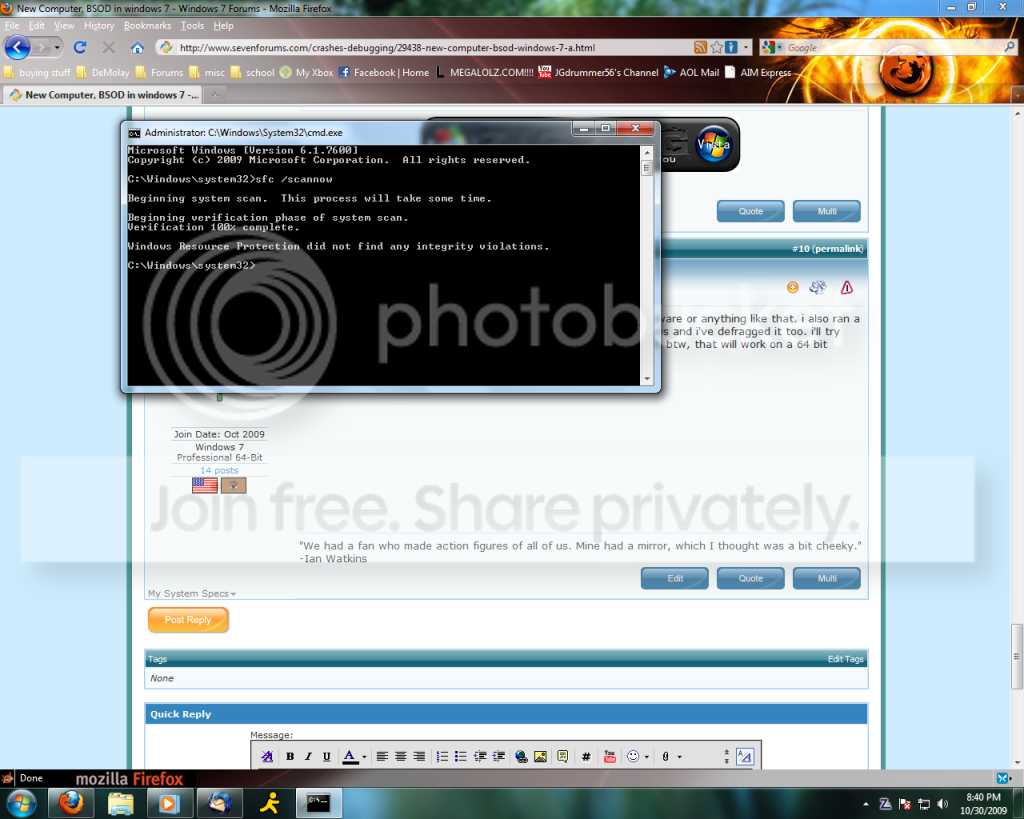
You do that by typing cmd in search>right click and run as admn> sfc /scannow

Let us know the results

You should also run a memory test like memtestx86 opreferable overnight

Ken
 

My Computer

Computer Manufacturer/Model Number
HP Pavillion dv-7 1005 Tx
OS
Win 8 Release candidate 8400
CPU
[email protected]
Memory
4 gigs
Graphics Card(s)
Nvidia 9600M
Sound Card
HD built-in
Monitor(s) Displays
17" Wxga
Screen Resolution
1440x900
Cooling
none
Internet Speed
45Mb down 5Mb up
you guessed right. i'm not overclocking, RAIDing, have any odd hardware or anything like that. i also ran a checkdisk earlier which fixed my system from the previous bluescreens and i've defragged it too. i'll try that command prompt thing and i'll leave memtest86 going overnight. btw, that will work on a 64 bit system, right?
 

My Computer

OS
Windows 7 Professional 32-Bit
CPU
AMD Phenom II X2 545 3GHz
Motherboard
Gigabyte MA785GM-US2H
Memory
3GB DDR2-800
Graphics Card(s)
PNY GeForce 9800 GT 512MB
Sound Card
Onboard sound
Monitor(s) Displays
e17T4 17"
Screen Resolution
1280x1024
Hard Drives
Western Digital Caviar 320GB IDE
PSU
Tiger 450W
Case
eMachines C6415 mATX
Cooling
AMD Stock Cooler
Keyboard
Logitech EX110 Wireless Keyboard
Mouse
Logitech EX110 Wireless Mouse
Internet Speed
Verizon FiOS
Other Info
Zonealarm Internet Security Suite 9 for Antivirus and Firewall
here's the shot of the command prompt thing. says it's clean.

commandpromptshot.png
 

My Computer

OS
Windows 7 Professional 32-Bit
CPU
AMD Phenom II X2 545 3GHz
Motherboard
Gigabyte MA785GM-US2H
Memory
3GB DDR2-800
Graphics Card(s)
PNY GeForce 9800 GT 512MB
Sound Card
Onboard sound
Monitor(s) Displays
e17T4 17"
Screen Resolution
1280x1024
Hard Drives
Western Digital Caviar 320GB IDE
PSU
Tiger 450W
Case
eMachines C6415 mATX
Cooling
AMD Stock Cooler
Keyboard
Logitech EX110 Wireless Keyboard
Mouse
Logitech EX110 Wireless Mouse
Internet Speed
Verizon FiOS
Other Info
Zonealarm Internet Security Suite 9 for Antivirus and Firewall
so, i kinda crashed last night and forgot to let memtest run. so i'm gonna start it now and let it go for a few hours and then report back.
 

My Computer

OS
Windows 7 Professional 32-Bit
CPU
AMD Phenom II X2 545 3GHz
Motherboard
Gigabyte MA785GM-US2H
Memory
3GB DDR2-800
Graphics Card(s)
PNY GeForce 9800 GT 512MB
Sound Card
Onboard sound
Monitor(s) Displays
e17T4 17"
Screen Resolution
1280x1024
Hard Drives
Western Digital Caviar 320GB IDE
PSU
Tiger 450W
Case
eMachines C6415 mATX
Cooling
AMD Stock Cooler
Keyboard
Logitech EX110 Wireless Keyboard
Mouse
Logitech EX110 Wireless Mouse
Internet Speed
Verizon FiOS
Other Info
Zonealarm Internet Security Suite 9 for Antivirus and Firewall
ok, so here's the report from memtest. no errors reported.

btw, sorry for double (triple) posting if there's a rule against that. i do that so if people are subscribed to the thread, they'll get the notification that there's been activity and check back. but i know some forums have problems with that, so sorry if i'm in violation of anything.
 

My Computer

OS
Windows 7 Professional 32-Bit
CPU
AMD Phenom II X2 545 3GHz
Motherboard
Gigabyte MA785GM-US2H
Memory
3GB DDR2-800
Graphics Card(s)
PNY GeForce 9800 GT 512MB
Sound Card
Onboard sound
Monitor(s) Displays
e17T4 17"
Screen Resolution
1280x1024
Hard Drives
Western Digital Caviar 320GB IDE
PSU
Tiger 450W
Case
eMachines C6415 mATX
Cooling
AMD Stock Cooler
Keyboard
Logitech EX110 Wireless Keyboard
Mouse
Logitech EX110 Wireless Mouse
Internet Speed
Verizon FiOS
Other Info
Zonealarm Internet Security Suite 9 for Antivirus and Firewall
and here's a ZIP file of my BSOD dumps since i've been having this problem (pretty sure they're all from the same issue). by the way, if anybody would like to jump in and try to make sense of my last 4 posts, it'd be much obliged. i'd kind of like to get this fixed and considering how many people are out there on this forum, i'm sure one of you must be able to make heads or tails of this stuff.

/edit:
my computer just did it again. i won't bother to upload the dump file because i doubt it has anything different in it than the ones in that file.
 

My Computer

OS
Windows 7 Professional 32-Bit
CPU
AMD Phenom II X2 545 3GHz
Motherboard
Gigabyte MA785GM-US2H
Memory
3GB DDR2-800
Graphics Card(s)
PNY GeForce 9800 GT 512MB
Sound Card
Onboard sound
Monitor(s) Displays
e17T4 17"
Screen Resolution
1280x1024
Hard Drives
Western Digital Caviar 320GB IDE
PSU
Tiger 450W
Case
eMachines C6415 mATX
Cooling
AMD Stock Cooler
Keyboard
Logitech EX110 Wireless Keyboard
Mouse
Logitech EX110 Wireless Mouse
Internet Speed
Verizon FiOS
Other Info
Zonealarm Internet Security Suite 9 for Antivirus and Firewall
and here's a ZIP file of my BSOD dumps since i've been having this problem (pretty sure they're all from the same issue). by the way, if anybody would like to jump in and try to make sense of my last 4 posts, it'd be much obliged. i'd kind of like to get this fixed and considering how many people are out there on this forum, i'm sure one of you must be able to make heads or tails of this stuff.

/edit:
my computer just did it again. i won't bother to upload the dump file because i doubt it has anything different in it than the ones in that file.

mb

NotHIng you dont already know. This crash was caused by memory
.

I would suggest. running memtestx86 for hours, or as one of my collegues says "until it bleeds"
I would also run a system file check by typeing cmd in search>right click and run as admin>
sfc /scannow

If you are overclocking stop.

Ken


quote by our most acidic one

Microsoft (R) Windows Debugger Version 6.11.0001.404 X86
Copyright (c) Microsoft Corporation. All rights reserved.


Loading Dump File [C:\Users\K\Desktop\103109-24445-01.dmp]
Mini Kernel Dump File: Only registers and stack trace are available

Symbol search path is: SRV*d:\symbols*Symbol information
Executable search path is:
Windows 7 Kernel Version 7600 MP (2 procs) Free x64
Product: WinNt, suite: TerminalServer SingleUserTS
Built by: 7600.16385.amd64fre.win7_rtm.090713-1255
Machine Name:
Kernel base = 0xfffff800`02a51000 PsLoadedModuleList = 0xfffff800`02c8ee50
Debug session time: Sat Oct 31 12:31:15.040 2009 (GMT-5)
System Uptime: 0 days 0:23:13.663
Loading Kernel Symbols
...............................................................
................................................................
.....................
Loading User Symbols
Loading unloaded module list
......
*******************************************************************************
* *
* Bugcheck Analysis *
* *
*******************************************************************************

Use !analyze -v to get detailed debugging information.

BugCheck 7F, {8, 80050031, 6f8, fffff80002ac89bc}

Probably caused by : ntkrnlmp.exe ( nt!KiDoubleFaultAbort+b2 )

Followup: MachineOwner
---------

1: kd> !analyze -v
*******************************************************************************
* *
* Bugcheck Analysis *
* *
*******************************************************************************

UNEXPECTED_KERNEL_MODE_TRAP (7f)
This means a trap occurred in kernel mode, and it's a trap of a kind
that the kernel isn't allowed to have/catch (bound trap) or that
is always instant death (double fault). The first number in the
bugcheck params is the number of the trap (8 = double fault, etc)
Consult an Intel x86 family manual to learn more about what these
traps are. Here is a *portion* of those codes:
If kv shows a taskGate
use .tss on the part before the colon, then kv.
Else if kv shows a trapframe
use .trap on that value
Else
.trap on the appropriate frame will show where the trap was taken
(on x86, this will be the ebp that goes with the procedure KiTrap)
Endif
kb will then show the corrected stack.
Arguments:
Arg1: 0000000000000008, EXCEPTION_DOUBLE_FAULT
Arg2: 0000000080050031
Arg3: 00000000000006f8
Arg4: fffff80002ac89bc


Debugging Details:
------------------


BUGCHECK_STR: 0x7f_8

CUSTOMER_CRASH_COUNT: 1

DEFAULT_BUCKET_ID: VISTA_DRIVER_FAULT

PROCESS_NAME: System

CURRENT_IRQL: 2

LAST_CONTROL_TRANSFER: from fffff80002ac2469 to fffff80002ac2f00

STACK_TEXT:
fffff880`009edc68 fffff800`02ac2469 : 00000000`0000007f 00000000`00000008 00000000`80050031 00000000`000006f8 : nt!KeBugCheckEx
fffff880`009edc70 fffff800`02ac0932 : 00000000`00000000 00000000`00000000 00000000`00000000 00000000`00000000 : nt!KiBugCheckDispatch+0x69
fffff880`009eddb0 fffff800`02ac89bc : 00000000`00000000 00000000`00000000 00000000`00000000 00000000`00000000 : nt!KiDoubleFaultAbort+0xb2
fffff880`0761dfb0 00000000`00000000 : 00000000`00000000 00000000`00000000 00000000`00000000 00000000`00000000 : nt!SepAccessCheck+0x1ac


STACK_COMMAND: kb

FOLLOWUP_IP:
nt!KiDoubleFaultAbort+b2
fffff800`02ac0932 90 nop

SYMBOL_STACK_INDEX: 2

SYMBOL_NAME: nt!KiDoubleFaultAbort+b2

FOLLOWUP_NAME: MachineOwner

MODULE_NAME: nt

IMAGE_NAME: ntkrnlmp.exe

DEBUG_FLR_IMAGE_TIMESTAMP: 4a5bc600

FAILURE_BUCKET_ID: X64_0x7f_8_nt!KiDoubleFaultAbort+b2

BUCKET_ID: X64_0x7f_8_nt!KiDoubleFaultAbort+b2


Followup: MachineOwner
 

My Computer

Computer Manufacturer/Model Number
HP Pavillion dv-7 1005 Tx
OS
Win 8 Release candidate 8400
CPU
[email protected]
Memory
4 gigs
Graphics Card(s)
Nvidia 9600M
Sound Card
HD built-in
Monitor(s) Displays
17" Wxga
Screen Resolution
1440x900
Cooling
none
Internet Speed
45Mb down 5Mb up
ok, i really can't make sense of any of that. but it's caused by memory? would the fact that 2 out of my 3 memory sticks are ECC?
 

My Computer

OS
Windows 7 Professional 32-Bit
CPU
AMD Phenom II X2 545 3GHz
Motherboard
Gigabyte MA785GM-US2H
Memory
3GB DDR2-800
Graphics Card(s)
PNY GeForce 9800 GT 512MB
Sound Card
Onboard sound
Monitor(s) Displays
e17T4 17"
Screen Resolution
1280x1024
Hard Drives
Western Digital Caviar 320GB IDE
PSU
Tiger 450W
Case
eMachines C6415 mATX
Cooling
AMD Stock Cooler
Keyboard
Logitech EX110 Wireless Keyboard
Mouse
Logitech EX110 Wireless Mouse
Internet Speed
Verizon FiOS
Other Info
Zonealarm Internet Security Suite 9 for Antivirus and Firewall
what is the exact spec of your memory sticks

maybe use cpu-z for a readout
 

My Computer

Computer Manufacturer/Model Number
built my own
OS
win7 ultimate / virtual box
CPU
Intel Core i7 3770K,1155, Ivy Bridge
Motherboard
MSI Z77A-G43
Memory
GSkill Ripjaws Z Series 1600 CL 9.0 16GB
Graphics Card(s)
KFA2 GeForce GTX 670 EX OC 2048MB GDDR5 PCI-E gfx card
Sound Card
onboard Nvidia HDMI audio
Monitor(s) Displays
ASUS VK222H 22" widescreen LCD monitor
Screen Resolution
1680x1050
Hard Drives
Kingston 128gb SSD
OCZ Vertex 90gb SSD
500GB WDCaviar 16mb 5000KS
320GB WDCaviar 16mb 3200AAKS sata 2
1TB Samsung 16mb HD103SJ sata 2
PSU
Corsair HX 750W ATX2.2 Modular
Cooling
Antec 25 Kuhler H2O 620
Keyboard
logitech
Mouse
logitech MX518
Internet Speed
7mb adsl
can't. i took out my 2 ECC ram sticks and i'm running the application to see if that was the problem at the suggestion of torrentg. seems to be working for now. i'm gonna leave it running and see how long it takes for it to crash (if it crashes at all).
 

My Computer

OS
Windows 7 Professional 32-Bit
CPU
AMD Phenom II X2 545 3GHz
Motherboard
Gigabyte MA785GM-US2H
Memory
3GB DDR2-800
Graphics Card(s)
PNY GeForce 9800 GT 512MB
Sound Card
Onboard sound
Monitor(s) Displays
e17T4 17"
Screen Resolution
1280x1024
Hard Drives
Western Digital Caviar 320GB IDE
PSU
Tiger 450W
Case
eMachines C6415 mATX
Cooling
AMD Stock Cooler
Keyboard
Logitech EX110 Wireless Keyboard
Mouse
Logitech EX110 Wireless Mouse
Internet Speed
Verizon FiOS
Other Info
Zonealarm Internet Security Suite 9 for Antivirus and Firewall
can't. i took out my 2 ECC ram sticks and i'm running the application to see if that was the problem at the suggestion of torrentg. seems to be working for now. i'm gonna leave it running and see how long it takes for it to crash (if it crashes at all).

well gl hope it gives you the cure :party:

If it is your ram can I suggest buy the same make of stick at the same time to ensure inter-compatibility :cool:
 

My Computer

Computer Manufacturer/Model Number
built my own
OS
win7 ultimate / virtual box
CPU
Intel Core i7 3770K,1155, Ivy Bridge
Motherboard
MSI Z77A-G43
Memory
GSkill Ripjaws Z Series 1600 CL 9.0 16GB
Graphics Card(s)
KFA2 GeForce GTX 670 EX OC 2048MB GDDR5 PCI-E gfx card
Sound Card
onboard Nvidia HDMI audio
Monitor(s) Displays
ASUS VK222H 22" widescreen LCD monitor
Screen Resolution
1680x1050
Hard Drives
Kingston 128gb SSD
OCZ Vertex 90gb SSD
500GB WDCaviar 16mb 5000KS
320GB WDCaviar 16mb 3200AAKS sata 2
1TB Samsung 16mb HD103SJ sata 2
PSU
Corsair HX 750W ATX2.2 Modular
Cooling
Antec 25 Kuhler H2O 620
Keyboard
logitech
Mouse
logitech MX518
Internet Speed
7mb adsl
it seems like that did it. i've had steam running for maybe an hour and a half now (with interspersed HL2) and it hasn't crashed yet. it usually would've crashed within that time frame. so i'm gonna see if this shop by me will take my 2 ECC sticks and let me buy 2 regular sticks for a discounted pricte (kinda like a trade in at gamestop).
 

My Computer

OS
Windows 7 Professional 32-Bit
CPU
AMD Phenom II X2 545 3GHz
Motherboard
Gigabyte MA785GM-US2H
Memory
3GB DDR2-800
Graphics Card(s)
PNY GeForce 9800 GT 512MB
Sound Card
Onboard sound
Monitor(s) Displays
e17T4 17"
Screen Resolution
1280x1024
Hard Drives
Western Digital Caviar 320GB IDE
PSU
Tiger 450W
Case
eMachines C6415 mATX
Cooling
AMD Stock Cooler
Keyboard
Logitech EX110 Wireless Keyboard
Mouse
Logitech EX110 Wireless Mouse
Internet Speed
Verizon FiOS
Other Info
Zonealarm Internet Security Suite 9 for Antivirus and Firewall
Back
Top