New Computer - Limited Access, Unidentified Network

azcactus

New member
Local time
11:49 AM
Messages
4
Hello,

I have a new laptop with information located below. My problem is I can't connect to the internet via a wireless connection. I have 3 computers around the house that have no problem connecting.

If I reset my router (D-Link WBR-1310) and plug it back in, I'm able to connect for a while. Then it goes back to limited Access again.

At that point the connection will show up as an unidentified network instead of a home network... Frustrating as this is a brand new machine. Any help would be appreciated.

I just uninstalled my antivirus to see if that was hanging something up, but that did not help.

Thank you

Manufacturer: Acer
Model : Aspire 5253
System Type x64 - based PC (Windows 7 Home Premium 64)
Processor: AMD E-350 Processor, 1600 Mhz, 2 Core(s) 2 Logical Processor(s)
Bios Version/Date: Acer V1.04, 12/31/10
SMBIOS Version 2.7
Hardware Abstraction Layer: Version = "6.1.7600.16385"
Antivirus: None (uninstalled)
 

My Computer

OS
Windows 7 Home Premium 64bit
First thing i would do is download the latest WLAN drivers for the laptop here. Install them and post back with your results.
 

My Computer

OS
Windows 7 Professional x64 Backtrack 4 R2
CPU
Intel Core i5-650
Motherboard
Gigabyte P55-UD3
Memory
4 GB Geil PC3 12800
Graphics Card(s)
HIS HD 4870 X2
Sound Card
Sound Blaster X-Fi Titanium Fatal1ty Champion
Monitor(s) Displays
BenQ 22" G2220HD
Hard Drives
Seagate Barracuda 7200.12 500GB
PSU
Antec High Current Gamer 620W Power Supply
Case
Thermaltake Armor+ MX
Keyboard
Microsoft SideWinder X6
Mouse
Razer Abyssus
Thank you for the reply.

I installed the newest drivers which are actually the one's I already had.

I went to work and can connect to our office wireless no problem. It shows up as a "public network."

I also tried this:

1. Went to the cmd line and did ipconfit/release
2. Reset the modem and router
3. Then went back to the command line and did ipconfig/renew

It's connected right now, but it hasn't been a problem connecting right after I reset the router, so I will report back a little later on to see if I still have the same problem.

Thank you for your reply.
 

My Computer

OS
Windows 7 Home Premium 64bit
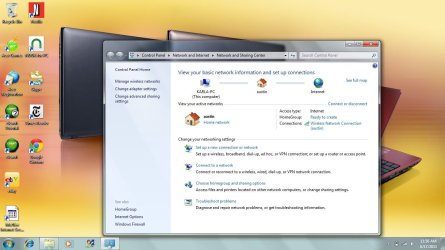
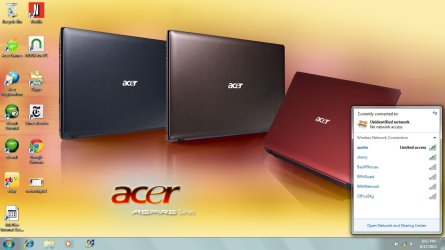
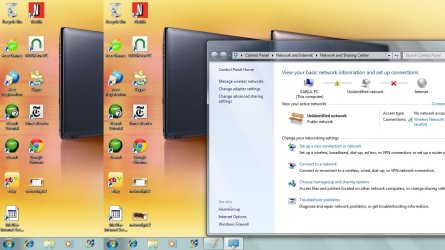
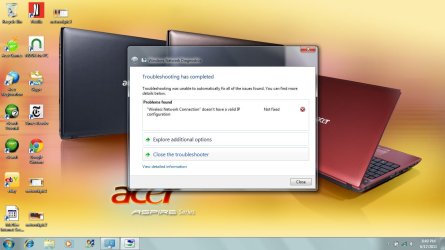
Unfortunately, I'm still having no luck. I don't understand why I can go to work and connect to our work router no problem, but can't do it at home. Here's some screen shots of everything. Maybe my router is too old (it works fine for all my other laptops though with XP)?

The first picture shows right after I disconnect the router and plug it back in. The network works fine and "austin" shows up as the home network. The 3rd picture is after I've been connected for a while and it reverts to "unidentified network."
 

Attachments

  • networkpic1.jpg
    networkpic1.jpg
    105.3 KB · Views: 155
  • networkpic2.jpg
    networkpic2.jpg
    94.1 KB · Views: 113
  • networkpic3.jpg
    networkpic3.jpg
    122.3 KB · Views: 162
  • networkpic4.jpg
    networkpic4.jpg
    95.8 KB · Views: 119
Last edited:

My Computer

OS
Windows 7 Home Premium 64bit
Thanks for all the great suggestions :) I figured it out on my own I think. Nothing really techie about the fix.

I just reset my router completely, and changed the router name. When the new name popped up on the list of available networks I just put in the password as you normally would when first logging on to wireless connection. Then Windows 7 had a screen that asked if I wanted to make it a public or home network etc.... I didn't choose any of them and just bypassed the screen. Rocking and rolling.
 

My Computer

OS
Windows 7 Home Premium 64bit
Way to go..!!!!
I've been working on getting my Windows XP Serv Pk 3 and Windows 7 Home Premium talking to one another..( XP Wired - W7 Wireless.. using a Belking Router- secured and password protected ) being seen in the list of items in the Network list. It seems crazy to see my XP on the Laptop W7.. then it disappears..
I don't have ample time to work on it tonite.. I have to leave the house too early tomorrow.. I'm like you.. I'm NOT giving up on this .
I have my HomeGroup , shows Joined
HomeNetwork made..
I have my Network showing on Windows 7 with both of the pc's showing, and sharing
folders and files.. next will be to get the printer working correctly with both
I may have to buy a new printer before this works correctly.
I'm so glad you got this all sorted.... Congrats !!!
 
Last edited:

My Computer

Computer type
Laptop
Computer Manufacturer/Model Number
Gateway 17.3" LCD Intel Dual-Core, 8GB RAM 1TB HDD Windows 8 Laptop
OS
Windows 8 - 64-bit
CPU
2.2GHz Intel Pentium dual-core B960 processor with 2MB L3 ca
Memory
8GB DDR3
Graphics Card(s)
Intel HD Graphics with 128MB of dedicated system memory
Monitor(s) Displays
17.3" Ultrabright HD widescreen LED-backlit LCD
Screen Resolution
1280 X 1024
Hard Drives
1TB hard drive-1000 GB HDD
DVD-Super Multi DL drive
PSU
Intel B960 processor
Case
XXXXX
Cooling
XXXXX
Keyboard
Multi Gesture Touchpad
Mouse
USB - portable mouse... I added this
Antivirus
Avast
Browser
I E 10
Other Info
I see nothing about Motherboard info.
I'm not sure about Sound Card
Ports :(3) USB 2.0, (1) HDMI, (1) VGA, (1) Headphone out, (1) Microphone in, (1) Ethernet LAN

•Fast Wi-Fi wireless and wired Gigabit Ethernet networking
•HDMI output
•Kensington lock slot
I have no idea what all this actually means
Back
Top