
New computer windows 7, sound stopped working in a week

Foximus

New member
Local time
10:54 AM
Messages
3
So, I bought and set up my new computer a week ago a HP Pavilion p6204y. I used my already owned 2.1 speaker system that I used on my old computer. Everything was working great.

Last night, I noticed something odd with my speakers; each time I opened a new window a different high pitched sound would emanate from it. I had no clue what was causing it so I shut down the computer, unplugged all the wires possible, replaced them just as they were, and restarted the computer. Problem solved, no more high pitched noises.

Then I realized that NO noises were coming from them at all, all I could hear was a slight static noise when the speakers were turned to full volume.

I decided to investigate and found that my speakers were not even being recognized as being in my computer.
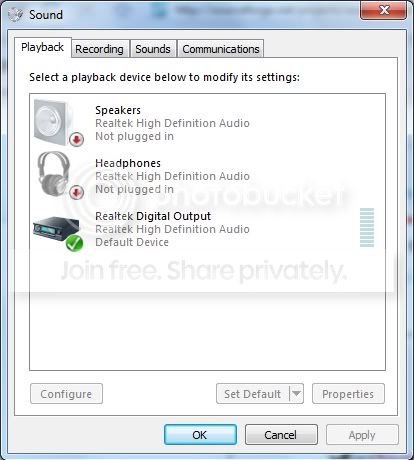
AudioProblem.jpg


After searching (and reading through) several forums, I came across HP's support site for audio problems and did every single suggestion on the page. Each resulted in no improvement whatsoever, though now the playback devices has an added option (which is still of no use)
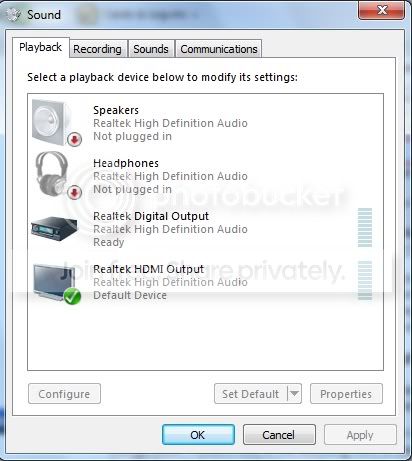
AudioProblemafterupdate.jpg


I am positive it is not the speakers themselves as plugging them straight into my zune or xbox results in perfect performance, and would really like to find a solution soon for this eight day old computer.
 
Last edited:

My Computer My Computer

At a glance

Windows 7Pentium Dual Core E54006GB
Computer Manufacturer/Model Number
HP p6204y
OS
Windows 7
CPU
Pentium Dual Core E5400
Memory
6GB
You mention you did everything that needed to be done, can you be more specific? The drivers come to mind right off the bat! If you are using older speakers this may be a problem with your new Windows 7 computer. It has nothing to do with the speakers, you will want to check for your sound card driver: Update a driver for hardware that isn't working properly.

Cheers,
Tara
Windows Outreach Team
 

My Computer My Computer

At a glance

Windows 7
OS
Windows 7
While it could be a software problem as suggested, (did you install any software right before this happened?)

It could also be a hardware/mechanical problem.

Since audio I/O is now monitored electrically... it's possible the speaker jack is malfunctioning.
Have you tried repeatedly plugging/unplugging the speaker? Some of these multi-function jacks can get stuck in a single mode.

Ap
 

My Computer My Computer

At a glance

Windows 7 Home PremiumIntel Core 2 Duo @ 3.00gHz4 GBATI Radeon HD 2600 XT
Computer Manufacturer/Model Number
Assembled in my workshop
OS
Windows 7 Home Premium
CPU
Intel Core 2 Duo @ 3.00gHz
Motherboard
Gigabyte GA-P35-S3G
Memory
4 GB
Graphics Card(s)
ATI Radeon HD 2600 XT
Sound Card
RME 24/96 Card, Realtek Internal Audio PreSonus FireStudio
Monitor(s) Displays
Acer 1917 (x2)
Screen Resolution
1280 x 1024 on both monitors
Hard Drives
Three 250GB Seagate SATA Barracuda 7200rpm
PSU
Rosewill 500-watt
Case
Rosewill mid-tower
Cooling
Noctua NH-U9B (CPU), PwrSupply fan + single large case Fan
Keyboard
Macally w/2/USB ports.
Mouse
Trackman Wheel
Other Info
Event 20/20 bas studio monitors, Yamaha sub.
Rackmount Korg/Roland/Yamaha synthesizers,
Cubase MIDI/audio recording. Sony Soundforge audio/mastering software. CD Architect Mastering. RME & Presonus audio interfaces.
You mention you did everything that needed to be done, can you be more specific? The drivers come to mind right off the bat!

I went to this link (also posted above, HP's audio support site) and followed each of the 12 steps, all the way to the bottom of the page and had no luck with any of those solutions, with step 7 being "restore the audio drivers", step 8 being "Update the audio driver from the HP web site", and step 9 being "Update the audio driver using device manager"

If you are using older speakers this may be a problem with your new Windows 7 computer.

I don't think my speakers are a problem; they are two years old and WERE WORKING with the computer for the first seven days I had it.

While it could be a software problem as suggested, (did you install any software right before this happened?)

Nothing was installed any amount of time near when this happened. The last thing installed was the Zune software, which worked perfectly and was installed on Monday afternoon, where this problem occurred at about 2am on Friday, so I'm not seeing any connection.

It could also be a hardware/mechanical problem.

Since audio I/O is now monitored electrically... it's possible the speaker jack is malfunctioning.
Have you tried repeatedly plugging/unplugging the speaker? Some of these multi-function jacks can get stuck in a single mode.

THIS JUST OCCURRED AS OF WRITING THIS;

I wanted to prove to myself that I wasn't crazy, as I've plugged and unplugged it multiple times with no resolution. So, I plugged and unplugged the speakers multiple times (as suggested) quickly (as I hadn't done before) and the speakers are now at the moment recognized, BUT all I have is a constant loud static sound. The speakers do not produce any sound being played on the computer.

I guess its a step in the right direction? Though, I'm worried that I'll lose the connection if I restart the computer though (as it did the first time).

If there is some sort of solution to a constant static effect that may prove helpful, PLEASE let me know!
 

My Computer My Computer

At a glance

Windows 7Pentium Dual Core E54006GB
Computer Manufacturer/Model Number
HP p6204y
OS
Windows 7
CPU
Pentium Dual Core E5400
Memory
6GB
I wanted to prove to myself that I wasn't crazy, as I've plugged and unplugged it multiple times with no resolution. So, I plugged and unplugged the speakers multiple times (as suggested) quickly (as I hadn't done before) and the speakers are now at the moment recognized, BUT all I have is a constant loud static sound. The speakers do not produce any sound being played on the computer.

I guess its a step in the right direction? Though, I'm worried that I'll lose the connection if I restart the computer though (as it did the first time).

If there is some sort of solution to a constant static effect that may prove helpful, PLEASE let me know!

Could be a couple of things...


-The constant static effect sounds like it could be a digital output instead of analog. Is the speaker output a multifunction jack that can also output digital audio? Have you somehow set the default audio output to digital?

-The jack itself is hosed (doubtful) or the audio chip is faulty.

Does the driver you've installed have the Realtek control panel available?
There's another couple hundred :confused: settings there to mess with.

Ap
 

My Computer My Computer

At a glance

Windows 7 Home PremiumIntel Core 2 Duo @ 3.00gHz4 GBATI Radeon HD 2600 XT
Computer Manufacturer/Model Number
Assembled in my workshop
OS
Windows 7 Home Premium
CPU
Intel Core 2 Duo @ 3.00gHz
Motherboard
Gigabyte GA-P35-S3G
Memory
4 GB
Graphics Card(s)
ATI Radeon HD 2600 XT
Sound Card
RME 24/96 Card, Realtek Internal Audio PreSonus FireStudio
Monitor(s) Displays
Acer 1917 (x2)
Screen Resolution
1280 x 1024 on both monitors
Hard Drives
Three 250GB Seagate SATA Barracuda 7200rpm
PSU
Rosewill 500-watt
Case
Rosewill mid-tower
Cooling
Noctua NH-U9B (CPU), PwrSupply fan + single large case Fan
Keyboard
Macally w/2/USB ports.
Mouse
Trackman Wheel
Other Info
Event 20/20 bas studio monitors, Yamaha sub.
Rackmount Korg/Roland/Yamaha synthesizers,
Cubase MIDI/audio recording. Sony Soundforge audio/mastering software. CD Architect Mastering. RME & Presonus audio interfaces.
i would suggest it's a hardware problem, your computer should be under warrenty so i'd return it for a replacement, it happens sometimes not really a fault of anyones as there are a lot of marts that could be faulty. let hp handle it for you. they are an easy company to deal with.
 

My Computer My Computer

At a glance

Windows 7 Ultimate Signature EditionIntel Core i7 Extreme 3.33GHz12GB DDR32x EVGA 285 2GB in SLI
Computer Manufacturer/Model Number
Custom
OS
Windows 7 Ultimate Signature Edition
CPU
Intel Core i7 Extreme 3.33GHz
Motherboard
EVGA X-58 SLI Classified
Memory
12GB DDR3
Graphics Card(s)
2x EVGA 285 2GB in SLI
Sound Card
Creative Labs X-Fi ExtremeGamer
Monitor(s) Displays
30" Viewsonic
Hard Drives
2x1TB Western Digital 7200RPM in RAID 0/1TB WD My Book External HDD
PSU
Thermaltake 1000w supporting quad SLI
Case
Thermaltake Armor Full Tower
Cooling
Thermaltake V1 CPU+DIY Liquid cooling
Could be a couple of things...

-The constant static effect sounds like it could be a digital output instead of analog. Is the speaker output a multifunction jack that can also output digital audio? Have you somehow set the default audio output to digital?

The computer has digital output jacks, so I don't believe it is that.

Does the driver you've installed have the Realtek control panel available?
There's another couple hundred :confused: settings there to mess with.

I found the realtek control panel and yes, there were a lot of options. But, sadly, after muting and un-muting the speakers in the control panel, the static was gone, yet still no audio. I tried plugging the speakers back in again, but it did no good.

And just as I feared, restarting the computer caused the speakers to show as "not plugged in" once more. And since then I cannot get the same results as before.

i would suggest it's a hardware problem, your computer should be under warrenty so i'd return it for a replacement, it happens sometimes not really a fault of anyones as there are a lot of marts that could be faulty. let hp handle it for you. they are an easy company to deal with.

Clearly, I wished it didn't come to this, but in case I find no further solution, do you know how long this might take?
 

My Computer My Computer

At a glance

Windows 7Pentium Dual Core E54006GB
Computer Manufacturer/Model Number
HP p6204y
OS
Windows 7
CPU
Pentium Dual Core E5400
Memory
6GB
that depends, if you bought it at a retail store you may still be able to return it to the location and walk out with a new one. if not HP can usually get a replacement to your home within a few weeks, if your pc is part of their current line up of course it's faster than one coming to the end of a 3 year warrenty. shouldn't be to long considering the shipping times, it's very reasonable.
 

My Computer My Computer

At a glance

Windows 7 Ultimate Signature EditionIntel Core i7 Extreme 3.33GHz12GB DDR32x EVGA 285 2GB in SLI
Computer Manufacturer/Model Number
Custom
OS
Windows 7 Ultimate Signature Edition
CPU
Intel Core i7 Extreme 3.33GHz
Motherboard
EVGA X-58 SLI Classified
Memory
12GB DDR3
Graphics Card(s)
2x EVGA 285 2GB in SLI
Sound Card
Creative Labs X-Fi ExtremeGamer
Monitor(s) Displays
30" Viewsonic
Hard Drives
2x1TB Western Digital 7200RPM in RAID 0/1TB WD My Book External HDD
PSU
Thermaltake 1000w supporting quad SLI
Case
Thermaltake Armor Full Tower
Cooling
Thermaltake V1 CPU+DIY Liquid cooling
Simple solution

I bought a refurbed unit and never worked from the start. After going through all of the windows 7 troubleshooting (which are very user friendly), I went on line and chatted with an HP techy. He had me do all of the same things which did not work.

I ordered a USB sound card from newegg.com, plugged it in and I have sound.

Forget the built in realtek and spend $16.99. My time was not worth chasing this forever.
 

My Computer My Computer

At a glance

windows 7
Computer Manufacturer/Model Number
HP
OS
windows 7
Back
Top