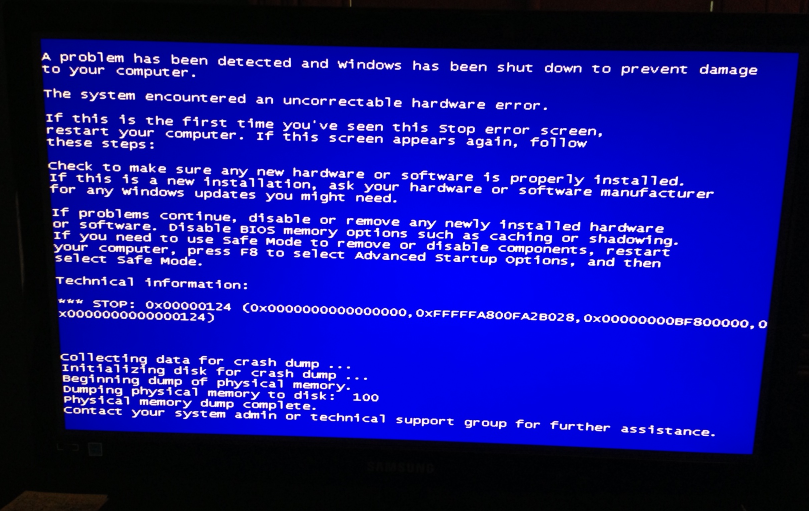
New custom build and just got first BSOD 0x00000124

StevenP

New member
Local time
5:06 PM
Messages
4
Need some help guys, just built this PC (first build) and i'm getting this BSOD thrown my way. :cry:
 

My Computer My Computer

At a glance

Windows 7 Ultimate x64i7 4770kASUS 660 Ti
Computer type
PC/Desktop
Computer Manufacturer/Model Number
Custom Build
OS
Windows 7 Ultimate x64
CPU
i7 4770k
Motherboard
ASUS Gryphon Z87
Graphics Card(s)
ASUS 660 Ti
Hard Drives
1 Westrn Digital 1TB Blue
Antivirus
United States
Hello! Thanks for the quick response.

I will get that dump information for you - I just need to setup Windows to dump them as I'm checking the error and it happens when: After 10 minutes, my monitor goes 'off' (normal - energy saving!...) and then when I click back to check what's going on I get this:
c9b95d5d843cf149bc06a65ca0710b48.png


Info:
Problem signature:
Problem Event Name: BlueScreen
OS Version: 6.1.7601.2.1.0.256.1
Locale ID: 1033

Additional information about the problem:
BCCode: 124
BCP1: 0000000000000000
BCP2: FFFFFA800FA34028
BCP3: 00000000FF800000
BCP4: 0000000000000124
OS Version: 6_1_7601
Service Pack: 1_0
Product: 256_1

Files that help describe the problem:
C:\Windows\Minidump\062313-14508-01.dmp
C:\Users\A2\AppData\Local\Temp\WER-32573-0.sysdata.xml

Read our privacy statement online:
Windows 7 Privacy Statement - Microsoft Windows

If the online privacy statement is not available, please read our privacy statement offline:
C:\Windows\system32\en-US\erofflps.txt
 

My Computer My Computer

At a glance

Windows 7 Ultimate x64i7 4770kASUS 660 Ti
Computer type
PC/Desktop
Computer Manufacturer/Model Number
Custom Build
OS
Windows 7 Ultimate x64
CPU
i7 4770k
Motherboard
ASUS Gryphon Z87
Graphics Card(s)
ASUS 660 Ti
Hard Drives
1 Westrn Digital 1TB Blue
Antivirus
United States
Thanks for the dump file,

Code:
[COLOR="Red"]BugCheck 124[/COLOR], {[COLOR="Blue"]0[/COLOR], [COLOR="SeaGreen"]fffffa800fa34028[/COLOR], ff800000, 124}

Probably caused by : GenuineIntel

Code:
Usual causes:  Hardware, Incompatibility, May be driver corruption

Code:
0: kd> [COLOR="SeaGreen"]!errrec fffffa800fa34028[/COLOR]
===============================================================================
Common Platform Error Record @ fffffa800fa34028
-------------------------------------------------------------------------------
Record Id     : 01ce704bd15e6e85
Severity      : Fatal (1)
Length        : 928
Creator       : Microsoft
Notify Type   : Machine Check Exception
Timestamp     : 6/23/2013 21:09:12 (UTC)
Flags         : 0x00000000

===============================================================================
Section 0     : Processor Generic
-------------------------------------------------------------------------------
Descriptor    @ fffffa800fa340a8
Section       @ fffffa800fa34180
Offset        : 344
Length        : 192
Flags         : 0x00000001 Primary
Severity      : Fatal

Proc. Type    : x86/x64
Instr. Set    : x64
Error Type    : Cache error
Operation     : Generic
Flags         : 0x00
Level         : 0
CPU Version   : 0x00000000000306c3
Processor ID  : 0x0000000000000000

===============================================================================
Section 1     : x86/x64 Processor Specific
-------------------------------------------------------------------------------
Descriptor    @ fffffa800fa340f0
Section       @ fffffa800fa34240
Offset        : 536
Length        : 128
Flags         : 0x00000000
Severity      : Fatal

Local APIC Id : 0x0000000000000000
CPU Id        : c3 06 03 00 00 08 10 00 - bf fb da 7f ff fb eb bf
                00 00 00 00 00 00 00 00 - 00 00 00 00 00 00 00 00
                00 00 00 00 00 00 00 00 - 00 00 00 00 00 00 00 00

Proc. Info 0  @ fffffa800fa34240

===============================================================================
Section 2     : x86/x64 MCA
-------------------------------------------------------------------------------
Descriptor    @ fffffa800fa34138
Section       @ fffffa800fa342c0
Offset        : 664
Length        : 264
Flags         : 0x00000000
Severity      : [COLOR="red"]Fatal[/COLOR]

Error         : [COLOR="Red"]DCACHEL0_WR_ERR (Proc 0 Bank 1)[/COLOR]
  Status      : 0xff80000000000124
  Address     : 0x0000000419dea7c0
  Misc.       : 0x0000000000000086

The first parameter or argument has the value of 0x0, which is a Machine Check Exception, which means the CPU has detected a hardware problem and the address points to a processor error because the CPU has found one, so it could be a different form of hardware which is causing the issue.

In such a situation, it is best to use these steps:
Enable "Round off checking" before the test (see first post below tutorial).
All the hardware seeming to be running stable and tests reporting no errors, could mean a bad motherboard.
 

My Computer My Computer

Computer type
Laptop
3) Update all hardware-related drivers: video, sound, RAID (if any), NIC... anything that interacts with a piece of hardware. It is good practice to run the latest drivers anyway.

4) Update the motherboard BIOS according to the manufacturer's instructions. Their website should provide detailed instructions as to the brand and model-specific procedure.

^^ How do I check #3 and #4 and get them to download and install/update? Is there some automated way of doing it without any issues that you could foresee? I'll check the Hardware - Stress Test with Prime95 as well and post back.
 

My Computer My Computer

At a glance

Windows 7 Ultimate x64i7 4770kASUS 660 Ti
Computer type
PC/Desktop
Computer Manufacturer/Model Number
Custom Build
OS
Windows 7 Ultimate x64
CPU
i7 4770k
Motherboard
ASUS Gryphon Z87
Graphics Card(s)
ASUS 660 Ti
Hard Drives
1 Westrn Digital 1TB Blue
Antivirus
United States
3) You will need to visit the hardware vendor's website, and then check for any available driver updates for the hardware you have. For example, for a chipset driver update, then go to the ASUS website and type in your motherboard model. A list of drivers and BIOS updates should be listed for the selected motherboard.

4) Go to your motherboard website, type in your motherboard model, there should be a BIOS tab with a list of BIOS updates, check if you have the latest BIOS. If you don't, then download the latest one, there should either be a list of instructions on how to update the BIOS or a readme.txt file with the instructions inside the folder of the BIOS update.
 

My Computer My Computer

Computer type
Laptop
Ran a MemTest86+ for 15 hours to rule that out - 0 errors over 8 passes.
Prime95 + OCCT both gave me reads of 90-95+ C when running them so I didn't feel safe running them. Fans seem to be working fan, CPU FAN was running @ 1800 RPM when I checked BIOS and thermal paste was re-applied to no avail... Losing hope here.

What should I do?
 

My Computer My Computer

At a glance

Windows 7 Ultimate x64i7 4770kASUS 660 Ti
Computer type
PC/Desktop
Computer Manufacturer/Model Number
Custom Build
OS
Windows 7 Ultimate x64
CPU
i7 4770k
Motherboard
ASUS Gryphon Z87
Graphics Card(s)
ASUS 660 Ti
Hard Drives
1 Westrn Digital 1TB Blue
Antivirus
United States
What's it like within the case? Any dust or debris accumulation in the heatsinks and fans? How long did you manage to run Prime95 for?

Were there any available driver updates?
 

My Computer My Computer

Computer type
Laptop
Back
Top