New Folder and Found Folder on Removable Disk

Melissa

New member
Power User
Local time
5:46 AM
Messages
394
Hello Forum,

I have been transferring data from one computer to another.

I have noticed that I have two new folders.

1> I have noticed that the folders have duplicated for some reason - maybe I copied and pasted.
2> One is write protected and the other is not.
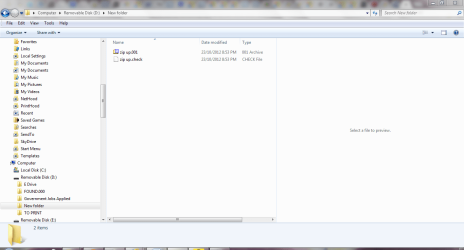
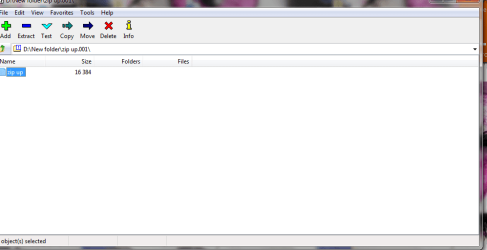
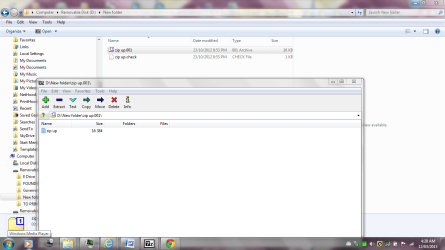
3 > I have the situation that I have a - New Folder with a zip folder in it
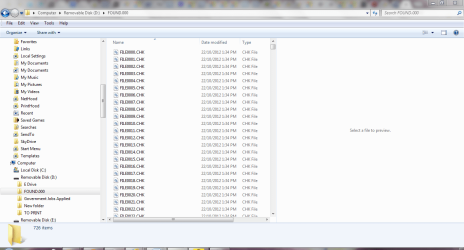
and another folder called Found Folder.
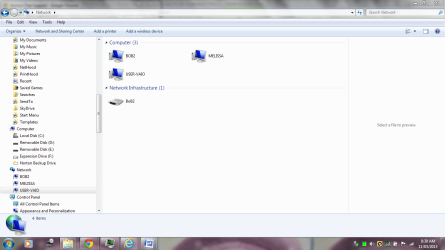
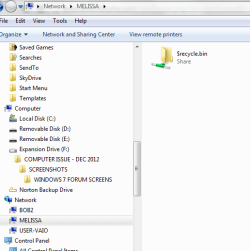
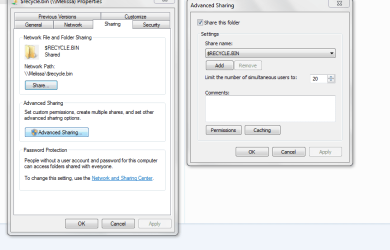
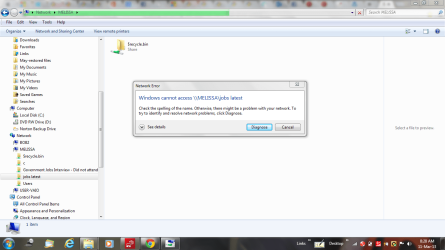
4 > The removable disks were previously shared and I have gone in and changed the sharing as per my screen shots.

I have attached a copy of the situation - I would just like to know if there is any resolution to the above issues?
 

Attachments

  • NETWORK ACCESS UNI.PNG
    NETWORK ACCESS UNI.PNG
    67 KB · Views: 3
  • duplicate drives - usb thumb.PNG
    duplicate drives - usb thumb.PNG
    19.2 KB · Views: 4
  • network capture melissa.PNG
    network capture melissa.PNG
    15.4 KB · Views: 4
  • network capture melissa1.PNG
    network capture melissa1.PNG
    22 KB · Views: 3
  • NEW FOLDER CREATED - EXTERNAL ZIP.PNG
    NEW FOLDER CREATED - EXTERNAL ZIP.PNG
    44.3 KB · Views: 3
  • sharing change.PNG
    sharing change.PNG
    66.3 KB · Views: 5
  • NEW FOLDER CREATED - EXTERNAL ZIP1.PNG
    NEW FOLDER CREATED - EXTERNAL ZIP1.PNG
    47.5 KB · Views: 5

My Computer

Computer type
Laptop
Computer Manufacturer/Model Number
Sony VAIO / E Series VPCEB46FG
OS
Windows 7 Home Premium 64bit
CPU
Windows 7 Service Pack 1 x86 NTFS
Motherboard
AMD E-350 Processor
Memory
4 GB
Hard Drives
500GB
Other Info
1.6GHz
Hi melissa
Not too sure what you are asking here but did you ever complete the backup of your data and complete the clean install of Windows 7 that you were going to do?
 

My Computer

Computer type
PC/Desktop
OS
Microsoft Windows 7 Home Premium 64-bit 7601 Multiprocessor Free Service Pack 1
CPU
Intel(R) Core(TM) i7-3770 CPU @ 3.40GHz
Motherboard
ASUSTeK COMPUTER INC. P8H77-M
Memory
8.00 GB
Graphics Card(s)
Intel(R) HD Graphics 4000
Sound Card
On Board
Monitor(s) Displays
Dell 24"
Screen Resolution
1920 x 1080
Hard Drives
(1) INTEL SSDSC2CT180A3 ATA Device (2) ST500DM002-1BD142 ATA Device (3) WDC WD3200AAKS-75L9A0 ATA Device (4) Generic- Compact Flash USB Device (5) Generic- MS/MS-Pro USB Device (6) Generic- SD/MMC USB Device (7) Generic- SM/xD-Picture USB
PSU
500w Corsair
Case
Cooler Master
Cooling
3 Fans
Keyboard
Logitech MK300
Mouse
Logitech WOM
Internet Speed
75Mb
Antivirus
Norton 360
Browser
Firefox, Opera, IE
I have two removable disks.

One is write protected (D) - I want to know if you can alter that property.

I have just put them into my laptop and discovered the presence of New Folder - with a zip folder in it and another folder called Found. Want to know how that got created.

The other question I have is that the removable disks had the status of being shared and could be accessed via the network - I was wondering if I had done that correctly? I have attached what folders were shared prior and also a screen shot of what I unchecked to get it off the network.

Thank you

I am doing everything after major surgery
 

Attachments

  • melissa share.PNG
    melissa share.PNG
    38.7 KB · Views: 3

My Computer

Computer type
Laptop
Computer Manufacturer/Model Number
Sony VAIO / E Series VPCEB46FG
OS
Windows 7 Home Premium 64bit
CPU
Windows 7 Service Pack 1 x86 NTFS
Motherboard
AMD E-350 Processor
Memory
4 GB
Hard Drives
500GB
Other Info
1.6GHz
I think the Zip "folder" you mention is in fact a file. If you right cick on it and choose extract you will be able to see what it is! If you don't want it or it is a duplicate then delete it. The Files in the FOUND folder look as if they may have been generated by a disc check software. They are the reports of what was found. They appear to be so old as to be of little use now. Have you run such software on this drive? I did ask "did you ever complete the backup of your data and complete the clean install of Windows 7 that you were going to do?" Did you?
 

My Computer

Computer type
PC/Desktop
OS
Microsoft Windows 7 Home Premium 64-bit 7601 Multiprocessor Free Service Pack 1
CPU
Intel(R) Core(TM) i7-3770 CPU @ 3.40GHz
Motherboard
ASUSTeK COMPUTER INC. P8H77-M
Memory
8.00 GB
Graphics Card(s)
Intel(R) HD Graphics 4000
Sound Card
On Board
Monitor(s) Displays
Dell 24"
Screen Resolution
1920 x 1080
Hard Drives
(1) INTEL SSDSC2CT180A3 ATA Device (2) ST500DM002-1BD142 ATA Device (3) WDC WD3200AAKS-75L9A0 ATA Device (4) Generic- Compact Flash USB Device (5) Generic- MS/MS-Pro USB Device (6) Generic- SD/MMC USB Device (7) Generic- SM/xD-Picture USB
PSU
500w Corsair
Case
Cooler Master
Cooling
3 Fans
Keyboard
Logitech MK300
Mouse
Logitech WOM
Internet Speed
75Mb
Antivirus
Norton 360
Browser
Firefox, Opera, IE
Hello I am sorry that you may have not read that I am waiting until my big surgery. I am not that well at all. I am lucky to still be here.

I have tried to extract anything from the drive - first it is write protected. It does not look like there is much on it. It has been suggested that I just in case do a restore point.

I think I may have accidently copied the files to the other USB flash disk.

The properties is zip up - so I do not know the extension.

They said in another forum you can just change the extension on a .chk fie and try and retrieve data - but may not always work.

Infusion and operation (Brain) this Thursday. So I will not be bugging anyone on here. So you can have a break.

I have read through everything. Just doing the last bits.

I appreciate your assistance.
 

Attachments

  • d drive zip.PNG
    d drive zip.PNG
    16.1 KB · Views: 2

My Computer

Computer type
Laptop
Computer Manufacturer/Model Number
Sony VAIO / E Series VPCEB46FG
OS
Windows 7 Home Premium 64bit
CPU
Windows 7 Service Pack 1 x86 NTFS
Motherboard
AMD E-350 Processor
Memory
4 GB
Hard Drives
500GB
Other Info
1.6GHz
You can't do a restore point as you call it on an extenal hard drive so whoever told you to do that had got it wrong. You can only restore an operating system! If you edit your folder properties to show file extensions of known file types this will show in Windows explorer. The chk files are reports of what the disc check found so there is no data to retrieve!
 

My Computer

Computer type
PC/Desktop
OS
Microsoft Windows 7 Home Premium 64-bit 7601 Multiprocessor Free Service Pack 1
CPU
Intel(R) Core(TM) i7-3770 CPU @ 3.40GHz
Motherboard
ASUSTeK COMPUTER INC. P8H77-M
Memory
8.00 GB
Graphics Card(s)
Intel(R) HD Graphics 4000
Sound Card
On Board
Monitor(s) Displays
Dell 24"
Screen Resolution
1920 x 1080
Hard Drives
(1) INTEL SSDSC2CT180A3 ATA Device (2) ST500DM002-1BD142 ATA Device (3) WDC WD3200AAKS-75L9A0 ATA Device (4) Generic- Compact Flash USB Device (5) Generic- MS/MS-Pro USB Device (6) Generic- SD/MMC USB Device (7) Generic- SM/xD-Picture USB
PSU
500w Corsair
Case
Cooler Master
Cooling
3 Fans
Keyboard
Logitech MK300
Mouse
Logitech WOM
Internet Speed
75Mb
Antivirus
Norton 360
Browser
Firefox, Opera, IE
perhaps it may have been my wording or screen shots - they did come back to me and then ask what type of drive.

I thought what you said above and also was given by a member here a site to go to File Extension .CHK Details

I may do that. I am pretty sure that there is nothing to retrieve - what is gone is gone. Just have to ensure that external drive dismounts correctly - someone gave me a software extension for that too.

I would be pretty lost without wise words on here.

Had a person to pyshically check the 500GB External Hard Drive and that had bad sectors.

You were right.

Thanks - Hope I survive the surgery.

Melissa
 

Attachments

  • d drive zip1.PNG
    d drive zip1.PNG
    80.4 KB · Views: 1

My Computer

Computer type
Laptop
Computer Manufacturer/Model Number
Sony VAIO / E Series VPCEB46FG
OS
Windows 7 Home Premium 64bit
CPU
Windows 7 Service Pack 1 x86 NTFS
Motherboard
AMD E-350 Processor
Memory
4 GB
Hard Drives
500GB
Other Info
1.6GHz
The Files in the FOUND folder look as if they may have been generated by a disc check software. They are the reports of what was found. They appear to be so old as to be of little use now. Have you run such software on this drive?

What software are you talking about? I do not recollect any such program that I can run. I have been advised by another post of some software that I can run - do you know of any to retrieve my information?
 

My Computer

Computer type
Laptop
Computer Manufacturer/Model Number
Sony VAIO / E Series VPCEB46FG
OS
Windows 7 Home Premium 64bit
CPU
Windows 7 Service Pack 1 x86 NTFS
Motherboard
AMD E-350 Processor
Memory
4 GB
Hard Drives
500GB
Other Info
1.6GHz
The Files in the FOUND folder look as if they may have been generated by a disc check software. They are the reports of what was found. They appear to be so old as to be of little use now. Have you run such software on this drive?

What software are you talking about? I do not recollect any such program that I can run. I have been advised by another post of some software that I can run - do you know of any to retrieve my information?
But Melissa you have been running checks on your various drives for week and weeks. All your previous threads show this. You have a lot of small third party checking type programs on your system as your various screenshots show. That is why we keep advising you to take up Gregrockers offer of some time ago and do a complete clean install of you OS. All these little niggles will then be solved!
 

My Computer

Computer type
PC/Desktop
OS
Microsoft Windows 7 Home Premium 64-bit 7601 Multiprocessor Free Service Pack 1
CPU
Intel(R) Core(TM) i7-3770 CPU @ 3.40GHz
Motherboard
ASUSTeK COMPUTER INC. P8H77-M
Memory
8.00 GB
Graphics Card(s)
Intel(R) HD Graphics 4000
Sound Card
On Board
Monitor(s) Displays
Dell 24"
Screen Resolution
1920 x 1080
Hard Drives
(1) INTEL SSDSC2CT180A3 ATA Device (2) ST500DM002-1BD142 ATA Device (3) WDC WD3200AAKS-75L9A0 ATA Device (4) Generic- Compact Flash USB Device (5) Generic- MS/MS-Pro USB Device (6) Generic- SD/MMC USB Device (7) Generic- SM/xD-Picture USB
PSU
500w Corsair
Case
Cooler Master
Cooling
3 Fans
Keyboard
Logitech MK300
Mouse
Logitech WOM
Internet Speed
75Mb
Antivirus
Norton 360
Browser
Firefox, Opera, IE
Back
Top