new hard drive won't boot

debgram1

New member
Member
Local time
3:02 AM
Messages
85
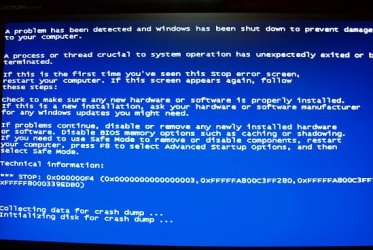
Okay I got a new hard drive and ran the backups from acronis to replace my main drive. But when I booted up it said it couldn't and to run repair which I did but that came back as not being able to repair automatically. Did I do something wrong or did I get a bad drive. I put my old drive in and it booted fine. Below is a pic of the error I got with the new hard drive.
 

Attachments
  • PC011382.JPG
    PC011382.JPG
    76.3 KB · Views: 24

My Computer My Computer

OS
Windows 7 Home Premium 64-bit
CPU
Intel Core i5-2500K Sandy Bridge 3.3GHz
Motherboard
Asus P8P67 deluxe
Memory
G.SKILL Ripjaws X Series 8GB (4 x 2GB) 240-Pin DDR3 SDRAM DD
Graphics Card(s)
Sapphire ATI Radeon 4800
Hard Drives
Western Digital Caviar Blue WD2500AAKS 250GB 7200 RPM SATA 3.0Gb/s 3.5" Internal Hard Drive, WDC WD5001AALS SCSI hard drive, SAMSUNG SP2504C SCSI hard drive
Cooling
ZALMAN CNPS9900 NT 120mm 2 Ball CPU Cooler
I'd temporarily just plan to use the new drive as a data drive rather than a boot drive--for as long as it took me to verify that the new drive is not defective.

Did the new drive seem to format OK? Had you used it at all before trying to restore an Acronis image to it?


Run the manufacturer's disk utility on the new drive. Or run chkdsk /r from a command prompt. Or both.

If you can verify that the new drive is not defective, then worry about Acronis. It may well be an Acronis or imaging issue.
 

My Computer My Computer

Computer type
PC/Desktop
Computer Manufacturer/Model Number
Ignatz Special; 4 speed manual gearbox; factory air conditioning; one of one
OS
Windows 7 Home Premium SP1, 64-bit
CPU
Intel Skylake i5-6600K, not overclocked
Motherboard
AsRock Z170M Extreme 4, micro ATX
Memory
8 GB HyperX DDR4-2666 (2 x 4 GB)
Graphics Card(s)
none; graphics are integrated on CPU
Sound Card
onboard: Realtek ALC1150; external: USB Behringer UF0-202
Monitor(s) Displays
Dell S2340M 23 inch IPS
Screen Resolution
1600 x 900
Hard Drives
System: Crucial MX100 series SSD, 128 GB;
Data: Samsung Spinpoint 103SJ, 1 TB;
Backup: WD Caviar Green WD30EZRX-00D8PB0, 3 TB
PSU
Rosewill SilentNight 500 watt fanless, semi-modular
Case
Antec Solo II
Cooling
Noctua NH-U12S; Noctua F12 intake, Noctua S12A exhaust
Keyboard
Microsoft 200 6JH-00001 USB
Mouse
Dell or Microsoft optical wired; USB
Antivirus
Microsoft Security Essentials and Malwarebytes Premium
Browser
Pale Moon
Other Info
All fans PWM; speeds at idle: CPU circa 500 rpm; intake circa 600 rpm; exhaust circa 600 rpm; CPU temps 27 idle and 47 C load in a warm room (27 C/81 F) when running Intel Extreme Tuning Utility stress test.
I was thinking I should have just installed windows on the bare disk and then run the acronis recovery, does that sound right? I never did a new hard drive myself before, I always got the parts and took it to the pc shop but I really don't have the extra money to do that right now. I removed the new disk and put the old one back. I can try tomorrow. Oh was I supposed to format it? I used the add new disk from acronis, see attachment
 

My Computer My Computer

OS
Windows 7 Home Premium 64-bit
CPU
Intel Core i5-2500K Sandy Bridge 3.3GHz
Motherboard
Asus P8P67 deluxe
Memory
G.SKILL Ripjaws X Series 8GB (4 x 2GB) 240-Pin DDR3 SDRAM DD
Graphics Card(s)
Sapphire ATI Radeon 4800
Hard Drives
Western Digital Caviar Blue WD2500AAKS 250GB 7200 RPM SATA 3.0Gb/s 3.5" Internal Hard Drive, WDC WD5001AALS SCSI hard drive, SAMSUNG SP2504C SCSI hard drive
Cooling
ZALMAN CNPS9900 NT 120mm 2 Ball CPU Cooler
I no longer use Acronis for fear of issues such as this, but I seriously doubt you have to first install Windows to a new drive before using Acronis.

I wouldn't expect Acronis to restore to a defective drive. Nor would I necessarily expect Acronis to restore to a good drive. Image restoration isn't a flawless process--as you may be finding out.

As stated in previous post---confirm to your satisfaction that the drive is not defective. Format it and run some disk checking utilities on it. Put some data on it for a few days to give you some idea that it isn't broken.
 

My Computer My Computer

Computer type
PC/Desktop
Computer Manufacturer/Model Number
Ignatz Special; 4 speed manual gearbox; factory air conditioning; one of one
OS
Windows 7 Home Premium SP1, 64-bit
CPU
Intel Skylake i5-6600K, not overclocked
Motherboard
AsRock Z170M Extreme 4, micro ATX
Memory
8 GB HyperX DDR4-2666 (2 x 4 GB)
Graphics Card(s)
none; graphics are integrated on CPU
Sound Card
onboard: Realtek ALC1150; external: USB Behringer UF0-202
Monitor(s) Displays
Dell S2340M 23 inch IPS
Screen Resolution
1600 x 900
Hard Drives
System: Crucial MX100 series SSD, 128 GB;
Data: Samsung Spinpoint 103SJ, 1 TB;
Backup: WD Caviar Green WD30EZRX-00D8PB0, 3 TB
PSU
Rosewill SilentNight 500 watt fanless, semi-modular
Case
Antec Solo II
Cooling
Noctua NH-U12S; Noctua F12 intake, Noctua S12A exhaust
Keyboard
Microsoft 200 6JH-00001 USB
Mouse
Dell or Microsoft optical wired; USB
Antivirus
Microsoft Security Essentials and Malwarebytes Premium
Browser
Pale Moon
Other Info
All fans PWM; speeds at idle: CPU circa 500 rpm; intake circa 600 rpm; exhaust circa 600 rpm; CPU temps 27 idle and 47 C load in a warm room (27 C/81 F) when running Intel Extreme Tuning Utility stress test.
yeah I'll try that tomorrow.
 

My Computer My Computer

OS
Windows 7 Home Premium 64-bit
CPU
Intel Core i5-2500K Sandy Bridge 3.3GHz
Motherboard
Asus P8P67 deluxe
Memory
G.SKILL Ripjaws X Series 8GB (4 x 2GB) 240-Pin DDR3 SDRAM DD
Graphics Card(s)
Sapphire ATI Radeon 4800
Hard Drives
Western Digital Caviar Blue WD2500AAKS 250GB 7200 RPM SATA 3.0Gb/s 3.5" Internal Hard Drive, WDC WD5001AALS SCSI hard drive, SAMSUNG SP2504C SCSI hard drive
Cooling
ZALMAN CNPS9900 NT 120mm 2 Ball CPU Cooler
Every hard disk will have a unique identifier and a restored OS from a backup of another disk may not work correctly, with the latest windows and the activation technologies.

You can first try to install the OS on the new HDD and once the OS is up and running and activated, and all other applications installed, you may restore all the other files from your old hard disk (better copy normally from old HDD rather than restoring a backup).
 

My Computer My Computer

Computer Manufacturer/Model Number
Toshiba Satellite P775-S7232
OS
MS Windows 7 Ultimate 64-bit SP1
CPU
i5-2410M 2.3GHz (2.9GHz Turbo-Boost) Sandy Bridge 32nm
Motherboard
Toshiba PHRAA ver. PSBY1U-00F003
Memory
4GB+4GB Samsung DDR3 PC3-10700 (1333 MHz)
Graphics Card(s)
Video Intel(R) HD Graphics Family, 1696MB available memory
Sound Card
Realtek High Definition Audio version=6.0.1.6323
Monitor(s) Displays
17.3 " Trubrite TFT LCD, LED Backlit
Screen Resolution
1600x900 32 bit, Native support for 720P content
Hard Drives
TOSHIBA MK6476GSXN
580.614 [GB] partitioned C: 80GB and D: 500GB with hidden recovery partitons.

Spare bay for 2nd HDD but no SATA connector :-(
PSU
Toshiba AC/DC Adapter
Case
Notebook
Cooling
Built-in Fan
Keyboard
Premium Raised Tile keyboard
Mouse
Logitech M215 wireless mouse
Internet Speed
Not fast enough
Other Info
Built-in Harman Kardon speakers with Dolby Advanced Audio, Waves MaxxAudio® 3. HDMI, 1xUSB3+3xUSB2 ports, WebCam, Battery life 4hrs 11mins, 4GB Readyboost SDHC card, WD My Book Essential Ext HDDs 2 TB, 2x1TB, My Passport SE 1TB and WDTV 1st Gen for Multimedia playing on a Sony Wega 32" LCD.
Recent addition to my toys are Asus Transformer Pad TF300T with 32GB onboard sd card + 32GB microsd card.
A backup image will generally include the unique disk ID, so that'll be restored along with it (it's part of the MBR). So I don't think that's the issue.

However, I suspect the original drive from which you made your Windows image also has a 100MB system partition containing the boot files. Did you back up that system partition as well? If not, then the restored system can't boot from the new drive because the boot manager and all boot entries are missing completely.

Installing a fresh copy of Windows followed by restoring your image to the new Windows partition (overwriting it) may well solve the issue; it's worth a try. You might need to run startup repair again after this, but should have a much better chance at getting it going.
 

My Computer My Computer

Computer type
PC/Desktop
Computer Manufacturer/Model Number
Custom-built
OS
Windows 7 Professional SP1 32-bit
CPU
Intel Core 2 Duo E6600 2.4GHz
Motherboard
Asus PL5D2
Memory
4GB DDR2-667 (4x1GB in dual-channel config)
Graphics Card(s)
nVidia GeForce 9800 GT
Sound Card
Creative X-Fi XtremeMusic
Monitor(s) Displays
Acer P236H
Screen Resolution
1920x1200 (DVI)
Hard Drives
OCZ SSD Vertex Plus 60GB SATA (Firmware 3.55), 64MB cache
Hitachi HD321KJ SATA, 320GB, 7200rpm, 16MB cache
PSU
Antec TruePower 2.0
Case
Cooler Master Centurion
Cooling
Too many fans
Keyboard
Standard
Mouse
Microsoft wireless optical mouse
Internet Speed
AT&T U-verse (18mbit/sec)
Antivirus
Microsoft Security Essentials
Browser
Firefox
Other Info
Other devices:
Compaq CQ-60 laptop
Google Nexus 7 (2012) tablet
Nvidia SHIELD tablet (US/LTE)
Hardkernel ODROID-XU single-board computer (Samsung Exynos 5420)
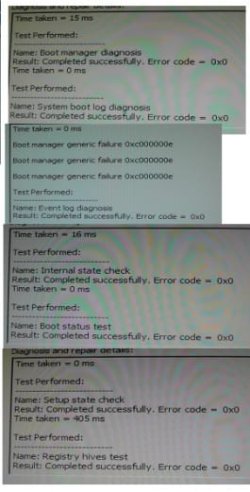
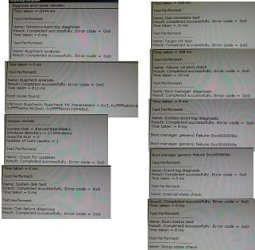
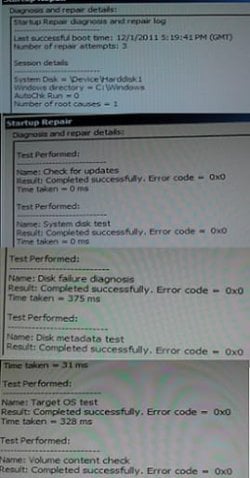
okay here's what I did and didn't work. I formatted the new drive and did a clean install of win 7, everything booted fine and dandy. Did my recovery backup and got the same error and the repair can't be done automatically. I took some snaps of the detailed report, I may have to put some in another post here. Anyway, I don't want to have to take it to the pc shop, I really can't afford the extra money right now to get it fixed, before they used to use my backups for new drives and they had no problem with booting.
 

Attachments

  • boot1.jpg
    boot1.jpg
    23.3 KB · Views: 15
  • boot2.jpg
    boot2.jpg
    22.5 KB · Views: 9
  • boot3.jpg
    boot3.jpg
    17.8 KB · Views: 575
  • boot4.jpg
    boot4.jpg
    23 KB · Views: 10

My Computer My Computer

OS
Windows 7 Home Premium 64-bit
CPU
Intel Core i5-2500K Sandy Bridge 3.3GHz
Motherboard
Asus P8P67 deluxe
Memory
G.SKILL Ripjaws X Series 8GB (4 x 2GB) 240-Pin DDR3 SDRAM DD
Graphics Card(s)
Sapphire ATI Radeon 4800
Hard Drives
Western Digital Caviar Blue WD2500AAKS 250GB 7200 RPM SATA 3.0Gb/s 3.5" Internal Hard Drive, WDC WD5001AALS SCSI hard drive, SAMSUNG SP2504C SCSI hard drive
Cooling
ZALMAN CNPS9900 NT 120mm 2 Ball CPU Cooler
Just a thought, if you were going to restore an image, you need to have a formated drive because that's how the working image was attained. Personally i would do a clean install on the new drive that way everything is fresh and new and you don't carry over any corruption. After that's done put your old drive back in transfer any pictures, music, files you need, then format the old drive and use it for storage and backup. Just my 2 cents
 

My Computer My Computer

Computer Manufacturer/Model Number
Dell XPS 730
OS
Windows 7 Home Premium 64 bit
CPU
Intel Core 2 quad Extreme Q9770 @ 3.2 GHz
Memory
4x2 GB Muskin 1600 MHz ram
Graphics Card(s)
NVidia GTX 250
Sound Card
Soundblaster X-Fi Fatality Champion
Monitor(s) Displays
2 Dell 2007WFP Ultrascans
Screen Resolution
3360 x 1050
Hard Drives
WD Black 1TB sata, 2-WD Black 500 sata, 2-Seagate 500 Go external
PSU
1000 Watt
Cooling
air
Keyboard
MS Natrual Keyboard Pro
Mouse
Logitech Wireless Trackball
Internet Speed
DSL Elite
Back
Top