New HDD not showing up in my computer

RD87

New member
Local time
6:54 PM
Messages
1
I have inserted new HDD instead of DVD drive.

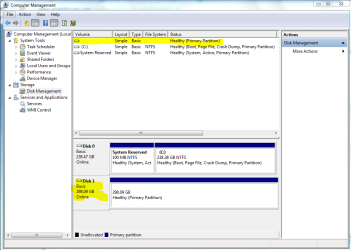
The new HDD is not showing up in My Computer. The HDD shows up in device management but when right clicked on disk all the options are grayed out.

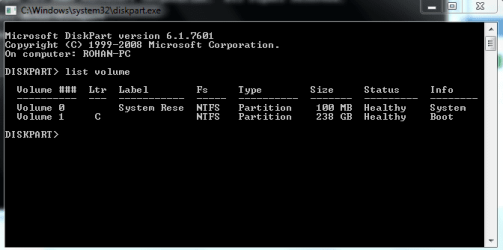
The new disk is not shown in diskpart.

Can someone help please

I have attached screenshots.
 

Attachments
  • disk 1.PNG
    disk 1.PNG
    31.2 KB · Views: 12
  • diskpart.PNG
    diskpart.PNG
    8.9 KB · Views: 8

My Computer My Computer

Computer type
Laptop
Computer Manufacturer/Model Number
HO Elitebook
OS
Windows 7 32 bit
CPU
Intel Core i5
Memory
8 GB
This does not apply if you have a SATA drive, but check for any jumper settings on the new HDD. It might be jumped as a Master instead of Slave. Google your HDD make & model if unsure about setting this.

Does the new HDD appear in the BIOS setup? Enter the BIOS by pressing the ESC key during boot (there should be a prompt on screen).
 
Last edited:

My Computer My Computer

Computer Manufacturer/Model Number
Asus CM1831 Tower
OS
Windows 7 Home Premium 64bit SP1
CPU
AMD FX 8120 3.10GHz
Memory
8GB
Browser
Google Chrome
Other Info
xplorer2; Office 2007
Right click were you've yellowed the 300g drive - initialize/choose a drive letter.
 

My Computer My Computer

Computer Manufacturer/Model Number
8 home-builds from the 80's into 2004
OS
W7 Home Premium 32bit
Looking more closely at the snapshot, it appears that the drive is initialized but doesn't have a letter.

Try right-clicking in the large white area and see if you can give it a D.
 

My Computer My Computer

Computer Manufacturer/Model Number
8 home-builds from the 80's into 2004
OS
W7 Home Premium 32bit
........The new HDD is not showing up in My Computer. The HDD shows up in device management but when right clicked on disk all the options are grayed out. ......

You have said all options are greyed out on right click. Are you sure of it?

Yes, if options are available, you can try giving a drive letter or try deleting the volume and then format.

If that is not possible, install MiniTools Partition Wizard Home Edition Best Free Partition Manager Freeware and free partition magic for Windows 7, Windows 8, Windows Vista and Windows XP 32 bit & 64 bit. MiniTool Free Partition Manager Software Home Edition.

If it can see the drive, delete the volume and format it. Give it a drive letter if need be.
 

My Computer My Computer

OS
Windows 7 Home Premium 32 bit
Back
Top