New installation of Windows 7 with large dynamic disk

heiNey

New member
Local time
9:42 PM
Messages
6
i currently have windows 7 installed on a 80 gig sata drive.

i also have 2 x 1.5TB drives and 1 x 3 TB drives set up as one large dynamic disk (they are combined and show up in windows explorer as D:\ with 5.45TB)

how do i go about re-installing windows on the 80 gb drive (or possibly a new SSD drive) without losing any data?

before anyone suggests backing up, re-install, then transfer the data back over, is there a way to do it without doing that, since i wont be able to back up that much data externally

thanks
 

My Computer My Computer

At a glance

windows 7 ultimate 32-bit
OS
windows 7 ultimate 32-bit
Backup any data on the 80GB drive, do a Clean Install with you Win 7 DVD then restore your data to the 80GB drive.

You should be able to backup 80GB to the 5.45TB dynamic drive.

To be safe, I would disconnect the other drives while doing this then reconnect them once the reinstall is complete.

Or is there more to this than it appears from your post?

If you are moving to a SSD then you should be able to clone the 80GB SATA to the SSD. Again, you disconnect the other drives, connect the SSSD to SATA port 0, the 80GB to another port then clone it using Acronis if it's an Intel drive as they offer it for free on theri website.
 

My Computer My Computer

At a glance

Windows 10 Pro X64Intel Quad Core i7-4770 @ 3.4Ghz16.0GB PC3-12800 DDR3 SDRAM 1600 MHzIntel Integrated HD Graphics
Computer type
PC/Desktop
Computer Manufacturer/Model Number
Lenovo IdeaCenter 450
OS
Windows 10 Pro X64
CPU
Intel Quad Core i7-4770 @ 3.4Ghz
Memory
16.0GB PC3-12800 DDR3 SDRAM 1600 MHz
Graphics Card(s)
Intel Integrated HD Graphics
Sound Card
Realtek HD Audio
Monitor(s) Displays
HP 22" LCD
Screen Resolution
1680 x 1050
Hard Drives
250GB Samsung EVO SATA-3 SSD
2TB Seagate ST2000DM001 SATA-2
1.5TB Seagate ST3150041AS SATA
Keyboard
Dell USB
Mouse
Lenovo USB
Internet Speed
Cable via Road Runner 3MB Upload, 30MB Download
Antivirus
Windows Defender, MBAM Pro, MBAE
Browser
Seamonkey
Other Info
UEFI/GPT
PLDS DVD-RW DH16AERSH
so, there wont be any issues with a new install of windows seeing the data that's spanned over 3 separate hard drives? that was my main concern, since i had to extend the volumes in order to make it seen as a single drive. it'll automatically see it like that with a new windows install?
 

My Computer My Computer

At a glance

windows 7 ultimate 32-bit
OS
windows 7 ultimate 32-bit
You'll have to try it to see.

As Rich says I'd unplug the other HD's, which might make it tricky to get the RAID re-established when you plug it back in. If you dont' want to unplug then make sure that the Win7 target HD is in DISK0 slot and no other partiitons are marked Active to possibly derail the System Boot Files.

May I ask why you need the spanned volume? The only reason I've heard that makes sense to go to all that trouble and potential pitfalls is for storing huge video files for editing.
 
i use the spanned volume because i store videos and use xbmc to access them. it was a pain to keep having to add several paths each time i had to reinstall xbmc. now i'm kinda stuck with it.

btw, this isn't set up in RAID. i guess it would jsut be JBOD

maybe ill do a test with some other drives before i try with my real data
 

My Computer My Computer

At a glance

windows 7 ultimate 32-bit
OS
windows 7 ultimate 32-bit
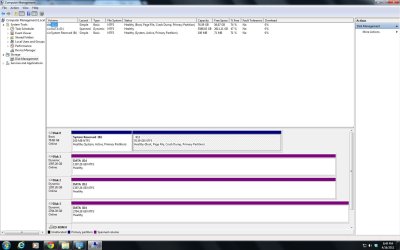
Can you post up a screenshot of your maximized Disk Management drive map with listings, using the snipping tool in Start menu? Screen Shots

We should be able to advise you so that you don't need to unplug the existing disks since the risk is only for boot files being derailed to a preceding partition incorrectly marked Active - only OS partitions should be.
 
ok, i've attached it.
 

Attachments

  • disk management.jpg
    disk management.jpg
    125.5 KB · Views: 45

My Computer My Computer

At a glance

windows 7 ultimate 32-bit
OS
windows 7 ultimate 32-bit
Yeah I don't see any reason in this one case to unplug the other HD's since none are marked Active and could even possibly derail the boot files to another HD/partition. Erring on the side of caution in this case would leave all HD's plugged in.

Just be sure to boot the DVD to install to the correct HD based on it's size, deleting both partitions using Custom Drive Options at this stage:

Then you can Create/Format your partition or just click Next and the installer will Create/Format it for you just like it is now.

The steps given here to get a perfect Clean Reinstall - Factory OEM Windows 7 are also good for retail.
 
ok, i'll give it a shot. thanks
 

My Computer My Computer

At a glance

windows 7 ultimate 32-bit
OS
windows 7 ultimate 32-bit
Let us know how it goes.

I'd also consider a backup solution taking into consideration that you could lose everything if one of the storage HD's fails at some time in the future.
 
yea, well i actually set up a mysql database and it seems to be working so far, which means i wont have to rebuild my xbmc profiles every time now. i'll look into getting another drive just to back up my stuff, then re-do all this from scratch.
 

My Computer My Computer

At a glance

windows 7 ultimate 32-bit
OS
windows 7 ultimate 32-bit
Back
Top