Solved New Intel RST 11.7.0.103 question

AirPower4ever

New member
Member
VIP
Local time
1:21 AM
Messages
269
I have an Asus P6T Deluxe v2 board, BIOS set to AHCI and I was running the version 11.2.0.1006. My set up is;
I have a single SSD (OS) C drive
a single mechanical drive (data files) D drive
a DVD ROM as E drive

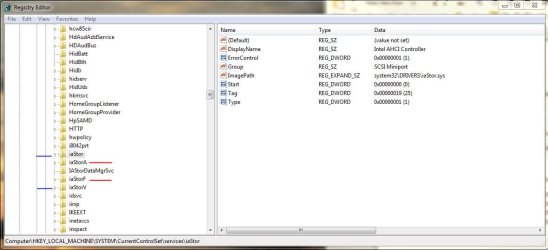
So in the attachments, you can see the registry for the 11.2.0.1006 set up. There were the standard two entries; iaStor and iaStorV.

But after installing the new RST 11.7.0.1013 (see attached file), there are the same two, but then there are added ones called iaStorA and iaStorF. I checked and the "Start" are enabled on these too

So in my set up this is what is on and off

iaStor = 0
iaStorA = 0
iaStorF = 0
iaStorV = 3
msahci = 0

So I am wondering if the new entries should be on? What are they and what are they doing? Just curious. Anyone seen this too?
 

Attachments

  • 11.2.0.1006.JPG
    11.2.0.1006.JPG
    65.7 KB · Views: 79
  • 11.7.0.1013.JPG
    11.7.0.1013.JPG
    66.1 KB · Views: 65

My Computer My Computer

At a glance

Windows 10 Pro 64-bitCore I7-67008GB Corsair DominatorAsus STRIX GTX 980Ti
Computer type
PC/Desktop
Computer Manufacturer/Model Number
Home Built
OS
Windows 10 Pro 64-bit
CPU
Core I7-6700
Motherboard
Asus Maximus VIII Hero
Memory
8GB Corsair Dominator
Graphics Card(s)
Asus STRIX GTX 980Ti
Monitor(s) Displays
Asus PG278Q, Dell U2410
Screen Resolution
2560 x 1440, 1920 x 1200
Hard Drives
1 x Samsung 950 Pro 512GB
1 x 1TB HGST
PSU
750W Seasonic
Case
Antec 900 v3
Cooling
Stock
Internet Speed
Cable Internet
Is in the "Devices Manager" your drives appears to be taggeg as SCSI drives or looks just normal?

I'm also curious because you have it installed without the v11.2.0.1006 iaStor.sys to be removed/replaced by v11.7.0.1013 iaStorA.sys & iaStorF.sys...

iaStorF.sys is the SCSI Filter Driver.
iaStorA.sys should be the SATA RAID Filter Driver, which i can't load at the moment since v11.2.0.1006. (i'm on Raid Mode Bios).

msahci (native Microsoft driver) should have set itself on "0" the time to update...it doesn't matter as it have to be set anyway on "0" to enable Ahci mode in Windows 7. But turns "3" when iaStor is installed.


IaStorV is the one for Intel Matrix Storage Manager, so "3" is normal because it is the previous version of the Intel Rapid Storage Technology.

The three others look normals set on "0" to me, but iaStor.sys that shouldn't be loaded. Is it still there in C:\Windows\System32\Drivers ?

Are you set in the Bios on RAID Mode or AHCI Mode?
 

My Computer My Computer

At a glance

Windows 7 Professional SP1 - x64 [Non-UEFI Boot]Ivy Bridge Core i5 3570K (Delidded)G.Skill "Ares" DDR3 PC3-12800 - 1600MHz (16Gb)Asus Dual-RX480-O4G
Computer type
PC/Desktop
Computer Manufacturer/Model Number
Custom Build
OS
Windows 7 Professional SP1 - x64 [Non-UEFI Boot]
CPU
Ivy Bridge Core i5 3570K (Delidded)
Motherboard
Asus P8Z77-V LE PLUS
Memory
G.Skill "Ares" DDR3 PC3-12800 - 1600MHz (16Gb)
Graphics Card(s)
Asus Dual-RX480-O4G
Sound Card
Creative Sound Blaster Z w/5.1 sound system
Monitor(s) Displays
Asus IPS 23"
Screen Resolution
16/9
Hard Drives
Internal:
500Go Sata 6Gb/s (x2)
500Go Sata 3Gb/s (x2)
SSD 60Go Sata 6Gb/s
PSU
In Win C 900W Series 80+ Platinum
Case
Thermaltake Chaser A71
Cooling
Custom Water Cooling Loop
Keyboard
Cooler Master QuickFire XTi
Mouse
Razer Imperator 2012 (4G)
Antivirus
MSE
Browser
IE 11.0.xxx Rtm
Other Info
"Raid0" with Intel Smart Response Technology (HDD/SSD)
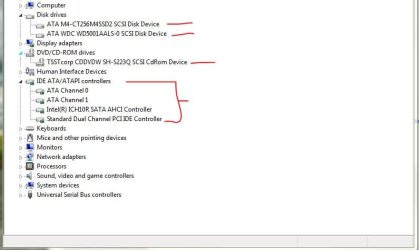
Okay, here is what the Device Manager says. The drives look to be using SCSI if I read that correct.

Some history, I use to have two Seagate drives in RAID0 about a 6-8 months ago. Then I got the Crucial drive, removed the old drives, went in to the BIOS and turned the SATA mode from RAID to AHCI, then installed the SSD and did a clean install of Windows 7, been running since. I just happened to notice these additions when I updated.

My BIOS is set to SATA mode AHCI.

The drives are;

C=Crucial M4 256GB SSD
D=Western Digital "Black" 500GB

So should I turn those iaStorA and F to off by changing the "Start" to 3 for each? Or what do I need to do to correct this? I would like to use the Intel drivers.
 

Attachments

  • Device Manager.JPG
    Device Manager.JPG
    39.1 KB · Views: 81
Last edited:

My Computer My Computer

At a glance

Windows 10 Pro 64-bitCore I7-67008GB Corsair DominatorAsus STRIX GTX 980Ti
Computer type
PC/Desktop
Computer Manufacturer/Model Number
Home Built
OS
Windows 10 Pro 64-bit
CPU
Core I7-6700
Motherboard
Asus Maximus VIII Hero
Memory
8GB Corsair Dominator
Graphics Card(s)
Asus STRIX GTX 980Ti
Monitor(s) Displays
Asus PG278Q, Dell U2410
Screen Resolution
2560 x 1440, 1920 x 1200
Hard Drives
1 x Samsung 950 Pro 512GB
1 x 1TB HGST
PSU
750W Seasonic
Case
Antec 900 v3
Cooling
Stock
Internet Speed
Cable Internet
That's what I thought... they're tagged as "ATA-SCSI Device" instead of their own name, WDC-WDxxx & M4-CTxxx, etc...

Which is not so important for the management of those drives as the new IRST 11.7.0.1013 is made first for x79 Platform and looks just renamed.

NO!!...let the first three ones on "0" (started)

IaStorA.sys & iaStorF.sys are working together now. That's the purpose of those drivers for x79 Platform and others.

It should works fine but it will check after next reboot if the msahci.sys turns back to value "3". iaStorV.sys will stay on "3".

PS:
you didn't mentionned if the first iaStor.sys (v11.2.0.1006) is still in C:\Windows\System32\Drivers
 

My Computer My Computer

At a glance

Windows 7 Professional SP1 - x64 [Non-UEFI Boot]Ivy Bridge Core i5 3570K (Delidded)G.Skill "Ares" DDR3 PC3-12800 - 1600MHz (16Gb)Asus Dual-RX480-O4G
Computer type
PC/Desktop
Computer Manufacturer/Model Number
Custom Build
OS
Windows 7 Professional SP1 - x64 [Non-UEFI Boot]
CPU
Ivy Bridge Core i5 3570K (Delidded)
Motherboard
Asus P8Z77-V LE PLUS
Memory
G.Skill "Ares" DDR3 PC3-12800 - 1600MHz (16Gb)
Graphics Card(s)
Asus Dual-RX480-O4G
Sound Card
Creative Sound Blaster Z w/5.1 sound system
Monitor(s) Displays
Asus IPS 23"
Screen Resolution
16/9
Hard Drives
Internal:
500Go Sata 6Gb/s (x2)
500Go Sata 3Gb/s (x2)
SSD 60Go Sata 6Gb/s
PSU
In Win C 900W Series 80+ Platinum
Case
Thermaltake Chaser A71
Cooling
Custom Water Cooling Loop
Keyboard
Cooler Master QuickFire XTi
Mouse
Razer Imperator 2012 (4G)
Antivirus
MSE
Browser
IE 11.0.xxx Rtm
Other Info
"Raid0" with Intel Smart Response Technology (HDD/SSD)
Missed that. So in the system32/driver folder these are the versions

iastor - 11.2.0.1006
iastorA - 11.7.0.1013
iastorF - 11.7.0.1013
iastorV - 8.6.2.1014

I rebooted and checked the registry, still shows what I mentioned above;
iaStor = 0
iaStorA = 0
iaStorF = 0
iaStorV = 3
msahci = 0

What about the iastor.sys? Should I uninstall, then go in and remove all of these .sys files and then reinstall RST?

BTW, I am using Windows 7 Pro 64-bit, if that makes a difference
 
Last edited:

My Computer My Computer

At a glance

Windows 10 Pro 64-bitCore I7-67008GB Corsair DominatorAsus STRIX GTX 980Ti
Computer type
PC/Desktop
Computer Manufacturer/Model Number
Home Built
OS
Windows 10 Pro 64-bit
CPU
Core I7-6700
Motherboard
Asus Maximus VIII Hero
Memory
8GB Corsair Dominator
Graphics Card(s)
Asus STRIX GTX 980Ti
Monitor(s) Displays
Asus PG278Q, Dell U2410
Screen Resolution
2560 x 1440, 1920 x 1200
Hard Drives
1 x Samsung 950 Pro 512GB
1 x 1TB HGST
PSU
750W Seasonic
Case
Antec 900 v3
Cooling
Stock
Internet Speed
Cable Internet
Weird, so as mentioned, in the folder in the above thread, the iastor.sys file is version 11.2.0.1006.

When I go to the Device Manager, select the IDE ATA/ATAPI and hit the properties, the Intel ICH10R SATA AHCI controller says it is version 11.7.0.1013.
 

My Computer My Computer

At a glance

Windows 10 Pro 64-bitCore I7-67008GB Corsair DominatorAsus STRIX GTX 980Ti
Computer type
PC/Desktop
Computer Manufacturer/Model Number
Home Built
OS
Windows 10 Pro 64-bit
CPU
Core I7-6700
Motherboard
Asus Maximus VIII Hero
Memory
8GB Corsair Dominator
Graphics Card(s)
Asus STRIX GTX 980Ti
Monitor(s) Displays
Asus PG278Q, Dell U2410
Screen Resolution
2560 x 1440, 1920 x 1200
Hard Drives
1 x Samsung 950 Pro 512GB
1 x 1TB HGST
PSU
750W Seasonic
Case
Antec 900 v3
Cooling
Stock
Internet Speed
Cable Internet
Weird, so as mentioned, in the folder in the above thread, the iastor.sys file is version 11.2.0.1006.

When I go to the Device Manager, select the IDE ATA/ATAPI and hit the properties, the Intel ICH10R SATA AHCI controller says it is version 11.7.0.1013.

It shouldn't hurt the system if the v11.2.0.1006 is still in Drivers folder and in Device Manager says v11.7.0.1013 as it is not in use.

It is just unusual for this driver be still there, it should be removed from that folder and placed in case rollin' back, here:

C:\Windows\System32\DriverStore\FileRepository\iaStor.inf.xxx

What you can do later if you feel enough confident, is to set iaStor.sys on "3" and msahci.sys on "3" too, reboot and sees if its troubleshooting. But only if something is really looking weird to your eyes.:sarc:

Otherwise i suggest you to let your new IRST install as is. :)
 

My Computer My Computer

At a glance

Windows 7 Professional SP1 - x64 [Non-UEFI Boot]Ivy Bridge Core i5 3570K (Delidded)G.Skill "Ares" DDR3 PC3-12800 - 1600MHz (16Gb)Asus Dual-RX480-O4G
Computer type
PC/Desktop
Computer Manufacturer/Model Number
Custom Build
OS
Windows 7 Professional SP1 - x64 [Non-UEFI Boot]
CPU
Ivy Bridge Core i5 3570K (Delidded)
Motherboard
Asus P8Z77-V LE PLUS
Memory
G.Skill "Ares" DDR3 PC3-12800 - 1600MHz (16Gb)
Graphics Card(s)
Asus Dual-RX480-O4G
Sound Card
Creative Sound Blaster Z w/5.1 sound system
Monitor(s) Displays
Asus IPS 23"
Screen Resolution
16/9
Hard Drives
Internal:
500Go Sata 6Gb/s (x2)
500Go Sata 3Gb/s (x2)
SSD 60Go Sata 6Gb/s
PSU
In Win C 900W Series 80+ Platinum
Case
Thermaltake Chaser A71
Cooling
Custom Water Cooling Loop
Keyboard
Cooler Master QuickFire XTi
Mouse
Razer Imperator 2012 (4G)
Antivirus
MSE
Browser
IE 11.0.xxx Rtm
Other Info
"Raid0" with Intel Smart Response Technology (HDD/SSD)
One more thing...

It would had been wise previously the install of the newer IRST, to uninstall the IRST v11.2.0.1006,

Reboot and update before to the Latest Intel Chipset Device Software WHQL version: 9.​3.​0.​1026

Just to remap/update the ports of the machine, then install the newer IRST.

But it still can be done after IRST install, if you need.

Maybe have you already done it? Asus shows on their specs card v9.1.1.1014.
 

My Computer My Computer

At a glance

Windows 7 Professional SP1 - x64 [Non-UEFI Boot]Ivy Bridge Core i5 3570K (Delidded)G.Skill "Ares" DDR3 PC3-12800 - 1600MHz (16Gb)Asus Dual-RX480-O4G
Computer type
PC/Desktop
Computer Manufacturer/Model Number
Custom Build
OS
Windows 7 Professional SP1 - x64 [Non-UEFI Boot]
CPU
Ivy Bridge Core i5 3570K (Delidded)
Motherboard
Asus P8Z77-V LE PLUS
Memory
G.Skill "Ares" DDR3 PC3-12800 - 1600MHz (16Gb)
Graphics Card(s)
Asus Dual-RX480-O4G
Sound Card
Creative Sound Blaster Z w/5.1 sound system
Monitor(s) Displays
Asus IPS 23"
Screen Resolution
16/9
Hard Drives
Internal:
500Go Sata 6Gb/s (x2)
500Go Sata 3Gb/s (x2)
SSD 60Go Sata 6Gb/s
PSU
In Win C 900W Series 80+ Platinum
Case
Thermaltake Chaser A71
Cooling
Custom Water Cooling Loop
Keyboard
Cooler Master QuickFire XTi
Mouse
Razer Imperator 2012 (4G)
Antivirus
MSE
Browser
IE 11.0.xxx Rtm
Other Info
"Raid0" with Intel Smart Response Technology (HDD/SSD)
@Non
I originally had IRST 11.2.0.1006. Today I went looking around and found out that Intel had a newer one (I skipped the one after 11.2.0.1006).

I downloaded the installer from Intel and ran it. So I did let it uninstall the old one before it put the new one. But you got me on the update of the chipset drivers. You are right, I have not done that yet. I stopped as soon as I found these entries. But I can still do this as you mentioned.

I also looked where you said the driver should go for the rollback; it is not there.

So let me get this straight (my head is foggy from other things right now). I should get the newer IRST, install it as it should remove the older files and send them to the filerepository and then install the newest files. Then I should update the chipset to the latest?

I can do this, I am not busy for the next few days. Question, that 9.3.0.1026 at the Intel site it does not have my board listed (X58). Does that mean the 9.1.1.1014 is the highest for my board?

I'll try the iastor and msahci to 3 and see and I will get back here.
 

My Computer My Computer

At a glance

Windows 10 Pro 64-bitCore I7-67008GB Corsair DominatorAsus STRIX GTX 980Ti
Computer type
PC/Desktop
Computer Manufacturer/Model Number
Home Built
OS
Windows 10 Pro 64-bit
CPU
Core I7-6700
Motherboard
Asus Maximus VIII Hero
Memory
8GB Corsair Dominator
Graphics Card(s)
Asus STRIX GTX 980Ti
Monitor(s) Displays
Asus PG278Q, Dell U2410
Screen Resolution
2560 x 1440, 1920 x 1200
Hard Drives
1 x Samsung 950 Pro 512GB
1 x 1TB HGST
PSU
750W Seasonic
Case
Antec 900 v3
Cooling
Stock
Internet Speed
Cable Internet
@Non
I originally had IRST 11.2.0.1006. Today I went looking around and found out that Intel had a newer one (I skipped the one after 11.2.0.1006).

I downloaded the installer from Intel and ran it. So I did let it uninstall the old one before it put the new one. But you got me on the update of the chipset drivers. You are right, I have not done that yet. I stopped as soon as I found these entries. But I can still do this as you mentioned.

I also looked where you said the driver should go for the rollback; it is not there.

So let me get this straight (my head is foggy from other things right now). I should get the newer IRST, install it as it should remove the older files and send them to the filerepository and then install the newest files. Then I should update the chipset to the latest?

I can do this, I am not busy for the next few days. Question, that 9.3.0.1026 at the Intel site it does not have my board listed (X58). Does that mean the 9.1.1.1014 is the highest for my board?

I'll try the iastor and msahci to 3 and see and I will get back here.

First, feel easy & confident!
You have the choice to let all "as is" also. Looks quite correct to me actually, just update your Chipset Inf.

but If...

1)
I'm suggesting if you have spare time now, to uninstall all of the IRST from "program and features".

Reboot will load the msahci.sys driver (just check before if it is still set to "0" if you decide to uninstall IRST).

On reboot don't allow Windows Update to search a driver for you, or disable it before the reboot!

Don't move yourself any files anywhere!

2)
After reboot check if there's any iaStor.sys (A & F included) left, in "System32\Drivers" folder only. Delete them if.

Delete the iaStor key registry entry, iaStorA & iaStorF keys in registry after uninstall & reboot (if they're still there).

Don't delete the iaStorV Key & driver!

And this before updating Chipset v9.3.0.1026 (doesn't matter if it is not for your x58 Board, as it is already included in)

3)
When ready run as administrator & install your WHQL Chipset v9.3.0.1026, reboot even if not needed.

Install the latest IRST you have. Reboot takes effect and remap the drives

Check all is in order upon reboot.

It should go back itself to:

iaStorA = 0
iaStorF = 0
iaStorV = 3
msahci = 3

PS:
I'm suggesting you an uninstall because the IRST v11.7.0.1013 is too much different version from v11.2.0.1006. That's maybe why iaStor.sys is still there in Drivers folder.

"install it as it should remove the older files and send them to the filerepository". This, is a bit of a mystery to me...it didn't backed up.
 
Last edited:

My Computer My Computer

At a glance

Windows 7 Professional SP1 - x64 [Non-UEFI Boot]Ivy Bridge Core i5 3570K (Delidded)G.Skill "Ares" DDR3 PC3-12800 - 1600MHz (16Gb)Asus Dual-RX480-O4G
Computer type
PC/Desktop
Computer Manufacturer/Model Number
Custom Build
OS
Windows 7 Professional SP1 - x64 [Non-UEFI Boot]
CPU
Ivy Bridge Core i5 3570K (Delidded)
Motherboard
Asus P8Z77-V LE PLUS
Memory
G.Skill "Ares" DDR3 PC3-12800 - 1600MHz (16Gb)
Graphics Card(s)
Asus Dual-RX480-O4G
Sound Card
Creative Sound Blaster Z w/5.1 sound system
Monitor(s) Displays
Asus IPS 23"
Screen Resolution
16/9
Hard Drives
Internal:
500Go Sata 6Gb/s (x2)
500Go Sata 3Gb/s (x2)
SSD 60Go Sata 6Gb/s
PSU
In Win C 900W Series 80+ Platinum
Case
Thermaltake Chaser A71
Cooling
Custom Water Cooling Loop
Keyboard
Cooler Master QuickFire XTi
Mouse
Razer Imperator 2012 (4G)
Antivirus
MSE
Browser
IE 11.0.xxx Rtm
Other Info
"Raid0" with Intel Smart Response Technology (HDD/SSD)
Well NoN, it is as you said. I followed exactly what you mentioned and it now looks exactly what you wrote with the exception of msahci. Mine looks like this in the registry;

iaStorA = 0
iaStorF = 0
iaStorV = 3
msahci = 0

(iastor is gone)

I checked in the Device Manager; I looked in both drives, the DVD ROM and the all the entries under the IDE ATA/ATAPI, non are using the msahci so not sure why it is on in my case. Maybe because of the Marvel controller? Not sure. Should I set msahci to 3?

Here is what's in the Device Manager
Each separate drive shows drivers
disk.sys
iastorF.sys (no certificate icon)
partmgr.sys

DVDROM
cdrom.sys
iastorF.sys (no certificate icon)

IDE ATA/ATAPI
there are 2 channel entries; they have atapi.sys and ataport.sys
Intel ICH10R SATA AHCI has both iastorA and F (but these show a certificate icon next to them)
Standard Dual Channel PCI IDE controller;
atapi.sys
ataport.sys
pciide.sys
pciidex.sys


In the C:\Windows\system32\drivers folder;
iastorA
iastorF
iastorV
msahci

So I have been running, playing BFBC2, BioShock and others. Used Word, Excel, Adobe; all seems fine. Boot up is about 1-2 seconds faster. I see this at the Windows 7 start point where the colored balls combine to make the Microsoft symbol. Use to hang there for a while, but now it seems that right after the symbol is made it continues without that pause.

I'll run some more programs and I will keep this thread open for another day and I will report back if anything.

Is it just better that when a new IRST is released to follow what you mentioned above, especially if there is also a chipset update?

Thanks for the help and the information. Very appreciated!
 

My Computer My Computer

At a glance

Windows 10 Pro 64-bitCore I7-67008GB Corsair DominatorAsus STRIX GTX 980Ti
Computer type
PC/Desktop
Computer Manufacturer/Model Number
Home Built
OS
Windows 10 Pro 64-bit
CPU
Core I7-6700
Motherboard
Asus Maximus VIII Hero
Memory
8GB Corsair Dominator
Graphics Card(s)
Asus STRIX GTX 980Ti
Monitor(s) Displays
Asus PG278Q, Dell U2410
Screen Resolution
2560 x 1440, 1920 x 1200
Hard Drives
1 x Samsung 950 Pro 512GB
1 x 1TB HGST
PSU
750W Seasonic
Case
Antec 900 v3
Cooling
Stock
Internet Speed
Cable Internet
Seing all went fine...good.

msahci entry should set back itself after a while to value "3".

Just let it flow like this for a while and keep an eye for troubleshooting in IRST Control Panel just to see if all is still in order.

IRST can be now updated to next newer without the need of newer Chipset INF, yours were quite old version and needed an update only.
 

My Computer My Computer

At a glance

Windows 7 Professional SP1 - x64 [Non-UEFI Boot]Ivy Bridge Core i5 3570K (Delidded)G.Skill "Ares" DDR3 PC3-12800 - 1600MHz (16Gb)Asus Dual-RX480-O4G
Computer type
PC/Desktop
Computer Manufacturer/Model Number
Custom Build
OS
Windows 7 Professional SP1 - x64 [Non-UEFI Boot]
CPU
Ivy Bridge Core i5 3570K (Delidded)
Motherboard
Asus P8Z77-V LE PLUS
Memory
G.Skill "Ares" DDR3 PC3-12800 - 1600MHz (16Gb)
Graphics Card(s)
Asus Dual-RX480-O4G
Sound Card
Creative Sound Blaster Z w/5.1 sound system
Monitor(s) Displays
Asus IPS 23"
Screen Resolution
16/9
Hard Drives
Internal:
500Go Sata 6Gb/s (x2)
500Go Sata 3Gb/s (x2)
SSD 60Go Sata 6Gb/s
PSU
In Win C 900W Series 80+ Platinum
Case
Thermaltake Chaser A71
Cooling
Custom Water Cooling Loop
Keyboard
Cooler Master QuickFire XTi
Mouse
Razer Imperator 2012 (4G)
Antivirus
MSE
Browser
IE 11.0.xxx Rtm
Other Info
"Raid0" with Intel Smart Response Technology (HDD/SSD)
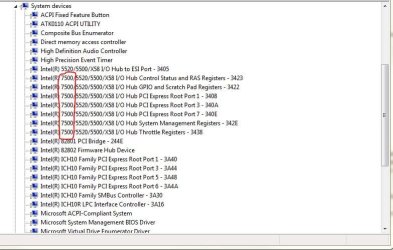
Also wanted to add that with the new chipset, the system devices also changed. There is an added 7500 to the list.
When I had the IRST 11.2.0.1006 with (if I remember correctly chipset update 9.3.0.1021) the entries were:

5520/5500/X58 I/O Hub...................

I also wanted to say thank you for your help and knowledge. Very much appreciated!
 

Attachments

  • System Devices.JPG
    System Devices.JPG
    66.4 KB · Views: 49
Last edited:

My Computer My Computer

At a glance

Windows 10 Pro 64-bitCore I7-67008GB Corsair DominatorAsus STRIX GTX 980Ti
Computer type
PC/Desktop
Computer Manufacturer/Model Number
Home Built
OS
Windows 10 Pro 64-bit
CPU
Core I7-6700
Motherboard
Asus Maximus VIII Hero
Memory
8GB Corsair Dominator
Graphics Card(s)
Asus STRIX GTX 980Ti
Monitor(s) Displays
Asus PG278Q, Dell U2410
Screen Resolution
2560 x 1440, 1920 x 1200
Hard Drives
1 x Samsung 950 Pro 512GB
1 x 1TB HGST
PSU
750W Seasonic
Case
Antec 900 v3
Cooling
Stock
Internet Speed
Cable Internet
You're welcome as SevenForums is made for that!:)
 

My Computer My Computer

At a glance

Windows 7 Professional SP1 - x64 [Non-UEFI Boot]Ivy Bridge Core i5 3570K (Delidded)G.Skill "Ares" DDR3 PC3-12800 - 1600MHz (16Gb)Asus Dual-RX480-O4G
Computer type
PC/Desktop
Computer Manufacturer/Model Number
Custom Build
OS
Windows 7 Professional SP1 - x64 [Non-UEFI Boot]
CPU
Ivy Bridge Core i5 3570K (Delidded)
Motherboard
Asus P8Z77-V LE PLUS
Memory
G.Skill "Ares" DDR3 PC3-12800 - 1600MHz (16Gb)
Graphics Card(s)
Asus Dual-RX480-O4G
Sound Card
Creative Sound Blaster Z w/5.1 sound system
Monitor(s) Displays
Asus IPS 23"
Screen Resolution
16/9
Hard Drives
Internal:
500Go Sata 6Gb/s (x2)
500Go Sata 3Gb/s (x2)
SSD 60Go Sata 6Gb/s
PSU
In Win C 900W Series 80+ Platinum
Case
Thermaltake Chaser A71
Cooling
Custom Water Cooling Loop
Keyboard
Cooler Master QuickFire XTi
Mouse
Razer Imperator 2012 (4G)
Antivirus
MSE
Browser
IE 11.0.xxx Rtm
Other Info
"Raid0" with Intel Smart Response Technology (HDD/SSD)
So everything has been working fine except one item.

I have HD Sentinel that monitors all my drives. One of the features is that it can display your current read/write activities and by how much. It gives you a history of how much each drive has been written to and read from. Just a lot of good details.

Anyways, that feature is now off. According to their site, for some reason in the registry this feature gets turned off. I can only assume that the newer IRST did this. I say this because I just updated another system (RAID though), I just installed the IRST and all went fine. I did not update the chipset on that one though and the HD Sentinel monitoring is now also off.

I am not saying that this is the root cause, but it seems that it is happening once installed. So just in case anyone else uses HD Sentinel, you might want to take a look.

Again, thank you for your help, this is why I come here.

Happy New Year to everyone here at Seven Forums!!!!
 

My Computer My Computer

At a glance

Windows 10 Pro 64-bitCore I7-67008GB Corsair DominatorAsus STRIX GTX 980Ti
Computer type
PC/Desktop
Computer Manufacturer/Model Number
Home Built
OS
Windows 10 Pro 64-bit
CPU
Core I7-6700
Motherboard
Asus Maximus VIII Hero
Memory
8GB Corsair Dominator
Graphics Card(s)
Asus STRIX GTX 980Ti
Monitor(s) Displays
Asus PG278Q, Dell U2410
Screen Resolution
2560 x 1440, 1920 x 1200
Hard Drives
1 x Samsung 950 Pro 512GB
1 x 1TB HGST
PSU
750W Seasonic
Case
Antec 900 v3
Cooling
Stock
Internet Speed
Cable Internet
Back
Top