
New laptop, changing partition disks?

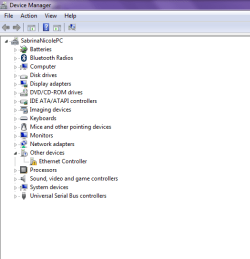
[FONT=Arial, Helvetica, sans-serif]Ok here goes, after I managed to connect to the internet and do the windows updates and drivers everything seems ok. There's just one driver I can't seem to find on the net which is the realteck ethernet controller driver [/FONT]
[FONT=Arial, Helvetica, sans-serif]devie man.png[/FONT]

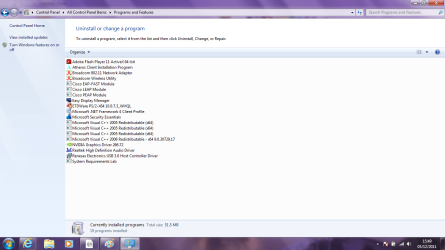
[FONT=Arial, Helvetica, sans-serif]Turns out I needed some of that easy software so that I can use the functions of the laptop for the display and so on. Here's how my programs list is looking, a lot healthier![/FONT]

[FONT=Arial, Helvetica, sans-serif]programslis.png[/FONT]

[FONT=Arial, Helvetica, sans-serif]I have also done another backup to my external using the windows backup and restore, including the system image.[/FONT]


[FONT=Arial, Helvetica, sans-serif]I haven't transferred anything to my user folders yet as I'm planning on having that on D, so I'm assuming I still do that this way? [/FONT]
[FONT=Arial, Helvetica, sans-serif]"To link User folders to D follow this method: User Folders - Change Default Location[/FONT]
[FONT=Arial, Helvetica, sans-serif]Or do them all at once by moving your named User account: User Profile - Change Default Location"[/FONT]

[FONT=Arial, Helvetica, sans-serif]I have used the disk management to do the partitions but I can only shrink C to 300gb now.[/FONT]

[FONT=Arial, Helvetica, sans-serif]diskmang.png[/FONT]
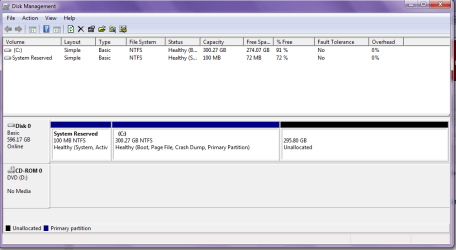
[FONT=Arial, Helvetica, sans-serif]So I have already installed the Partition Wizard bootable CD to a CD[/FONT]


My Computer My Computer

Computer Manufacturer/Model Number
Samsung RF511-S02UK
OS
Microsoft Windows 7 Home Premium 64-bit 7601 Multiprocessor Free Service Pack 1
CPU
Intel Core i5 2410M CPU @ 2.30GHz
Motherboard
SAMSUNG ELECTRONICS CO., LTD. RF511/RF411/RF711
Memory
6GB
Graphics Card(s)
(1) Intel(R) HD Graphics Family (2) NVIDIA GeForce GT 540M
Sound Card
(1) Realtek High Definition Audio (2) Bluetooth Hands-free
Screen Resolution
1366x768
Hard Drives
640GB
Other Info
15.6"
Looks good. Did you get the extra Display functionality you need now with the Easy Display software? Manufacturers will normally put laptop software needed for these functions (hotkeys, Cam, etc) on the Downloads webpage.

If Updates don't catch up with one, you can look at your laptop specs to find the Ethernet adapter's make/model to get the driver from the maker's Support website, or trace it using this tool: Hardware Identification

Boot Partition Wizard CD to rightclick C, choose Resize, slide right grey border to left by as much more space as you want, click OK. Then create New Primary partition lettered D in the Unallocated Space, label it as you wish, OK, Apply all steps.

Do you have Aero transparency on your windows borders? You can choose an Aero theme and set up a slideshow with the spectacular Win7 backgrounds by rightclicking Desktop to choose Personalize. Here is the whole collection of Win7 national backgrounds which are some of the most spectacular pictures ever taken, to load in at the Desktop Backgrounds tab as a slideshow, then turn off screensaver: 120 Original Windows 7 High Resolution Scenery Regional Wallpapers Free Download » My Digital Life
 
Last edited:
Yeah the easy display manager seems to have provided everything I need

Thank you very much I've managed to find the drver from the link you provided :)

I'll perform the boot CD for the partition now.

Yeah I've chosen a aero theme, thanks for that link I'll have a good time making my desktop look pretty
 

My Computer My Computer

Computer Manufacturer/Model Number
Samsung RF511-S02UK
OS
Microsoft Windows 7 Home Premium 64-bit 7601 Multiprocessor Free Service Pack 1
CPU
Intel Core i5 2410M CPU @ 2.30GHz
Motherboard
SAMSUNG ELECTRONICS CO., LTD. RF511/RF411/RF711
Memory
6GB
Graphics Card(s)
(1) Intel(R) HD Graphics Family (2) NVIDIA GeForce GT 540M
Sound Card
(1) Realtek High Definition Audio (2) Bluetooth Hands-free
Screen Resolution
1366x768
Hard Drives
640GB
Other Info
15.6"
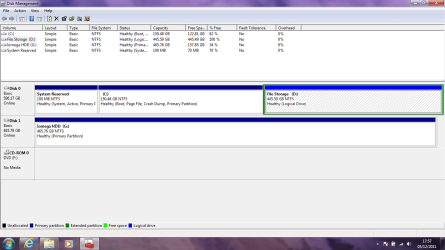
No problem, I've managed to do it! (Getting the hang of this :p ) Can I just confirm that in the future I can resize these drives even if they both have files in them? I'm happy with the space I've allocated for them as of now, but I wanted to double check, again.
 

My Computer My Computer

Computer Manufacturer/Model Number
Samsung RF511-S02UK
OS
Microsoft Windows 7 Home Premium 64-bit 7601 Multiprocessor Free Service Pack 1
CPU
Intel Core i5 2410M CPU @ 2.30GHz
Motherboard
SAMSUNG ELECTRONICS CO., LTD. RF511/RF411/RF711
Memory
6GB
Graphics Card(s)
(1) Intel(R) HD Graphics Family (2) NVIDIA GeForce GT 540M
Sound Card
(1) Realtek High Definition Audio (2) Bluetooth Hands-free
Screen Resolution
1366x768
Hard Drives
640GB
Other Info
15.6"
Yes, you can Resize into or out of any available space with PW CD which has the ability to move System Files since it's run at boot, never fails, and checks the file system in the process.
 
Done :) 150GB might be too large for C but I estimated all my design/programs at 110GB.

diskmag2.png

So now I'm ready to go ahead and move my user files??


Also, I'm having a problem with the touchpad driver, everytime I restart I've noticed I can't use the scroll function until I go into control panel/mouse.
 

My Computer My Computer

Computer Manufacturer/Model Number
Samsung RF511-S02UK
OS
Microsoft Windows 7 Home Premium 64-bit 7601 Multiprocessor Free Service Pack 1
CPU
Intel Core i5 2410M CPU @ 2.30GHz
Motherboard
SAMSUNG ELECTRONICS CO., LTD. RF511/RF411/RF711
Memory
6GB
Graphics Card(s)
(1) Intel(R) HD Graphics Family (2) NVIDIA GeForce GT 540M
Sound Card
(1) Realtek High Definition Audio (2) Bluetooth Hands-free
Screen Resolution
1366x768
Hard Drives
640GB
Other Info
15.6"
You likely need the full touchpad software package from the Support Downloads webpage for your model computer, or the device itself. It may also need to startup in the System tray to provide scrolling feature and possibly tap-to-click - test it both ways to see.

Let us know how moving User folders goes.
 
Everything went great moving the user files, however now that I'm trying to install new programs, like Firefox, I'm unable to open the .exe files. It asks me what program to open with. So I read around and found this http://www.sevenforums.com/tutorials/19449-default-file-type-associations-restore.html

But it's still not working for me, I changed the default program to (C:\Windows\regedit.exe) as it said but once I open those files for the extension I still can't see the 'merge' option.

So I renamed the file myself putting .reg at the end and then merging from there, but it still didn't work. From that link I've tried the exe and reg files.

EDIT: I opened up in safe mode and managed to fix this issue ^^

(I'm going to to try removing and reinstalling the driver for the touchpad, I got it from the website but I don't know why there was a problem.) - I did this and still seem to have a problem even though I got it direct from the Samsung website, it's not a major issue as it does work, but just annoying after every restart it stops.
 
Last edited:

My Computer My Computer

Computer Manufacturer/Model Number
Samsung RF511-S02UK
OS
Microsoft Windows 7 Home Premium 64-bit 7601 Multiprocessor Free Service Pack 1
CPU
Intel Core i5 2410M CPU @ 2.30GHz
Motherboard
SAMSUNG ELECTRONICS CO., LTD. RF511/RF411/RF711
Memory
6GB
Graphics Card(s)
(1) Intel(R) HD Graphics Family (2) NVIDIA GeForce GT 540M
Sound Card
(1) Realtek High Definition Audio (2) Bluetooth Hands-free
Screen Resolution
1366x768
Hard Drives
640GB
Other Info
15.6"
Not sure what to do about this error, I've little knowledge of this graphics card. Nvidia GT540M

nvidiaerr.png


EDIT
Ok I managed to get rid of that error but how can I check that I'm getting the best of this graphics card?
 
Last edited:

My Computer My Computer

Computer Manufacturer/Model Number
Samsung RF511-S02UK
OS
Microsoft Windows 7 Home Premium 64-bit 7601 Multiprocessor Free Service Pack 1
CPU
Intel Core i5 2410M CPU @ 2.30GHz
Motherboard
SAMSUNG ELECTRONICS CO., LTD. RF511/RF411/RF711
Memory
6GB
Graphics Card(s)
(1) Intel(R) HD Graphics Family (2) NVIDIA GeForce GT 540M
Sound Card
(1) Realtek High Definition Audio (2) Bluetooth Hands-free
Screen Resolution
1366x768
Hard Drives
640GB
Other Info
15.6"
I have a slight variation on the problems NicoleUK is having. After resizing my C: and D: partitions my WIN7Pro64 allows me to log on to user but then displays message "preparing desktop". After some time 'preparing' I get a blue screen (not a BSOD) with a message in the bottom right hand corner "Window 7 Build 7600 This copy of Windows is not genuine". The copy is genuine but seems to have lost it's activation. I have researched methods to fix this, the most likely to run the install CD from Windows, However I can't get into Windows. Can anyone help
 

My Computer My Computer

Computer Manufacturer/Model Number
Asus K61IC Notebook
OS
win7 pro 64bit
CPU
core2duo
Sounds like you didn't use Partition Wizard bootable CD, which has never failed in hundreds of partitioning operations we've helped with here. It may be reparable or not. Sometimes the non-genuine lockout is due to drive letter slippage which need correcting in registry.

Repairs when Win7 will not boot are done by booting into System Recovery Options.

If it offers a repair, accept it and reboot. If not run Startup Repair repeatedly after making sure WIn7 or it's 100mb Boot partition (preferred if you have it) are still marked Active: Partition - Mark as Active (Method Two).

If it won't repair after 3 tries with 100mb Active, switch the Active flag to Win7 partition itself and run 3 Repairs again.

If it won't repair, boot free Paragon rescue disk.

Boot the Paragon CD - select Normal Mode , then Boot Corrector.

Correct drive letters in the system registry. Return C to it's correct partition, releasing it from another first if necessary.

click to enlarge

If this fails, you can use Rescue CD to try to copy out your files to external or stick if they are intact.

Then run Factory Recovery Disks if you've made them or order them from manufacturer's Tech Support if factory OEM, or do the superior clean reinstall using Win7 DVD following these steps to get a perfect reinstall: Reinstalling Windows 7
 
Guilty as charged:o. Managed to accidently convert to a dynamic drive during the resize which appeared to block my changeing the drive letters(which had "Drifted". Had to use Ghost to copy the drive to another spare drive and back again which returned the drive to basic and cured my problems:D. Have downloaded the utils you suggested and promise to use them in the future. Many thanks for your quick reply and accurate diagnosis.:party:
 

My Computer My Computer

Computer Manufacturer/Model Number
Asus K61IC Notebook
OS
win7 pro 64bit
CPU
core2duo
Hello again guys, I have been getting used to things with the laptop however I still have a few worries. Some of the software that I needed isn't available for download on the Samsung site, I contacted them and they said I'd need to restore everything again which I don't want to do because I don't want all that crapware back. I made that disk when I first got the laptop, is there something I can do with that to get back a "few" of the software I need without having to erase my C drive all over again! (I didn't realise at the time there was some I may have needed)
 

My Computer My Computer

Computer Manufacturer/Model Number
Samsung RF511-S02UK
OS
Microsoft Windows 7 Home Premium 64-bit 7601 Multiprocessor Free Service Pack 1
CPU
Intel Core i5 2410M CPU @ 2.30GHz
Motherboard
SAMSUNG ELECTRONICS CO., LTD. RF511/RF411/RF711
Memory
6GB
Graphics Card(s)
(1) Intel(R) HD Graphics Family (2) NVIDIA GeForce GT 540M
Sound Card
(1) Realtek High Definition Audio (2) Bluetooth Hands-free
Screen Resolution
1366x768
Hard Drives
640GB
Other Info
15.6"
Well everytime I restart, it tells me that the software (from Easy) driver isn't found even though I've installed everything possible from the website.

I also can't get Samsung Recovery 5 back because it says "there is no samsung recovery area on your hardisk" I'm guessing that's because I deleted it when I did the partitions if you remember. I've been reading around some other forums and I've yet to find a solution
 

My Computer My Computer

Computer Manufacturer/Model Number
Samsung RF511-S02UK
OS
Microsoft Windows 7 Home Premium 64-bit 7601 Multiprocessor Free Service Pack 1
CPU
Intel Core i5 2410M CPU @ 2.30GHz
Motherboard
SAMSUNG ELECTRONICS CO., LTD. RF511/RF411/RF711
Memory
6GB
Graphics Card(s)
(1) Intel(R) HD Graphics Family (2) NVIDIA GeForce GT 540M
Sound Card
(1) Realtek High Definition Audio (2) Bluetooth Hands-free
Screen Resolution
1366x768
Hard Drives
640GB
Other Info
15.6"
You no longer have Samsung Recovery, or any other Samsung utilities unless you import their software from the Samsung site.

If there are any drivers in the Device Manager missing which need a driver, look for them on the Samsung Support Downloads webpage for your model.

If you cannot find the driver and it is prompting you then let us know exactly what it is and we'll help you research it - meanwhile you can disable it in Device Manager to stop being bothered.
 
IMO, I personally would return the Notebook back to out of box state.
 

My Computer My Computer

OS
ME/XP/Vista/Win7
I've been connecting the past two nights to help Nicole. She cannot get the Samsung Elan touchpad driver from website to install correctly so that it has the scroll features. It has a folder in it for Synaptics but no matter what order they're installed, it's dysfunctional with a run box starting up on the desktop every time which we finally deleted.

In addition the SRS Premium Sound package is not available to add on to the Realtek sound driver so the quality sound she had is missing. All the downloads found online are for other OEM's and won't work.

She was able to get the laptop buttons functioning using the Easy Display software.

Worse, she has no ability to use the Samsung Recovery backup image she saved externally because a small Recovery partition on her HD was deleted that enables F4 hotkey. So she has the image file on her external but no way to run it to factory restore. Apparently Samsung requires it to be shipped back to reimage the HD but don't want to help her because she divulged that she has clean reinstalled and deleted the Recov partition.

I'm hoping they reconsider since this thread is a top Google search result for Samsung now so millions will read about how they treated a young girl after the worst clean reinstall experience we've had here out of thousands.
 
   Information
We always assume you have made your Recovery Disks using the OEM manufacturer's Recovery Media Creator app the first day you had your new PC.​

& made the Startup Repair CD.
startup repair disc-create


Did you make the OEM manufacturer's Recovery Disks?


How to use Samsung Recovery, make Recovery disks:
Get Downloads, Firmware, Manuals and Software for Samsung NP-RF511-S02US#
What Is Samsung Recovery Solution III?
What Is Samsung Recovery Solution 4?

Get Downloads, Firmware, Manuals and Software for Samsung NP-RF511-S02US#

Did you make the Recovery disks?

Can you post a screen shot of Disk management?
 

My Computer My Computer

OS
ME/XP/Vista/Win7
Back
Top