

You are using an out of date browser. It may not display this or other websites correctly.
You should upgrade or use an alternative browser.
You should upgrade or use an alternative browser.
New laptop, changing partition disks?
- Thread starter NicoleUK
- Start date

- Local time
- 9:20 AM
- Messages
- 50,634
Someone deleted that post but I don't think so anyway. She successfully made a Samsung Recovery Solution backup image to external using that program, as one of the last things done before clean reinstalling. So it was working until she clean reinstalled - and cannot work now because the small OEM Recov partition was deleted.All went wrong at post 28, when OP was told to uninstall needed app's.
For Samsung Recovery Solution 5 try downloading from here:
Download Samsung Recovery Solution 5.0.0.7 Free - This program restores the hard disk drive when a serous problem occurs in the system or backs up the contents of the hard disk drive - Softpedia
This is also posted on the Samsung Downloads page but will not run without the Recovery partition as Nicole explains in her last post.
The Win7 backup image was taken after the clean reinstall and deletion of the Recov partition.If the Samsung Recovery is working, use the Windows recovery image, & leave the App's installed.
According to info found on internet:
It would be possible to get a DVD copy from an owner of similar Samsung computer who made a full backup of disk to DVD set using Samsung Recovery Solution.
This DVD set than can be started from DVD 1 and is capable of recreating the the Recovery Partition (and the whole disk contents with options of changing partition sizes).
The bad thing is that the so recreated "foreign" Recovery Partition has user information stored in it and will stop, I suppose, when the computer hardware is checked and matched to user info.
There seem to be only 2 оr 3 files connected with user information but it is not known how to generate these user files.
They just put your key in the box(Recovery Partition). You throw away the box - you loose your key forever.
Samsung should have a "master key" but they would not give it away.
As you have paid for your computer and the software - in case of general hdd failure they have to have a solution.
Formating a hdd can happen to everybody too. If you have made a Samsung Recovery DVD set even it can get damaged.
I think Samsung should regenerate a set of backup DVDs with your customer info and purchased software and send it to you for a small fee - you have paid for the software ! Without the software your computer is not what you have paid for.
It would be possible to get a DVD copy from an owner of similar Samsung computer who made a full backup of disk to DVD set using Samsung Recovery Solution.
This DVD set than can be started from DVD 1 and is capable of recreating the the Recovery Partition (and the whole disk contents with options of changing partition sizes).
The bad thing is that the so recreated "foreign" Recovery Partition has user information stored in it and will stop, I suppose, when the computer hardware is checked and matched to user info.
There seem to be only 2 оr 3 files connected with user information but it is not known how to generate these user files.
They just put your key in the box(Recovery Partition). You throw away the box - you loose your key forever.
Samsung should have a "master key" but they would not give it away.
As you have paid for your computer and the software - in case of general hdd failure they have to have a solution.
Formating a hdd can happen to everybody too. If you have made a Samsung Recovery DVD set even it can get damaged.
I think Samsung should regenerate a set of backup DVDs with your customer info and purchased software and send it to you for a small fee - you have paid for the software ! Without the software your computer is not what you have paid for.
My Computer
- Computer Manufacturer/Model Number
- Acer Notebook
- OS
- Win 8 RP, Win 7, XP
- CPU
- Intel
- Local time
- 9:20 AM
- Messages
- 50,634
Boyan's impression is also the best I could decipher from meandering threads on sammynetbooks site trying to interpret the strange Recovery Soutions method Samsung uses.
It still begs the question: If you can reinstate the partition by booting DVD's, why can it not be done somehow from the very same image backup using Samsung Recov Solution but on external HD? Can the external image somehow be transferred to disks using a program like Vlite?
Once she gets the HD reimaged with a Recov partition and Samsung Recov Solutions will run to dispense needed software, she can reimage the current clean reinstall to C.
It still begs the question: If you can reinstate the partition by booting DVD's, why can it not be done somehow from the very same image backup using Samsung Recov Solution but on external HD? Can the external image somehow be transferred to disks using a program like Vlite?
Once she gets the HD reimaged with a Recov partition and Samsung Recov Solutions will run to dispense needed software, she can reimage the current clean reinstall to C.
Samsung Update Plus.
Samsung PC Software - Samsung Update Plus - YouTube
Samsung PC Software - Samsung Update Plus - YouTube
My Computer
- OS
- ME/XP/Vista/Win7

I dont wana hijack this thread but want to share my experience here.I bought DELL laptop one year ago and performed clean install to get rid of crapware which comes pre-installed with the box.
I wanted to install roxio software and when i contacted DELL their reply was i can get it back using the OEM recovery partition.I replied i have deleted it & they vaguely replied like sorry we can't help you in this case and redirected me to DELL website to install primitive version of roxio.
So in short OEM manufacturers don't provide support if customer deletes OEM recovery partition.Thankfully DELL had supplied me with drivers CD.
My advice to people who don't want crapware which comes pre-installed with several manufacturers is to uninstall each software individually and to leave OEM partition as it is.
My 2 cents
I wanted to install roxio software and when i contacted DELL their reply was i can get it back using the OEM recovery partition.I replied i have deleted it & they vaguely replied like sorry we can't help you in this case and redirected me to DELL website to install primitive version of roxio.
So in short OEM manufacturers don't provide support if customer deletes OEM recovery partition.Thankfully DELL had supplied me with drivers CD.
My advice to people who don't want crapware which comes pre-installed with several manufacturers is to uninstall each software individually and to leave OEM partition as it is.
My 2 cents
My Computer
- Computer Manufacturer/Model Number
- DELL
- OS
- Windows 8 Pro
- CPU
- intel i3 2.40 Ghz
- Motherboard
- DELL inc
- Memory
- 6 GB RAM
- Graphics Card(s)
- Integrated Intel HD
- Sound Card
- Realtek high definition SRS surround sound
- Screen Resolution
- 1366*768
- Hard Drives
- 320 GB
- Internet Speed
- 1Mbps
- Local time
- 9:20 AM
- Messages
- 50,634
Dreamer -
For years Tech Enthusiasts have clean reinstalled to get beyond OEM bloatware, the worst of which includes Roxio. There is a perfectly good burner installed in Win7 and freeware which does labeling, etc.
You can run Dell Recovery Disks which you made, came with PC, or can order from Dell. This will restore all partitions including the OEM and Recovery partitions. Then you can clean reinstall to C, or apply a backup image of your current clean install to deleted C, reinstall needed apps from Dell recovery.
Unfortunately Nicole relied upon Samsung's new Recovery Solution to save her Recovery to external which now cannot run at all without their OEM partition.
For years Tech Enthusiasts have clean reinstalled to get beyond OEM bloatware, the worst of which includes Roxio. There is a perfectly good burner installed in Win7 and freeware which does labeling, etc.
You can run Dell Recovery Disks which you made, came with PC, or can order from Dell. This will restore all partitions including the OEM and Recovery partitions. Then you can clean reinstall to C, or apply a backup image of your current clean install to deleted C, reinstall needed apps from Dell recovery.
Unfortunately Nicole relied upon Samsung's new Recovery Solution to save her Recovery to external which now cannot run at all without their OEM partition.
Dreamer -
You can run Dell Recovery Disks which you made, came with PC, or can order from Dell. This will restore all partitions including the OEM and Recovery partitions. Then you can clean reinstall to C, or apply a backup image of your current clean install to deleted C, reinstall needed apps from Dell recovery.
Thanks for this additional information greg.
Fortunately on my end i did create recovery disks and DELL provided me with windows 7 installation CD.
Hope you people can find a solution to Nicole's problem
My Computer
- Computer Manufacturer/Model Number
- DELL
- OS
- Windows 8 Pro
- CPU
- intel i3 2.40 Ghz
- Motherboard
- DELL inc
- Memory
- 6 GB RAM
- Graphics Card(s)
- Integrated Intel HD
- Sound Card
- Realtek high definition SRS surround sound
- Screen Resolution
- 1366*768
- Hard Drives
- 320 GB
- Internet Speed
- 1Mbps

Thank you all for the responses to try and help me, I am still waiting for Samsung's response again so I shall see what happens, however would still appreciate the help here.
In the mean time I am still looking for solutions to help me with my driver problems http://www.sevenforums.com/hardware...scroll-samsung-clean-install.html#post1692981
In the mean time I am still looking for solutions to help me with my driver problems http://www.sevenforums.com/hardware...scroll-samsung-clean-install.html#post1692981
My Computer
- Computer Manufacturer/Model Number
- Samsung RF511-S02UK
- OS
- Microsoft Windows 7 Home Premium 64-bit 7601 Multiprocessor Free Service Pack 1
- CPU
- Intel Core i5 2410M CPU @ 2.30GHz
- Motherboard
- SAMSUNG ELECTRONICS CO., LTD. RF511/RF411/RF711
- Memory
- 6GB
- Graphics Card(s)
- (1) Intel(R) HD Graphics Family (2) NVIDIA GeForce GT 540M
- Sound Card
- (1) Realtek High Definition Audio (2) Bluetooth Hands-free
- Screen Resolution
- 1366x768
- Hard Drives
- 640GB
- Other Info
- 15.6"
Samsung Update Plus.
Samsung PC Software - Samsung Update Plus - YouTube
Have you tried Samsung Update Plus?
My Computer
- OS
- ME/XP/Vista/Win7
Yeah I did try that, it said everything was up to date.
My Computer
- Computer Manufacturer/Model Number
- Samsung RF511-S02UK
- OS
- Microsoft Windows 7 Home Premium 64-bit 7601 Multiprocessor Free Service Pack 1
- CPU
- Intel Core i5 2410M CPU @ 2.30GHz
- Motherboard
- SAMSUNG ELECTRONICS CO., LTD. RF511/RF411/RF711
- Memory
- 6GB
- Graphics Card(s)
- (1) Intel(R) HD Graphics Family (2) NVIDIA GeForce GT 540M
- Sound Card
- (1) Realtek High Definition Audio (2) Bluetooth Hands-free
- Screen Resolution
- 1366x768
- Hard Drives
- 640GB
- Other Info
- 15.6"
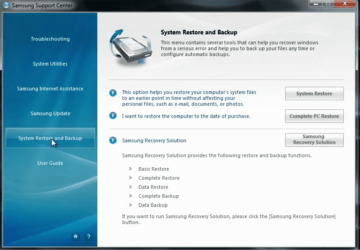
Can you start your Samsung backup from here?
My Computer
- OS
- ME/XP/Vista/Win7
Sorry it took me awhile to get back to you, no I can't start the backup from there, the only option I have from that page is System Restore, there's no options for the Samsung Recovery as in that image.
My Computer
- Computer Manufacturer/Model Number
- Samsung RF511-S02UK
- OS
- Microsoft Windows 7 Home Premium 64-bit 7601 Multiprocessor Free Service Pack 1
- CPU
- Intel Core i5 2410M CPU @ 2.30GHz
- Motherboard
- SAMSUNG ELECTRONICS CO., LTD. RF511/RF411/RF711
- Memory
- 6GB
- Graphics Card(s)
- (1) Intel(R) HD Graphics Family (2) NVIDIA GeForce GT 540M
- Sound Card
- (1) Realtek High Definition Audio (2) Bluetooth Hands-free
- Screen Resolution
- 1366x768
- Hard Drives
- 640GB
- Other Info
- 15.6"
Am I wrong or right for asking Samsung for a disk with the correct drivers and such? The more I contact them the more they are making me feel stupid for trying to solve this matter. With this laptop they provided me with a clean installation disk and then directed me to their own website with the drivers and software which clearly haven't worked as they should. I don't see why they are acting like this isn't an issue for them. This laptop is 3 weeks old and I still haven't been able to find solutions for these problems.
I have thought about sending it back but the supplier PC world told me these are Samsung issues as the warranty and technical support is with them.
I have thought about sending it back but the supplier PC world told me these are Samsung issues as the warranty and technical support is with them.
My Computer
- Computer Manufacturer/Model Number
- Samsung RF511-S02UK
- OS
- Microsoft Windows 7 Home Premium 64-bit 7601 Multiprocessor Free Service Pack 1
- CPU
- Intel Core i5 2410M CPU @ 2.30GHz
- Motherboard
- SAMSUNG ELECTRONICS CO., LTD. RF511/RF411/RF711
- Memory
- 6GB
- Graphics Card(s)
- (1) Intel(R) HD Graphics Family (2) NVIDIA GeForce GT 540M
- Sound Card
- (1) Realtek High Definition Audio (2) Bluetooth Hands-free
- Screen Resolution
- 1366x768
- Hard Drives
- 640GB
- Other Info
- 15.6"
- Local time
- 9:20 AM
- Messages
- 50,634
So the retailer has no return policy?
From what I am seeing here I would never even consider buying Samsung's PC's and will suggest that no one else do so either.
They gave you a clean Reinstallation DVD but won't support a clean reinstall. Hello?
Then the software on their website will not work correctly after clean reinstalling with the disk they provided. They tell you the real software which will work is on the Recovery partition which won't work and is not then recoverable without buying it again. Nor will the backup image you saved for Factory Recovery work without this partition.
You've tried to do everything correctly and receive bullying emails from their "Support."
Be sure to link them to this thread which is one of the top Google results for Samsung PC's right now. They are doing themselves millions of dollars worth of PR damage which will last for years if they don't change their tune.
From what I am seeing here I would never even consider buying Samsung's PC's and will suggest that no one else do so either.
They gave you a clean Reinstallation DVD but won't support a clean reinstall. Hello?
Then the software on their website will not work correctly after clean reinstalling with the disk they provided. They tell you the real software which will work is on the Recovery partition which won't work and is not then recoverable without buying it again. Nor will the backup image you saved for Factory Recovery work without this partition.
You've tried to do everything correctly and receive bullying emails from their "Support."
Be sure to link them to this thread which is one of the top Google results for Samsung PC's right now. They are doing themselves millions of dollars worth of PR damage which will last for years if they don't change their tune.
Last edited:
I have now sent on this entire thread to Samsung and the relevant departments and I hope others will definitely see this in regards to how Samsung deal with their customer problems.
After weeks of contact I am still receiving emails from multiple people dealing with this case who tell me do the simple things like "Thanks for contacting Samsung. Check the device manager" which is something I have already done from the start and explained every single step of all these problems and they still fail to read and understand that I have tried as many solutions that I can with the help from members here.
I have even tried to speak to them over the phone which is worse as I am talked to like stupid child and can't get a word in because they clearly think I'm incapable of knowing certain details about laptops.
The retailer PC World have dealt with this quite kindly and I am expected to get a replacement as they have deemed it as faulty. If it wasn't for the fact that the specs on this laptop are just what I need then I would have exchanged it for a laptop that isn't Samsung are there service is one of the worse I've ever come across.
Will keep this updated based on these principles and to help others out in the future.
After weeks of contact I am still receiving emails from multiple people dealing with this case who tell me do the simple things like "Thanks for contacting Samsung. Check the device manager" which is something I have already done from the start and explained every single step of all these problems and they still fail to read and understand that I have tried as many solutions that I can with the help from members here.
I have even tried to speak to them over the phone which is worse as I am talked to like stupid child and can't get a word in because they clearly think I'm incapable of knowing certain details about laptops.
The retailer PC World have dealt with this quite kindly and I am expected to get a replacement as they have deemed it as faulty. If it wasn't for the fact that the specs on this laptop are just what I need then I would have exchanged it for a laptop that isn't Samsung are there service is one of the worse I've ever come across.
Will keep this updated based on these principles and to help others out in the future.
My Computer
- Computer Manufacturer/Model Number
- Samsung RF511-S02UK
- OS
- Microsoft Windows 7 Home Premium 64-bit 7601 Multiprocessor Free Service Pack 1
- CPU
- Intel Core i5 2410M CPU @ 2.30GHz
- Motherboard
- SAMSUNG ELECTRONICS CO., LTD. RF511/RF411/RF711
- Memory
- 6GB
- Graphics Card(s)
- (1) Intel(R) HD Graphics Family (2) NVIDIA GeForce GT 540M
- Sound Card
- (1) Realtek High Definition Audio (2) Bluetooth Hands-free
- Screen Resolution
- 1366x768
- Hard Drives
- 640GB
- Other Info
- 15.6"

Hiya, was pointed toward this thread by gregrocker a while ago, but just now getting around to checking it out.
So...I've read the whole thread... I've also found my way through Samsung's web maze and ended up at Support for NP-RF511 which seems to list all the relevant software and drivers for Nicole's laptop. (I was careful to find the right page for her exact model, right down to its UK version).
I mean, there's all of it. Easy this, easy that, drivers, software, firmware. I don't see anything that would've been included with the original factory install that isn't available on this page.
Confusingly, the listings come up with WinXP versions first but Win7 versions are further down the list.
In the course of trying to fix the sound (SRS Premium) and touchpad issues, have we come across this particular webpage before? Seems Samsung has quite a few different ways of getting there and I wonder if gregrocker and Nicole found the same one I did.
Do any of these downloads have a problem installing on the clean install of Windows 7 that's on the laptop now?
As a prerequisite, I'd personally install the chipset drivers first and then reboot just for good measure, and then try some of the other downloads.
I know this goes against the (correct) general advice of letting Windows 7 worry about drivers, but my guts tell me that the chipset drivers might provide some specific support that the other software components need to install correctly...in this case.
So...I've read the whole thread... I've also found my way through Samsung's web maze and ended up at Support for NP-RF511 which seems to list all the relevant software and drivers for Nicole's laptop. (I was careful to find the right page for her exact model, right down to its UK version).
I mean, there's all of it. Easy this, easy that, drivers, software, firmware. I don't see anything that would've been included with the original factory install that isn't available on this page.
Confusingly, the listings come up with WinXP versions first but Win7 versions are further down the list.
In the course of trying to fix the sound (SRS Premium) and touchpad issues, have we come across this particular webpage before? Seems Samsung has quite a few different ways of getting there and I wonder if gregrocker and Nicole found the same one I did.
Do any of these downloads have a problem installing on the clean install of Windows 7 that's on the laptop now?
As a prerequisite, I'd personally install the chipset drivers first and then reboot just for good measure, and then try some of the other downloads.
I know this goes against the (correct) general advice of letting Windows 7 worry about drivers, but my guts tell me that the chipset drivers might provide some specific support that the other software components need to install correctly...in this case.
My Computer
- Computer type
- PC/Desktop
- Computer Manufacturer/Model Number
- Custom-built
- OS
- Windows 7 Professional SP1 32-bit
- CPU
- Intel Core 2 Duo E6600 2.4GHz
- Motherboard
- Asus PL5D2
- Memory
- 4GB DDR2-667 (4x1GB in dual-channel config)
- Graphics Card(s)
- nVidia GeForce 9800 GT
- Sound Card
- Creative X-Fi XtremeMusic
- Monitor(s) Displays
- Acer P236H
- Screen Resolution
- 1920x1200 (DVI)
- Hard Drives
- OCZ SSD Vertex Plus 60GB SATA (Firmware 3.55), 64MB cache
Hitachi HD321KJ SATA, 320GB, 7200rpm, 16MB cache
- PSU
- Antec TruePower 2.0
- Case
- Cooler Master Centurion
- Cooling
- Too many fans
- Keyboard
- Standard
- Mouse
- Microsoft wireless optical mouse
- Internet Speed
- AT&T U-verse (18mbit/sec)
- Antivirus
- Microsoft Security Essentials
- Browser
- Firefox
- Other Info
- Other devices:
Compaq CQ-60 laptop
Google Nexus 7 (2012) tablet
Nvidia SHIELD tablet (US/LTE)
Hardkernel ODROID-XU single-board computer (Samsung Exynos 5420)
- Local time
- 9:20 AM
- Messages
- 50,634
Nicole can clarify it more thoroughly but she did indeed try the website's software and it wouldn't work correctly. The cam software and Elan touchpad lacked features that she wants. Samsung told her that the real downloads which work correctly are stored in the Recov partition which won't boot now after clean reinstall, and can't be reinstalled itself because she chose to backup Recovery image using external instead of DVD's.
They also absurdly told her they don't support clean reinstall even though they provide a Reinstallation DVD for a clean reinstall.
It's the shabbiest OEM setup I've ever seen, backed by "tech support" that appears to be a performing parody troupe. I would tell everyone to not even consider a Samsung PC.
They also absurdly told her they don't support clean reinstall even though they provide a Reinstallation DVD for a clean reinstall.
It's the shabbiest OEM setup I've ever seen, backed by "tech support" that appears to be a performing parody troupe. I would tell everyone to not even consider a Samsung PC.
I would say the same webpages.
Corazon.
samsung.com/uk/support/model/NP-RF511-S02UK-downloads?isManualDownload=true
NicoleUK
samsung.com/uk/support/model/NP-RF511-S02UK-downloads
Corazon.
samsung.com/uk/support/model/NP-RF511-S02UK-downloads?isManualDownload=true
NicoleUK
samsung.com/uk/support/model/NP-RF511-S02UK-downloads
My Computer
- OS
- ME/XP/Vista/Win7
Similar threads
- Replies
- 4
- Views
- 4K


- Replies
- 3
- Views
- 6K

