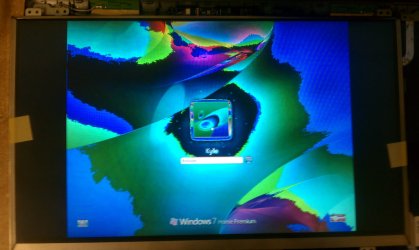
New LED Laptop Display Not displaying correctly

mohavepc

Mohave PC Computers
Guru
VIP
Local time
7:53 PM
Messages
559
Location
Lake Havasu City, Arizona
Replaced a Cracked LED (no not a misprint it is a LED) display on a newer Samsung laptop. the issue is that when powered on the LED does not display correctly. I have reseated and checked all the connections to no avail. I am not sure if it is a Display issue or perhaps a cable issue. Please look at the screenshots and you will see what I mean. I plugged in an external monitor and have a beautiful picture so I don't think it is the graphics proc. Image 0836 is the external and 0837 is the LED. Should I contact the seller and see about a replacement?
 

Attachments

  • IMAG0386.jpg
    IMAG0386.jpg
    510.7 KB · Views: 11
  • IMAG0387.jpg
    IMAG0387.jpg
    444.9 KB · Views: 14

My Computer My Computer

At a glance

Windows 7 Professional x64AMD Athlon II x4 3.00 GHz16GB Kingston DDR3Nvidia 8600 (dual DVI out for 2 monitors)
Computer type
PC/Desktop
Computer Manufacturer/Model Number
Custom Build MPCBS AMII
OS
Windows 7 Professional x64
CPU
AMD Athlon II x4 3.00 GHz
Motherboard
MSI GF615M-p33
Memory
16GB Kingston DDR3
Graphics Card(s)
Nvidia 8600 (dual DVI out for 2 monitors)
Sound Card
Onboard
Monitor(s) Displays
Acer H233H 23", ASUS 23"
Screen Resolution
1366 x 768
Hard Drives
(2) WD Blue 1 TB 3 partitions, (1) Seagate 7200 500GB with 2 partitions for useless and frequently deleted data Looking forward do an ssd for os soon.
PSU
Corsair 1100Watt
Case
Apevia HAF
Cooling
HAF AMD High Profile Heat sink and fan
Keyboard
wireless Logitech
Mouse
wireless Logitech
Internet Speed
16 mbps
Antivirus
eSet, AVG, Clam and Clamwin (depends on machine)
Browser
Firefox
Other Info
(9) Win 7 machines all x64 (POS Updated to Windows 7 pro YEA), (4) Linux machines x64 and x86 including a v3000 compaq lappy brought back to life with Mint 9 used to scan drives, (1) Linux Machine dual boot XP Pro (for testing and destroying), (1) Win 7 pro x64/Win 8.1 Lenovo Laptop Dual Boot.
Could be the LED screen itself . The cable comes with the LED replacement or are using the cable from the old screen ?
 

My Computer My Computer

At a glance

Windows 7 Ultimate 32-Bit & Windows 7 Ultimat...Intel Core i7 CPU 950 @ 3.07GHzOCZ 6GB (3 x 2GB) 240-Pin DDR3 SDRAM DDR3 160...ATI Radeon HD 5700 Series
Computer Manufacturer/Model Number
Custom Built
OS
Windows 7 Ultimate 32-Bit & Windows 7 Ultimate 64-Bit
CPU
Intel Core i7 CPU 950 @ 3.07GHz
Motherboard
ASUS P6T DELUXE V2
Memory
OCZ 6GB (3 x 2GB) 240-Pin DDR3 SDRAM DDR3 1600 OCZ3X1600R2
Graphics Card(s)
ATI Radeon HD 5700 Series
Sound Card
OnBoard
Hard Drives
WD6400AACS-00M3B0 (640GB SATA )
PSU
CORSAIR 850w
Case
NZXT LEXA
Cooling
Intel Stock Heatsink Fan
Keyboard
Microsoft Wireless Laser Keyboard 7000
Mouse
Microsoft Wireless Laser Mouse 7000
As VistaKing so adroitly mentioned it, could be the cable. If you've checked and rechecked all connections and its still under warranty, personally I'd ask for a replacement. I replaced a screen not too long ago and all problems I had were traced to a faulty cable. (My fault too as I had squished the cable in the hinge as I put the machine together. Replaced the poor thing and the machine is dancing in the street. Lesson learned on my part.:o
 

My Computer My Computer

At a glance

Windows 10x64 Build 1709Intel i7 7700HQ Kaby Lake16 GB DDR4 @2400Nvidia Geforce GTX 1060
Computer type
Laptop
Computer Manufacturer/Model Number
MSI GE72VR Apache Pro-416
OS
Windows 10x64 Build 1709
CPU
Intel i7 7700HQ Kaby Lake
Motherboard
Micro-Star Intl. MS-179B (U3C1)
Memory
16 GB DDR4 @2400
Graphics Card(s)
Nvidia Geforce GTX 1060
Screen Resolution
1920x1080 120Hz
Hard Drives
256 GB Nvme M.2 SSD

1TB HDD@7200
Cooling
Cooler Blast 4
Keyboard
Steel Series
Antivirus
Bit Defender Free
Browser
Edge
Yes drivers are updated, Cable is original but I am ordering one as a cheap test. no word from the seller yet but we will see. this customer is wanting it done asap of course. sucks being in a small town. the nearest part is 250 miles away and they only ship post. well they ship ups too but for a huge cost.

*edit*
Seller has asked me to ship it back for testing. I will most likely order another one from a different supplier as I have had issues with this company before. once the new cable and LED/Lcd arrive I will update or mark as solved.
Thanks
Herb
 
Last edited:

My Computer My Computer

At a glance

Windows 7 Professional x64AMD Athlon II x4 3.00 GHz16GB Kingston DDR3Nvidia 8600 (dual DVI out for 2 monitors)
Computer type
PC/Desktop
Computer Manufacturer/Model Number
Custom Build MPCBS AMII
OS
Windows 7 Professional x64
CPU
AMD Athlon II x4 3.00 GHz
Motherboard
MSI GF615M-p33
Memory
16GB Kingston DDR3
Graphics Card(s)
Nvidia 8600 (dual DVI out for 2 monitors)
Sound Card
Onboard
Monitor(s) Displays
Acer H233H 23", ASUS 23"
Screen Resolution
1366 x 768
Hard Drives
(2) WD Blue 1 TB 3 partitions, (1) Seagate 7200 500GB with 2 partitions for useless and frequently deleted data Looking forward do an ssd for os soon.
PSU
Corsair 1100Watt
Case
Apevia HAF
Cooling
HAF AMD High Profile Heat sink and fan
Keyboard
wireless Logitech
Mouse
wireless Logitech
Internet Speed
16 mbps
Antivirus
eSet, AVG, Clam and Clamwin (depends on machine)
Browser
Firefox
Other Info
(9) Win 7 machines all x64 (POS Updated to Windows 7 pro YEA), (4) Linux machines x64 and x86 including a v3000 compaq lappy brought back to life with Mint 9 used to scan drives, (1) Linux Machine dual boot XP Pro (for testing and destroying), (1) Win 7 pro x64/Win 8.1 Lenovo Laptop Dual Boot.
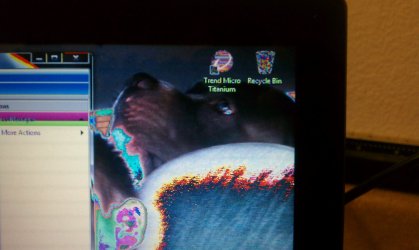
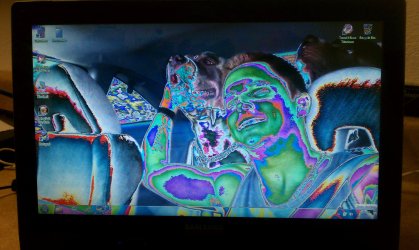
ok "New Cable", "New LCD" and still the same issue. I'm stumped unless the motherboard is toast. but if so why is the output to an external screen so perfect? any Ideas"

*edit*
It should be noted that the display on Both "new" screens looks like color separation or 8bit color without a hard drive, cd-rom/dvd, and 2GB memory. The Bios screens look just as awful on the led/lcd and fine on an external.

*edit 2*
New drivers direct from Samsung, No difference. I am at my whit's end.
 

Attachments

  • IMAG0405.jpg
    IMAG0405.jpg
    523 KB · Views: 5
  • IMAG0406.jpg
    IMAG0406.jpg
    499.8 KB · Views: 5
  • IMAG0407.jpg
    IMAG0407.jpg
    660.2 KB · Views: 5
Last edited:

My Computer My Computer

At a glance

Windows 7 Professional x64AMD Athlon II x4 3.00 GHz16GB Kingston DDR3Nvidia 8600 (dual DVI out for 2 monitors)
Computer type
PC/Desktop
Computer Manufacturer/Model Number
Custom Build MPCBS AMII
OS
Windows 7 Professional x64
CPU
AMD Athlon II x4 3.00 GHz
Motherboard
MSI GF615M-p33
Memory
16GB Kingston DDR3
Graphics Card(s)
Nvidia 8600 (dual DVI out for 2 monitors)
Sound Card
Onboard
Monitor(s) Displays
Acer H233H 23", ASUS 23"
Screen Resolution
1366 x 768
Hard Drives
(2) WD Blue 1 TB 3 partitions, (1) Seagate 7200 500GB with 2 partitions for useless and frequently deleted data Looking forward do an ssd for os soon.
PSU
Corsair 1100Watt
Case
Apevia HAF
Cooling
HAF AMD High Profile Heat sink and fan
Keyboard
wireless Logitech
Mouse
wireless Logitech
Internet Speed
16 mbps
Antivirus
eSet, AVG, Clam and Clamwin (depends on machine)
Browser
Firefox
Other Info
(9) Win 7 machines all x64 (POS Updated to Windows 7 pro YEA), (4) Linux machines x64 and x86 including a v3000 compaq lappy brought back to life with Mint 9 used to scan drives, (1) Linux Machine dual boot XP Pro (for testing and destroying), (1) Win 7 pro x64/Win 8.1 Lenovo Laptop Dual Boot.
check the plug on the vid card. There may be a pin not in use by the external monitor that the LED uses that is bent. Once you've ruled out the cable, that's the next thing to look at.
 

My Computer My Computer

At a glance

Microsoft Windows 10 Home Build 15036Intel(R) Core(TM) i7-860 @ 2.80GHz4.00 GBNVIDIA GeForce GTX 750
Computer type
PC/Desktop
Computer Manufacturer/Model Number
iBuyPower NZXT
OS
Microsoft Windows 10 Home Build 15036
CPU
Intel(R) Core(TM) i7-860 @ 2.80GHz
Motherboard
Gigabyte Technology Co., Ltd. P55-UD3L
Memory
4.00 GB
Graphics Card(s)
NVIDIA GeForce GTX 750
Sound Card
(1) Line 6 UX2 (2) Realtek High Definition Audio
Monitor(s) Displays
23" acer
Screen Resolution
1920 x 1080 x 32 bits (4294967296 colors) @ 60 Hz
Hard Drives
(1) WDC WD5000AAKS-00D2B0 ATA Device (2) Seagate FreeAgent Go 250G USB Device
Cooling
Corsair H75 liquid cooler (Very easy to install, actually)
Internet Speed
60M cable modem-->Linksys E1200-->1Gbps net card
Browser
Chrome
Other Info
This is probably the longest I've ever had a Windows machine run without having to restore it to scratch. I'm used to restoring to "factory" about every 2 yrs. I've run with Win7 since new in 2009 and only recently (Nov, '14) restored to clean up the machine from all my 'xperimenting. LOL!! I may never need another machine.

Upgraded to 10 when it was still free, then installed 2017 update.
I am using the vga plug on the side of the laptop for the external so no it's not the same plug. I will look at the plug in a little bit.

*edit*
looked at plug at looks fine. no bent pins and no broken solder points. checked with a multimeter and there is connectivity between pins and opposite side of Mobo. *sigh* looks like a mobo after all. she could have bought a new pc by now.
 
Last edited:

My Computer My Computer

At a glance

Windows 7 Professional x64AMD Athlon II x4 3.00 GHz16GB Kingston DDR3Nvidia 8600 (dual DVI out for 2 monitors)
Computer type
PC/Desktop
Computer Manufacturer/Model Number
Custom Build MPCBS AMII
OS
Windows 7 Professional x64
CPU
AMD Athlon II x4 3.00 GHz
Motherboard
MSI GF615M-p33
Memory
16GB Kingston DDR3
Graphics Card(s)
Nvidia 8600 (dual DVI out for 2 monitors)
Sound Card
Onboard
Monitor(s) Displays
Acer H233H 23", ASUS 23"
Screen Resolution
1366 x 768
Hard Drives
(2) WD Blue 1 TB 3 partitions, (1) Seagate 7200 500GB with 2 partitions for useless and frequently deleted data Looking forward do an ssd for os soon.
PSU
Corsair 1100Watt
Case
Apevia HAF
Cooling
HAF AMD High Profile Heat sink and fan
Keyboard
wireless Logitech
Mouse
wireless Logitech
Internet Speed
16 mbps
Antivirus
eSet, AVG, Clam and Clamwin (depends on machine)
Browser
Firefox
Other Info
(9) Win 7 machines all x64 (POS Updated to Windows 7 pro YEA), (4) Linux machines x64 and x86 including a v3000 compaq lappy brought back to life with Mint 9 used to scan drives, (1) Linux Machine dual boot XP Pro (for testing and destroying), (1) Win 7 pro x64/Win 8.1 Lenovo Laptop Dual Boot.
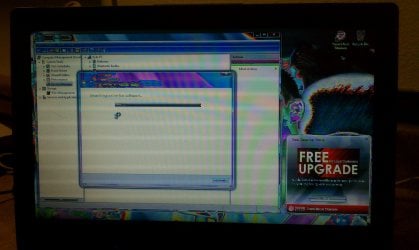
Well Now I am Truly stumped. New Mobo, New Cable, New LED/LCD, New case (old was bent), new Keyboard/Mobo mount (yes bent on a corner where it hit the ground). New mobo means new Vid chip and i5 processor. (as they are soldered on not in sockets).

:confused: SAME FREAKING ISSUE :confused::banghead::banghead::banghead::doh::mad2:(d):banghead: and a few other choice words later.
I don't know I am at a total and utter loss. Hard drive makes no diff as I tried booting without the drive using a Linux cd. Memory makes no diff as I have changed that out to with two test sticks 8gb (also tried a single 2gb).
 

My Computer My Computer

At a glance

Windows 7 Professional x64AMD Athlon II x4 3.00 GHz16GB Kingston DDR3Nvidia 8600 (dual DVI out for 2 monitors)
Computer type
PC/Desktop
Computer Manufacturer/Model Number
Custom Build MPCBS AMII
OS
Windows 7 Professional x64
CPU
AMD Athlon II x4 3.00 GHz
Motherboard
MSI GF615M-p33
Memory
16GB Kingston DDR3
Graphics Card(s)
Nvidia 8600 (dual DVI out for 2 monitors)
Sound Card
Onboard
Monitor(s) Displays
Acer H233H 23", ASUS 23"
Screen Resolution
1366 x 768
Hard Drives
(2) WD Blue 1 TB 3 partitions, (1) Seagate 7200 500GB with 2 partitions for useless and frequently deleted data Looking forward do an ssd for os soon.
PSU
Corsair 1100Watt
Case
Apevia HAF
Cooling
HAF AMD High Profile Heat sink and fan
Keyboard
wireless Logitech
Mouse
wireless Logitech
Internet Speed
16 mbps
Antivirus
eSet, AVG, Clam and Clamwin (depends on machine)
Browser
Firefox
Other Info
(9) Win 7 machines all x64 (POS Updated to Windows 7 pro YEA), (4) Linux machines x64 and x86 including a v3000 compaq lappy brought back to life with Mint 9 used to scan drives, (1) Linux Machine dual boot XP Pro (for testing and destroying), (1) Win 7 pro x64/Win 8.1 Lenovo Laptop Dual Boot.
I'm thinking its a connection issue. The cable to the monitor may not be connected correctly to the motherboard header. Please don't take this the wrong way as I don't know you or how tech savvy you are, but how much experience do have in doing these type of repairs? I ask because there is a trick to latching and unlatching some of the motherboard cable headers. A lot of them have a little bar you raise to release the cable and then lock it in again. Others have two small tabs on the ends you move to release the cable. This makes them zero insertion force type connectors. If you don't know how these connectors work you end up pulling on the cables to disconnect them and then pushing hard on them to reinsert them.
 

My Computer My Computer

At a glance

Windows 10 Education 64 bitAMD Phenom II X4 980 Black Edition Deneb 3.7GHz8GB 4GBx2 Kingston PC10600 DDR3 1333 MemoryZotac NVIDIA Geforce GT640 2 Gig DDR3 PCIe
Computer type
PC/Desktop
Computer Manufacturer/Model Number
Home Built
OS
Windows 10 Education 64 bit
CPU
AMD Phenom II X4 980 Black Edition Deneb 3.7GHz
Motherboard
Asus M4N68T-M V2 µATX Motherboard
Memory
8GB 4GBx2 Kingston PC10600 DDR3 1333 Memory
Graphics Card(s)
Zotac NVIDIA Geforce GT640 2 Gig DDR3 PCIe
Sound Card
VIA VT1708s High Definition Audio 8-channel Onboard
Monitor(s) Displays
22" LG E2242 1080p and 2 19" I-INC AG191D
Screen Resolution
1280x1024 - 1920x1080 - 1280x1024
Hard Drives
Crucial M100 256 GB SSD and 500 GB WD Blue SATA
PSU
Thermaltake TR 620
Case
Power Up Black ATX Mid-Tower Case
Cooling
Stock heatsink and fan
Keyboard
Logitech Wireless K350 Wave
Mouse
Logitech Wireless M570 Trackman Wheel
Internet Speed
80 Mbps Down 30 Mbps Up
Antivirus
Windows Defender
Browser
Internet Explorer 11
Other Info
HP DVD1040e Lightscribe - External USB2
I'm thinking its a connection issue. The cable to the monitor may not be connected correctly to the motherboard header. Please don't take this the wrong way as I don't know you or how tech savvy you are, but how much experience do have in doing these type of repairs? I ask because there is a trick to latching and unlatching some of the motherboard cable headers. A lot of them have a little bar you raise to release the cable and then lock it in again. Others have two small tabs on the ends you move to release the cable. This makes them zero insertion force type connectors. If you don't know how these connectors work you end up pulling on the cables to disconnect them and then pushing hard on them to reinsert them.

I won't take it the wrong way because as you say you don't know me. I have a computer repair shop in a small town in Arizona. We are the only one out of 8 that does laptop repair. I have been doing computer repair since 1985 and I quite understand zif connections. this laptop is using standard albeit small 26 or 28 pin connector on the mobo end and a standard flat manifold on the led/lcd side with the stupid sticky tape style lock, they are definitely not zif connectors.

What's bugging me is that 2 different screens, one different cable and one different motherboard and still this funky issue. Looks like crap on the native screen and is bright and clean on an external monitor pugged into the vga output on the laptop. Bios screen, Linux disc or windows makes no difference. Drivers for windows are latest from Samsung but that should have zero effect on the bios or Linux screens. (Not the bios itself unless two different mobos have the same bios issue). :cry:
 

My Computer My Computer

At a glance

Windows 7 Professional x64AMD Athlon II x4 3.00 GHz16GB Kingston DDR3Nvidia 8600 (dual DVI out for 2 monitors)
Computer type
PC/Desktop
Computer Manufacturer/Model Number
Custom Build MPCBS AMII
OS
Windows 7 Professional x64
CPU
AMD Athlon II x4 3.00 GHz
Motherboard
MSI GF615M-p33
Memory
16GB Kingston DDR3
Graphics Card(s)
Nvidia 8600 (dual DVI out for 2 monitors)
Sound Card
Onboard
Monitor(s) Displays
Acer H233H 23", ASUS 23"
Screen Resolution
1366 x 768
Hard Drives
(2) WD Blue 1 TB 3 partitions, (1) Seagate 7200 500GB with 2 partitions for useless and frequently deleted data Looking forward do an ssd for os soon.
PSU
Corsair 1100Watt
Case
Apevia HAF
Cooling
HAF AMD High Profile Heat sink and fan
Keyboard
wireless Logitech
Mouse
wireless Logitech
Internet Speed
16 mbps
Antivirus
eSet, AVG, Clam and Clamwin (depends on machine)
Browser
Firefox
Other Info
(9) Win 7 machines all x64 (POS Updated to Windows 7 pro YEA), (4) Linux machines x64 and x86 including a v3000 compaq lappy brought back to life with Mint 9 used to scan drives, (1) Linux Machine dual boot XP Pro (for testing and destroying), (1) Win 7 pro x64/Win 8.1 Lenovo Laptop Dual Boot.
OK, you obviously have done this before. You are correct if its distorted on the BIOS screen its not a driver issue as no drivers are loaded or required for that screen. When you swapped out the screen did you swap out the whole upper clam shell half or just the screen section itself? Maybe its the backlight or light diffuser or what ever its called?
 

My Computer My Computer

At a glance

Windows 10 Education 64 bitAMD Phenom II X4 980 Black Edition Deneb 3.7GHz8GB 4GBx2 Kingston PC10600 DDR3 1333 MemoryZotac NVIDIA Geforce GT640 2 Gig DDR3 PCIe
Computer type
PC/Desktop
Computer Manufacturer/Model Number
Home Built
OS
Windows 10 Education 64 bit
CPU
AMD Phenom II X4 980 Black Edition Deneb 3.7GHz
Motherboard
Asus M4N68T-M V2 µATX Motherboard
Memory
8GB 4GBx2 Kingston PC10600 DDR3 1333 Memory
Graphics Card(s)
Zotac NVIDIA Geforce GT640 2 Gig DDR3 PCIe
Sound Card
VIA VT1708s High Definition Audio 8-channel Onboard
Monitor(s) Displays
22" LG E2242 1080p and 2 19" I-INC AG191D
Screen Resolution
1280x1024 - 1920x1080 - 1280x1024
Hard Drives
Crucial M100 256 GB SSD and 500 GB WD Blue SATA
PSU
Thermaltake TR 620
Case
Power Up Black ATX Mid-Tower Case
Cooling
Stock heatsink and fan
Keyboard
Logitech Wireless K350 Wave
Mouse
Logitech Wireless M570 Trackman Wheel
Internet Speed
80 Mbps Down 30 Mbps Up
Antivirus
Windows Defender
Browser
Internet Explorer 11
Other Info
HP DVD1040e Lightscribe - External USB2
New clamshell back as the old was bent from being dropped. Essentially all that's old is the hard drive, dvd drive, usb daughterboard, audio daughterboard, card reader daughterboard and display front plastic cover. Has been tested with each and all disconnected. It is essentially a new machine and that's what freaking bugs me. I just cannot fid a reason for this to be going on. I personally would have thought cable first as it is distorted right from boot with the vga generic drivers out of bios being loaded immediately, plus the fact the vga output on the mobo works fine.

I just don't know now. I tried the old cable for giggles without plugging in the camera thinking it could have something to do with it since the camera leads merge with the video cable but alas no luck.
 

My Computer My Computer

At a glance

Windows 7 Professional x64AMD Athlon II x4 3.00 GHz16GB Kingston DDR3Nvidia 8600 (dual DVI out for 2 monitors)
Computer type
PC/Desktop
Computer Manufacturer/Model Number
Custom Build MPCBS AMII
OS
Windows 7 Professional x64
CPU
AMD Athlon II x4 3.00 GHz
Motherboard
MSI GF615M-p33
Memory
16GB Kingston DDR3
Graphics Card(s)
Nvidia 8600 (dual DVI out for 2 monitors)
Sound Card
Onboard
Monitor(s) Displays
Acer H233H 23", ASUS 23"
Screen Resolution
1366 x 768
Hard Drives
(2) WD Blue 1 TB 3 partitions, (1) Seagate 7200 500GB with 2 partitions for useless and frequently deleted data Looking forward do an ssd for os soon.
PSU
Corsair 1100Watt
Case
Apevia HAF
Cooling
HAF AMD High Profile Heat sink and fan
Keyboard
wireless Logitech
Mouse
wireless Logitech
Internet Speed
16 mbps
Antivirus
eSet, AVG, Clam and Clamwin (depends on machine)
Browser
Firefox
Other Info
(9) Win 7 machines all x64 (POS Updated to Windows 7 pro YEA), (4) Linux machines x64 and x86 including a v3000 compaq lappy brought back to life with Mint 9 used to scan drives, (1) Linux Machine dual boot XP Pro (for testing and destroying), (1) Win 7 pro x64/Win 8.1 Lenovo Laptop Dual Boot.
New clamshell back as the old was bent from being dropped. Essentially all that's old is the hard drive, dvd drive, usb daughterboard, audio daughterboard, card reader daughterboard and display front plastic cover. Has been tested with each and all disconnected. It is essentially a new machine and that's what freaking bugs me. I just cannot fid a reason for this to be going on. I personally would have thought cable first as it is distorted right from boot with the vga generic drivers out of bios being loaded immediately, plus the fact the vga output on the mobo works fine.

I just don't know now. I tried the old cable for giggles without plugging in the camera thinking it could have something to do with it since the camera leads merge with the video cable but alas no luck.

I do believe the signal that feeds the VGA port is a different signal from the one that goes to the built in LCD display. Analog versus digital. I've seen situations like this where one worked OK and the other didn't. Are you sure you have the correct replacement for the LCD screen? You've swapped everything out so I'm at a lose for suggestions at this point.
 

My Computer My Computer

At a glance

Windows 10 Education 64 bitAMD Phenom II X4 980 Black Edition Deneb 3.7GHz8GB 4GBx2 Kingston PC10600 DDR3 1333 MemoryZotac NVIDIA Geforce GT640 2 Gig DDR3 PCIe
Computer type
PC/Desktop
Computer Manufacturer/Model Number
Home Built
OS
Windows 10 Education 64 bit
CPU
AMD Phenom II X4 980 Black Edition Deneb 3.7GHz
Motherboard
Asus M4N68T-M V2 µATX Motherboard
Memory
8GB 4GBx2 Kingston PC10600 DDR3 1333 Memory
Graphics Card(s)
Zotac NVIDIA Geforce GT640 2 Gig DDR3 PCIe
Sound Card
VIA VT1708s High Definition Audio 8-channel Onboard
Monitor(s) Displays
22" LG E2242 1080p and 2 19" I-INC AG191D
Screen Resolution
1280x1024 - 1920x1080 - 1280x1024
Hard Drives
Crucial M100 256 GB SSD and 500 GB WD Blue SATA
PSU
Thermaltake TR 620
Case
Power Up Black ATX Mid-Tower Case
Cooling
Stock heatsink and fan
Keyboard
Logitech Wireless K350 Wave
Mouse
Logitech Wireless M570 Trackman Wheel
Internet Speed
80 Mbps Down 30 Mbps Up
Antivirus
Windows Defender
Browser
Internet Explorer 11
Other Info
HP DVD1040e Lightscribe - External USB2
The last time I saw a screen that looked like that was after a friend used alcohol to clean his screen. That screen was soft to the touch almost like jello and didn't have a hard glass cover. Eventually it went back to normal as the alcohol evaporated.
 

My Computer My Computer

At a glance

Windows 10 Education 64 bitAMD Phenom II X4 980 Black Edition Deneb 3.7GHz8GB 4GBx2 Kingston PC10600 DDR3 1333 MemoryZotac NVIDIA Geforce GT640 2 Gig DDR3 PCIe
Computer type
PC/Desktop
Computer Manufacturer/Model Number
Home Built
OS
Windows 10 Education 64 bit
CPU
AMD Phenom II X4 980 Black Edition Deneb 3.7GHz
Motherboard
Asus M4N68T-M V2 µATX Motherboard
Memory
8GB 4GBx2 Kingston PC10600 DDR3 1333 Memory
Graphics Card(s)
Zotac NVIDIA Geforce GT640 2 Gig DDR3 PCIe
Sound Card
VIA VT1708s High Definition Audio 8-channel Onboard
Monitor(s) Displays
22" LG E2242 1080p and 2 19" I-INC AG191D
Screen Resolution
1280x1024 - 1920x1080 - 1280x1024
Hard Drives
Crucial M100 256 GB SSD and 500 GB WD Blue SATA
PSU
Thermaltake TR 620
Case
Power Up Black ATX Mid-Tower Case
Cooling
Stock heatsink and fan
Keyboard
Logitech Wireless K350 Wave
Mouse
Logitech Wireless M570 Trackman Wheel
Internet Speed
80 Mbps Down 30 Mbps Up
Antivirus
Windows Defender
Browser
Internet Explorer 11
Other Info
HP DVD1040e Lightscribe - External USB2
First screen I ordered by model number off the laptop even though I know better but it matched what was in the machine. I RMA'd that one and ordered another through a different supplier using the model number off the screen itself. no chemicals have been in contact with this screen as I have the plastic shield film they tape on them still in place. it looks like the old 8bit vga output that is trying to show millions of colors. I don't have another laptop to see if perhaps I have indeed gotten two bad led/lcd's. I am not liking these newer displays as I don't think the quality nor the display quality is up to par with the older standard lcd with the florescent lighting.
 

My Computer My Computer

At a glance

Windows 7 Professional x64AMD Athlon II x4 3.00 GHz16GB Kingston DDR3Nvidia 8600 (dual DVI out for 2 monitors)
Computer type
PC/Desktop
Computer Manufacturer/Model Number
Custom Build MPCBS AMII
OS
Windows 7 Professional x64
CPU
AMD Athlon II x4 3.00 GHz
Motherboard
MSI GF615M-p33
Memory
16GB Kingston DDR3
Graphics Card(s)
Nvidia 8600 (dual DVI out for 2 monitors)
Sound Card
Onboard
Monitor(s) Displays
Acer H233H 23", ASUS 23"
Screen Resolution
1366 x 768
Hard Drives
(2) WD Blue 1 TB 3 partitions, (1) Seagate 7200 500GB with 2 partitions for useless and frequently deleted data Looking forward do an ssd for os soon.
PSU
Corsair 1100Watt
Case
Apevia HAF
Cooling
HAF AMD High Profile Heat sink and fan
Keyboard
wireless Logitech
Mouse
wireless Logitech
Internet Speed
16 mbps
Antivirus
eSet, AVG, Clam and Clamwin (depends on machine)
Browser
Firefox
Other Info
(9) Win 7 machines all x64 (POS Updated to Windows 7 pro YEA), (4) Linux machines x64 and x86 including a v3000 compaq lappy brought back to life with Mint 9 used to scan drives, (1) Linux Machine dual boot XP Pro (for testing and destroying), (1) Win 7 pro x64/Win 8.1 Lenovo Laptop Dual Boot.
I'm a TV tech, and if I saw something like that after changing a panel, I'd suspect the panel, then the LVDS cable, then I'd check the settings in the main board. TV's often have settings for panel type. 8 bit, 10 bit. VESA, PDP, etc. Since this is a laptop, I'd suspect the panel is not the same, it's possible a cable issue, but it's unlikely to display like your pictures. I realize this is not much help for you, but that's my thoughts. A Guy
 

My Computer My Computer

At a glance

Windows 10 Home x64INTEL Core i5-750 Quad-Core 3.37GHzHyperX Fury Black Series 8GB (2 x 4GB) 1866MhzEVGA GeForce GTX 750 Superclocked 1GB 128-Bit...
Computer type
PC/Desktop
OS
Windows 10 Home x64
CPU
INTEL Core i5-750 Quad-Core 3.37GHz
Motherboard
ASUS P7P55D
Memory
HyperX Fury Black Series 8GB (2 x 4GB) 1866Mhz
Graphics Card(s)
EVGA GeForce GTX 750 Superclocked 1GB 128-Bit GDDR5
Monitor(s) Displays
LG 32MA68HY 32" IPS
Screen Resolution
1920 x 1080
Hard Drives
Samsung 840 Evo 120GB, SEAGATE 500GB Barracuda® 7200.12, SATA 3 Gb/s, 7200 RPM, 16MB cache
PSU
ANTEC TruePower New TP-550, 80 PLUS, 550W
Case
ANTEC Three Hundred Illusion
Cooling
COOLER MASTER Hyper 212 Plus, 4 x 120mm 1 x 140mm Noctua's
Internet Speed
85 + Mbps
Antivirus
Avast
Browser
Vivaldi
First screen I ordered by model number off the laptop even though I know better but it matched what was in the machine. I RMA'd that one and ordered another through a different supplier using the model number off the screen itself. no chemicals have been in contact with this screen as I have the plastic shield film they tape on them still in place. it looks like the old 8bit vga output that is trying to show millions of colors. I don't have another laptop to see if perhaps I have indeed gotten two bad led/lcd's. I am not liking these newer displays as I don't think the quality nor the display quality is up to par with the older standard lcd with the florescent lighting.

Take the plastic film shield off and see what happens.
 

My Computer My Computer

At a glance

Windows 10 Education 64 bitAMD Phenom II X4 980 Black Edition Deneb 3.7GHz8GB 4GBx2 Kingston PC10600 DDR3 1333 MemoryZotac NVIDIA Geforce GT640 2 Gig DDR3 PCIe
Computer type
PC/Desktop
Computer Manufacturer/Model Number
Home Built
OS
Windows 10 Education 64 bit
CPU
AMD Phenom II X4 980 Black Edition Deneb 3.7GHz
Motherboard
Asus M4N68T-M V2 µATX Motherboard
Memory
8GB 4GBx2 Kingston PC10600 DDR3 1333 Memory
Graphics Card(s)
Zotac NVIDIA Geforce GT640 2 Gig DDR3 PCIe
Sound Card
VIA VT1708s High Definition Audio 8-channel Onboard
Monitor(s) Displays
22" LG E2242 1080p and 2 19" I-INC AG191D
Screen Resolution
1280x1024 - 1920x1080 - 1280x1024
Hard Drives
Crucial M100 256 GB SSD and 500 GB WD Blue SATA
PSU
Thermaltake TR 620
Case
Power Up Black ATX Mid-Tower Case
Cooling
Stock heatsink and fan
Keyboard
Logitech Wireless K350 Wave
Mouse
Logitech Wireless M570 Trackman Wheel
Internet Speed
80 Mbps Down 30 Mbps Up
Antivirus
Windows Defender
Browser
Internet Explorer 11
Other Info
HP DVD1040e Lightscribe - External USB2
[/QUOTE]

Take the plastic film shield off and see what happens.[/QUOTE]

ummmmm sorry did already. Nice thought . but not the issue. 2 diff lcd's 2 diff mobo's and 2 diff cables. makes absolutely no sense.
 

My Computer My Computer

At a glance

Windows 7 Professional x64AMD Athlon II x4 3.00 GHz16GB Kingston DDR3Nvidia 8600 (dual DVI out for 2 monitors)
Computer type
PC/Desktop
Computer Manufacturer/Model Number
Custom Build MPCBS AMII
OS
Windows 7 Professional x64
CPU
AMD Athlon II x4 3.00 GHz
Motherboard
MSI GF615M-p33
Memory
16GB Kingston DDR3
Graphics Card(s)
Nvidia 8600 (dual DVI out for 2 monitors)
Sound Card
Onboard
Monitor(s) Displays
Acer H233H 23", ASUS 23"
Screen Resolution
1366 x 768
Hard Drives
(2) WD Blue 1 TB 3 partitions, (1) Seagate 7200 500GB with 2 partitions for useless and frequently deleted data Looking forward do an ssd for os soon.
PSU
Corsair 1100Watt
Case
Apevia HAF
Cooling
HAF AMD High Profile Heat sink and fan
Keyboard
wireless Logitech
Mouse
wireless Logitech
Internet Speed
16 mbps
Antivirus
eSet, AVG, Clam and Clamwin (depends on machine)
Browser
Firefox
Other Info
(9) Win 7 machines all x64 (POS Updated to Windows 7 pro YEA), (4) Linux machines x64 and x86 including a v3000 compaq lappy brought back to life with Mint 9 used to scan drives, (1) Linux Machine dual boot XP Pro (for testing and destroying), (1) Win 7 pro x64/Win 8.1 Lenovo Laptop Dual Boot.
I'm a TV tech, and if I saw something like that after changing a panel, I'd suspect the panel, then the LVDS cable, then I'd check the settings in the main board. TV's often have settings for panel type. 8 bit, 10 bit. VESA, PDP, etc. Since this is a laptop, I'd suspect the panel is not the same, it's possible a cable issue, but it's unlikely to display like your pictures. I realize this is not much help for you, but that's my thoughts. A Guy

Thanks A Guy but the second display matches by model number, the first display was off by last two digits but was assured it would work. the first display was rma'ed without question due to the model number. I believe the LED/LCD is correct according to model.
 

My Computer My Computer

At a glance

Windows 7 Professional x64AMD Athlon II x4 3.00 GHz16GB Kingston DDR3Nvidia 8600 (dual DVI out for 2 monitors)
Computer type
PC/Desktop
Computer Manufacturer/Model Number
Custom Build MPCBS AMII
OS
Windows 7 Professional x64
CPU
AMD Athlon II x4 3.00 GHz
Motherboard
MSI GF615M-p33
Memory
16GB Kingston DDR3
Graphics Card(s)
Nvidia 8600 (dual DVI out for 2 monitors)
Sound Card
Onboard
Monitor(s) Displays
Acer H233H 23", ASUS 23"
Screen Resolution
1366 x 768
Hard Drives
(2) WD Blue 1 TB 3 partitions, (1) Seagate 7200 500GB with 2 partitions for useless and frequently deleted data Looking forward do an ssd for os soon.
PSU
Corsair 1100Watt
Case
Apevia HAF
Cooling
HAF AMD High Profile Heat sink and fan
Keyboard
wireless Logitech
Mouse
wireless Logitech
Internet Speed
16 mbps
Antivirus
eSet, AVG, Clam and Clamwin (depends on machine)
Browser
Firefox
Other Info
(9) Win 7 machines all x64 (POS Updated to Windows 7 pro YEA), (4) Linux machines x64 and x86 including a v3000 compaq lappy brought back to life with Mint 9 used to scan drives, (1) Linux Machine dual boot XP Pro (for testing and destroying), (1) Win 7 pro x64/Win 8.1 Lenovo Laptop Dual Boot.
2 bad displays?
 

My Computer My Computer

At a glance

Windows 10 Education 64 bitAMD Phenom II X4 980 Black Edition Deneb 3.7GHz8GB 4GBx2 Kingston PC10600 DDR3 1333 MemoryZotac NVIDIA Geforce GT640 2 Gig DDR3 PCIe
Computer type
PC/Desktop
Computer Manufacturer/Model Number
Home Built
OS
Windows 10 Education 64 bit
CPU
AMD Phenom II X4 980 Black Edition Deneb 3.7GHz
Motherboard
Asus M4N68T-M V2 µATX Motherboard
Memory
8GB 4GBx2 Kingston PC10600 DDR3 1333 Memory
Graphics Card(s)
Zotac NVIDIA Geforce GT640 2 Gig DDR3 PCIe
Sound Card
VIA VT1708s High Definition Audio 8-channel Onboard
Monitor(s) Displays
22" LG E2242 1080p and 2 19" I-INC AG191D
Screen Resolution
1280x1024 - 1920x1080 - 1280x1024
Hard Drives
Crucial M100 256 GB SSD and 500 GB WD Blue SATA
PSU
Thermaltake TR 620
Case
Power Up Black ATX Mid-Tower Case
Cooling
Stock heatsink and fan
Keyboard
Logitech Wireless K350 Wave
Mouse
Logitech Wireless M570 Trackman Wheel
Internet Speed
80 Mbps Down 30 Mbps Up
Antivirus
Windows Defender
Browser
Internet Explorer 11
Other Info
HP DVD1040e Lightscribe - External USB2
Back
Top