Solved New monitor with hdmi giving a fuzzy screen.

Luna TGaP

New member
Local time
8:55 PM
Messages
23
Location
Lincolnshire
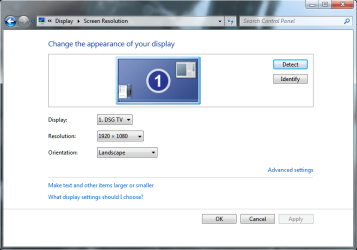
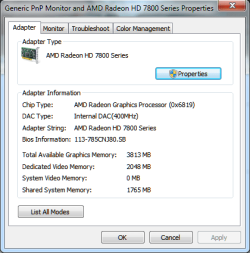
Heya. I recently (for Christmas) received a new LOGIK monitor to accompany my old one and I'm having problems getting them both to run correctly. My old monitor used to be using a VGA cable with a DVI adapter at 1920 x 1080, where it worked fine. I plugged in my new monitor with a HDMI cable with a DVI adapter, however upon doing so, the resolution of the older screen was reduced to 1440 x 900 (or something like that) and my new monitor became fuzzy, as in, everything is out of focus and the colours seem dark / unnatural. I've tried using a HDMI cable with the older monitor, where I can get 1920 x 1080, however it too becomes fuzzy. I tried to use the VGA in my old monitor as that worked previously, but no longer does. The screens have their proper aspect ratios (dot to dot, full, whatever you want to call them) and are not using overscan. Sometimes I am able (after hours of playing with CCC and windows control panel) to make one of them display correctly, however after restarting it returns to being fuzzy. All of the cables are connected securely and my drivers are up-to-date (as of 01/01/14). I'll attach a screenshot for further reference (currently i'm just using 1 screen as I had to borrow the second HDMI cable - I'll be getting another in about a week). I've been browsing a wide number of forums for about a week now and cannot seem to get it to work. Sorry if I'm being vague, if there's any more information you need don't hesitate to ask. :) Thanks.
 
Last edited:

My Computer My Computer

At a glance

Windows 7 Home Premium 64biti5-3570k 3.4GHzCorsair 12GB vengeance 1333MHzRadeon HD 7850 2GB
Computer type
PC/Desktop
Computer Manufacturer/Model Number
Custom build
OS
Windows 7 Home Premium 64bit
CPU
i5-3570k 3.4GHz
Motherboard
ASUS P8Z77-V PRO
Memory
Corsair 12GB vengeance 1333MHz
Graphics Card(s)
Radeon HD 7850 2GB
Monitor(s) Displays
2 LOGIK TVs
Screen Resolution
1920 x 1080
Hard Drives
500GB SAMSUNG sata HDD 5400rpm
1TB WD sata HDD 7200rpm
PSU
Thermaltake Smart 530W
Cooling
A couple of fans that came with the case. :)
Internet Speed
Horribly slow
Antivirus
Avast! Free antivirus
Browser
Chrome
Something that's just occured to me - should this thread be moved to Hardware and Devices? Only, I'm not sure whether the problem is with the graphics card, the cable, the monitor(s), the drivers or windows. :S
 

My Computer My Computer

At a glance

Windows 7 Home Premium 64biti5-3570k 3.4GHzCorsair 12GB vengeance 1333MHzRadeon HD 7850 2GB
Computer type
PC/Desktop
Computer Manufacturer/Model Number
Custom build
OS
Windows 7 Home Premium 64bit
CPU
i5-3570k 3.4GHz
Motherboard
ASUS P8Z77-V PRO
Memory
Corsair 12GB vengeance 1333MHz
Graphics Card(s)
Radeon HD 7850 2GB
Monitor(s) Displays
2 LOGIK TVs
Screen Resolution
1920 x 1080
Hard Drives
500GB SAMSUNG sata HDD 5400rpm
1TB WD sata HDD 7200rpm
PSU
Thermaltake Smart 530W
Cooling
A couple of fans that came with the case. :)
Internet Speed
Horribly slow
Antivirus
Avast! Free antivirus
Browser
Chrome
CCC isn't very useful unless you're tweaking your system - I think you stated that you are not (not using overscan)

If that is the case, I suggest uninstalling CCC - leave CCM, just get rid of CCC

Forget about the old monitor for the moment and focus on getting the new monitor behaving.

I have an HP 20 inch monitor - there is a driver that I installed, but it didn't seem to do much (added HP color .icc and some color temp presets).

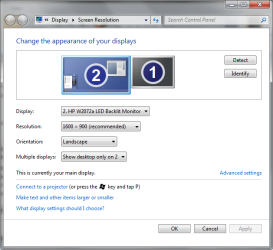
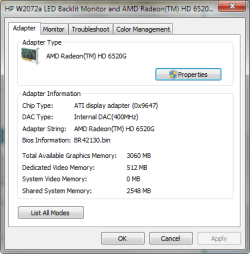
Please post screenshots showin Screen Resolution and Adv properties
 

Attachments

  • monRes.png
    monRes.png
    29.7 KB · Views: 24
  • monAdv.png
    monAdv.png
    14.5 KB · Views: 24

My Computer My Computer

At a glance

x64 (6.3.9600) Win8.1 Pro & soon dual boot x6...AMD A6-3420M APU with Radeon(tm) HD Graphics6.00 GBAMD Radeon(TM) HD 6520G
Computer type
Laptop
Computer Manufacturer/Model Number
HP Pavilion dv6-6c10us
OS
x64 (6.3.9600) Win8.1 Pro & soon dual boot x64 (6.1.7601) Win7_SP1 HomePrem
CPU
AMD A6-3420M APU with Radeon(tm) HD Graphics
Motherboard
Hewlett-Packard 1805
Memory
6.00 GB
Graphics Card(s)
AMD Radeon(TM) HD 6520G
Sound Card
(1) AMD High Definition Audio Device (2) IDT High Definiti
Monitor(s) Displays
HP W2072a 20" LCD (1600 x 900) @ 60 Hz
Screen Resolution
1366 x 768 x 32 bits (4294967296 colors) @ 60 Hz
Hard Drives
ST640LM0 00 HM641JI SATA Disk Device
Keyboard
Logitech k520 wireless KB
Mouse
Logitech m320 wireless mouse (bundled with KB)
Internet Speed
15/5 | 54 MB Wireless 'n'
Antivirus
Realtime: Defender or Avast | On-demand: Malwarebytes, ESET
Browser
IE 11 on Win8, IE 10 on win 7
Other Info
Media: [Gimp, Audacity, VLC] || Comm: [WEmail 2012, Skype] || Productivity: [OpenOffice,| Textpad] || Utils: [Sysinternals, cCleaner, Speccy, Defraggler]
I've uninstalled CCC and rebooted, I don't think anything's changed since. Also, I'd like to note that Window's recommended resolution is 1280 x 720, however the TV's manual states that for PCs that 1920 x 1080 should be used.
Screen res.png
Screen res adv.png
 

My Computer My Computer

At a glance

Windows 7 Home Premium 64biti5-3570k 3.4GHzCorsair 12GB vengeance 1333MHzRadeon HD 7850 2GB
Computer type
PC/Desktop
Computer Manufacturer/Model Number
Custom build
OS
Windows 7 Home Premium 64bit
CPU
i5-3570k 3.4GHz
Motherboard
ASUS P8Z77-V PRO
Memory
Corsair 12GB vengeance 1333MHz
Graphics Card(s)
Radeon HD 7850 2GB
Monitor(s) Displays
2 LOGIK TVs
Screen Resolution
1920 x 1080
Hard Drives
500GB SAMSUNG sata HDD 5400rpm
1TB WD sata HDD 7200rpm
PSU
Thermaltake Smart 530W
Cooling
A couple of fans that came with the case. :)
Internet Speed
Horribly slow
Antivirus
Avast! Free antivirus
Browser
Chrome
How does TV fit into this?

I don't think VGA will get you where you want to be. Adapters/converters can only change so much-usually just the pinouts.

I don't know what affect an HDMI/dvi conversion acheives, other than matching connectors. Better to go with what your equipment supports (HDMI->dvi, HDMI->DMI, VGA->VGA)

I'm stumped.
 

My Computer My Computer

At a glance

x64 (6.3.9600) Win8.1 Pro & soon dual boot x6...AMD A6-3420M APU with Radeon(tm) HD Graphics6.00 GBAMD Radeon(TM) HD 6520G
Computer type
Laptop
Computer Manufacturer/Model Number
HP Pavilion dv6-6c10us
OS
x64 (6.3.9600) Win8.1 Pro & soon dual boot x64 (6.1.7601) Win7_SP1 HomePrem
CPU
AMD A6-3420M APU with Radeon(tm) HD Graphics
Motherboard
Hewlett-Packard 1805
Memory
6.00 GB
Graphics Card(s)
AMD Radeon(TM) HD 6520G
Sound Card
(1) AMD High Definition Audio Device (2) IDT High Definiti
Monitor(s) Displays
HP W2072a 20" LCD (1600 x 900) @ 60 Hz
Screen Resolution
1366 x 768 x 32 bits (4294967296 colors) @ 60 Hz
Hard Drives
ST640LM0 00 HM641JI SATA Disk Device
Keyboard
Logitech k520 wireless KB
Mouse
Logitech m320 wireless mouse (bundled with KB)
Internet Speed
15/5 | 54 MB Wireless 'n'
Antivirus
Realtime: Defender or Avast | On-demand: Malwarebytes, ESET
Browser
IE 11 on Win8, IE 10 on win 7
Other Info
Media: [Gimp, Audacity, VLC] || Comm: [WEmail 2012, Skype] || Productivity: [OpenOffice,| Textpad] || Utils: [Sysinternals, cCleaner, Speccy, Defraggler]
Alright, thanks anyway. I'll keep working away at it and post if I manage to make any progress. :) If there's anything that comes to mind, don't hesitation to ask for screenshots / information.
 

My Computer My Computer

At a glance

Windows 7 Home Premium 64biti5-3570k 3.4GHzCorsair 12GB vengeance 1333MHzRadeon HD 7850 2GB
Computer type
PC/Desktop
Computer Manufacturer/Model Number
Custom build
OS
Windows 7 Home Premium 64bit
CPU
i5-3570k 3.4GHz
Motherboard
ASUS P8Z77-V PRO
Memory
Corsair 12GB vengeance 1333MHz
Graphics Card(s)
Radeon HD 7850 2GB
Monitor(s) Displays
2 LOGIK TVs
Screen Resolution
1920 x 1080
Hard Drives
500GB SAMSUNG sata HDD 5400rpm
1TB WD sata HDD 7200rpm
PSU
Thermaltake Smart 530W
Cooling
A couple of fans that came with the case. :)
Internet Speed
Horribly slow
Antivirus
Avast! Free antivirus
Browser
Chrome
Ahhhh, I see now (I think)

The LOGIK monitor is the TV....yes? Sorry, thought there was a new variable.

Thought of something after that epiphany:
When I hook up my box to the flat screen, I change the HDMI port (on the TV menu) to PC

Does the LOGIK allow you to customize the port (presets for DVD, VCR, PC, HDMI...)? Yes -> try defining that as PC
 

My Computer My Computer

At a glance

x64 (6.3.9600) Win8.1 Pro & soon dual boot x6...AMD A6-3420M APU with Radeon(tm) HD Graphics6.00 GBAMD Radeon(TM) HD 6520G
Computer type
Laptop
Computer Manufacturer/Model Number
HP Pavilion dv6-6c10us
OS
x64 (6.3.9600) Win8.1 Pro & soon dual boot x64 (6.1.7601) Win7_SP1 HomePrem
CPU
AMD A6-3420M APU with Radeon(tm) HD Graphics
Motherboard
Hewlett-Packard 1805
Memory
6.00 GB
Graphics Card(s)
AMD Radeon(TM) HD 6520G
Sound Card
(1) AMD High Definition Audio Device (2) IDT High Definiti
Monitor(s) Displays
HP W2072a 20" LCD (1600 x 900) @ 60 Hz
Screen Resolution
1366 x 768 x 32 bits (4294967296 colors) @ 60 Hz
Hard Drives
ST640LM0 00 HM641JI SATA Disk Device
Keyboard
Logitech k520 wireless KB
Mouse
Logitech m320 wireless mouse (bundled with KB)
Internet Speed
15/5 | 54 MB Wireless 'n'
Antivirus
Realtime: Defender or Avast | On-demand: Malwarebytes, ESET
Browser
IE 11 on Win8, IE 10 on win 7
Other Info
Media: [Gimp, Audacity, VLC] || Comm: [WEmail 2012, Skype] || Productivity: [OpenOffice,| Textpad] || Utils: [Sysinternals, cCleaner, Speccy, Defraggler]
Sorry for not being clear - I'm still working with the same 2 monitors, the older one and the newer one. They're both primarily TVs, however I use them as monitors (they were gifts, so I had little choice). Also, I'm not too sure how to change the names of the input, I know you can with Samsung monitors, but I'm not so sure it works with LOGIK ones, the options menu doesn't come with many features and I think I've been through all of them. If it helps, my new monitor is a LOGIK 24" LED TV L24FE13. The manual does state under 'Connecting an AV Device Using an HDMI Cable' that, 'Although this TV is able to connect to an HDMI device, it is possible that some devices may not operate correctly.' The thing that really gets me is that I have been able, once or twice, to get it to operate correctly, however, when I try to get the other, older monitor to work or I restart my computer, it becomes blurry again. I couldn't find an online manual on KnowHow, but I have a copy in front of me from the box if there's anything else you want to know. :)
 
Last edited:

My Computer My Computer

At a glance

Windows 7 Home Premium 64biti5-3570k 3.4GHzCorsair 12GB vengeance 1333MHzRadeon HD 7850 2GB
Computer type
PC/Desktop
Computer Manufacturer/Model Number
Custom build
OS
Windows 7 Home Premium 64bit
CPU
i5-3570k 3.4GHz
Motherboard
ASUS P8Z77-V PRO
Memory
Corsair 12GB vengeance 1333MHz
Graphics Card(s)
Radeon HD 7850 2GB
Monitor(s) Displays
2 LOGIK TVs
Screen Resolution
1920 x 1080
Hard Drives
500GB SAMSUNG sata HDD 5400rpm
1TB WD sata HDD 7200rpm
PSU
Thermaltake Smart 530W
Cooling
A couple of fans that came with the case. :)
Internet Speed
Horribly slow
Antivirus
Avast! Free antivirus
Browser
Chrome
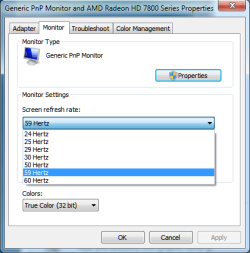
Another thing I've noticed, not sure if it'll help at all, but under monitor settings, the refresh rate is set to 59Hz, however I set it to 60Hz. It changes back to 59Hz every time I change it to 60Hz, not immediately, but every time the computer restarts or if any of the monitors settings change. Also, I remember the other monitor under the same settings is classed as a Generic non-PnP Monitor. Don't know if that's relevant, but there you go. :)
Screen monitor.png
 
Last edited:

My Computer My Computer

At a glance

Windows 7 Home Premium 64biti5-3570k 3.4GHzCorsair 12GB vengeance 1333MHzRadeon HD 7850 2GB
Computer type
PC/Desktop
Computer Manufacturer/Model Number
Custom build
OS
Windows 7 Home Premium 64bit
CPU
i5-3570k 3.4GHz
Motherboard
ASUS P8Z77-V PRO
Memory
Corsair 12GB vengeance 1333MHz
Graphics Card(s)
Radeon HD 7850 2GB
Monitor(s) Displays
2 LOGIK TVs
Screen Resolution
1920 x 1080
Hard Drives
500GB SAMSUNG sata HDD 5400rpm
1TB WD sata HDD 7200rpm
PSU
Thermaltake Smart 530W
Cooling
A couple of fans that came with the case. :)
Internet Speed
Horribly slow
Antivirus
Avast! Free antivirus
Browser
Chrome
Update - I plugged in the old monitor with a HDMI cable, with the intention of fiddling with it until I could get it to work, however upon plugging it in, it already worked! The main (new) monitor is still fuzzy, however the older one is working at 1920 x 1080 without any fuzziness. I've tried rebooting it to see if it would become fuzzy again, but it didn't. I tried swapping the cables, but nothing changed, so I can safely say there's no problem there. It also doesn't seem to make a difference whether the monitor is connect HDMI -> HDMI or HDMI -> DVI, so there's something else. As far as I know, both monitors have the same settings (in Windows, in the monitors settings and they're both plugged in to HDMI 1). If I can get anything to change, I'll post it.
 

My Computer My Computer

At a glance

Windows 7 Home Premium 64biti5-3570k 3.4GHzCorsair 12GB vengeance 1333MHzRadeon HD 7850 2GB
Computer type
PC/Desktop
Computer Manufacturer/Model Number
Custom build
OS
Windows 7 Home Premium 64bit
CPU
i5-3570k 3.4GHz
Motherboard
ASUS P8Z77-V PRO
Memory
Corsair 12GB vengeance 1333MHz
Graphics Card(s)
Radeon HD 7850 2GB
Monitor(s) Displays
2 LOGIK TVs
Screen Resolution
1920 x 1080
Hard Drives
500GB SAMSUNG sata HDD 5400rpm
1TB WD sata HDD 7200rpm
PSU
Thermaltake Smart 530W
Cooling
A couple of fans that came with the case. :)
Internet Speed
Horribly slow
Antivirus
Avast! Free antivirus
Browser
Chrome

My Computer My Computer

At a glance

x64 (6.3.9600) Win8.1 Pro & soon dual boot x6...AMD A6-3420M APU with Radeon(tm) HD Graphics6.00 GBAMD Radeon(TM) HD 6520G
Computer type
Laptop
Computer Manufacturer/Model Number
HP Pavilion dv6-6c10us
OS
x64 (6.3.9600) Win8.1 Pro & soon dual boot x64 (6.1.7601) Win7_SP1 HomePrem
CPU
AMD A6-3420M APU with Radeon(tm) HD Graphics
Motherboard
Hewlett-Packard 1805
Memory
6.00 GB
Graphics Card(s)
AMD Radeon(TM) HD 6520G
Sound Card
(1) AMD High Definition Audio Device (2) IDT High Definiti
Monitor(s) Displays
HP W2072a 20" LCD (1600 x 900) @ 60 Hz
Screen Resolution
1366 x 768 x 32 bits (4294967296 colors) @ 60 Hz
Hard Drives
ST640LM0 00 HM641JI SATA Disk Device
Keyboard
Logitech k520 wireless KB
Mouse
Logitech m320 wireless mouse (bundled with KB)
Internet Speed
15/5 | 54 MB Wireless 'n'
Antivirus
Realtime: Defender or Avast | On-demand: Malwarebytes, ESET
Browser
IE 11 on Win8, IE 10 on win 7
Other Info
Media: [Gimp, Audacity, VLC] || Comm: [WEmail 2012, Skype] || Productivity: [OpenOffice,| Textpad] || Utils: [Sysinternals, cCleaner, Speccy, Defraggler]
Looked at the manual for L22FED12 just to see how LOGIK described selecting PC on an HDMI port and found:
6 INPUT
Press to select among different input signal sources:
DTV / ATV / SCART / YPbPr / PC / HDMI1 / HDMI2 / AV / DVD / USB.
Use the buttons on the remote control to select the input, and then press the OK button to confirm.

This refers to buttons on the side of the TV, you might also be able to use the remote control to set this, but at least you know there is a button. Set the TV to PC
 

My Computer My Computer

At a glance

x64 (6.3.9600) Win8.1 Pro & soon dual boot x6...AMD A6-3420M APU with Radeon(tm) HD Graphics6.00 GBAMD Radeon(TM) HD 6520G
Computer type
Laptop
Computer Manufacturer/Model Number
HP Pavilion dv6-6c10us
OS
x64 (6.3.9600) Win8.1 Pro & soon dual boot x64 (6.1.7601) Win7_SP1 HomePrem
CPU
AMD A6-3420M APU with Radeon(tm) HD Graphics
Motherboard
Hewlett-Packard 1805
Memory
6.00 GB
Graphics Card(s)
AMD Radeon(TM) HD 6520G
Sound Card
(1) AMD High Definition Audio Device (2) IDT High Definiti
Monitor(s) Displays
HP W2072a 20" LCD (1600 x 900) @ 60 Hz
Screen Resolution
1366 x 768 x 32 bits (4294967296 colors) @ 60 Hz
Hard Drives
ST640LM0 00 HM641JI SATA Disk Device
Keyboard
Logitech k520 wireless KB
Mouse
Logitech m320 wireless mouse (bundled with KB)
Internet Speed
15/5 | 54 MB Wireless 'n'
Antivirus
Realtime: Defender or Avast | On-demand: Malwarebytes, ESET
Browser
IE 11 on Win8, IE 10 on win 7
Other Info
Media: [Gimp, Audacity, VLC] || Comm: [WEmail 2012, Skype] || Productivity: [OpenOffice,| Textpad] || Utils: [Sysinternals, cCleaner, Speccy, Defraggler]
Setting the TV to PC is how you connect to VGA, it might as well just be named VGA. Selecting PC gives a blank screen saying no signal.
 

My Computer My Computer

At a glance

Windows 7 Home Premium 64biti5-3570k 3.4GHzCorsair 12GB vengeance 1333MHzRadeon HD 7850 2GB
Computer type
PC/Desktop
Computer Manufacturer/Model Number
Custom build
OS
Windows 7 Home Premium 64bit
CPU
i5-3570k 3.4GHz
Motherboard
ASUS P8Z77-V PRO
Memory
Corsair 12GB vengeance 1333MHz
Graphics Card(s)
Radeon HD 7850 2GB
Monitor(s) Displays
2 LOGIK TVs
Screen Resolution
1920 x 1080
Hard Drives
500GB SAMSUNG sata HDD 5400rpm
1TB WD sata HDD 7200rpm
PSU
Thermaltake Smart 530W
Cooling
A couple of fans that came with the case. :)
Internet Speed
Horribly slow
Antivirus
Avast! Free antivirus
Browser
Chrome
I see, my TV has a different setup.

Power everything down
Powerup TV, set to HDMI1 or HDMI2
Power up PC

When you have two monitors connected, how are Multiple Displays configured on the PC?
:ar: Control Panel\All Control Panel Items\Display\Screen Resolution
 

My Computer My Computer

At a glance

x64 (6.3.9600) Win8.1 Pro & soon dual boot x6...AMD A6-3420M APU with Radeon(tm) HD Graphics6.00 GBAMD Radeon(TM) HD 6520G
Computer type
Laptop
Computer Manufacturer/Model Number
HP Pavilion dv6-6c10us
OS
x64 (6.3.9600) Win8.1 Pro & soon dual boot x64 (6.1.7601) Win7_SP1 HomePrem
CPU
AMD A6-3420M APU with Radeon(tm) HD Graphics
Motherboard
Hewlett-Packard 1805
Memory
6.00 GB
Graphics Card(s)
AMD Radeon(TM) HD 6520G
Sound Card
(1) AMD High Definition Audio Device (2) IDT High Definiti
Monitor(s) Displays
HP W2072a 20" LCD (1600 x 900) @ 60 Hz
Screen Resolution
1366 x 768 x 32 bits (4294967296 colors) @ 60 Hz
Hard Drives
ST640LM0 00 HM641JI SATA Disk Device
Keyboard
Logitech k520 wireless KB
Mouse
Logitech m320 wireless mouse (bundled with KB)
Internet Speed
15/5 | 54 MB Wireless 'n'
Antivirus
Realtime: Defender or Avast | On-demand: Malwarebytes, ESET
Browser
IE 11 on Win8, IE 10 on win 7
Other Info
Media: [Gimp, Audacity, VLC] || Comm: [WEmail 2012, Skype] || Productivity: [OpenOffice,| Textpad] || Utils: [Sysinternals, cCleaner, Speccy, Defraggler]
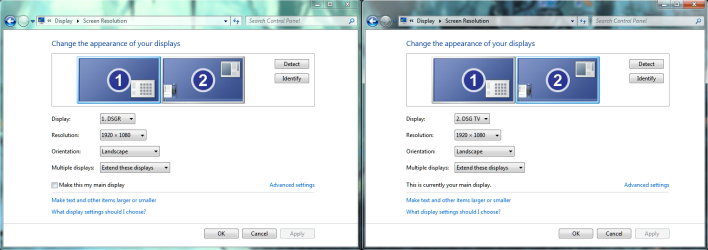
Hey again. I have a couple of things to tell you, the answers to your question and something that might interest you. Firstly, here is a screenshot of the two monitor configurations. The recommended resolution for both is 1280 x 720, however they should both be 1980 x 1080, which they are currently set to. My new monitor is the DSG TV and the old one is DSGR.
Dual screens.png
Secondly, I decided to make a spreadsheet to send to you with all of the port to wire to monitor combinations, to help you work out which is the faulty component. However, upon completing the sheet, I saw that there were 2 combinations that would work together. Trying them out, they didn't so I just plugged everything back in to the first combination I tried. What confused me was that the results from the first combination had changed - the new monitor is now working perfectly and the older one is fuzzy. None of the results are repeatable... Good news is that the new monitor now works fine, with or without the old monitor attached, no matter which hdmi cable or which port I use. Bad news is I have no idea why. This leads me to think that it's a software problem and not a hardware problem. I don't know if any of this helps, but I'm just trying to give you as much information as I can. :)
 

My Computer My Computer

At a glance

Windows 7 Home Premium 64biti5-3570k 3.4GHzCorsair 12GB vengeance 1333MHzRadeon HD 7850 2GB
Computer type
PC/Desktop
Computer Manufacturer/Model Number
Custom build
OS
Windows 7 Home Premium 64bit
CPU
i5-3570k 3.4GHz
Motherboard
ASUS P8Z77-V PRO
Memory
Corsair 12GB vengeance 1333MHz
Graphics Card(s)
Radeon HD 7850 2GB
Monitor(s) Displays
2 LOGIK TVs
Screen Resolution
1920 x 1080
Hard Drives
500GB SAMSUNG sata HDD 5400rpm
1TB WD sata HDD 7200rpm
PSU
Thermaltake Smart 530W
Cooling
A couple of fans that came with the case. :)
Internet Speed
Horribly slow
Antivirus
Avast! Free antivirus
Browser
Chrome
An interesting development - If I unplug both wires then plug both back in, whichever is plugged in first is fuzzy and whichever is plugged in second is crystal clear. This is fully repeatable so I can get one screen to be fuzzy and one to be clear (doesn't matter which one). If only 1 monitor is plugged in, it remains fuzzy. This may change if I restart, but I'll wait until you've made a decision as I enjoy actually having my new monitor working for the time being. xD
 

My Computer My Computer

At a glance

Windows 7 Home Premium 64biti5-3570k 3.4GHzCorsair 12GB vengeance 1333MHzRadeon HD 7850 2GB
Computer type
PC/Desktop
Computer Manufacturer/Model Number
Custom build
OS
Windows 7 Home Premium 64bit
CPU
i5-3570k 3.4GHz
Motherboard
ASUS P8Z77-V PRO
Memory
Corsair 12GB vengeance 1333MHz
Graphics Card(s)
Radeon HD 7850 2GB
Monitor(s) Displays
2 LOGIK TVs
Screen Resolution
1920 x 1080
Hard Drives
500GB SAMSUNG sata HDD 5400rpm
1TB WD sata HDD 7200rpm
PSU
Thermaltake Smart 530W
Cooling
A couple of fans that came with the case. :)
Internet Speed
Horribly slow
Antivirus
Avast! Free antivirus
Browser
Chrome
Good news and good re-wiring.

Try changing "Extend these displays" to "Show Desktop only on #" where # is your main display.
In your screen shot # = 2, but you've changed things so # = whatever display is identified as your main in screen resoultion.....
 

My Computer My Computer

At a glance

x64 (6.3.9600) Win8.1 Pro & soon dual boot x6...AMD A6-3420M APU with Radeon(tm) HD Graphics6.00 GBAMD Radeon(TM) HD 6520G
Computer type
Laptop
Computer Manufacturer/Model Number
HP Pavilion dv6-6c10us
OS
x64 (6.3.9600) Win8.1 Pro & soon dual boot x64 (6.1.7601) Win7_SP1 HomePrem
CPU
AMD A6-3420M APU with Radeon(tm) HD Graphics
Motherboard
Hewlett-Packard 1805
Memory
6.00 GB
Graphics Card(s)
AMD Radeon(TM) HD 6520G
Sound Card
(1) AMD High Definition Audio Device (2) IDT High Definiti
Monitor(s) Displays
HP W2072a 20" LCD (1600 x 900) @ 60 Hz
Screen Resolution
1366 x 768 x 32 bits (4294967296 colors) @ 60 Hz
Hard Drives
ST640LM0 00 HM641JI SATA Disk Device
Keyboard
Logitech k520 wireless KB
Mouse
Logitech m320 wireless mouse (bundled with KB)
Internet Speed
15/5 | 54 MB Wireless 'n'
Antivirus
Realtime: Defender or Avast | On-demand: Malwarebytes, ESET
Browser
IE 11 on Win8, IE 10 on win 7
Other Info
Media: [Gimp, Audacity, VLC] || Comm: [WEmail 2012, Skype] || Productivity: [OpenOffice,| Textpad] || Utils: [Sysinternals, cCleaner, Speccy, Defraggler]
Not too sure what you mean there, you lost me at 'screen shot # = 2', but by showing the desktop only on #1 (new monitor) it's full res and clear and by showing the desktop only on #2 (old monitor) it's full res and fuzzy.
 

My Computer My Computer

At a glance

Windows 7 Home Premium 64biti5-3570k 3.4GHzCorsair 12GB vengeance 1333MHzRadeon HD 7850 2GB
Computer type
PC/Desktop
Computer Manufacturer/Model Number
Custom build
OS
Windows 7 Home Premium 64bit
CPU
i5-3570k 3.4GHz
Motherboard
ASUS P8Z77-V PRO
Memory
Corsair 12GB vengeance 1333MHz
Graphics Card(s)
Radeon HD 7850 2GB
Monitor(s) Displays
2 LOGIK TVs
Screen Resolution
1920 x 1080
Hard Drives
500GB SAMSUNG sata HDD 5400rpm
1TB WD sata HDD 7200rpm
PSU
Thermaltake Smart 530W
Cooling
A couple of fans that came with the case. :)
Internet Speed
Horribly slow
Antivirus
Avast! Free antivirus
Browser
Chrome
Post# 15 shows that display 2 is (was) main display. I don't know if display 1 or display 2 is currently your main display since changes have been made.

Please post a new screen shot of Screen Resolution showing both displays (as you did in post# 15)
What I'd like to see is (note the "This is currently your main display" setting)
 

Attachments

  • Screen1.PNG
    Screen1.PNG
    1.7 KB · Views: 13

My Computer My Computer

At a glance

x64 (6.3.9600) Win8.1 Pro & soon dual boot x6...AMD A6-3420M APU with Radeon(tm) HD Graphics6.00 GBAMD Radeon(TM) HD 6520G
Computer type
Laptop
Computer Manufacturer/Model Number
HP Pavilion dv6-6c10us
OS
x64 (6.3.9600) Win8.1 Pro & soon dual boot x64 (6.1.7601) Win7_SP1 HomePrem
CPU
AMD A6-3420M APU with Radeon(tm) HD Graphics
Motherboard
Hewlett-Packard 1805
Memory
6.00 GB
Graphics Card(s)
AMD Radeon(TM) HD 6520G
Sound Card
(1) AMD High Definition Audio Device (2) IDT High Definiti
Monitor(s) Displays
HP W2072a 20" LCD (1600 x 900) @ 60 Hz
Screen Resolution
1366 x 768 x 32 bits (4294967296 colors) @ 60 Hz
Hard Drives
ST640LM0 00 HM641JI SATA Disk Device
Keyboard
Logitech k520 wireless KB
Mouse
Logitech m320 wireless mouse (bundled with KB)
Internet Speed
15/5 | 54 MB Wireless 'n'
Antivirus
Realtime: Defender or Avast | On-demand: Malwarebytes, ESET
Browser
IE 11 on Win8, IE 10 on win 7
Other Info
Media: [Gimp, Audacity, VLC] || Comm: [WEmail 2012, Skype] || Productivity: [OpenOffice,| Textpad] || Utils: [Sysinternals, cCleaner, Speccy, Defraggler]
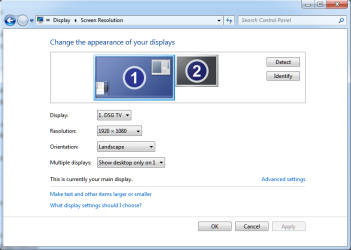
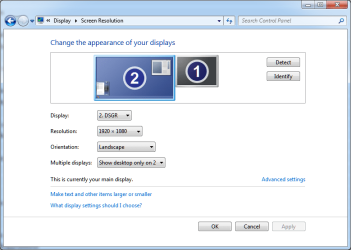
Ah, I get it now, thanks. :) Display 2, which is to my left, is my older monitor. Display 1, which is in front of me, is my new and main monitor. I just switched them around so my mouse would move smoothly from one monitor to another. They've changed since post# 15 as I've been fiddling with the wires. I think these are the screenshots you're after (I hope!).
Desktop 1 only.png
Desktop 2 only.png
I'd like to note that both monitors appear to have a darker display when one of them is disabled, but I'm sure that's nothing an increase in brightness wouldn't fix. :) Monitor 1 (main / new one) remained clear and monitor 2 (left / old one) remained fuzzy.
 

My Computer My Computer

At a glance

Windows 7 Home Premium 64biti5-3570k 3.4GHzCorsair 12GB vengeance 1333MHzRadeon HD 7850 2GB
Computer type
PC/Desktop
Computer Manufacturer/Model Number
Custom build
OS
Windows 7 Home Premium 64bit
CPU
i5-3570k 3.4GHz
Motherboard
ASUS P8Z77-V PRO
Memory
Corsair 12GB vengeance 1333MHz
Graphics Card(s)
Radeon HD 7850 2GB
Monitor(s) Displays
2 LOGIK TVs
Screen Resolution
1920 x 1080
Hard Drives
500GB SAMSUNG sata HDD 5400rpm
1TB WD sata HDD 7200rpm
PSU
Thermaltake Smart 530W
Cooling
A couple of fans that came with the case. :)
Internet Speed
Horribly slow
Antivirus
Avast! Free antivirus
Browser
Chrome
Back
Top