New Motherboard, No Sound

truthinnumberz

New member
Local time
12:56 PM
Messages
6
Hello guys,

I'm a musician and I just wrote 5 of my best songs and as soon as I finished the last one, I got a blue screen of death and my computer wouldn't even boot. That was with my last motherboard, which was a Gigabyte GA-870A-UD3. I had a lot of problems with that board, it would constantly blue screen about twice a day and I'd have to take out the memory from one slot and put it in another. The motherboard had problems with the memory socket, so when it wouldn't boot, I bought a whole nother motherboard.
I installed my new motherboard, which is an ASUS M5A88-M. I had it profesionally installed, and it now boots up fine and I have access to all my old files. When it booted up though, the only thing that didn't work was the sound. I put in the disc that came with the motherboard and installed the drivers. That didn't work, so I checked the BIOS settings to make sure sound was enabled. It was. I then updated the graphics card, which is an ATI Radeon HD 5800. That didn't work, so I went into my Device Manager and saw what the onboard sound was. The two options were AMD High Definition Audio Device and Realtek. I went to the Realtek site and downloaded the drivers and installed them and still no sound. I then uninstalled every sound driver I saw and it then automatically found them and reinstalled them. I tried inserting my Windows 7 CD and repairing, but it would not let me. There are no exclamation points in the sound driver, it says everything is working.
So I've uninstalled the drivers, reinstalled them... checked for updates to the BIOS and motherboard... I've tried plugging in speakers and headphones into the back green port and the front panel as well with no results. I know they work fine. I've been reading forums and troubleshooting for a week and I'm about to take a sledgehammer to this thing. :cry: I need my songs that I just made!!! Can anyone help? Thanks
 

My Computer My Computer

At a glance

Windows 7 Home Premium x64AMD Phenom II x6 1055TPQIATI Radeon HD 5800
Computer Manufacturer/Model Number
CyberPower PC
OS
Windows 7 Home Premium x64
CPU
AMD Phenom II x6 1055T
Motherboard
ASUS M5A88-M
Memory
PQI
Graphics Card(s)
ATI Radeon HD 5800
Sound Card
None
Monitor(s) Displays
Samsung Widescreen
Hard Drives
wd1002faex
Cooling
liquid cooling system
do you have in device manger in the audio section one of them called high defition audio device? Update that one if it's there by right clicking it and then selecting update driver software. I had a similar problem with my asus mobo but i had to update that one to get it working on mine.
 

My Computer My Computer

At a glance

Windows 10 64bitAMD Phenom II X4 925 (Deneb)(2.8GHz) OC 3.4GHzCorsair Vengeance DDR3 4GBX2 (8192MB)XFX HD 6870 1GB (OC)- 940MHz core, mem 1150MHz
Computer type
PC/Desktop
Computer Manufacturer/Model Number
custom build
OS
Windows 10 64bit
CPU
AMD Phenom II X4 925 (Deneb)(2.8GHz) OC 3.4GHz
Motherboard
M5A78L-MLX Plus
Memory
Corsair Vengeance DDR3 4GBX2 (8192MB)
Graphics Card(s)
XFX HD 6870 1GB (OC)- 940MHz core, mem 1150MHz
Monitor(s) Displays
Vizio 26' 1920x1080 / Acer 1336x768
Screen Resolution
1920x1080 60Hz /1336x768
Hard Drives
Kingston Digital 60GB SSDNow V300/500gb HDD Western Digital 7200rpm (/WD 160GB HDD 7200rpm
PSU
CORSAIR CX600 600w
Case
AZZA Orion 202 EVO
Cooling
cooler master hyper TX3 cpu cooler
Keyboard
Razer DeathStalker
Mouse
Logitech Optical Gaming Mouse G400
Antivirus
Defualt on win 10
Browser
Firefox
Other Info
cpu is overclocked in bios
Hi M1GU31, thanks for responding. Yeah, that's actually one of the first things I tried. It said the best driver for my device was already installed. I tried that option with both options listed there after searching automatically.
 

My Computer My Computer

At a glance

Windows 7 Home Premium x64AMD Phenom II x6 1055TPQIATI Radeon HD 5800
Computer Manufacturer/Model Number
CyberPower PC
OS
Windows 7 Home Premium x64
CPU
AMD Phenom II x6 1055T
Motherboard
ASUS M5A88-M
Memory
PQI
Graphics Card(s)
ATI Radeon HD 5800
Sound Card
None
Monitor(s) Displays
Samsung Widescreen
Hard Drives
wd1002faex
Cooling
liquid cooling system
Hi,

Have you Tried Going to "Sounds" (Type it in the start bar System sounds) Then Right Clicking on the Realtek and set a default device.

Regs
 

My Computer My Computer

At a glance

Windows 7 Home PreQ8200 Intell 2.333DDR3 1333 4gigAti HD4870
Computer Manufacturer/Model Number
Home Build.
OS
Windows 7 Home Pre
CPU
Q8200 Intell 2.333
Motherboard
Asus P5Q3 Delux
Memory
DDR3 1333 4gig
Graphics Card(s)
Ati HD4870
Sound Card
Onboard Soundmax. 7.1
Monitor(s) Displays
1, 20" Samsung
Screen Resolution
1600/900
PSU
Good enough
Case
Le Shark
Cooling
FAN FAN FAN FAN, Thermaltake Minitype 90 with speed fan 4.
Keyboard
Standard, Gaming Wolfking
Mouse
Cm-storm-inferno-wired-gaming-mouse
Internet Speed
Sky Crappy upto 20meg I get a whapping 5.8mbs.
Since you had the board professionally installed, I would take it back to the person who did so, because ironing out problems such as this are part and parcel of installing a motherboard. It shouldn't cost you anything, except time and aggravation.
 

My Computer My Computer

At a glance

W7x64 Pro, SuSe 12.1/** W7 x64 Pro, XP MCEPhenom II 1090T w/Noctua NH-D14 /**4400+ X2 w...2 x 2GB Patriot PGS34g1600LLKA/**4x1GB Corsai...EVGA GTX460 SC/**EVGA 8800GTS
Computer Manufacturer/Model Number
DIY
OS
W7x64 Pro, SuSe 12.1/** W7 x64 Pro, XP MCE
CPU
Phenom II 1090T w/Noctua NH-D14 /**4400+ X2 w/CM Hyper TX 3
Motherboard
ASRock 890FX Deluxe 4/**A8N-SLI
Memory
2 x 2GB Patriot PGS34g1600LLKA/**4x1GB Corsair VS
Graphics Card(s)
EVGA GTX460 SC/**EVGA 8800GTS
Sound Card
Asus Xonar D2X/**Xonar D1
Monitor(s) Displays
Acer X233H, Dell E152FPc /**LG M237-WD
Screen Resolution
1920x1080 & 1024x768/**1980x1080
Hard Drives
WDC 2TB, 1.5TB, 1TB, 500GB,Seagate 500GB , Maxtor 80GB /**500GB Seagate & WDC 1TB Black
PSU
CM RS600 w/ APC BX1000G/**Antec 500 TP w/ APC BX1000
Case
HAF922/**Antec 1040IIB
Cooling
3x200mm, 1x140 and 1x120mm/**5x80mm fans
Keyboard
Logitech Media USB/**Saitek Eclipse
Mouse
Cordless Trackman Wheel/**Ditto
Internet Speed
3.3Mbps
Other Info
SB 560 5.1 w/ Sennheiser RS140/**Creative T20 speakers, Dvico FusionHDTV7 Gold RT, Cisco E3000, HP 5510V AIO, Linksys E3000, Belkin F5U237 hub and **F5D8055 adapter
(** = 2nd rig)
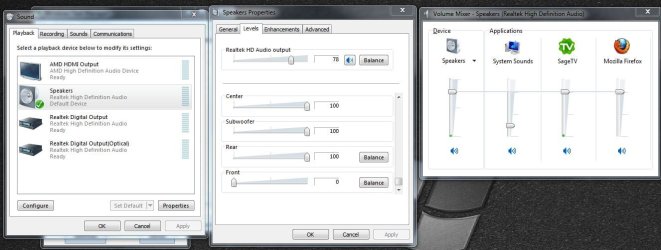
Hi, mrdemon, yes I typed in "System sounds" and now have made sure that the Realtek is the enabled device as you can see in the screen shot. Also in the screen shot you can see I have an MP3 playing, and the volume levels indicate that sound is playing. And yeah, seekermeister, if any of these tips do not solve my sound problem, I will definitely take it back to where I had the mobo installed... it's just that it's far away and very time consuming. I'd also be very curious to see if he can even fix it because I've tried absolutely everything.


<a href="TinyPic - Free Image Hosting, Photo Sharing & Video Hosting" target="_blank"><img src="http://i43.tinypic.com/swu8hh.jpg" border="0" alt="Image and video hosting by TinyPic"></a>
 

My Computer My Computer

At a glance

Windows 7 Home Premium x64AMD Phenom II x6 1055TPQIATI Radeon HD 5800
Computer Manufacturer/Model Number
CyberPower PC
OS
Windows 7 Home Premium x64
CPU
AMD Phenom II x6 1055T
Motherboard
ASUS M5A88-M
Memory
PQI
Graphics Card(s)
ATI Radeon HD 5800
Sound Card
None
Monitor(s) Displays
Samsung Widescreen
Hard Drives
wd1002faex
Cooling
liquid cooling system
That is one reason why I never use professionals anymore, because when doing a repair such as this, they should take it on themselves to check that a problem like this doesn't exist, before they return the item to the customer and accept payment...however in my experience, they never do.
 

My Computer My Computer

At a glance

W7x64 Pro, SuSe 12.1/** W7 x64 Pro, XP MCEPhenom II 1090T w/Noctua NH-D14 /**4400+ X2 w...2 x 2GB Patriot PGS34g1600LLKA/**4x1GB Corsai...EVGA GTX460 SC/**EVGA 8800GTS
Computer Manufacturer/Model Number
DIY
OS
W7x64 Pro, SuSe 12.1/** W7 x64 Pro, XP MCE
CPU
Phenom II 1090T w/Noctua NH-D14 /**4400+ X2 w/CM Hyper TX 3
Motherboard
ASRock 890FX Deluxe 4/**A8N-SLI
Memory
2 x 2GB Patriot PGS34g1600LLKA/**4x1GB Corsair VS
Graphics Card(s)
EVGA GTX460 SC/**EVGA 8800GTS
Sound Card
Asus Xonar D2X/**Xonar D1
Monitor(s) Displays
Acer X233H, Dell E152FPc /**LG M237-WD
Screen Resolution
1920x1080 & 1024x768/**1980x1080
Hard Drives
WDC 2TB, 1.5TB, 1TB, 500GB,Seagate 500GB , Maxtor 80GB /**500GB Seagate & WDC 1TB Black
PSU
CM RS600 w/ APC BX1000G/**Antec 500 TP w/ APC BX1000
Case
HAF922/**Antec 1040IIB
Cooling
3x200mm, 1x140 and 1x120mm/**5x80mm fans
Keyboard
Logitech Media USB/**Saitek Eclipse
Mouse
Cordless Trackman Wheel/**Ditto
Internet Speed
3.3Mbps
Other Info
SB 560 5.1 w/ Sennheiser RS140/**Creative T20 speakers, Dvico FusionHDTV7 Gold RT, Cisco E3000, HP 5510V AIO, Linksys E3000, Belkin F5U237 hub and **F5D8055 adapter
(** = 2nd rig)
I'm taking a flyer asking if you've been completely through the bios settings. Could there be a setting to turn on "on board sound device as default". Please have a look and see if you need to enable a feature.
 

My Computer My Computer

At a glance

Windows 7 Ultimate 64i7 3770k OC'd 4.6 @ 1.17v, also FX 8120 & i5 ...32 gb G.Skill Sniper DDR3 10-12-12-31 @ 2133XFX Radeon 7870 2GB DDR5
Computer type
PC/Desktop
Computer Manufacturer/Model Number
A blend of brains, brawn and dumb luck.
OS
Windows 7 Ultimate 64
CPU
i7 3770k OC'd 4.6 @ 1.17v, also FX 8120 & i5 miniITX
Motherboard
MSI P67A-GD80 b3
Memory
32 gb G.Skill Sniper DDR3 10-12-12-31 @ 2133
Graphics Card(s)
XFX Radeon 7870 2GB DDR5
Sound Card
Sound Blaster Z Series Card
Monitor(s) Displays
(2) LG LED 23" 1920 x 1080 2ms Monitors via mini d-port
Screen Resolution
1680 X 1050 p
Hard Drives
Samsung 256 gb 830 SSD sata III
(1) 1 tb WD Black
(2) 1 tb Hitachi deskmates/sata II
(2) 1 tb WD green/sata II
(2) 3 tb Seagate Barracuda
(1) 120 gb OCZ Vertex SS
(1) Drobo 5N w/5 Seagate 3tb
PSU
EVGA modular 1000G2 80% gold rating & APC 1200 RS
Case
CoolerMaster Storm Styker
Cooling
7 case fans 140mm & 120mm, NZXT Kraken X60
Keyboard
(2) Logitech Illuminated Keyboards (1) usb (1) wireless
Mouse
Logitech G700 & T-BC21 - nano nx for the laptop
Internet Speed
Basic 120mbps down
Antivirus
Trend Micro Titanium Max Security & Malwarebytes Premium
Browser
Chrome and IE 10
Other Info
5 Noctua case fans + 3 Noctua in p/p on NZXT cooler
Integrated hot swap drive bays for 2.5" Drives
(2) Lite-on dvd/cd/Blu Ray optical 22X
Integrated fan controller and led on/off
HP Officejet Pro 8630 all-n-one
Hot-swappable 3.5" hard drive bay
Netgear Nighthawk router
Asus USB 3 & sata 6 PCIe card
Vantec IDE to sata adptr./Ultra sata adptr
Lenovo L420 i5 lappy with m sata
Drobo 5N advanced NAS
truthinnumberz

Looking at your Pic tells me that the sound card is indeed working, On another note have you tried the following.

1, Unplug the Speaker from the BACK and Plug into the Front Panel if you have one.
2, Try the Pink or Black Socket.
3, In the BIOS is there anywhere that is saying HD Only. Maybe Turning this off may help as most speakers dont support this.
4, Is your front panel faulty. This may be causing the Rear speakers not to be activated.

Try these steps please.
 

My Computer My Computer

At a glance

Windows 7 Home PreQ8200 Intell 2.333DDR3 1333 4gigAti HD4870
Computer Manufacturer/Model Number
Home Build.
OS
Windows 7 Home Pre
CPU
Q8200 Intell 2.333
Motherboard
Asus P5Q3 Delux
Memory
DDR3 1333 4gig
Graphics Card(s)
Ati HD4870
Sound Card
Onboard Soundmax. 7.1
Monitor(s) Displays
1, 20" Samsung
Screen Resolution
1600/900
PSU
Good enough
Case
Le Shark
Cooling
FAN FAN FAN FAN, Thermaltake Minitype 90 with speed fan 4.
Keyboard
Standard, Gaming Wolfking
Mouse
Cm-storm-inferno-wired-gaming-mouse
Internet Speed
Sky Crappy upto 20meg I get a whapping 5.8mbs.
What is your speaker setup...analog, digital, HDMI?
 

My Computer My Computer

At a glance

W7x64 Pro, SuSe 12.1/** W7 x64 Pro, XP MCEPhenom II 1090T w/Noctua NH-D14 /**4400+ X2 w...2 x 2GB Patriot PGS34g1600LLKA/**4x1GB Corsai...EVGA GTX460 SC/**EVGA 8800GTS
Computer Manufacturer/Model Number
DIY
OS
W7x64 Pro, SuSe 12.1/** W7 x64 Pro, XP MCE
CPU
Phenom II 1090T w/Noctua NH-D14 /**4400+ X2 w/CM Hyper TX 3
Motherboard
ASRock 890FX Deluxe 4/**A8N-SLI
Memory
2 x 2GB Patriot PGS34g1600LLKA/**4x1GB Corsair VS
Graphics Card(s)
EVGA GTX460 SC/**EVGA 8800GTS
Sound Card
Asus Xonar D2X/**Xonar D1
Monitor(s) Displays
Acer X233H, Dell E152FPc /**LG M237-WD
Screen Resolution
1920x1080 & 1024x768/**1980x1080
Hard Drives
WDC 2TB, 1.5TB, 1TB, 500GB,Seagate 500GB , Maxtor 80GB /**500GB Seagate & WDC 1TB Black
PSU
CM RS600 w/ APC BX1000G/**Antec 500 TP w/ APC BX1000
Case
HAF922/**Antec 1040IIB
Cooling
3x200mm, 1x140 and 1x120mm/**5x80mm fans
Keyboard
Logitech Media USB/**Saitek Eclipse
Mouse
Cordless Trackman Wheel/**Ditto
Internet Speed
3.3Mbps
Other Info
SB 560 5.1 w/ Sennheiser RS140/**Creative T20 speakers, Dvico FusionHDTV7 Gold RT, Cisco E3000, HP 5510V AIO, Linksys E3000, Belkin F5U237 hub and **F5D8055 adapter
(** = 2nd rig)
Hey guys, thanks for your responses... I just messed around in the BIOS settings and in the Advanced, Chipset options I did see AMD HDMI Audio was enabled. I disabled and restarted it, but then it just plain said no sound was installed. I re-enabled it and saw under "Onboard Devices Configuration" that the HD Audio Controller was enabled. I disabled that and it didn't work so I re-enabled it. Front Panel Select had two options: HDMI and AC97. It was set to HDMI, so I tried AC97 and that didn't work so now it's back.

As for my speaker setup, I have two different speakers. One is a subwoofer attached to 5 different speakers and one is a really cheap and simple pair of speakers that simply plugs in to the computer. Both those speakers are known to work and I hear nothing out of them. My headphones are a nice pair... they used to work with the last setup.
 

My Computer My Computer

At a glance

Windows 7 Home Premium x64AMD Phenom II x6 1055TPQIATI Radeon HD 5800
Computer Manufacturer/Model Number
CyberPower PC
OS
Windows 7 Home Premium x64
CPU
AMD Phenom II x6 1055T
Motherboard
ASUS M5A88-M
Memory
PQI
Graphics Card(s)
ATI Radeon HD 5800
Sound Card
None
Monitor(s) Displays
Samsung Widescreen
Hard Drives
wd1002faex
Cooling
liquid cooling system
It comes down to the fact that either the Realtek sound doesn't work, or it is disabled. If it were correct, obviously it would appear in the Device Manager. I may have overlooked it, but I read where you found the HD sound, and disabled/enabled it, but it wasn't clear that you enabled the regular realtek onboard sound. If you are positive that it is enabled, and it doesn't appear in the Device Manager, even after installing the driver, then I would say that you have another lemon motherboard.
 

My Computer My Computer

At a glance

W7x64 Pro, SuSe 12.1/** W7 x64 Pro, XP MCEPhenom II 1090T w/Noctua NH-D14 /**4400+ X2 w...2 x 2GB Patriot PGS34g1600LLKA/**4x1GB Corsai...EVGA GTX460 SC/**EVGA 8800GTS
Computer Manufacturer/Model Number
DIY
OS
W7x64 Pro, SuSe 12.1/** W7 x64 Pro, XP MCE
CPU
Phenom II 1090T w/Noctua NH-D14 /**4400+ X2 w/CM Hyper TX 3
Motherboard
ASRock 890FX Deluxe 4/**A8N-SLI
Memory
2 x 2GB Patriot PGS34g1600LLKA/**4x1GB Corsair VS
Graphics Card(s)
EVGA GTX460 SC/**EVGA 8800GTS
Sound Card
Asus Xonar D2X/**Xonar D1
Monitor(s) Displays
Acer X233H, Dell E152FPc /**LG M237-WD
Screen Resolution
1920x1080 & 1024x768/**1980x1080
Hard Drives
WDC 2TB, 1.5TB, 1TB, 500GB,Seagate 500GB , Maxtor 80GB /**500GB Seagate & WDC 1TB Black
PSU
CM RS600 w/ APC BX1000G/**Antec 500 TP w/ APC BX1000
Case
HAF922/**Antec 1040IIB
Cooling
3x200mm, 1x140 and 1x120mm/**5x80mm fans
Keyboard
Logitech Media USB/**Saitek Eclipse
Mouse
Cordless Trackman Wheel/**Ditto
Internet Speed
3.3Mbps
Other Info
SB 560 5.1 w/ Sennheiser RS140/**Creative T20 speakers, Dvico FusionHDTV7 Gold RT, Cisco E3000, HP 5510V AIO, Linksys E3000, Belkin F5U237 hub and **F5D8055 adapter
(** = 2nd rig)
Have you been to the Asus web site and searched for recent updated audio drivers?

I'd trust Asus drivers before Realtek's drivers.
 

My Computer My Computer

At a glance

Windows 7 Home Premium SP1, 64-bitIntel Skylake i5-6600K, not overclocked8 GB HyperX DDR4-2666 (2 x 4 GB)none; graphics are integrated on CPU
Computer type
PC/Desktop
Computer Manufacturer/Model Number
Ignatz Special; 4 speed manual gearbox; factory air conditioning; one of one
OS
Windows 7 Home Premium SP1, 64-bit
CPU
Intel Skylake i5-6600K, not overclocked
Motherboard
AsRock Z170M Extreme 4, micro ATX
Memory
8 GB HyperX DDR4-2666 (2 x 4 GB)
Graphics Card(s)
none; graphics are integrated on CPU
Sound Card
onboard: Realtek ALC1150; external: USB Behringer UF0-202
Monitor(s) Displays
Dell S2340M 23 inch IPS
Screen Resolution
1600 x 900
Hard Drives
System: Crucial MX100 series SSD, 128 GB;
Data: Samsung Spinpoint 103SJ, 1 TB;
Backup: WD Caviar Green WD30EZRX-00D8PB0, 3 TB
PSU
Rosewill SilentNight 500 watt fanless, semi-modular
Case
Antec Solo II
Cooling
Noctua NH-U12S; Noctua F12 intake, Noctua S12A exhaust
Keyboard
Microsoft 200 6JH-00001 USB
Mouse
Dell or Microsoft optical wired; USB
Antivirus
Microsoft Security Essentials and Malwarebytes Premium
Browser
Pale Moon
Other Info
All fans PWM; speeds at idle: CPU circa 500 rpm; intake circa 600 rpm; exhaust circa 600 rpm; CPU temps 27 idle and 47 C load in a warm room (27 C/81 F) when running Intel Extreme Tuning Utility stress test.

My Computer My Computer

At a glance

Windows 7 Home PreQ8200 Intell 2.333DDR3 1333 4gigAti HD4870
Computer Manufacturer/Model Number
Home Build.
OS
Windows 7 Home Pre
CPU
Q8200 Intell 2.333
Motherboard
Asus P5Q3 Delux
Memory
DDR3 1333 4gig
Graphics Card(s)
Ati HD4870
Sound Card
Onboard Soundmax. 7.1
Monitor(s) Displays
1, 20" Samsung
Screen Resolution
1600/900
PSU
Good enough
Case
Le Shark
Cooling
FAN FAN FAN FAN, Thermaltake Minitype 90 with speed fan 4.
Keyboard
Standard, Gaming Wolfking
Mouse
Cm-storm-inferno-wired-gaming-mouse
Internet Speed
Sky Crappy upto 20meg I get a whapping 5.8mbs.
Thanks again everyone for putting your heads together on this one. My songs must be great because I've had many obstacles thrown in my way to prevent me from finishing them. I've done all I can do and I'm going to take it to get professionally fixed... I just have no idea and it's really frustrating. If he can solve it, I will post what it ended up being.
 

My Computer My Computer

At a glance

Windows 7 Home Premium x64AMD Phenom II x6 1055TPQIATI Radeon HD 5800
Computer Manufacturer/Model Number
CyberPower PC
OS
Windows 7 Home Premium x64
CPU
AMD Phenom II x6 1055T
Motherboard
ASUS M5A88-M
Memory
PQI
Graphics Card(s)
ATI Radeon HD 5800
Sound Card
None
Monitor(s) Displays
Samsung Widescreen
Hard Drives
wd1002faex
Cooling
liquid cooling system
There's one last thing you can check before you call it a day.
Check the Levels tab and make sure that "Front" is not at zero.
Capture.JPG
 

My Computer My Computer

At a glance

Windows 7 Home Premium 64 bitIntel Core i7-4790G.SKILL 8GB (2 x 4GB) DDR3 F3-10666CL9D-8GBNTAMD Radeon R7 250
Computer type
PC/Desktop
Computer Manufacturer/Model Number
Custom Build
OS
Windows 7 Home Premium 64 bit
CPU
Intel Core i7-4790
Motherboard
GA-Z87X-D3H
Memory
G.SKILL 8GB (2 x 4GB) DDR3 F3-10666CL9D-8GBNT
Graphics Card(s)
AMD Radeon R7 250
Sound Card
Realtek ALC892
Monitor(s) Displays
Samsung UN32EH5000, Dell 1703FPT
Screen Resolution
1920 x 1080, 1280 x 1024
Hard Drives
WD5003AZEX
WD10EZEX
Samsung HD103SJ
Samsung 128 GB 840 PRO
PSU
SeaSonic M12II SS-500GM
Case
Fractal Design Define R4
Cooling
Zalman CNPS9900ALED
Keyboard
Logitech K800
Mouse
Logitech M705
Internet Speed
16 Mbps
Antivirus
Avast
Browser
Firefox
Other Info
Bose Companion 2 Multimedia Speakers
Got a codec package installed?
 

My Computer My Computer

At a glance

Win7 Home Premium 64 bitAMD Phenom II X2 555 Black4 GB Kingston DDR2 800Sapphire ATI Raedon HD6570 2GB DDR3
Computer Manufacturer/Model Number
ME
OS
Win7 Home Premium 64 bit
CPU
AMD Phenom II X2 555 Black
Motherboard
Gigabyte GA-MA770-UD3
Memory
4 GB Kingston DDR2 800
Graphics Card(s)
Sapphire ATI Raedon HD6570 2GB DDR3
Sound Card
Built in
Monitor(s) Displays
HP 2010i
Screen Resolution
1600x900
Hard Drives
2 WD 500GB Caviar blue
1 WD 250GB
1 WD 80GB (usb)
Case
Antec P-160
Cooling
Hyper 212 EVO
Keyboard
Logitech K320
Mouse
Logitech Trackman Wheel Optical
Eureka!

OK so here is the answer to the riddle. First, my computer wouldn't start and I spent 2 weeks troubleshooting it with the old and new motherboard until I got so frustrated I took it in to be professionally repaired. They repaired it and it booted but then it had no sound at all. I troubleshot THAT for a couple weeks, tried everything until I got so frustrated that I took it again and paid again to be repaired. My new songs must be the best in the world because something doesn't want them being released to the world.

My PC repair tech tried the motherboard in his Ubuntu system as well as a whole bunch of other diagnostics and it turns out that I just have horrible luck and bought another lemon motherboard. The first motherboard was Gigabyte and it had problems from the start with the memory so I bought an ASUS which turns out to have bad sound on the motherboard. I purchased a soundcard for 30 bucks and now I have working sound again. I don't know what the odds are for 2 back to back horrible motherboards but anyway thanks for your help and I can now finish my songs.
 

My Computer My Computer

At a glance

Windows 7 Home Premium x64AMD Phenom II x6 1055TPQIATI Radeon HD 5800
Computer Manufacturer/Model Number
CyberPower PC
OS
Windows 7 Home Premium x64
CPU
AMD Phenom II x6 1055T
Motherboard
ASUS M5A88-M
Memory
PQI
Graphics Card(s)
ATI Radeon HD 5800
Sound Card
None
Monitor(s) Displays
Samsung Widescreen
Hard Drives
wd1002faex
Cooling
liquid cooling system
Glad you got a workaround to work. Your luck doesn't surprise me, because I've had far worse than that. I've found that the odds of a lemon motherboard are much higher than for any other component. That is why I now stick with only brands that I know something about, and even that doesn't necessarily eliminate the problems.
 

My Computer My Computer

At a glance

W7x64 Pro, SuSe 12.1/** W7 x64 Pro, XP MCEPhenom II 1090T w/Noctua NH-D14 /**4400+ X2 w...2 x 2GB Patriot PGS34g1600LLKA/**4x1GB Corsai...EVGA GTX460 SC/**EVGA 8800GTS
Computer Manufacturer/Model Number
DIY
OS
W7x64 Pro, SuSe 12.1/** W7 x64 Pro, XP MCE
CPU
Phenom II 1090T w/Noctua NH-D14 /**4400+ X2 w/CM Hyper TX 3
Motherboard
ASRock 890FX Deluxe 4/**A8N-SLI
Memory
2 x 2GB Patriot PGS34g1600LLKA/**4x1GB Corsair VS
Graphics Card(s)
EVGA GTX460 SC/**EVGA 8800GTS
Sound Card
Asus Xonar D2X/**Xonar D1
Monitor(s) Displays
Acer X233H, Dell E152FPc /**LG M237-WD
Screen Resolution
1920x1080 & 1024x768/**1980x1080
Hard Drives
WDC 2TB, 1.5TB, 1TB, 500GB,Seagate 500GB , Maxtor 80GB /**500GB Seagate & WDC 1TB Black
PSU
CM RS600 w/ APC BX1000G/**Antec 500 TP w/ APC BX1000
Case
HAF922/**Antec 1040IIB
Cooling
3x200mm, 1x140 and 1x120mm/**5x80mm fans
Keyboard
Logitech Media USB/**Saitek Eclipse
Mouse
Cordless Trackman Wheel/**Ditto
Internet Speed
3.3Mbps
Other Info
SB 560 5.1 w/ Sennheiser RS140/**Creative T20 speakers, Dvico FusionHDTV7 Gold RT, Cisco E3000, HP 5510V AIO, Linksys E3000, Belkin F5U237 hub and **F5D8055 adapter
(** = 2nd rig)
Back
Top