new pc: in what order?

soulfood

New member
Member
VIP
Local time
11:29 PM
Messages
180
Hi, can anyone help me out? i bought a computer and now i want to install windows 7 home premium 64-bit on it. i am not sure what order i should then proceed.
1/ install windows 7
2/install anti-virus software and do a scan
3/do a system image and backup on external drive (using macrium or windows 7)
4/create a system repair disk
5/ download drivers for motherboard and graphics card
thank you
 

My Computer

Computer Manufacturer/Model Number
windows XP professional service pack 2
OS
XP windows Professional
CPU
intel core 2 Duo/ E8400 3.00 Ghz
Motherboard
Gigabyte EP355-DS3
Memory
3.50 GB
Graphics Card(s)
Gigabyte 512MB 8800GT
Sound Card
?
Monitor(s) Displays
HP 2159m
Hard Drives
C: 400GB
D: 80GB
G: 100GB
H: 300GB
PSU
?
Case
CoolerMaster Centurion CAC-TO5
Cooling
?
1/ install windows 7
2/ update fully
3/ download drivers for motherboard and graphics card from manufacturer site only
4/ install anti-virus software and do a scan
5/ do a system image and backup on external drive (using macrium) - no repair disk needed - follow macrium instructions
 

My Computer

Computer type
PC/Desktop
Computer Manufacturer/Model Number
Golden Mk. I.4
OS
Windows 10 Pro x64 ; Xubuntu x64
CPU
Intel i7 860 @ 2.80 GHz O/C'ed to 4.0GHz
Motherboard
Gigabyte P55A-UD3R Rev.1. Award BIOS F13
Memory
16GB Corsair Vengance DDR3 @ 661 MHz Dual Channel (9-9-9-24)
Graphics Card(s)
EVGA NVidia GTX 560 1024MB
Sound Card
Realtek Integrated
Monitor(s) Displays
Dual Samsung SyncMaster 2494HS
Screen Resolution
1920*1080 and 1920*1080
Hard Drives
1*Samsung 840 EVO 120GB SSD;
1*OCZ Vertex 2 60GB SSD;
2*Samsung F3 SpinPoint 1TB in RAID0;
1*Samsung F1 SpinPoint 1TB;
2*Western Digital 1TB External USB 3.0
1*Western Digital 500GB External USB 3.0
1*Seagate 500GB External USB 2.0
PSU
Thermaltake ToughPower QFan 750W
Case
Thermaltake Element S VK60001W2Z
Cooling
Corsair H60 Water Cooling, 2*230mm and 2*80mm case fans
Keyboard
Logitech G110
Mouse
Logitech MX518
hey golden, what do you mean by 2/ update fully?
 

My Computer

Computer Manufacturer/Model Number
windows XP professional service pack 2
OS
XP windows Professional
CPU
intel core 2 Duo/ E8400 3.00 Ghz
Motherboard
Gigabyte EP355-DS3
Memory
3.50 GB
Graphics Card(s)
Gigabyte 512MB 8800GT
Sound Card
?
Monitor(s) Displays
HP 2159m
Hard Drives
C: 400GB
D: 80GB
G: 100GB
H: 300GB
PSU
?
Case
CoolerMaster Centurion CAC-TO5
Cooling
?
Before & After AV

1/ install windows 7
2/ update fully
3/ download drivers for motherboard and graphics card from manufacturer site only
4/ install anti-virus software and do a scan
5/ do a system image and backup on external drive (using macrium) - no repair disk needed - follow macrium instructions
I'd be tempted to do a backup image, before installing the AV and after installing the AV (given the tales I've heard about how difficult it is to remove AV programs).
 

My Computer

Computer type
PC/Desktop
Computer Manufacturer/Model Number
n/a
OS
W7 Ultimate SP1, LM19.2 MATE, W10 Home 1703, W10 Pro 1703 VM, #All 64 bit
CPU
AMD Phenom II x6 1100T, 3.3 GHz
Motherboard
ASUS M4A88T-M/USB3 (AM3)
Memory
12GB DDR3 1333 G-Skill (4GB x 2), G-Skill (2GB x 2)
Graphics Card(s)
NVIDIA GeForce GTX 660
Sound Card
Realtek?
Monitor(s) Displays
Samsung S23B350
Screen Resolution
1920x1080
Hard Drives
WD Green 2TB (SATA), WD Green 3TB (SATA), WD Blue 4TB (SATA), WD Blue 6TB (SATA)
PSU
Cooler Master
Case
Antec GX300 Tower
Cooling
3x Antec TRICOOL 120mm Fans
Mouse
Wired Optical
Internet Speed
DSL
Antivirus
Avast
Browser
Pale Moon (64 bit)
Other Info
2018-12-27 Upgraded HDDs
2015-12-10 Upgraded case, graphics card, storage
2015-08-15 Upgraded motherboard & RAM
2015-07-15 Upgraded LM17.1 to LM17.2
hey golden, what do you mean by 2/ update fully?

Apply all the latest updates to the operating system from Windows Update.
 

My Computer

Computer type
PC/Desktop
Computer Manufacturer/Model Number
Custom Built
OS
Windows 10 Pro x64, Windows 8.1 Pro x64, Windows 7 Ultimate x64 SP1,
CPU
INTEL i9-7920X LGA 2066
Motherboard
Gigabyte X299-WU8 F3
Memory
64 GB (4 X 16 GB) G-Skill V Series DDR4 3200 Quad Channel
Graphics Card(s)
EVGA GTX 1060 SC 3 GB
Sound Card
Realtek Onboard ALC1220
Monitor(s) Displays
2 x Samsung S27E310
Screen Resolution
1920x1080
Hard Drives
Samsung 2 x 970 EVO Plus 500 GB NVMe
1 x 6TB WD 6003FZBX SATA
1 x 6TB WD 60EFRX SATA
12 x 3TB WD 30EFRX SATA
PSU
Seasonic X-1050
Case
Thermaltake Armor+
Cooling
Corsair H80i V2 Liquid AOI Cooler
Keyboard
Logitech G510s
Mouse
Logitech MX Master 2S
Internet Speed
200 Mb/s
Antivirus
ESET NOD32 13.1
Browser
EDGE (Dev, Canary, Beta), Chrome
Other Info
ASUS RT-AC68U router
Malwarebytes 4.0.4
^ what pbcopter said
 

My Computer

Computer type
PC/Desktop
Computer Manufacturer/Model Number
Golden Mk. I.4
OS
Windows 10 Pro x64 ; Xubuntu x64
CPU
Intel i7 860 @ 2.80 GHz O/C'ed to 4.0GHz
Motherboard
Gigabyte P55A-UD3R Rev.1. Award BIOS F13
Memory
16GB Corsair Vengance DDR3 @ 661 MHz Dual Channel (9-9-9-24)
Graphics Card(s)
EVGA NVidia GTX 560 1024MB
Sound Card
Realtek Integrated
Monitor(s) Displays
Dual Samsung SyncMaster 2494HS
Screen Resolution
1920*1080 and 1920*1080
Hard Drives
1*Samsung 840 EVO 120GB SSD;
1*OCZ Vertex 2 60GB SSD;
2*Samsung F3 SpinPoint 1TB in RAID0;
1*Samsung F1 SpinPoint 1TB;
2*Western Digital 1TB External USB 3.0
1*Western Digital 500GB External USB 3.0
1*Seagate 500GB External USB 2.0
PSU
Thermaltake ToughPower QFan 750W
Case
Thermaltake Element S VK60001W2Z
Cooling
Corsair H60 Water Cooling, 2*230mm and 2*80mm case fans
Keyboard
Logitech G110
Mouse
Logitech MX518
how do i find all the latest updates from windows?
 

My Computer

Computer Manufacturer/Model Number
windows XP professional service pack 2
OS
XP windows Professional
CPU
intel core 2 Duo/ E8400 3.00 Ghz
Motherboard
Gigabyte EP355-DS3
Memory
3.50 GB
Graphics Card(s)
Gigabyte 512MB 8800GT
Sound Card
?
Monitor(s) Displays
HP 2159m
Hard Drives
C: 400GB
D: 80GB
G: 100GB
H: 300GB
PSU
?
Case
CoolerMaster Centurion CAC-TO5
Cooling
?
:rolleyes: Run Windows Update
 

My Computer

Computer type
PC/Desktop
Computer Manufacturer/Model Number
Golden Mk. I.4
OS
Windows 10 Pro x64 ; Xubuntu x64
CPU
Intel i7 860 @ 2.80 GHz O/C'ed to 4.0GHz
Motherboard
Gigabyte P55A-UD3R Rev.1. Award BIOS F13
Memory
16GB Corsair Vengance DDR3 @ 661 MHz Dual Channel (9-9-9-24)
Graphics Card(s)
EVGA NVidia GTX 560 1024MB
Sound Card
Realtek Integrated
Monitor(s) Displays
Dual Samsung SyncMaster 2494HS
Screen Resolution
1920*1080 and 1920*1080
Hard Drives
1*Samsung 840 EVO 120GB SSD;
1*OCZ Vertex 2 60GB SSD;
2*Samsung F3 SpinPoint 1TB in RAID0;
1*Samsung F1 SpinPoint 1TB;
2*Western Digital 1TB External USB 3.0
1*Western Digital 500GB External USB 3.0
1*Seagate 500GB External USB 2.0
PSU
Thermaltake ToughPower QFan 750W
Case
Thermaltake Element S VK60001W2Z
Cooling
Corsair H60 Water Cooling, 2*230mm and 2*80mm case fans
Keyboard
Logitech G110
Mouse
Logitech MX518
how do i find all the latest updates from windows?


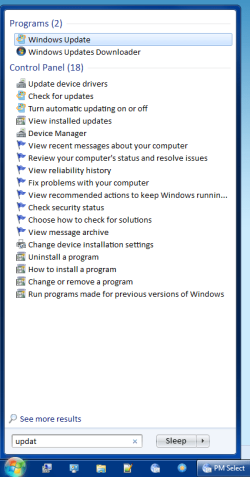
  • Open the Start Menu
  • Type "update" into the search box (no quotes)
  • Choose "Windows Update" from the results
Windows Update - Start.png
Additional
My results offered "Check for updates", which would be a quicker method of updating your PC.
 
Last edited:

My Computer

Computer type
PC/Desktop
Computer Manufacturer/Model Number
n/a
OS
W7 Ultimate SP1, LM19.2 MATE, W10 Home 1703, W10 Pro 1703 VM, #All 64 bit
CPU
AMD Phenom II x6 1100T, 3.3 GHz
Motherboard
ASUS M4A88T-M/USB3 (AM3)
Memory
12GB DDR3 1333 G-Skill (4GB x 2), G-Skill (2GB x 2)
Graphics Card(s)
NVIDIA GeForce GTX 660
Sound Card
Realtek?
Monitor(s) Displays
Samsung S23B350
Screen Resolution
1920x1080
Hard Drives
WD Green 2TB (SATA), WD Green 3TB (SATA), WD Blue 4TB (SATA), WD Blue 6TB (SATA)
PSU
Cooler Master
Case
Antec GX300 Tower
Cooling
3x Antec TRICOOL 120mm Fans
Mouse
Wired Optical
Internet Speed
DSL
Antivirus
Avast
Browser
Pale Moon (64 bit)
Other Info
2018-12-27 Upgraded HDDs
2015-12-10 Upgraded case, graphics card, storage
2015-08-15 Upgraded motherboard & RAM
2015-07-15 Upgraded LM17.1 to LM17.2
  • Like
Reactions: mjf
when should i do a system rescue repair disk?
 

My Computer

Computer Manufacturer/Model Number
windows XP professional service pack 2
OS
XP windows Professional
CPU
intel core 2 Duo/ E8400 3.00 Ghz
Motherboard
Gigabyte EP355-DS3
Memory
3.50 GB
Graphics Card(s)
Gigabyte 512MB 8800GT
Sound Card
?
Monitor(s) Displays
HP 2159m
Hard Drives
C: 400GB
D: 80GB
G: 100GB
H: 300GB
PSU
?
Case
CoolerMaster Centurion CAC-TO5
Cooling
?
System repair disk anytime after install. May as well make it as item 6/.
I make both Windows inbuilt AND Macrium images to external HDDs for extra safety.

Windows inbuilt requires the System Repair disk to do a restore. For Macrium you should make a Restore pe disk and test that it works. You can make the Macrium pe disk yourself by following the Macrium WAIK download guide. WAIK is a large download and a member has kindly provided access to a Macrium Restore pe:
http://www.sevenforums.com/tutorials/73828-imaging-free-macrium.html
The download link is in the Tutorial.
 

My Computer

Computer type
PC/Desktop
Computer Manufacturer/Model Number
Own build
OS
Windows 7x64 Home Premium SP1
CPU
Intel i7 2600k
Motherboard
ASUS P8Z68 Deluxe
Memory
G.Skill Ripjaws (DDR3-1600) 2x4GB
Graphics Card(s)
Nvidia GeForce GTS 450; Intel HD Graphics 3000(GT2+)
Monitor(s) Displays
Dell Ultrasharp IPS panel U2311H, Samsung SyncMaster P2350
Screen Resolution
1920x1080
Hard Drives
Samsung 850 Pro SSD 256GB, Samsung SSD 840 120GB, Seagates 1TB Barracuda ST31000528AS x2
PSU
Seasonic M12II 520W
Case
Lian Li Lancool PC-K60
Cooling
Case: 1x120mm, 3x140mm CPU: Hyper 212+
Keyboard
Logitech MK520 (wireless)
Mouse
Logitech MK520
Internet Speed
6-7 Mbps
Antivirus
Norton Security Premium, Malwarebytes on 2 (MSE on 3rd PC)
Browser
FireFox
Other Info
Audio: Logitech Z523 2.1
Would you recommend having two external hard drives, one for windows and one for macrium images?
 

My Computer

Computer Manufacturer/Model Number
windows XP professional service pack 2
OS
XP windows Professional
CPU
intel core 2 Duo/ E8400 3.00 Ghz
Motherboard
Gigabyte EP355-DS3
Memory
3.50 GB
Graphics Card(s)
Gigabyte 512MB 8800GT
Sound Card
?
Monitor(s) Displays
HP 2159m
Hard Drives
C: 400GB
D: 80GB
G: 100GB
H: 300GB
PSU
?
Case
CoolerMaster Centurion CAC-TO5
Cooling
?
Windows is imaged using Macrium.....you dont "keep Windows on an external hard drive"
 

My Computer

Computer type
PC/Desktop
Computer Manufacturer/Model Number
Golden Mk. I.4
OS
Windows 10 Pro x64 ; Xubuntu x64
CPU
Intel i7 860 @ 2.80 GHz O/C'ed to 4.0GHz
Motherboard
Gigabyte P55A-UD3R Rev.1. Award BIOS F13
Memory
16GB Corsair Vengance DDR3 @ 661 MHz Dual Channel (9-9-9-24)
Graphics Card(s)
EVGA NVidia GTX 560 1024MB
Sound Card
Realtek Integrated
Monitor(s) Displays
Dual Samsung SyncMaster 2494HS
Screen Resolution
1920*1080 and 1920*1080
Hard Drives
1*Samsung 840 EVO 120GB SSD;
1*OCZ Vertex 2 60GB SSD;
2*Samsung F3 SpinPoint 1TB in RAID0;
1*Samsung F1 SpinPoint 1TB;
2*Western Digital 1TB External USB 3.0
1*Western Digital 500GB External USB 3.0
1*Seagate 500GB External USB 2.0
PSU
Thermaltake ToughPower QFan 750W
Case
Thermaltake Element S VK60001W2Z
Cooling
Corsair H60 Water Cooling, 2*230mm and 2*80mm case fans
Keyboard
Logitech G110
Mouse
Logitech MX518
Would you recommend having two external hard drives, one for windows and one for macrium images?
I'm assuming you mean windows inbuilt images versus Macrium images. Of course both are imaging the Windows OS partition.
You can keep copies of Windows (inbuilt) images and Macrium on the one ext HDD. I keep images and other backup data on 2 external HDDs simply for hardware redundancy.
 

My Computer

Computer type
PC/Desktop
Computer Manufacturer/Model Number
Own build
OS
Windows 7x64 Home Premium SP1
CPU
Intel i7 2600k
Motherboard
ASUS P8Z68 Deluxe
Memory
G.Skill Ripjaws (DDR3-1600) 2x4GB
Graphics Card(s)
Nvidia GeForce GTS 450; Intel HD Graphics 3000(GT2+)
Monitor(s) Displays
Dell Ultrasharp IPS panel U2311H, Samsung SyncMaster P2350
Screen Resolution
1920x1080
Hard Drives
Samsung 850 Pro SSD 256GB, Samsung SSD 840 120GB, Seagates 1TB Barracuda ST31000528AS x2
PSU
Seasonic M12II 520W
Case
Lian Li Lancool PC-K60
Cooling
Case: 1x120mm, 3x140mm CPU: Hyper 212+
Keyboard
Logitech MK520 (wireless)
Mouse
Logitech MK520
Internet Speed
6-7 Mbps
Antivirus
Norton Security Premium, Malwarebytes on 2 (MSE on 3rd PC)
Browser
FireFox
Other Info
Audio: Logitech Z523 2.1
Back
Top