New PC wont load

Sheekey

New member
Local time
10:53 PM
Messages
25
Hey this is my first post here since it seemed to be full of helpful people.

So yesterday i got my new MSI motherboard with 4gb ram and my w7 disc

I previously installed w7 on my new harddrive that came and that wont load because of old motherboard drivers according to people

And my CD Drive wont read my w7 disc to install, i can get into the MSI bios and set it to boot first but it does nothing, ive took it apart put it all back together so many times and i just cant find the problem

So my PC loads and just goes to a black screen with a flashing underscore after the MSI image

Please help this is a joke :(
 

My Computer

OS
Windows 7 ultimate 64
Hello Sheekey, welcome to Seven Forums!


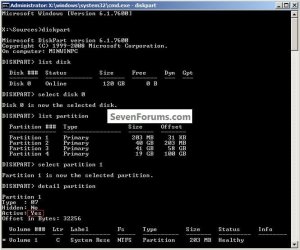
Have a look at this tutorial at the link below and the snip, then boot the Windows 7 installation media to see if diskpart will start and list the partitions to see if they exist at all.
DISKPART : At PC Startup


click to enlarge
DetailPartition.jpg


My Computer

Computer Manufacturer/Model Number
* BFK Customs *
OS
W 7 64-bit Ultimate
CPU
Intel Q9550 Yorkfield
Motherboard
ASUS P5Q Pro
Memory
8GB Dominator 8500C5D
Graphics Card(s)
ATI : XFX 5870
Sound Card
Realtek HD Audio 7-1
Monitor(s) Displays
1x 47" LCD HDMI & 3x 26" LCD HDMI
Screen Resolution
1920x1080P & 1920x1200
Hard Drives
1x 80GB Intel X25-M G2 SSD : 1x 500GB & 1x 640GB WD Caviar Black(s)
PSU
Corsair 620HX
Case
Cooler Master RC-690
Cooling
Tuniq Tower 120, 2x 140mm and 3x 120mm case fans
Keyboard
Microsoft 500
Mouse
Razer Diamondback 3G
Internet Speed
14 Mb/s
Other Info
1x Koutech 3Gb/s SATA HDD Hot Swap Rack
Hello Sheekey, welcome to Seven Forums!


Have a look at this tutorial at the link below and the snip, then boot the Windows 7 installation media to see if diskpart will start and list the partitions to see if they exist at all.

Hey thanks

I cant even press spacebar my keyboard dosent get to work untill the MSI page which then leads onto the black screen with flashing underscore which i cant do anything on
 

My Computer

OS
Windows 7 ultimate 64
Are you using a USB keyboard?
 

My Computer

Computer Manufacturer/Model Number
* BFK Customs *
OS
W 7 64-bit Ultimate
CPU
Intel Q9550 Yorkfield
Motherboard
ASUS P5Q Pro
Memory
8GB Dominator 8500C5D
Graphics Card(s)
ATI : XFX 5870
Sound Card
Realtek HD Audio 7-1
Monitor(s) Displays
1x 47" LCD HDMI & 3x 26" LCD HDMI
Screen Resolution
1920x1080P & 1920x1200
Hard Drives
1x 80GB Intel X25-M G2 SSD : 1x 500GB & 1x 640GB WD Caviar Black(s)
PSU
Corsair 620HX
Case
Cooler Master RC-690
Cooling
Tuniq Tower 120, 2x 140mm and 3x 120mm case fans
Keyboard
Microsoft 500
Mouse
Razer Diamondback 3G
Internet Speed
14 Mb/s
Other Info
1x Koutech 3Gb/s SATA HDD Hot Swap Rack
Is there anyone you could borrow a PS2 KB from for a while?
 

My Computer

Computer Manufacturer/Model Number
* BFK Customs *
OS
W 7 64-bit Ultimate
CPU
Intel Q9550 Yorkfield
Motherboard
ASUS P5Q Pro
Memory
8GB Dominator 8500C5D
Graphics Card(s)
ATI : XFX 5870
Sound Card
Realtek HD Audio 7-1
Monitor(s) Displays
1x 47" LCD HDMI & 3x 26" LCD HDMI
Screen Resolution
1920x1080P & 1920x1200
Hard Drives
1x 80GB Intel X25-M G2 SSD : 1x 500GB & 1x 640GB WD Caviar Black(s)
PSU
Corsair 620HX
Case
Cooler Master RC-690
Cooling
Tuniq Tower 120, 2x 140mm and 3x 120mm case fans
Keyboard
Microsoft 500
Mouse
Razer Diamondback 3G
Internet Speed
14 Mb/s
Other Info
1x Koutech 3Gb/s SATA HDD Hot Swap Rack
And my CD Drive wont read my w7 disc to install, i can get into the MSI bios and set it to boot first but it does nothing, ive took it apart put it all back together so many times and i just cant find the problem.
Am I seeing this right? You mean a DVD Drive, don't you? The Windows 7 media is on DVD, the last Windows OS on CD was Windows XP.
 

My Computer

Computer type
PC/Desktop
Computer Manufacturer/Model Number
Dwarf Dwf/11/2012 r09/2013
OS
Windows 8.1 Pro RTM x64
CPU
Intel Core-i5-3570K 4-core @ 3.4GHz (Ivy Bridge) (OC 4.4GHz)
Motherboard
ASRock Z77 Extreme4-M
Memory
4 x 4GB DDR3-1600 Corsair Vengeance CMZ8GX3M2A1600C9B (16GB)
Graphics Card(s)
MSI GeForce GTX770 Gaming OC 2GB
Sound Card
Realtek High Definition on board solution (ALC 898)
Monitor(s) Displays
ViewSonic VA1912w Widescreen (VGA)
Screen Resolution
1440x900
Hard Drives
OCZ Agility 3 SSD 120GB SATA III x2 (RAID 0)
Samsung HD501LJ 500GB SATA II x2
Hitachi HDS721010CLA332 1TB SATA II
Iomega 1.5TB Ext USB 2.0
WD 2.0TB Ext USB 3.0
PSU
XFX Pro Series 850W Semi-Modular
Case
Gigabyte IF233
Cooling
1 x 120mm Front Inlet 1 x 120mm Rear Exhaust
Keyboard
Microsoft Comfort Curve Keyboard 3000 (USB)
Mouse
Microsoft Comfort Mouse 3000 for Business (USB)
Internet Speed
NetGear DG834Gv3 ADSL Modem/Router (Ethernet) ~4.0 Mb/s (O2)
Antivirus
Avast! 8.0.1497
Browser
IE 11
Other Info
Optical Drive: HL-DT-ST BD-RE BH10LS30 SATA Bluray
Lexmark S305 Printer/Scanner/Copier (USB)
WEI Score: 8.1/8.1/8.5/8.5/8.25
Asus Eee PC 1011PX Netbook (Windows 7 x86 Starter)
And my CD Drive wont read my w7 disc to install, i can get into the MSI bios and set it to boot first but it does nothing, ive took it apart put it all back together so many times and i just cant find the problem.
Am I seeing this right? You mean a DVD Drive, don't you? The Windows 7 media is on DVD, the last Windows OS on CD was Windows XP.

Yeah im not the best with naming pc parts :) but thats what i mean yes
 

My Computer

OS
Windows 7 ultimate 64
I can't guarantee that but it'll be one more thing you have ruled out as the culprit.
 

My Computer

Computer Manufacturer/Model Number
* BFK Customs *
OS
W 7 64-bit Ultimate
CPU
Intel Q9550 Yorkfield
Motherboard
ASUS P5Q Pro
Memory
8GB Dominator 8500C5D
Graphics Card(s)
ATI : XFX 5870
Sound Card
Realtek HD Audio 7-1
Monitor(s) Displays
1x 47" LCD HDMI & 3x 26" LCD HDMI
Screen Resolution
1920x1080P & 1920x1200
Hard Drives
1x 80GB Intel X25-M G2 SSD : 1x 500GB & 1x 640GB WD Caviar Black(s)
PSU
Corsair 620HX
Case
Cooler Master RC-690
Cooling
Tuniq Tower 120, 2x 140mm and 3x 120mm case fans
Keyboard
Microsoft 500
Mouse
Razer Diamondback 3G
Internet Speed
14 Mb/s
Other Info
1x Koutech 3Gb/s SATA HDD Hot Swap Rack
I can't guarantee that but it'll be one more thing you have ruled out as the culprit.

So if i get it do i just follow that guide? As i get 1 blank screen then the MSI logo then another black screen but iwth a flashing underscore.

IS there no other wya for me to access it@
 

My Computer

OS
Windows 7 ultimate 64
Check in BIOS for USB legacy is enable, & not disabled.
or
Try a PS2 keyboard.
 

My Computer

OS
ME/XP/Vista/Win7
You can boot free Partition Wizard bootable CD which will autostart. http://www.partitionwizard.com/download.html

Click on the HD to highlight it then from Disk tab Wipe HD with one set of zeroes.

This will force the DVD to autostart too.

Of course the USB keyboard will need to work to install but may start working once you are into the installation environment.
 
You can boot free Partition Wizard bootable CD which will autostart. Free Download Magic Partition Manager Software - Partition Wizard Online

Click on the HD to highlight it then from Disk tab Wipe HD with one set of zeroes.

This will force the DVD to autostart too.

Of course the USB keyboard will need to work to install but may start working once you are into the installation environment.


That's a good idea too, if the PW boot disk won't boot, then something else is wrong for sure.
 

My Computer

Computer Manufacturer/Model Number
* BFK Customs *
OS
W 7 64-bit Ultimate
CPU
Intel Q9550 Yorkfield
Motherboard
ASUS P5Q Pro
Memory
8GB Dominator 8500C5D
Graphics Card(s)
ATI : XFX 5870
Sound Card
Realtek HD Audio 7-1
Monitor(s) Displays
1x 47" LCD HDMI & 3x 26" LCD HDMI
Screen Resolution
1920x1080P & 1920x1200
Hard Drives
1x 80GB Intel X25-M G2 SSD : 1x 500GB & 1x 640GB WD Caviar Black(s)
PSU
Corsair 620HX
Case
Cooler Master RC-690
Cooling
Tuniq Tower 120, 2x 140mm and 3x 120mm case fans
Keyboard
Microsoft 500
Mouse
Razer Diamondback 3G
Internet Speed
14 Mb/s
Other Info
1x Koutech 3Gb/s SATA HDD Hot Swap Rack

My Computer

OS
Windows 7 ultimate 64
You can boot free Partition Wizard bootable CD which will autostart. Free Download Magic Partition Manager Software - Partition Wizard Online

Click on the HD to highlight it then from Disk tab Wipe HD with one set of zeroes.

This will force the DVD to autostart too.

Of course the USB keyboard will need to work to install but may start working once you are into the installation environment.

So what do i do? DL this then what

Have a look at Option Three of this tutorial at this first link below for an outline of the wipe secure erase process.
First download the Partition Wizard Bootable Disk (PWBD) ISO file to the desktop, be sure to get the PWBD and not the installed version; scroll down to see the download link for the bootable CD ISO file at this link below.
Then use ImgBurn to burn the ISO to a CD, at no greater than 4x speed with a verify; it was designed for use and works best from a CD rather that a then boot the created CD to make the changes.
 

My Computer

Computer Manufacturer/Model Number
* BFK Customs *
OS
W 7 64-bit Ultimate
CPU
Intel Q9550 Yorkfield
Motherboard
ASUS P5Q Pro
Memory
8GB Dominator 8500C5D
Graphics Card(s)
ATI : XFX 5870
Sound Card
Realtek HD Audio 7-1
Monitor(s) Displays
1x 47" LCD HDMI & 3x 26" LCD HDMI
Screen Resolution
1920x1080P & 1920x1200
Hard Drives
1x 80GB Intel X25-M G2 SSD : 1x 500GB & 1x 640GB WD Caviar Black(s)
PSU
Corsair 620HX
Case
Cooler Master RC-690
Cooling
Tuniq Tower 120, 2x 140mm and 3x 120mm case fans
Keyboard
Microsoft 500
Mouse
Razer Diamondback 3G
Internet Speed
14 Mb/s
Other Info
1x Koutech 3Gb/s SATA HDD Hot Swap Rack
You can boot free Partition Wizard bootable CD which will autostart. Free Download Magic Partition Manager Software - Partition Wizard Online

Click on the HD to highlight it then from Disk tab Wipe HD with one set of zeroes.

This will force the DVD to autostart too.

Of course the USB keyboard will need to work to install but may start working once you are into the installation environment.

So what do i do? DL this then what

Have a look at Option Three of this tutorial at this first link below for an outline of the wipe secure erase process.
First download the Partition Wizard Bootable Disk (PWBD) ISO file to the desktop, be sure to get the PWBD and not the installed version; scroll down to see the download link for the bootable CD ISO file at this link below.
Then use ImgBurn to burn the ISO to a CD, at no greater than 4x speed with a verify; it was designed for use and works best from a CD rather that a then boot the created CD to make the changes.

Havent got no spare discs :{
 

My Computer

OS
Windows 7 ultimate 64
CD's are 5 for $2 on the wall rack at Walgreens, by the camera dept.
 
Back
Top