New program will not open, rest of computer works fine

LydiaGP

New member
Local time
6:32 AM
Messages
2
Hello,
I just recently installed a program on my laptop. It is called Precor Channel Editor (a work-specific program). It will not open. The spinning circle appears next to my mouse when I double-click it, stays for about 5 seconds, then disappears. The program doesn't ever open though.

The other programs on my computer seem to work fine, although I do remember having spent about 4 hours once before trying to get a program (C-SAFE) to work. Unfortunately, that was about 4 years ago and I have no idea what I did.

A few things I have tried:
Updated video drivers.
I originally had 7 Starter on my laptop, after speaking with tech support at Precor, they suggested getting Windows 7 Professional as that is what they use. I did, no difference.
I have uninstalled and reinstalled this program several times.
I also installed this program on my co-workers desktop just to make sure I wasn't doing something wrong/there wasn't anything wrong with the program. It worked fine on her desktop.
I have tried to run as administrator.
I opened task manager and watched it while I tried to open the program. The program name showed up in the processes for about 5-10 seconds, then disappeared.

Any ideas what might be going on? I have spoken to tech support at Precor several times and they don't know what the problem is either. It is a fairly new program, but they've never run into this issue with anyone else that downloaded it.

Thanks in advance!

Lydia
 

My Computer My Computer

At a glance

Windows 7 Professional 32 bit
Computer type
Laptop
Computer Manufacturer/Model Number
Dell Inspiron Mini
OS
Windows 7 Professional 32 bit
Browser
Internet Explorer
Just a few basic things to try;

Restart the computer after install.
Run it in compatibility mode.

I don't really know to be honest :o
 

My Computer My Computer

At a glance

Windows 7 Ultimate 64-bitIntel G3420 3.2GHZ Dual CoreKingson 8GB 1600mhzMSI R7970 TF 3GD5/OC BE
Computer type
PC/Desktop
Computer Manufacturer/Model Number
Custom Build
OS
Windows 7 Ultimate 64-bit
CPU
Intel G3420 3.2GHZ Dual Core
Motherboard
Gigabyte H87-HD3
Memory
Kingson 8GB 1600mhz
Graphics Card(s)
MSI R7970 TF 3GD5/OC BE
Monitor(s) Displays
21" LG & "19 Vertical Samsung
Hard Drives
120GB SSD - Boot
1TB WD
350GB External
2TB External (Wireless)
PSU
Corsair CX 500 modular
Case
Zalman Z11 Plus (modified)
Cooling
Corsair H55, 2x 120mm SP Corsair, 1x 140 Coolermaster
Keyboard
Corsair K50
Mouse
CSL Gaming
Internet Speed
164Mbps
Antivirus
Avast, Malwarebytes
Browser
Google Chrome, IE, Firefox
As a shot in the dark. does it have enough memory? Some of those baby ones, especially coming with 7 starter, had very little memory to spare. Other than that I second the above post " I really don't know"
Art.
 

My Computer My Computer

At a glance

Win7 sp1 Pro 64bit / XP sp2 Pro (games only)Intel Core 2 Duo E8400 @ 3.00GHz8.00 GB Dual-Channel DDR2 @ 400MHz (5-5-5-18)1024MB GeForce GTX 560
Computer type
PC/Desktop
Computer Manufacturer/Model Number
Home built
OS
Win7 sp1 Pro 64bit / XP sp2 Pro (games only)
CPU
Intel Core 2 Duo E8400 @ 3.00GHz
Motherboard
Intel Corporation DP35DP (CPU1)
Memory
8.00 GB Dual-Channel DDR2 @ 400MHz (5-5-5-18)
Graphics Card(s)
1024MB GeForce GTX 560
Sound Card
NVIDIA High Definition Audio
Monitor(s) Displays
SyncMaster (2048x1152@60Hz)
Hard Drives
240GB Sandisc Extreme Pro SSD
244GB Seagate ST3250410AS
488GB Seagate ST500DM002-1BD142
931GB Western Digital WDC WD1003FZEX
PSU
Corsair 720
Case
ATX
Keyboard
HID Keyboard Device Logitech
Mouse
HID-compliant mouse Microsoft
Other Info
TSSTcorp CDDVDW SH-S223L

HL-DT-ST BD-RE BH12LS35
I tried the compatibility mode, no difference with that. I will have to try the re-start and see if that makes any difference. I'm waiting on an email back about memory. Thanks for the suggestions! Any other ideas would be appreciated too.
 

My Computer My Computer

At a glance

Windows 7 Professional 32 bit
Computer type
Laptop
Computer Manufacturer/Model Number
Dell Inspiron Mini
OS
Windows 7 Professional 32 bit
Browser
Internet Explorer
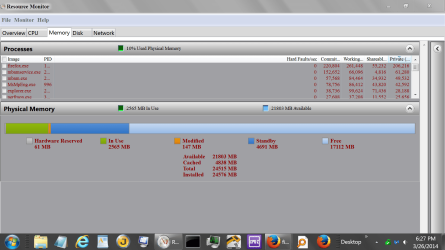
Rebooting is a great idea. You don't need a email to know your memory.

Window 7 can do that for you.
Start Orb and type in Resource Monitor and tick on it.
At the top of the display tick on memory and you should get one of these.

New ram picture.PNG
 

My Computer My Computer

At a glance

Windows 10 Pro. 64/ version 1709 Windows 7 Pr...Intel i7-6800K @ 4.3Corsair Platinum 16 gig @2400EVGA GTX 1070 OC
Computer type
PC/Desktop
Computer Manufacturer/Model Number
Home made Desktop
OS
Windows 10 Pro. 64/ version 1709 Windows 7 Pro/64
CPU
Intel i7-6800K @ 4.3
Motherboard
ASUS X-99 Deluxe II
Memory
Corsair Platinum 16 gig @2400
Graphics Card(s)
EVGA GTX 1070 OC
Monitor(s) Displays
Asus 27" LED LCD/VE278Q
Screen Resolution
1920-1080 or 1280-720 HDMI
Hard Drives
INTEL SSD 730-240 Gb Sata 3.0/
PSU
EVGA Platium 1200W
Case
Phanteks Luxe Tempered Glass 8 fans/ one radiator
Cooling
XSPC/ Water Cooled CPU
Keyboard
Das 4 Professional
Mouse
Logitech M705/MX Anywhere 2-S
Internet Speed
100 mbits
Antivirus
Microsoft Security Essentials/ Malwarebytes Premium 3.0/ SAS
Browser
I.E. 11 default/Firefox/ ISP Time Warner Cable/Spectrum
Other Info
LG BluRay Burner/
Sound system-KLipsch-THX/
Icy Dock ssd Hot Swap bays.
Having the same problem. Win7 Pro, 2gb ram, plenty of HD space. I do get an error in the event viewer that says:
Log Name: Application
Source: Application Error
Date: 3/10/2015 4:48:54 PM
Event ID: 1000
Task Category: (100)
Level: Error
Keywords: Classic
User: N/A
Computer: Technotes
Description:
Faulting application name: PrecorChannelEditor.exe, version: 0.0.0.0, time stamp: 0x525443bb
Faulting module name: ig4icd32.dll, version: 8.15.10.2086, time stamp: 0x4b8004f4
Exception code: 0xc0000005
Fault offset: 0x0052eec8
Faulting process id: 0x112c
Faulting application start time: 0x01d05b8cc23de301
Faulting application path: C:\Users\TechThree\AppData\Local\Precor Channel Editor 1.0\PrecorChannelEditor.exe
Faulting module path: C:\windows\system32\ig4icd32.dll
Report Id: 0230d77f-c780-11e4-b4e1-00266cb2d10c
Event Xml:
<Event xmlns="http://schemas.microsoft.com/win/2004/08/events/event">
<System>
<Provider Name="Application Error" />
<EventID Qualifiers="0">1000</EventID>
<Level>2</Level>
<Task>100</Task>
<Keywords>0x80000000000000</Keywords>
<TimeCreated SystemTime="2015-03-10T23:48:54.000000000Z" />
<EventRecordID>19977</EventRecordID>
<Channel>Application</Channel>
<Computer>Technotes</Computer>
<Security />
</System>
<EventData>
<Data>PrecorChannelEditor.exe</Data>
<Data>0.0.0.0</Data>
<Data>525443bb</Data>
<Data>ig4icd32.dll</Data>
<Data>8.15.10.2086</Data>
<Data>4b8004f4</Data>
<Data>c0000005</Data>
<Data>0052eec8</Data>
<Data>112c</Data>
<Data>01d05b8cc23de301</Data>
<Data>C:\Users\TechThree\AppData\Local\Precor Channel Editor 1.0\PrecorChannelEditor.exe</Data>
<Data>C:\windows\system32\ig4icd32.dll</Data>
<Data>0230d77f-c780-11e4-b4e1-00266cb2d10c</Data>
</EventData>
</Event>

I've also tried updating video drivers and removing or updating the offending .dll file. Tried reinstalling, rebooting etc etc.

Thanks,

Daren.
 

My Computer My Computer

At a glance

Windows 7 Pro 64 bit
Computer type
PC/Desktop
OS
Windows 7 Pro 64 bit
Back
Top