
New SSD, Looking to copy windows boot partition to SSD

mgr1397

New member
Local time
7:20 AM
Messages
1
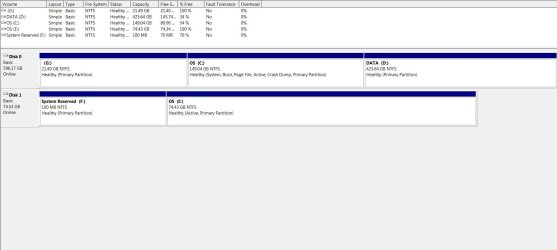
I have a brand new 80 gb Intel SSD that I want to put my windows partition on and make it bootable from the SSD instead of the HDD.

And after that I want to combine my storage drive and old windows partition (both on on the same HDD) into 1 partition without losing the files on my storage drive.

Can someone help me on how to do this?
 

Attachments
  • Capture.JPG
    Capture.JPG
    82 KB · Views: 252

My Computer My Computer

At a glance

windows 7 64bit home premium
OS
windows 7 64bit home premium

My Computer My Computer

At a glance

Win 7 Ultimate, Win 8.1 Pro, Linux Mint 19 Ci...Intel i5 4690KCorsair Vengeance LP 32GB DDR3MSI GTX 1060 GAMING X 6GB
Computer type
PC/Desktop
Computer Manufacturer/Model Number
Custom Build
OS
Win 7 Ultimate, Win 8.1 Pro, Linux Mint 19 Cinnamon (All 64-Bit)
CPU
Intel i5 4690K
Motherboard
Gigabyte Z97X-UD3H
Memory
Corsair Vengeance LP 32GB DDR3
Graphics Card(s)
MSI GTX 1060 GAMING X 6GB
Sound Card
Onboard
Hard Drives
Samsung 850 EVO 250GB SSD (x2)
Samsung 860 EVO 1TB SSD (x2)
Crucial MX300 525GB SSD
WD Blue 2TB 5400rpm Intellipark Disabled (x2)
PSU
Corsair HX750i
Case
Phanteks Enthoo Pro
Cooling
CM Hyper 212 EVO on CPU, Noctua Redux NF-P14S 1500rpm (x6)
Keyboard
Corsair K70 RGB LUX
Mouse
Corsair Sabre RGB
Antivirus
Avast Free, MalwareBytes, SAS & CryptoPrevent
Browser
Chrome
Other Info
StarTech PEXESAT322I 2 Port PCI-E SATA Card
ASUS PCE-AC56 Dual-band AC1300 Wireless Card
Akasa FC.Six Manual Fan Controller
And a Partridge in a Pear Tree!
I have a brand new 80 gb Intel SSD that I want to put my windows partition on and make it bootable from the SSD instead of the HDD.

And after that I want to combine my storage drive and old windows partition (both on on the same HDD) into 1 partition without losing the files on my storage drive.

Can someone help me on how to do this?

Confirm you can boot with only the SSD connected after you get Windows onto the SSD. If you can boot with the SSD alone, you should then be able to re-attach the old drive and repartition it.

Do you have an external drive or some other storage location large enough to hold all data that is now on the old hard drive? If so, you could temporarily move data to that location and then wipe the old drive. Then make a new single partition on the old drive and move your data back to it.

You can probably manipulate the partitions on the old drive with Partition Wizard bootable disc, but you should back up your data to some other drive before you start in case something goes wrong--which can happen.
 

My Computer My Computer

At a glance

Windows 7 Home Premium SP1, 64-bitIntel Skylake i5-6600K, not overclocked8 GB HyperX DDR4-2666 (2 x 4 GB)none; graphics are integrated on CPU
Computer type
PC/Desktop
Computer Manufacturer/Model Number
Ignatz Special; 4 speed manual gearbox; factory air conditioning; one of one
OS
Windows 7 Home Premium SP1, 64-bit
CPU
Intel Skylake i5-6600K, not overclocked
Motherboard
AsRock Z170M Extreme 4, micro ATX
Memory
8 GB HyperX DDR4-2666 (2 x 4 GB)
Graphics Card(s)
none; graphics are integrated on CPU
Sound Card
onboard: Realtek ALC1150; external: USB Behringer UF0-202
Monitor(s) Displays
Dell S2340M 23 inch IPS
Screen Resolution
1600 x 900
Hard Drives
System: Crucial MX100 series SSD, 128 GB;
Data: Samsung Spinpoint 103SJ, 1 TB;
Backup: WD Caviar Green WD30EZRX-00D8PB0, 3 TB
PSU
Rosewill SilentNight 500 watt fanless, semi-modular
Case
Antec Solo II
Cooling
Noctua NH-U12S; Noctua F12 intake, Noctua S12A exhaust
Keyboard
Microsoft 200 6JH-00001 USB
Mouse
Dell or Microsoft optical wired; USB
Antivirus
Microsoft Security Essentials and Malwarebytes Premium
Browser
Pale Moon
Other Info
All fans PWM; speeds at idle: CPU circa 500 rpm; intake circa 600 rpm; exhaust circa 600 rpm; CPU temps 27 idle and 47 C load in a warm room (27 C/81 F) when running Intel Extreme Tuning Utility stress test.
Just me... but I would not put ANYTHING old on that new SSD. Fresh is best!
 

My Computer My Computer

At a glance

W7x64 Ult.i7 97512GB Corsair DomEvga GTX285
Computer Manufacturer/Model Number
HB
OS
W7x64 Ult.
CPU
i7 975
Motherboard
P6T7 SC
Memory
12GB Corsair Dom
Graphics Card(s)
Evga GTX285
Sound Card
OB
Monitor(s) Displays
HP LP2475
Screen Resolution
1920x1200
Hard Drives
Velociraptors Raid0 BU
Crucial M4 OS
WD RE4 Data
PSU
PC Power & Cooling 950
Case
Chieftec Bravo
Cooling
Air 6 GentleTyphoon
Keyboard
Logitech Illuminated
Mouse
Logitech MX518
Back
Top