SSD Upgrade : Not able to boot from new SSD disk

BOBdGreat

New member
Local time
1:56 AM
Messages
4
Location
Germany
Hello All,


I want to upgrade the hard disk for my laptop HDD to SSD.

With the help of Mini tool partition wizard I migrated my OS to the new SSD disk(Sandisk SSD Plus) with SATA USB adapter.


After migration to SSD, I removed the HDD and installed the SSD.
But when I started my laptop I got the message as "no bootable device found".
In my BIOS setting there is specific option for SSD :confused:.

I tried updating the BIOS to F.48 from HP website, still worse, not able to enter into BIOS now.
Please check the Error_BIOS image attached


Please let me know what went wrong here and what I am missing :cry:.


HP G62 - b20SG - Windows 7 Home Premium 64 bit


- BoBdGreat
 

Attachments
  • Error_BIOS.jpg
    Error_BIOS.jpg
    282.7 KB · Views: 1
Last edited:

My Computer My Computer

At a glance

Windows 7 Home Premium 64 BitCore i54GBIntel, ATI
Computer type
Laptop
Computer Manufacturer/Model Number
HP
OS
Windows 7 Home Premium 64 Bit
CPU
Core i5
Motherboard
ACPI x64
Memory
4GB
Graphics Card(s)
Intel, ATI
Hard Drives
Hitachi
Antivirus
Microsoft
Welcome to the forum. The error means the boot sector wasnt copied. Did you copy all partitions. Can you post a screen shot from disk manager of the old drive and the new one so we can see
 

My Computer My Computer

At a glance

win 8 32 bit
Computer type
PC/Desktop
OS
win 8 32 bit
Thanks for the warm welcome.
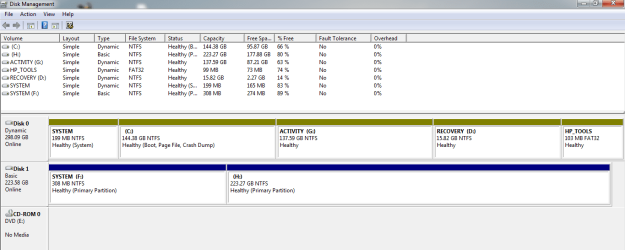
Please find the screen shot of the hard drives.


Disc 0 : HHD
Disc 1 : SSD (Sandisk SSD Plus - Connected via SATA USB ADAPTER)


I used Migrate OS to SSD/HD option from Mini Tool Partition Wizard
 

Attachments

  • Disc_manager.PNG
    Disc_manager.PNG
    22.4 KB · Views: 4

My Computer My Computer

At a glance

Windows 7 Home Premium 64 BitCore i54GBIntel, ATI
Computer type
Laptop
Computer Manufacturer/Model Number
HP
OS
Windows 7 Home Premium 64 Bit
CPU
Core i5
Motherboard
ACPI x64
Memory
4GB
Graphics Card(s)
Intel, ATI
Hard Drives
Hitachi
Antivirus
Microsoft
Last edited:

My Computer My Computer

At a glance

win 8 32 bit
Computer type
PC/Desktop
OS
win 8 32 bit
Looks like Disk0 is dynamic.

That could be the problem. It is usually better to either clone the entire disk, or convert dynamic disk to basic first.

However, it is possible minitool copied the partitions correctly, but failed to set an active flag. Maybe setting the system partition (F) active will do the trick.

In addition:
I tried updating the BIOS to F.48 from HP website, still worse, not able to enter into BIOS now.
Please check the Error_BIOS image attached

Not clear from your post - is that just the disk diagnostics that gives the error? What do you mean by "not able to enter bios" ?
 
Last edited:

My Computers My Computers

  • At a glance

    7 X64i5 84002x8gb 3200mhz
    Computer type
    PC/Desktop
    OS
    7 X64
    CPU
    i5 8400
    Motherboard
    gigabyte b365m ds3h
    Memory
    2x8gb 3200mhz
    Hard Drives
    various
    PSU
    pure power 11 400w cm
    Case
    Coolermaster
    Cooling
    cryorig m9i
  • At a glance

    7x64g54008gb ddr4 2400
    Computer type
    PC/Desktop
    OS
    7x64
    CPU
    g5400
    Motherboard
    ga b365m ds3h
    Memory
    8gb ddr4 2400
    PSU
    xfx pro 450w
Thanks for your suggestions. Finally it worked.

First I converted the Dynamic disk to Basic disk.
Second I cloned the HDD to SSD.


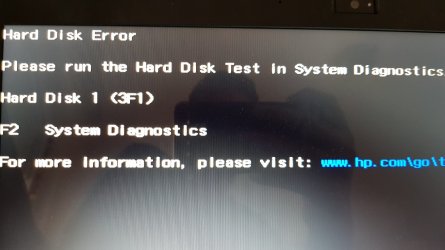
Now I have issue of "Hard Disk Error" 3F1 while starting the laptop.
Please check the attachment.

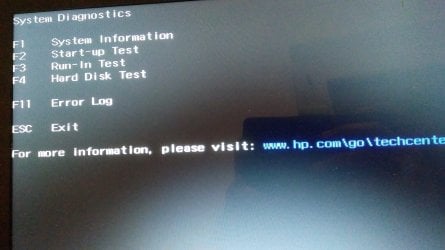
Hard disk test also PASSED.
Kindly let me know how this error can be solved.
 

Attachments

  • Hard_disk_error.jpg
    Hard_disk_error.jpg
    239 KB · Views: 0

My Computer My Computer

At a glance

Windows 7 Home Premium 64 BitCore i54GBIntel, ATI
Computer type
Laptop
Computer Manufacturer/Model Number
HP
OS
Windows 7 Home Premium 64 Bit
CPU
Core i5
Motherboard
ACPI x64
Memory
4GB
Graphics Card(s)
Intel, ATI
Hard Drives
Hitachi
Antivirus
Microsoft

My Computers My Computers

  • At a glance

    7 X64i5 84002x8gb 3200mhz
    Computer type
    PC/Desktop
    OS
    7 X64
    CPU
    i5 8400
    Motherboard
    gigabyte b365m ds3h
    Memory
    2x8gb 3200mhz
    Hard Drives
    various
    PSU
    pure power 11 400w cm
    Case
    Coolermaster
    Cooling
    cryorig m9i
  • At a glance

    7x64g54008gb ddr4 2400
    Computer type
    PC/Desktop
    OS
    7x64
    CPU
    g5400
    Motherboard
    ga b365m ds3h
    Memory
    8gb ddr4 2400
    PSU
    xfx pro 450w
Thanks for your valuable time and for the solution.

For past 1 year I have disabled my ATI Raedon 5470 HD graphics card in the Device Manager.
Because whenever I install the device driver for this CARD, screen goes black.
Even after a restart the screen goes black. So I entered into the safe mode and disabled the ATI card.

Now I am using only Intel HD graphics card.

Please let me know the right solution for this issue.

I also tried to install drivers by entering into Safe Mode with Networking, still no use.
 

My Computer My Computer

At a glance

Windows 7 Home Premium 64 BitCore i54GBIntel, ATI
Computer type
Laptop
Computer Manufacturer/Model Number
HP
OS
Windows 7 Home Premium 64 Bit
CPU
Core i5
Motherboard
ACPI x64
Memory
4GB
Graphics Card(s)
Intel, ATI
Hard Drives
Hitachi
Antivirus
Microsoft
Back
Top