
New SSD - Questions

JimmyJazz

New member
Member
Local time
7:00 PM
Messages
54
I am about to purchase a OCZ Vertex2 120Gb SSD. This will be used to house a fresh install of Windows 7 Home Prem and programs. All data, vids, music etc. will be housed on the old drive.

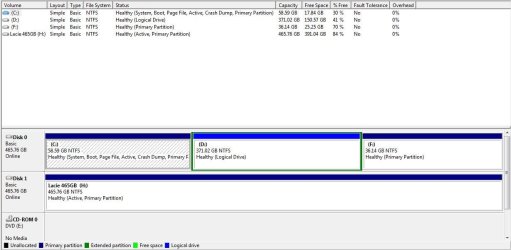
My question is what will happen to my old drive letters when I place Win7 on the new SSD? I understand I must unplug the old spinner (as it contains my current win7) before loading it on the new drive. But when I plug it back in, what happens to it. Will windows make the changes, or will I have to manually do it?
 

Attachments
  • Capture.JPG
    Capture.JPG
    74.1 KB · Views: 21

My Computer

Computer Manufacturer/Model Number
Asus
OS
Win 7 x64 H.Prem XP SP3 x86
CPU
E8400
Motherboard
P5Q-E
Memory
4Gb.
Graphics Card(s)
Radeon 4870
Monitor(s) Displays
Samsung T220HD
Hard Drives
SSD - OCZ RevoDrive PCI-e 120Gb

Spinner - Seagate Barracuda 7200.11 SATA 3Gb/s 500-GB
Case
Antec 900
If you plan to continue booting your old HD, then after install to the SSD with it set first to boot in BIOS setup, plug back in the HD and boot it when needed by using the one-time BIOS Boot Menu key. Win7 should see itself as C whichever you are booted into - you'll have to see what the other partitions are lettered from SSD.

One way to save space on an SSD is to link to user folders on another HD: User Folders - Change Default Location - Windows 7 Forums

When you're ready to delete Win7 on the HD, you can keep User folders and delete the Windows and other files by taking ownership of them: Take Ownership Shortcut - Windows 7 Forums Folders which balk may need to grant full Permission to Everyone (as Administrator) on Properties>Security tab. Or move User folders to another partition and delete the Win7 partition, reformat NTFS primary and move User folders back to maintain their path.
 
Thanks for the reply Greg!

I forgot to mention in my orig. post that I have WinXP operating system loaded on F: drive.
Will I still be able to run it after Loading Win7 on SSD and deleting old Win7 from the HD?
 

My Computer

Computer Manufacturer/Model Number
Asus
OS
Win 7 x64 H.Prem XP SP3 x86
CPU
E8400
Motherboard
P5Q-E
Memory
4Gb.
Graphics Card(s)
Radeon 4870
Monitor(s) Displays
Samsung T220HD
Hard Drives
SSD - OCZ RevoDrive PCI-e 120Gb

Spinner - Seagate Barracuda 7200.11 SATA 3Gb/s 500-GB
Case
Antec 900
Hello JimmyJazz, welcome to Seven Forums!


If you leave only the SSD connected for the new installation, setting it as the first boot device in the BIOS, then after the 'new' Windows 7 is booting good all on its own, power down and reconnect the other HDDs and then you will be able to use the one-time BIOS boot menu (F8 for ASUS) to select to start one of the other OS/HDDs at PC startup.
 

My Computer

Computer Manufacturer/Model Number
* BFK Customs *
OS
W 7 64-bit Ultimate
CPU
Intel Q9550 Yorkfield
Motherboard
ASUS P5Q Pro
Memory
8GB Dominator 8500C5D
Graphics Card(s)
ATI : XFX 5870
Sound Card
Realtek HD Audio 7-1
Monitor(s) Displays
1x 47" LCD HDMI & 3x 26" LCD HDMI
Screen Resolution
1920x1080P & 1920x1200
Hard Drives
1x 80GB Intel X25-M G2 SSD : 1x 500GB & 1x 640GB WD Caviar Black(s)
PSU
Corsair 620HX
Case
Cooler Master RC-690
Cooling
Tuniq Tower 120, 2x 140mm and 3x 120mm case fans
Keyboard
Microsoft 500
Mouse
Razer Diamondback 3G
Internet Speed
14 Mb/s
Other Info
1x Koutech 3Gb/s SATA HDD Hot Swap Rack
Ubet! Thanks again for the replies all.

Just to clarify, I will load Win7 on my new SSD. Afterwards, I can plug the spinner back in and it will still be possible to access my old Win7 and WinXp installs.

What happens to the drive letters on the old spinner when it is plugged back in? I'm guessing windows will rename them? And if so, will that effect the old Win7 and XP OS's.

Only reason it would be nice to access OLD Win7 on spinner would be to get something I may forget to back-up before wiping the spinner and going only with the SSD for Win7 :)
 

My Computer

Computer Manufacturer/Model Number
Asus
OS
Win 7 x64 H.Prem XP SP3 x86
CPU
E8400
Motherboard
P5Q-E
Memory
4Gb.
Graphics Card(s)
Radeon 4870
Monitor(s) Displays
Samsung T220HD
Hard Drives
SSD - OCZ RevoDrive PCI-e 120Gb

Spinner - Seagate Barracuda 7200.11 SATA 3Gb/s 500-GB
Case
Antec 900
Ubet! Thanks again for the replies all.

Just to clarify, I will load Win7 on my new SSD. Afterwards, I can plug the spinner back in and it will still be possible to access my old Win7 and WinXp installs.

What happens to the drive letters on the old spinner when it is plugged back in? I'm guessing windows will rename them? And if so, will that effect the old Win7 and XP OS's.

Only reason it would be nice to access OLD Win7 on spinner would be to get something I may forget to back-up before wiping the spinner and going only with the SSD for Win7 :)


Yes, when you first start the PC start tapping the F8 key to access the ASUS one-time boot menu to select to boot the spinner first instead of the SSD.
 

My Computer

Computer Manufacturer/Model Number
* BFK Customs *
OS
W 7 64-bit Ultimate
CPU
Intel Q9550 Yorkfield
Motherboard
ASUS P5Q Pro
Memory
8GB Dominator 8500C5D
Graphics Card(s)
ATI : XFX 5870
Sound Card
Realtek HD Audio 7-1
Monitor(s) Displays
1x 47" LCD HDMI & 3x 26" LCD HDMI
Screen Resolution
1920x1080P & 1920x1200
Hard Drives
1x 80GB Intel X25-M G2 SSD : 1x 500GB & 1x 640GB WD Caviar Black(s)
PSU
Corsair 620HX
Case
Cooler Master RC-690
Cooling
Tuniq Tower 120, 2x 140mm and 3x 120mm case fans
Keyboard
Microsoft 500
Mouse
Razer Diamondback 3G
Internet Speed
14 Mb/s
Other Info
1x Koutech 3Gb/s SATA HDD Hot Swap Rack
Thanks Bare Foot Kid!

Was worried that the drive letter getting changed would screw everything up.

Appreciate it!
 

My Computer

Computer Manufacturer/Model Number
Asus
OS
Win 7 x64 H.Prem XP SP3 x86
CPU
E8400
Motherboard
P5Q-E
Memory
4Gb.
Graphics Card(s)
Radeon 4870
Monitor(s) Displays
Samsung T220HD
Hard Drives
SSD - OCZ RevoDrive PCI-e 120Gb

Spinner - Seagate Barracuda 7200.11 SATA 3Gb/s 500-GB
Case
Antec 900
Do not attemp to change OS drive letters, you will cause more harm than good and you probably not be able to anyway.

XP is weird so don't be too concerned with that drive letter.

Each Windows 7 will see itself as C: anyway. ;)


You are very much welcome!
 

My Computer

Computer Manufacturer/Model Number
* BFK Customs *
OS
W 7 64-bit Ultimate
CPU
Intel Q9550 Yorkfield
Motherboard
ASUS P5Q Pro
Memory
8GB Dominator 8500C5D
Graphics Card(s)
ATI : XFX 5870
Sound Card
Realtek HD Audio 7-1
Monitor(s) Displays
1x 47" LCD HDMI & 3x 26" LCD HDMI
Screen Resolution
1920x1080P & 1920x1200
Hard Drives
1x 80GB Intel X25-M G2 SSD : 1x 500GB & 1x 640GB WD Caviar Black(s)
PSU
Corsair 620HX
Case
Cooler Master RC-690
Cooling
Tuniq Tower 120, 2x 140mm and 3x 120mm case fans
Keyboard
Microsoft 500
Mouse
Razer Diamondback 3G
Internet Speed
14 Mb/s
Other Info
1x Koutech 3Gb/s SATA HDD Hot Swap Rack
ok, in that case, when I run win7 on the new SSD with the old spinner plugged in, I will see two C: drives in explorer correct?
 

My Computer

Computer Manufacturer/Model Number
Asus
OS
Win 7 x64 H.Prem XP SP3 x86
CPU
E8400
Motherboard
P5Q-E
Memory
4Gb.
Graphics Card(s)
Radeon 4870
Monitor(s) Displays
Samsung T220HD
Hard Drives
SSD - OCZ RevoDrive PCI-e 120Gb

Spinner - Seagate Barracuda 7200.11 SATA 3Gb/s 500-GB
Case
Antec 900
ok, in that case, when I run win7 on the new SSD with the old spinner plugged in, I will see two C: drives in explorer correct?


No, sorry for the confusion, each booted Windows 7 will see itself as C: and the 'other' as the next available drive letter.
 

My Computer

Computer Manufacturer/Model Number
* BFK Customs *
OS
W 7 64-bit Ultimate
CPU
Intel Q9550 Yorkfield
Motherboard
ASUS P5Q Pro
Memory
8GB Dominator 8500C5D
Graphics Card(s)
ATI : XFX 5870
Sound Card
Realtek HD Audio 7-1
Monitor(s) Displays
1x 47" LCD HDMI & 3x 26" LCD HDMI
Screen Resolution
1920x1080P & 1920x1200
Hard Drives
1x 80GB Intel X25-M G2 SSD : 1x 500GB & 1x 640GB WD Caviar Black(s)
PSU
Corsair 620HX
Case
Cooler Master RC-690
Cooling
Tuniq Tower 120, 2x 140mm and 3x 120mm case fans
Keyboard
Microsoft 500
Mouse
Razer Diamondback 3G
Internet Speed
14 Mb/s
Other Info
1x Koutech 3Gb/s SATA HDD Hot Swap Rack
Ohhhh ok, My thick skull finely 'gets it' :)

Thanks alot BFK!
 

My Computer

Computer Manufacturer/Model Number
Asus
OS
Win 7 x64 H.Prem XP SP3 x86
CPU
E8400
Motherboard
P5Q-E
Memory
4Gb.
Graphics Card(s)
Radeon 4870
Monitor(s) Displays
Samsung T220HD
Hard Drives
SSD - OCZ RevoDrive PCI-e 120Gb

Spinner - Seagate Barracuda 7200.11 SATA 3Gb/s 500-GB
Case
Antec 900
:thumbsup:
 

My Computer

Computer Manufacturer/Model Number
* BFK Customs *
OS
W 7 64-bit Ultimate
CPU
Intel Q9550 Yorkfield
Motherboard
ASUS P5Q Pro
Memory
8GB Dominator 8500C5D
Graphics Card(s)
ATI : XFX 5870
Sound Card
Realtek HD Audio 7-1
Monitor(s) Displays
1x 47" LCD HDMI & 3x 26" LCD HDMI
Screen Resolution
1920x1080P & 1920x1200
Hard Drives
1x 80GB Intel X25-M G2 SSD : 1x 500GB & 1x 640GB WD Caviar Black(s)
PSU
Corsair 620HX
Case
Cooler Master RC-690
Cooling
Tuniq Tower 120, 2x 140mm and 3x 120mm case fans
Keyboard
Microsoft 500
Mouse
Razer Diamondback 3G
Internet Speed
14 Mb/s
Other Info
1x Koutech 3Gb/s SATA HDD Hot Swap Rack
And thanks too you also Greg! Rock on! :)
 

My Computer

Computer Manufacturer/Model Number
Asus
OS
Win 7 x64 H.Prem XP SP3 x86
CPU
E8400
Motherboard
P5Q-E
Memory
4Gb.
Graphics Card(s)
Radeon 4870
Monitor(s) Displays
Samsung T220HD
Hard Drives
SSD - OCZ RevoDrive PCI-e 120Gb

Spinner - Seagate Barracuda 7200.11 SATA 3Gb/s 500-GB
Case
Antec 900
   Warning
seriously off-topic alert!


now that's all sorted, maybe we can all relax a little now with a classic track from a classic album.

thanks for the memories, JJ :)


My Computer

Computer Manufacturer/Model Number
mickey megabyte 1234
OS
ultimate 64 sp1
CPU
i5 2500K [email protected]
Motherboard
MSI P67A-GD53
Memory
8 gigs GSkill Ripjaws 1600
Graphics Card(s)
amd hd6950
Sound Card
creative x-fi gamer
Monitor(s) Displays
samsung 24"
Screen Resolution
1920x1080
Hard Drives
ocz vertex 2e 60 gig, samsung f3 1tb, buffalo 2tb ext
PSU
antec 550
Case
antec three hundred
Cooling
i'm a cooling fan
Keyboard
saitek eclipse ii
Mouse
logitech g3
Internet Speed
about 4 Mbps
Other Info
i love win7
Attaboy... Police walked in for.... :)
Mind you, those days are long gone, but the nick name stuck!
 

My Computer

Computer Manufacturer/Model Number
Asus
OS
Win 7 x64 H.Prem XP SP3 x86
CPU
E8400
Motherboard
P5Q-E
Memory
4Gb.
Graphics Card(s)
Radeon 4870
Monitor(s) Displays
Samsung T220HD
Hard Drives
SSD - OCZ RevoDrive PCI-e 120Gb

Spinner - Seagate Barracuda 7200.11 SATA 3Gb/s 500-GB
Case
Antec 900
Just popping in to say that I ended up getting the OCZ 120Gb RevoDrive PCI-e card instead of the SATA Vertex 2.

Man this sucker is fast! Click shut-down and the computer is off in a couple of secs. Start-up is under 16 sec. Firefox loads in a sec.

Its like having a brand new suped up computer :thumbsup:
 

My Computer

Computer Manufacturer/Model Number
Asus
OS
Win 7 x64 H.Prem XP SP3 x86
CPU
E8400
Motherboard
P5Q-E
Memory
4Gb.
Graphics Card(s)
Radeon 4870
Monitor(s) Displays
Samsung T220HD
Hard Drives
SSD - OCZ RevoDrive PCI-e 120Gb

Spinner - Seagate Barracuda 7200.11 SATA 3Gb/s 500-GB
Case
Antec 900
enjoy!
 

My Computer

Computer Manufacturer/Model Number
mickey megabyte 1234
OS
ultimate 64 sp1
CPU
i5 2500K [email protected]
Motherboard
MSI P67A-GD53
Memory
8 gigs GSkill Ripjaws 1600
Graphics Card(s)
amd hd6950
Sound Card
creative x-fi gamer
Monitor(s) Displays
samsung 24"
Screen Resolution
1920x1080
Hard Drives
ocz vertex 2e 60 gig, samsung f3 1tb, buffalo 2tb ext
PSU
antec 550
Case
antec three hundred
Cooling
i'm a cooling fan
Keyboard
saitek eclipse ii
Mouse
logitech g3
Internet Speed
about 4 Mbps
Other Info
i love win7
Back
Top