New SSD - Questions

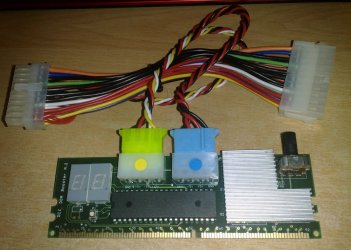
can't be a better upgrade than this - a super ddr booster - notice the tweaking knob on the right :geek:

22012009434.jpg
 

My Computer My Computer

Computer Manufacturer/Model Number
mickey megabyte 1234
OS
ultimate 64 sp1
CPU
i5 2500K [email protected]
Motherboard
MSI P67A-GD53
Memory
8 gigs GSkill Ripjaws 1600
Graphics Card(s)
amd hd6950
Sound Card
creative x-fi gamer
Monitor(s) Displays
samsung 24"
Screen Resolution
1920x1080
Hard Drives
ocz vertex 2e 60 gig, samsung f3 1tb, buffalo 2tb ext
PSU
antec 550
Case
antec three hundred
Cooling
i'm a cooling fan
Keyboard
saitek eclipse ii
Mouse
logitech g3
Internet Speed
about 4 Mbps
Other Info
i love win7
Hello again Guru's!,

Ok, for some reason the XP install on the SATA drive crashes when loading. So, I want to reinstall it!

Being that the SSD PCI-e raid card is now set as the 1st. boot in bios, do I just go ahead and load WinXP onto the SATA HDD partition, then when rebooting, do the F8 thing when I want to run it, or will loading XP onto the HDD screw up the booting of the SSD?

Thanks !
 

My Computer My Computer

Computer Manufacturer/Model Number
Asus
OS
Win 7 x64 H.Prem XP SP3 x86
CPU
E8400
Motherboard
P5Q-E
Memory
4Gb.
Graphics Card(s)
Radeon 4870
Monitor(s) Displays
Samsung T220HD
Hard Drives
SSD - OCZ RevoDrive PCI-e 120Gb

Spinner - Seagate Barracuda 7200.11 SATA 3Gb/s 500-GB
Case
Antec 900
Hello again Jimmy!


If you install XP with any other OS/HDD/SSD connected the older OS(s) will not boot without startup repairs, leave only the HDD/SSD you want to install XP to connected for the XP install.
 

My Computer My Computer

Computer Manufacturer/Model Number
* BFK Customs *
OS
W 7 64-bit Ultimate
CPU
Intel Q9550 Yorkfield
Motherboard
ASUS P5Q Pro
Memory
8GB Dominator 8500C5D
Graphics Card(s)
ATI : XFX 5870
Sound Card
Realtek HD Audio 7-1
Monitor(s) Displays
1x 47" LCD HDMI & 3x 26" LCD HDMI
Screen Resolution
1920x1080P & 1920x1200
Hard Drives
1x 80GB Intel X25-M G2 SSD : 1x 500GB & 1x 640GB WD Caviar Black(s)
PSU
Corsair 620HX
Case
Cooler Master RC-690
Cooling
Tuniq Tower 120, 2x 140mm and 3x 120mm case fans
Keyboard
Microsoft 500
Mouse
Razer Diamondback 3G
Internet Speed
14 Mb/s
Other Info
1x Koutech 3Gb/s SATA HDD Hot Swap Rack
Hello BFK and thank-you for your reply!

Yikes... I think you just said "Jimmy... remove that SSD card from the PCI-e slot and then load WinXP onto the HDD" :(

The SSD has Win7 and is what I will use most! I want XP for a few older programs I still run and are not Win7 compatible.

You also stated that it may be possible with some start-up repairs.

Since I have not removed the XP install on the HDD, possibly you could help me to get that up and running and save me from ripping the computer apart again?
 

My Computer My Computer

Computer Manufacturer/Model Number
Asus
OS
Win 7 x64 H.Prem XP SP3 x86
CPU
E8400
Motherboard
P5Q-E
Memory
4Gb.
Graphics Card(s)
Radeon 4870
Monitor(s) Displays
Samsung T220HD
Hard Drives
SSD - OCZ RevoDrive PCI-e 120Gb

Spinner - Seagate Barracuda 7200.11 SATA 3Gb/s 500-GB
Case
Antec 900
i'm not sure if this is related, or just totally spurious, but when i installed my ssd, i also enabled ahci in bios - since then i tried installing xp (for a cheap laugh), but ran into problem at early stage of install, so abandoned it.

can't remember exact error message, sorry.

what a useless post :o
 

My Computer My Computer

Computer Manufacturer/Model Number
mickey megabyte 1234
OS
ultimate 64 sp1
CPU
i5 2500K [email protected]
Motherboard
MSI P67A-GD53
Memory
8 gigs GSkill Ripjaws 1600
Graphics Card(s)
amd hd6950
Sound Card
creative x-fi gamer
Monitor(s) Displays
samsung 24"
Screen Resolution
1920x1080
Hard Drives
ocz vertex 2e 60 gig, samsung f3 1tb, buffalo 2tb ext
PSU
antec 550
Case
antec three hundred
Cooling
i'm a cooling fan
Keyboard
saitek eclipse ii
Mouse
logitech g3
Internet Speed
about 4 Mbps
Other Info
i love win7
The only option with other OSs booting is to use the Windows managed dual boot, which isn't really a big deal; just do at least 3 separate startup repairs to Windows 7, making sure that the Windows 7 partition is Active before the repairs; after XP is installed to get Windows 7 booting again and set-up the Windows managed dual boot.


Startup Repair - Run 3 Separate Times
 

My Computer My Computer

Computer Manufacturer/Model Number
* BFK Customs *
OS
W 7 64-bit Ultimate
CPU
Intel Q9550 Yorkfield
Motherboard
ASUS P5Q Pro
Memory
8GB Dominator 8500C5D
Graphics Card(s)
ATI : XFX 5870
Sound Card
Realtek HD Audio 7-1
Monitor(s) Displays
1x 47" LCD HDMI & 3x 26" LCD HDMI
Screen Resolution
1920x1080P & 1920x1200
Hard Drives
1x 80GB Intel X25-M G2 SSD : 1x 500GB & 1x 640GB WD Caviar Black(s)
PSU
Corsair 620HX
Case
Cooler Master RC-690
Cooling
Tuniq Tower 120, 2x 140mm and 3x 120mm case fans
Keyboard
Microsoft 500
Mouse
Razer Diamondback 3G
Internet Speed
14 Mb/s
Other Info
1x Koutech 3Gb/s SATA HDD Hot Swap Rack
Yes, I have tried the repair XP install and after it was done, I could not boot into anything, Win7 or XP.

Had to install everything onto the SSD again... been an eventful week :)

I was thinking about what BFK wrote and I am wondering if I can somehow disable the SSD, then load XP on the HDD. Possibly this would save having to rip the card out...
 

My Computer My Computer

Computer Manufacturer/Model Number
Asus
OS
Win 7 x64 H.Prem XP SP3 x86
CPU
E8400
Motherboard
P5Q-E
Memory
4Gb.
Graphics Card(s)
Radeon 4870
Monitor(s) Displays
Samsung T220HD
Hard Drives
SSD - OCZ RevoDrive PCI-e 120Gb

Spinner - Seagate Barracuda 7200.11 SATA 3Gb/s 500-GB
Case
Antec 900
Don't remove the card, have you seen my post #27 above?
 

My Computer My Computer

Computer Manufacturer/Model Number
* BFK Customs *
OS
W 7 64-bit Ultimate
CPU
Intel Q9550 Yorkfield
Motherboard
ASUS P5Q Pro
Memory
8GB Dominator 8500C5D
Graphics Card(s)
ATI : XFX 5870
Sound Card
Realtek HD Audio 7-1
Monitor(s) Displays
1x 47" LCD HDMI & 3x 26" LCD HDMI
Screen Resolution
1920x1080P & 1920x1200
Hard Drives
1x 80GB Intel X25-M G2 SSD : 1x 500GB & 1x 640GB WD Caviar Black(s)
PSU
Corsair 620HX
Case
Cooler Master RC-690
Cooling
Tuniq Tower 120, 2x 140mm and 3x 120mm case fans
Keyboard
Microsoft 500
Mouse
Razer Diamondback 3G
Internet Speed
14 Mb/s
Other Info
1x Koutech 3Gb/s SATA HDD Hot Swap Rack
i'm not sure if this is related, or just totally spurious, but when i installed my ssd, i also enabled ahci in bios - since then i tried installing xp (for a cheap laugh), but ran into problem at early stage of install, so abandoned it.

can't remember exact error message, sorry.

what a useless post :o

With XP you need to load the AHCI drivers at the start of the install. Otherwise it will always fail. XP, any SP (to my knowledge) does not include any AHCI drivers so if they aren't loaded at the beginning of the install (at the prompt to load 3rd party SCSI drivers hit F6 [I think]) the install always fail.

Back on topic for the OP.

This is probably why your current install on your old HDD gave you a BSOD when you tried to boot to it. You probably enabled AHCI in the BIOS when you installed the SSD. And when you did a fresh install of 7 it loaded the correct drivers, as they are included in 7.

But have you tried to boot to your old install of 7? If you did how did that go.
Actually I think 7 doesn't have a problem dealing with the BIOS set to AHCI even if you haven't made the proper registry edit to enable AHCI in the OS.

I know I had AHCI enabled in the BIOS then loaded a older 7 image on my HDD that I had not made the registry edit in and it booted right up, no problem.
 

My Computer My Computer

Computer Manufacturer/Model Number
Built be Me
OS
Windows 7 Pro x64
CPU
i5 760
Motherboard
Asus P7P55D-E Pro
Memory
16GB
Graphics Card(s)
Nvidia GTS450
Sound Card
On board
Monitor(s) Displays
Dell 2007WFP Dell 1800FP
Screen Resolution
1680x1050 1280x1024
Hard Drives
Seagate 250GB & 750GB
WD 1TB
PSU
Antec 750
Case
In Win
Cooling
Cooler Master Hyper 212+
Keyboard
IBM
Mouse
MS
Yes Sir, just reading the link you forwarded! Thanks for that.
 

My Computer My Computer

Computer Manufacturer/Model Number
Asus
OS
Win 7 x64 H.Prem XP SP3 x86
CPU
E8400
Motherboard
P5Q-E
Memory
4Gb.
Graphics Card(s)
Radeon 4870
Monitor(s) Displays
Samsung T220HD
Hard Drives
SSD - OCZ RevoDrive PCI-e 120Gb

Spinner - Seagate Barracuda 7200.11 SATA 3Gb/s 500-GB
Case
Antec 900
i'm not sure if this is related, or just totally spurious, but when i installed my ssd, i also enabled ahci in bios - since then i tried installing xp (for a cheap laugh), but ran into problem at early stage of install, so abandoned it.

can't remember exact error message, sorry.

what a useless post :o

With XP you need to load the AHCI drivers at the start of the install. Otherwise it will always fail. XP, any SP (to my knowledge) does not include any AHCI drivers so if they aren't loaded at the beginning of the install (at the prompt to load 3rd party SCSI drivers hit F6 [I think]) the install always fail.

Back on topic for the OP.

This is probably why your current install on your old HDD gave you a BSOD when you tried to boot to it. You probably enabled AHCI in the BIOS when you installed the SSD. And when you did a fresh install of 7 it loaded the correct drivers, as they are included in 7.

But have you tried to boot to your old install of 7? If you did how did that go.
Actually I think 7 doesn't have a problem dealing with the BIOS set to AHCI even if you haven't made the proper registry edit to enable AHCI in the OS.

I know I had AHCI enabled in the BIOS then loaded a older 7 image on my HDD that I had not made the registry edit in and it booted right up, no problem.

No, I never tried to boot the older Win7 install on the HDD after I installed it on the new SSD. And it is long gone now, as I formatted that part of the HDD.

I have however tried to load the old XP install on the HDD but to no avail.
 

My Computer My Computer

Computer Manufacturer/Model Number
Asus
OS
Win 7 x64 H.Prem XP SP3 x86
CPU
E8400
Motherboard
P5Q-E
Memory
4Gb.
Graphics Card(s)
Radeon 4870
Monitor(s) Displays
Samsung T220HD
Hard Drives
SSD - OCZ RevoDrive PCI-e 120Gb

Spinner - Seagate Barracuda 7200.11 SATA 3Gb/s 500-GB
Case
Antec 900
Let's back up to where we left off with you last week.

You agreed you wanted to boot the OS HD's independently via the BIOS, correctly?

So you installed Win7 on the SSD, plugged in alone and set to boot first? And it ran OK?

Then you unplugged it to install XP to the SATA HD?

Is this what happened? If not, give us the steps you took exactly.
 
Hi Greg,

I did as instructed with Win7 on the SSD and it ran fine.

I never unplugged the SSD or did a fresh install of XP, it was already on Sata HD.

I then plugged in the HDD and when I was sure that Win7 was running good on the SSD, I formatted the old System partition which housed Win7 on HDD.

I noticed the WinXP install on the HDD that (was on F: drive), became D: drive afterwards.

I then tried to boot into XP, but to no avail.

I figured a repair XP install would help, so I ran that but all it did was screw up my boot for Win7 on SSD. And, WinXp would not boot either.

Not knowing what to do next and being 3am,(I figured all you good folks would be snoozin) I then reinstalled Win7 on the SSD.

Spent a few days getting it back to where I want it and with all software loaded... again...

I then used EasyBCD to configure a dual boot.

When I attempted to boot into XP, it gave a 1/2 sec view of the Windows XP screen, then crashed.

A fellow at a BCD support forum had me try again, but hitting F8 while booting into XP, as he said it would stop the screen and give me an error code. Unfortunately, it did not.

So, I am back to square one... wanting XP on the HDD, but I really want to do it properly this time because reloading software and configuring Win7 for SSD is fun, but I am really getting sick of it :)

Holy crap, I hope that all made sense...
 

My Computer My Computer

Computer Manufacturer/Model Number
Asus
OS
Win 7 x64 H.Prem XP SP3 x86
CPU
E8400
Motherboard
P5Q-E
Memory
4Gb.
Graphics Card(s)
Radeon 4870
Monitor(s) Displays
Samsung T220HD
Hard Drives
SSD - OCZ RevoDrive PCI-e 120Gb

Spinner - Seagate Barracuda 7200.11 SATA 3Gb/s 500-GB
Case
Antec 900
Question.
Did you enable AHCI mode in the BIOS before you installed Win 7 on the SSD drive?

Can you check to see if it is enabled?

If it is then if you want to re-install XP on the spinning HDD you will need to download the drivers for AHCI from Intel and load them on a USB stick and during the XP install load them.

Another option is to LOOK in the BIOS for the AHCI (hard drive configuration) and set that to IDE. That will allow you to boot to XP on that other HDD.

But you should re-enable AHCI to boot back into 7 on the SSD.
 

My Computer My Computer

Computer Manufacturer/Model Number
Built be Me
OS
Windows 7 Pro x64
CPU
i5 760
Motherboard
Asus P7P55D-E Pro
Memory
16GB
Graphics Card(s)
Nvidia GTS450
Sound Card
On board
Monitor(s) Displays
Dell 2007WFP Dell 1800FP
Screen Resolution
1680x1050 1280x1024
Hard Drives
Seagate 250GB & 750GB
WD 1TB
PSU
Antec 750
Case
In Win
Cooling
Cooler Master Hyper 212+
Keyboard
IBM
Mouse
MS
Thanks for your reply Shootist!

Yes, i did before loading Win 7 on the SSD and I checked it about 30 min ago just to be sure.

I think I will grab the ACHI drivers from intel and go that route...

So, will I have to disable the SSD prior to loading XP again? I'm still in the dark about this. And, if so, can I disable in the bios, or must the SSD card be pulled?
 

My Computer My Computer

Computer Manufacturer/Model Number
Asus
OS
Win 7 x64 H.Prem XP SP3 x86
CPU
E8400
Motherboard
P5Q-E
Memory
4Gb.
Graphics Card(s)
Radeon 4870
Monitor(s) Displays
Samsung T220HD
Hard Drives
SSD - OCZ RevoDrive PCI-e 120Gb

Spinner - Seagate Barracuda 7200.11 SATA 3Gb/s 500-GB
Case
Antec 900
Well, good news is I am typing this message from WinXP. I thought about what Shootist had said about changing to IDE in bios to load WinXp on HHD. I tried it and low and behold, it worked.

Bad news is, now I can't get into my Win7 on SSD. I rebooted after WinXP worked, went in to Bios and set it back to AHCI and attempted to boot into Win7. No go!

It recommended launching startup repair, which I did and I was unable to fix the problem.

Anything I can do to repair this F'n problem now? Or must I again start over with the install of Win7?
 

My Computer My Computer

Computer Manufacturer/Model Number
Asus
OS
Win 7 x64 H.Prem XP SP3 x86
CPU
E8400
Motherboard
P5Q-E
Memory
4Gb.
Graphics Card(s)
Radeon 4870
Monitor(s) Displays
Samsung T220HD
Hard Drives
SSD - OCZ RevoDrive PCI-e 120Gb

Spinner - Seagate Barracuda 7200.11 SATA 3Gb/s 500-GB
Case
Antec 900
Make sure Win7 is set first HD to boot in BIOS setup (after DVD drive) and AHCI is enabled for SATA, then try to boot Win7 again.

If this fails, try it again with the XP HD unplugged.
 
Will do now and report back.. thanks Greg!
 

My Computer My Computer

Computer Manufacturer/Model Number
Asus
OS
Win 7 x64 H.Prem XP SP3 x86
CPU
E8400
Motherboard
P5Q-E
Memory
4Gb.
Graphics Card(s)
Radeon 4870
Monitor(s) Displays
Samsung T220HD
Hard Drives
SSD - OCZ RevoDrive PCI-e 120Gb

Spinner - Seagate Barracuda 7200.11 SATA 3Gb/s 500-GB
Case
Antec 900
Hi Greg,

Well, I verified setings in Bios and all were as you stated, but this time I choose 'start windows normally' and I thought it would not load, because the colored windows logo that usually dances around at startup did not show-up... just a black screen. But, I was watching the hard drive light on the computer and it was working. After maybe 15 seconds Win7 loaded.

I rebooted and same thing again... it loads, but for some reason that startup screen is gone...
 

My Computer My Computer

Computer Manufacturer/Model Number
Asus
OS
Win 7 x64 H.Prem XP SP3 x86
CPU
E8400
Motherboard
P5Q-E
Memory
4Gb.
Graphics Card(s)
Radeon 4870
Monitor(s) Displays
Samsung T220HD
Hard Drives
SSD - OCZ RevoDrive PCI-e 120Gb

Spinner - Seagate Barracuda 7200.11 SATA 3Gb/s 500-GB
Case
Antec 900
Back
Top