
New SSD - Questions

My Computer My Computer

Computer Manufacturer/Model Number
Asus
OS
Win 7 x64 H.Prem XP SP3 x86
CPU
E8400
Motherboard
P5Q-E
Memory
4Gb.
Graphics Card(s)
Radeon 4870
Monitor(s) Displays
Samsung T220HD
Hard Drives
SSD - OCZ RevoDrive PCI-e 120Gb

Spinner - Seagate Barracuda 7200.11 SATA 3Gb/s 500-GB
Case
Antec 900
Now plug in the XP HD while Win7 is still plugged in, change SATA controller to IDE mode, then at restart press the one-time BIOS Boot Menu key to see if you can start it.

If so your choices are reinstalling XP with AHCI drivers slipstreamed in, or reinstalling Win7 in IDE mode - which may be preferable if 7 has truly lost it's boot animation.

Here are the steps if you decide to slipstream the AHCI drivers into XP: SATA Drivers - Slipstream into Windows XP CD - Windows 7 Forums

If you have a floppy drive you can also insert them at initial F6 drivers prompt during install. SATA Drivers - Load in Windows XP Setup on Dual Boot - Windows 7 Forums
 
Greg, in post #38 I only attempted the first paragragh. I never unplugged the HDD.

My reply was only based on trying what was suggested in that 1st. paragragh
 

My Computer My Computer

Computer Manufacturer/Model Number
Asus
OS
Win 7 x64 H.Prem XP SP3 x86
CPU
E8400
Motherboard
P5Q-E
Memory
4Gb.
Graphics Card(s)
Radeon 4870
Monitor(s) Displays
Samsung T220HD
Hard Drives
SSD - OCZ RevoDrive PCI-e 120Gb

Spinner - Seagate Barracuda 7200.11 SATA 3Gb/s 500-GB
Case
Antec 900
OK. Have you had the chance to try the BIOS Boot Menu key to see if booting via the BIOS is acceptable for you?

Do you need AHCI for hot plugging? Or do you prefer to reinstall XP because you dont' want to reinstall 7?
 
Sorry Greg, not yet.. have been pondering over the AHCI drivers at intel. I am clueless as to what AHCI driver I need. Am I right in assuming it would be AHCI for Sata, because that is where I am loading it, or would I need one for raid, because I have theRaid SSD ?

Sorry Man... I am clueless

I will go and try the BIOS Boot Menu key boot right now

I am afraid I will be reinstalling Win7, because of the boot animation problem I am having... brb!
 

My Computer My Computer

Computer Manufacturer/Model Number
Asus
OS
Win 7 x64 H.Prem XP SP3 x86
CPU
E8400
Motherboard
P5Q-E
Memory
4Gb.
Graphics Card(s)
Radeon 4870
Monitor(s) Displays
Samsung T220HD
Hard Drives
SSD - OCZ RevoDrive PCI-e 120Gb

Spinner - Seagate Barracuda 7200.11 SATA 3Gb/s 500-GB
Case
Antec 900
You want an XP driver for your SATA controller on a SATA HD, inserted during file loading using floppy or slipstreamed into the ISO.

If you don't like the BIOS booting option which keeps the HD's independent to come and go as you please, then leave XP HD plugged in when you install Win7 in IDE mode set to boot first. Win7 installer will configure a Windows-managed Dual Boot.

When it comes time to remove XP, you'll need to mark 7 Active and write the System boot files to Win7 from the DVD using Startup Repair - Run 3 Separate Times
 
ok, I have now tried both AHCI and IDE booting into win7. When I hit F8 it just brings up the windows boot manager and Windows7 or Xp option

Both AHCI and IDE settings in the bios will let me into Win7, just missing that animation screen.

I think I would prefer the drives independent, because I rarely use XP, and it is not that difficult to go to the bios boot.

Please walk me through how to go about getting this system to that state. Hopefully it will be my last installing of operating systems for awhile

Greg, I really appreciate you taking the time... Thank-you!
 

My Computer My Computer

Computer Manufacturer/Model Number
Asus
OS
Win 7 x64 H.Prem XP SP3 x86
CPU
E8400
Motherboard
P5Q-E
Memory
4Gb.
Graphics Card(s)
Radeon 4870
Monitor(s) Displays
Samsung T220HD
Hard Drives
SSD - OCZ RevoDrive PCI-e 120Gb

Spinner - Seagate Barracuda 7200.11 SATA 3Gb/s 500-GB
Case
Antec 900
FFSakes.... I found this regarding the Animated startup screen

<<<You can also check System Configuration (start, run, msconfig) and go to the Boot Tab, make sure No GUI Boot is not checked (un-checked).>>>

How and why mine was checked I have no Idea. Maybe my kid was playing around in there???

Well Greg, It seems if I leave the bios in IDE, I can boot into both OS.

What a freaking waste of everyones time...

I am so sorry for this... I have no idea as to why it would work this way, but it does!
 

My Computer My Computer

Computer Manufacturer/Model Number
Asus
OS
Win 7 x64 H.Prem XP SP3 x86
CPU
E8400
Motherboard
P5Q-E
Memory
4Gb.
Graphics Card(s)
Radeon 4870
Monitor(s) Displays
Samsung T220HD
Hard Drives
SSD - OCZ RevoDrive PCI-e 120Gb

Spinner - Seagate Barracuda 7200.11 SATA 3Gb/s 500-GB
Case
Antec 900
You shouldn't be getting a Windows Boot Manager at F8, which is the key for BIOS Boot manager on Asus' boards. It should give you the choice of HD's or other attached devices to boot.

Best to post back a screenshot of your maximized full Disk Mgmt drive map with listings, using Snipping Tool in Start Menu.

Then test a few more times that XP will boot in IDE mode from BIOS Boot manager when Win7 is set to boot first in BIO setup, and when Win7 HD is unplugged.
 
I am positive I set AHCI before loading Win7on the SSD while the HDD was unplugged. But now that I think of it, when I had problems the first time, I did not unplug the HDD when I reinstalled WIN7... My Bad!
 

My Computer My Computer

Computer Manufacturer/Model Number
Asus
OS
Win 7 x64 H.Prem XP SP3 x86
CPU
E8400
Motherboard
P5Q-E
Memory
4Gb.
Graphics Card(s)
Radeon 4870
Monitor(s) Displays
Samsung T220HD
Hard Drives
SSD - OCZ RevoDrive PCI-e 120Gb

Spinner - Seagate Barracuda 7200.11 SATA 3Gb/s 500-GB
Case
Antec 900
So post up the Disk mgmt screenie so we can see if everything looks good.
 
I apologise, I meant the option for the boot from drive, not windows boot manager. Was thinking of something else while typin that... :( It actually did bring up the HDD and DVD etc.
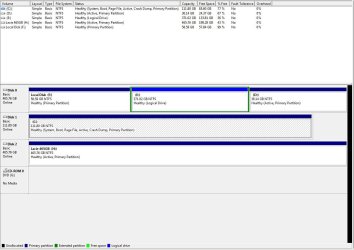
Attached is the requested capture of the disk management

C: is WIN7, D: is XP, E: and F: are both for data as well as the Lacie being backup/data.
 

Attachments

  • Capture.JPG
    Capture.JPG
    97.7 KB · Views: 6

My Computer My Computer

Computer Manufacturer/Model Number
Asus
OS
Win 7 x64 H.Prem XP SP3 x86
CPU
E8400
Motherboard
P5Q-E
Memory
4Gb.
Graphics Card(s)
Radeon 4870
Monitor(s) Displays
Samsung T220HD
Hard Drives
SSD - OCZ RevoDrive PCI-e 120Gb

Spinner - Seagate Barracuda 7200.11 SATA 3Gb/s 500-GB
Case
Antec 900
It's a concern that XP partition is not marked System drive, meaning it doesn't have it's own boot files but is booting off the Win7 System HD. It's possible this is incorrectly marked.

Try unplugging the Win7 HD to see if XP will boot when triggered using the F8 Boot Menu key. If so then it has its boot files and is good to go.

Then test again that both HD's will boot in IDE mode when Win7 is plugged back in, set to boot first, and XP is booted via F8.
 
Greg, would it be possible to disable the SSD Win7 drive in bios and do as suggested, or must the PCI-e card be pulled out to do so?
 

My Computer My Computer

Computer Manufacturer/Model Number
Asus
OS
Win 7 x64 H.Prem XP SP3 x86
CPU
E8400
Motherboard
P5Q-E
Memory
4Gb.
Graphics Card(s)
Radeon 4870
Monitor(s) Displays
Samsung T220HD
Hard Drives
SSD - OCZ RevoDrive PCI-e 120Gb

Spinner - Seagate Barracuda 7200.11 SATA 3Gb/s 500-GB
Case
Antec 900
FFSakes.... I found this regarding the Animated startup screen

<<<You can also check System Configuration (start, run, msconfig) and go to the Boot Tab, make sure No GUI Boot is not checked (un-checked).>>>

How and why mine was checked I have no Idea. Maybe my kid was playing around in there???

Well Greg, It seems if I leave the bios in IDE, I can boot into both OS.

What a freaking waste of everyones time...

I am so sorry for this... I have no idea as to why it would work this way, but it does!

Right I thought I pointed that out.
Once you enable AHCI in Win 7 and then switch back IDE Win 7 will still boot.
I found that out by accident. But you may find the SSD a little slower in IDE mode
Glad you got it all working.
 

My Computer My Computer

Computer Manufacturer/Model Number
Built be Me
OS
Windows 7 Pro x64
CPU
i5 760
Motherboard
Asus P7P55D-E Pro
Memory
16GB
Graphics Card(s)
Nvidia GTS450
Sound Card
On board
Monitor(s) Displays
Dell 2007WFP Dell 1800FP
Screen Resolution
1680x1050 1280x1024
Hard Drives
Seagate 250GB & 750GB
WD 1TB
PSU
Antec 750
Case
In Win
Cooling
Cooler Master Hyper 212+
Keyboard
IBM
Mouse
MS
Me 2 Shootlist, me 2 :) And thanks for your input!

All i know is the SSD still flies... I am typing this from XP and man things are slow in here on the HDD!
 

My Computer My Computer

Computer Manufacturer/Model Number
Asus
OS
Win 7 x64 H.Prem XP SP3 x86
CPU
E8400
Motherboard
P5Q-E
Memory
4Gb.
Graphics Card(s)
Radeon 4870
Monitor(s) Displays
Samsung T220HD
Hard Drives
SSD - OCZ RevoDrive PCI-e 120Gb

Spinner - Seagate Barracuda 7200.11 SATA 3Gb/s 500-GB
Case
Antec 900
ok, off to try!
 

My Computer My Computer

Computer Manufacturer/Model Number
Asus
OS
Win 7 x64 H.Prem XP SP3 x86
CPU
E8400
Motherboard
P5Q-E
Memory
4Gb.
Graphics Card(s)
Radeon 4870
Monitor(s) Displays
Samsung T220HD
Hard Drives
SSD - OCZ RevoDrive PCI-e 120Gb

Spinner - Seagate Barracuda 7200.11 SATA 3Gb/s 500-GB
Case
Antec 900
Greg, would it be possible to disable the SSD Win7 drive in bios and do as suggested, or must the PCI-e card be pulled out to do so?

Greg may no more but I would think you would have to remove the card. If it was just a SSD you could pull the SATA cable. But since it is plugged into the mother board I don't think there is a way to stop it. Unless your BIOS allows you to disable the PCI-e ports and specifically each port independently. Otherwise you might lose your video. The video is plugged into a PCI-e port.
 

My Computer My Computer

Computer Manufacturer/Model Number
Built be Me
OS
Windows 7 Pro x64
CPU
i5 760
Motherboard
Asus P7P55D-E Pro
Memory
16GB
Graphics Card(s)
Nvidia GTS450
Sound Card
On board
Monitor(s) Displays
Dell 2007WFP Dell 1800FP
Screen Resolution
1680x1050 1280x1024
Hard Drives
Seagate 250GB & 750GB
WD 1TB
PSU
Antec 750
Case
In Win
Cooling
Cooler Master Hyper 212+
Keyboard
IBM
Mouse
MS
Back
Top