
Solved New SSD Transfer Help

jeepmann4x4

Rubber side down!
Guru
VIP
Local time
5:17 PM
Messages
512
Location
St.Louis,Mo
Ok the research is over and the ssd is in the mail (Samsung 830 128gb)....

Ive seen a lot of threads about new setup but I have a question,

I have Acronis True Image Home 2011 w/plus pack....
Can't I just Clone my hdd to the ssd?
Will it have the right alignment?
If I do the above will it perform at its best?

As you can see I'm new to ssd's...
 

My Computer

Computer type
PC/Desktop
Computer Manufacturer/Model Number
Jeepmann/Custom Built
OS
Windows 7 Ultimate 64bit
CPU
Intel Core i7-2600K Sandy Bridge 3.4GHz (@[email protected])
Motherboard
Asus Maximus IV Extreme LGA 1155 Intel P67
Memory
G.SKILL Ripjaws X Series 16GB 1600Mhz (4 x 4GB) (Stock)
Graphics Card(s)
x2 EVGA GeForce GTX 760's w/ACXCoolers in SLI Surround
Sound Card
On-Board
Monitor(s) Displays
3x Acer 24" HDMI Widescreen LCD Monitor
Screen Resolution
3@ 1920x1080 (5760x1080 In Surround)
Hard Drives
Samsung 830 128gb ssd
Western Digital Caviar Black 640GB 7200 RPM
Western Digital Caviar Black 500GB 7200 RPM
Seagate 2tb 7200 RPM
PSU
COOLER MASTER Silent Pro 1000W
Case
COOLER MASTER HAF X Black
Cooling
CORSAIR Hydro H70
Keyboard
Logitech G510
Mouse
Zalman M300
Internet Speed
100mbps-ish Down & 5mbps-ish Up
Other Info
I installed the stock 140mm case fan outside of case then installed the H70+ 1 of its 120mm fans inside case. Used the 2nd 120mm from the H70 to go in the Gpu tunnel.
230mm Front,200mm side,200mm top,120mm Gpu tunnel,120mm&140mm on H70.
It needs to be in AHCI mode and be properly aligned to do it's best. The fastest and easiest way is paragon Migrate (19.95). It will transfer the OS and programs and align the SSD in about 20 minutes. I have it and use it all the time. Reduce the size of your OS drive to less than the SSD and it will do the rest easily. You can move your user files to another drive or partition, delete the hyberfile and depending on the amount of ram, reduce the page file size. That is about all I do. I have OS and programs on the SSD, games and user files on spinning hard drives. That is all I go, except verify alignment and that trim is on, make sure defrag is off. Nothing else needs to be done, except enjoy the speed.

WHS has a tutorial on the subject http://www.sevenforums.com/tutorials/149969-ssd-install-transfer-operating-system.html
 

My Computers

System One System Two

  • Computer type
    PC/Desktop
    Computer Manufacturer/Model Number
    ALWAYS UNDER CONSTRUCTION
    OS
    Windows 11 Pro
    CPU
    Ryzen 9 5900X
    Motherboard
    Asus X570 Crosshair Viii Hero
    Memory
    32GB G Skill DDR4-3600
    Graphics Card(s)
    EVGA RTX 3080 FTW 3 Ultra
    Sound Card
    On Board/Sennheiser PC37X Headset
    Monitor(s) Displays
    3 X Asus 27"
    Screen Resolution
    2560x1440
    Hard Drives
    2 X 1 TB NVME drives
    PSU
    EVGA 850
    Case
    Phanteks Eclipse P400A
    Cooling
    EVGA 280 AIO
    Keyboard
    Logitech G510s/ Logitech G13
    Mouse
    Logitech G502
    Internet Speed
    24/1
    Antivirus
    ESET/MBAM Pro/SAS Pro
    Browser
    Chrome/ Firefox/ Edge
  • Computer type
    Laptop
    System Manufacturer/Model Number
    Dell 16 Plus
    OS
    Windows 11 Pro
    CPU
    Intel Ultra 9 288V
    Memory
    32 GB LPDDR5X 8533
    Monitor(s) Displays
    16" Mini-LED HDR600 Touch 90 Hz
    Screen Resolution
    2560X1600
    Hard Drives
    1 TB NVME
It needs to be in AHCI mode and be properly aligned to do it's best. The fastest and easiest way is paragon Migrate (19.95). It will transfer the OS and programs and align the SSD in about 20 minutes. I have it and use it all the time. Reduce the size of your OS drive to less than the SSD and it will do the rest easily. You can move your user files to another drive or partition, delete the hyberfile and depending on the amount of ram, reduce the page file size. That is about all I do. I have OS and programs on the SSD, games and user files on spinning hard drives. That is all I go, except verify alignment and that trim is on, make sure defrag is off. Nothing else needs to be done, except enjoy the speed.

WHS has a tutorial on the subject http://www.sevenforums.com/tutorials/149969-ssd-install-transfer-operating-system.html

I was (am) trying to do it without buying a new program....My OS Drive is all ready for the move, I have all my user files..ect.. on other drives, I resized my "C:" to 128gb (only has 55gb on it), hyberfile off,page file at 2gb (i have 16gb ram),defrag will be turned off...

What is a good way to verify alignment and that trim is on?

I do have access(friend) to an old version of Paragon Migrate OS to SSD v 10.0.17 (I think) Will it work?

Or how about Acronis True Image Home 2012? (I have 2011)

I just dont need another program that I'll only use once or for just one thing.
 

My Computer

Computer type
PC/Desktop
Computer Manufacturer/Model Number
Jeepmann/Custom Built
OS
Windows 7 Ultimate 64bit
CPU
Intel Core i7-2600K Sandy Bridge 3.4GHz (@[email protected])
Motherboard
Asus Maximus IV Extreme LGA 1155 Intel P67
Memory
G.SKILL Ripjaws X Series 16GB 1600Mhz (4 x 4GB) (Stock)
Graphics Card(s)
x2 EVGA GeForce GTX 760's w/ACXCoolers in SLI Surround
Sound Card
On-Board
Monitor(s) Displays
3x Acer 24" HDMI Widescreen LCD Monitor
Screen Resolution
3@ 1920x1080 (5760x1080 In Surround)
Hard Drives
Samsung 830 128gb ssd
Western Digital Caviar Black 640GB 7200 RPM
Western Digital Caviar Black 500GB 7200 RPM
Seagate 2tb 7200 RPM
PSU
COOLER MASTER Silent Pro 1000W
Case
COOLER MASTER HAF X Black
Cooling
CORSAIR Hydro H70
Keyboard
Logitech G510
Mouse
Zalman M300
Internet Speed
100mbps-ish Down & 5mbps-ish Up
Other Info
I installed the stock 140mm case fan outside of case then installed the H70+ 1 of its 120mm fans inside case. Used the 2nd 120mm from the H70 to go in the Gpu tunnel.
230mm Front,200mm side,200mm top,120mm Gpu tunnel,120mm&140mm on H70.
I hope that version works, it's the version I use. It will have to be installed and activated on your computer first though. It will work fine.
 

My Computers

System One System Two

  • Computer type
    PC/Desktop
    Computer Manufacturer/Model Number
    ALWAYS UNDER CONSTRUCTION
    OS
    Windows 11 Pro
    CPU
    Ryzen 9 5900X
    Motherboard
    Asus X570 Crosshair Viii Hero
    Memory
    32GB G Skill DDR4-3600
    Graphics Card(s)
    EVGA RTX 3080 FTW 3 Ultra
    Sound Card
    On Board/Sennheiser PC37X Headset
    Monitor(s) Displays
    3 X Asus 27"
    Screen Resolution
    2560x1440
    Hard Drives
    2 X 1 TB NVME drives
    PSU
    EVGA 850
    Case
    Phanteks Eclipse P400A
    Cooling
    EVGA 280 AIO
    Keyboard
    Logitech G510s/ Logitech G13
    Mouse
    Logitech G502
    Internet Speed
    24/1
    Antivirus
    ESET/MBAM Pro/SAS Pro
    Browser
    Chrome/ Firefox/ Edge
  • Computer type
    Laptop
    System Manufacturer/Model Number
    Dell 16 Plus
    OS
    Windows 11 Pro
    CPU
    Intel Ultra 9 288V
    Memory
    32 GB LPDDR5X 8533
    Monitor(s) Displays
    16" Mini-LED HDR600 Touch 90 Hz
    Screen Resolution
    2560X1600
    Hard Drives
    1 TB NVME
I hope that version works, it's the version I use. It will have to be installed and activated on your computer first though. It will work fine.

Your talking about...Paragon Migrate OS to SSD v 10.0.17 (I think)? I had seen 2.0 was in the link, so was not sure.

how about this....What is a good way to verify alignment and that trim is on?


SideNote: All I can find about Acronis True Image Home is .....well some say it will, some say it will not.....and this kb for it ...
Solid State Drive Support in Acronis Products | Knowledge Base:
 

My Computer

Computer type
PC/Desktop
Computer Manufacturer/Model Number
Jeepmann/Custom Built
OS
Windows 7 Ultimate 64bit
CPU
Intel Core i7-2600K Sandy Bridge 3.4GHz (@[email protected])
Motherboard
Asus Maximus IV Extreme LGA 1155 Intel P67
Memory
G.SKILL Ripjaws X Series 16GB 1600Mhz (4 x 4GB) (Stock)
Graphics Card(s)
x2 EVGA GeForce GTX 760's w/ACXCoolers in SLI Surround
Sound Card
On-Board
Monitor(s) Displays
3x Acer 24" HDMI Widescreen LCD Monitor
Screen Resolution
3@ 1920x1080 (5760x1080 In Surround)
Hard Drives
Samsung 830 128gb ssd
Western Digital Caviar Black 640GB 7200 RPM
Western Digital Caviar Black 500GB 7200 RPM
Seagate 2tb 7200 RPM
PSU
COOLER MASTER Silent Pro 1000W
Case
COOLER MASTER HAF X Black
Cooling
CORSAIR Hydro H70
Keyboard
Logitech G510
Mouse
Zalman M300
Internet Speed
100mbps-ish Down & 5mbps-ish Up
Other Info
I installed the stock 140mm case fan outside of case then installed the H70+ 1 of its 120mm fans inside case. Used the 2nd 120mm from the H70 to go in the Gpu tunnel.
230mm Front,200mm side,200mm top,120mm Gpu tunnel,120mm&140mm on H70.
jeepman,

First and foremost: Make a backup to an external USB drive so that you can recover from any disaster.

I use Win 7 Backup and Restore to make a backup to an external USB.

Since this will be your first time at this, then to make sure that we correctly advise you then please carry out:

HOW TO POST A SNAPSHOT OF DISK MANAGEMENT DISPLAY
Run disk management:
WIN |
type DISKMGMT.MSC | ENTER
This method gives you a display without the unneeded navigation pane.
WIN=key with Microsoft logo on top.


Maximize the output of Disk Management:
ALT-Spacebar
key combo | X key (selects Maximize) |
Drag the field separators (such as between Status and Capacity) to show entire field.


Make a snapshot:
WIN |
type SNIPPING | ENTER | New
Drag the cursor around the area you want to snip.
File | Save as | select save location and name | Save


Post the snapshot:
Post a File or Screenshot in Seven Forums

===========================================
thanks, karl
 

My Computer

Computer Manufacturer/Model Number
Toshiba Satellite S875D-S7239 laptop
OS
MS Windows 7 Ultimate SP1 64-bit
CPU
AMD A10-4600M
Motherboard
AMD Pumori (Socket FT1)
Memory
6.00 GB Dual-Channel DDR3 @ 798MHz (11-11-12-28)
Graphics Card(s)
AMD Radeon HD 7660G
Sound Card
High Definition Audio Device
Monitor(s) Displays
Generic PnP Monitor (1600x900@60Hz)
Screen Resolution
1600x900@60Hz
Hard Drives
SSD 119GB Corsair CSSD-V128GB2 ATA Device
Keyboard
Standard PS/2 Keyboard
Mouse
HP Wireless Optical Mobile Mouse Model FHA-3410
Internet Speed
What the local pub, local coffee shop offers.
Other Info
Optical Drive:MATSHITA BD-CMB UJ160B ATA Device


Also have an Asus ha1002xp netbook with Win 7 Ultimate installed.
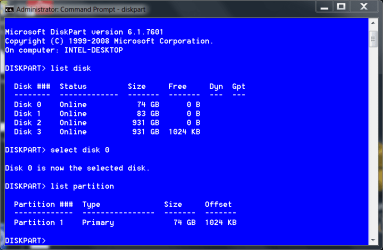
Here is an old one I kept. The offset is the alignment.

check alignment.PNG

Or if you want to do it the easy way, download and install AS SSD, open the program and you don't have to run the test. In the upper left corner it will tell you firmware number, driver and alignment. Make sure you are in AHCI mode. AS long as all the numbers in As SSD are in green, you're OK. Bad ones will be in red.
 

My Computers

System One System Two

  • Computer type
    PC/Desktop
    Computer Manufacturer/Model Number
    ALWAYS UNDER CONSTRUCTION
    OS
    Windows 11 Pro
    CPU
    Ryzen 9 5900X
    Motherboard
    Asus X570 Crosshair Viii Hero
    Memory
    32GB G Skill DDR4-3600
    Graphics Card(s)
    EVGA RTX 3080 FTW 3 Ultra
    Sound Card
    On Board/Sennheiser PC37X Headset
    Monitor(s) Displays
    3 X Asus 27"
    Screen Resolution
    2560x1440
    Hard Drives
    2 X 1 TB NVME drives
    PSU
    EVGA 850
    Case
    Phanteks Eclipse P400A
    Cooling
    EVGA 280 AIO
    Keyboard
    Logitech G510s/ Logitech G13
    Mouse
    Logitech G502
    Internet Speed
    24/1
    Antivirus
    ESET/MBAM Pro/SAS Pro
    Browser
    Chrome/ Firefox/ Edge
  • Computer type
    Laptop
    System Manufacturer/Model Number
    Dell 16 Plus
    OS
    Windows 11 Pro
    CPU
    Intel Ultra 9 288V
    Memory
    32 GB LPDDR5X 8533
    Monitor(s) Displays
    16" Mini-LED HDR600 Touch 90 Hz
    Screen Resolution
    2560X1600
    Hard Drives
    1 TB NVME
Here is an old one I kept. The offset is the alignment.

View attachment 216559

Or if you want to do it the easy way, download and install AS SSD, open the program and you don't have to run the test. In the upper left corner it will tell you firmware number, driver and alignment. Make sure you are in AHCI mode. AS long as all the numbers in As SSD are in green, you're OK. Bad ones will be in red.

Thanks, I downloaded that program the other day so i'll use it when ready.
 

My Computer

Computer type
PC/Desktop
Computer Manufacturer/Model Number
Jeepmann/Custom Built
OS
Windows 7 Ultimate 64bit
CPU
Intel Core i7-2600K Sandy Bridge 3.4GHz (@[email protected])
Motherboard
Asus Maximus IV Extreme LGA 1155 Intel P67
Memory
G.SKILL Ripjaws X Series 16GB 1600Mhz (4 x 4GB) (Stock)
Graphics Card(s)
x2 EVGA GeForce GTX 760's w/ACXCoolers in SLI Surround
Sound Card
On-Board
Monitor(s) Displays
3x Acer 24" HDMI Widescreen LCD Monitor
Screen Resolution
3@ 1920x1080 (5760x1080 In Surround)
Hard Drives
Samsung 830 128gb ssd
Western Digital Caviar Black 640GB 7200 RPM
Western Digital Caviar Black 500GB 7200 RPM
Seagate 2tb 7200 RPM
PSU
COOLER MASTER Silent Pro 1000W
Case
COOLER MASTER HAF X Black
Cooling
CORSAIR Hydro H70
Keyboard
Logitech G510
Mouse
Zalman M300
Internet Speed
100mbps-ish Down & 5mbps-ish Up
Other Info
I installed the stock 140mm case fan outside of case then installed the H70+ 1 of its 120mm fans inside case. Used the 2nd 120mm from the H70 to go in the Gpu tunnel.
230mm Front,200mm side,200mm top,120mm Gpu tunnel,120mm&140mm on H70.
jeepman,

First and foremost: Make a backup to an external USB drive so that you can recover from any disaster.

I use Win 7 Backup and Restore to make a backup to an external USB.

Since this will be your first time at this, then to make sure that we correctly advise you then please carry out:

HOW TO POST A SNAPSHOT OF DISK MANAGEMENT DISPLAY
Run disk management:
WIN |
type DISKMGMT.MSC | ENTER
This method gives you a display without the unneeded navigation pane.
WIN=key with Microsoft logo on top.


Maximize the output of Disk Management:
ALT-Spacebar
key combo | X key (selects Maximize) |
Drag the field separators (such as between Status and Capacity) to show entire field.


Make a snapshot:
WIN |
type SNIPPING | ENTER | New
Drag the cursor around the area you want to snip.
File | Save as | select save location and name | Save


Post the snapshot:
Post a File or Screenshot in Seven Forums

===========================================
thanks, karl


Sure I'll post it up.... What are we going to try?
 

Attachments

  • DiskMgmt.PNG
    DiskMgmt.PNG
    63.7 KB · Views: 37

My Computer

Computer type
PC/Desktop
Computer Manufacturer/Model Number
Jeepmann/Custom Built
OS
Windows 7 Ultimate 64bit
CPU
Intel Core i7-2600K Sandy Bridge 3.4GHz (@[email protected])
Motherboard
Asus Maximus IV Extreme LGA 1155 Intel P67
Memory
G.SKILL Ripjaws X Series 16GB 1600Mhz (4 x 4GB) (Stock)
Graphics Card(s)
x2 EVGA GeForce GTX 760's w/ACXCoolers in SLI Surround
Sound Card
On-Board
Monitor(s) Displays
3x Acer 24" HDMI Widescreen LCD Monitor
Screen Resolution
3@ 1920x1080 (5760x1080 In Surround)
Hard Drives
Samsung 830 128gb ssd
Western Digital Caviar Black 640GB 7200 RPM
Western Digital Caviar Black 500GB 7200 RPM
Seagate 2tb 7200 RPM
PSU
COOLER MASTER Silent Pro 1000W
Case
COOLER MASTER HAF X Black
Cooling
CORSAIR Hydro H70
Keyboard
Logitech G510
Mouse
Zalman M300
Internet Speed
100mbps-ish Down & 5mbps-ish Up
Other Info
I installed the stock 140mm case fan outside of case then installed the H70+ 1 of its 120mm fans inside case. Used the 2nd 120mm from the H70 to go in the Gpu tunnel.
230mm Front,200mm side,200mm top,120mm Gpu tunnel,120mm&140mm on H70.
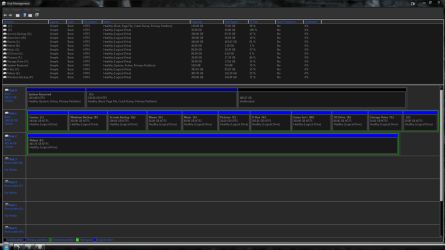
that's nice and well, but completely unreadable.

Could you repeat that with something else other than black for a background?
 

My Computer

Computer Manufacturer/Model Number
Toshiba Satellite S875D-S7239 laptop
OS
MS Windows 7 Ultimate SP1 64-bit
CPU
AMD A10-4600M
Motherboard
AMD Pumori (Socket FT1)
Memory
6.00 GB Dual-Channel DDR3 @ 798MHz (11-11-12-28)
Graphics Card(s)
AMD Radeon HD 7660G
Sound Card
High Definition Audio Device
Monitor(s) Displays
Generic PnP Monitor (1600x900@60Hz)
Screen Resolution
1600x900@60Hz
Hard Drives
SSD 119GB Corsair CSSD-V128GB2 ATA Device
Keyboard
Standard PS/2 Keyboard
Mouse
HP Wireless Optical Mobile Mouse Model FHA-3410
Internet Speed
What the local pub, local coffee shop offers.
Other Info
Optical Drive:MATSHITA BD-CMB UJ160B ATA Device


Also have an Asus ha1002xp netbook with Win 7 Ultimate installed.
that's nice and well, but completely unreadable.

Could you repeat that with something else other than black for a background?

Sorry been away for a few days....... I'm all done with the cloning and running great at this time, though I'll still repost the snip if you would like.. :)

I'll be posting W.E.I. and others later in there respected threads, after I play a bit..:D

Thanks to everyone for all the help,
JEEP
 

My Computer

Computer type
PC/Desktop
Computer Manufacturer/Model Number
Jeepmann/Custom Built
OS
Windows 7 Ultimate 64bit
CPU
Intel Core i7-2600K Sandy Bridge 3.4GHz (@[email protected])
Motherboard
Asus Maximus IV Extreme LGA 1155 Intel P67
Memory
G.SKILL Ripjaws X Series 16GB 1600Mhz (4 x 4GB) (Stock)
Graphics Card(s)
x2 EVGA GeForce GTX 760's w/ACXCoolers in SLI Surround
Sound Card
On-Board
Monitor(s) Displays
3x Acer 24" HDMI Widescreen LCD Monitor
Screen Resolution
3@ 1920x1080 (5760x1080 In Surround)
Hard Drives
Samsung 830 128gb ssd
Western Digital Caviar Black 640GB 7200 RPM
Western Digital Caviar Black 500GB 7200 RPM
Seagate 2tb 7200 RPM
PSU
COOLER MASTER Silent Pro 1000W
Case
COOLER MASTER HAF X Black
Cooling
CORSAIR Hydro H70
Keyboard
Logitech G510
Mouse
Zalman M300
Internet Speed
100mbps-ish Down & 5mbps-ish Up
Other Info
I installed the stock 140mm case fan outside of case then installed the H70+ 1 of its 120mm fans inside case. Used the 2nd 120mm from the H70 to go in the Gpu tunnel.
230mm Front,200mm side,200mm top,120mm Gpu tunnel,120mm&140mm on H70.
that's nice and well, but completely unreadable.

Could you repeat that with something else other than black for a background?

Sorry been away for a few days....... I'm all done with the cloning and running great at this time, though I'll still repost the snip if you would like.. :)

I'll be posting W.E.I. and others later in there respected threads, after I play a bit..:D

Thanks to everyone for all the help,
JEEP

Glad that we could help and a repost will not be needed. Thanks for the update.
karl
 

My Computer

Computer Manufacturer/Model Number
Toshiba Satellite S875D-S7239 laptop
OS
MS Windows 7 Ultimate SP1 64-bit
CPU
AMD A10-4600M
Motherboard
AMD Pumori (Socket FT1)
Memory
6.00 GB Dual-Channel DDR3 @ 798MHz (11-11-12-28)
Graphics Card(s)
AMD Radeon HD 7660G
Sound Card
High Definition Audio Device
Monitor(s) Displays
Generic PnP Monitor (1600x900@60Hz)
Screen Resolution
1600x900@60Hz
Hard Drives
SSD 119GB Corsair CSSD-V128GB2 ATA Device
Keyboard
Standard PS/2 Keyboard
Mouse
HP Wireless Optical Mobile Mouse Model FHA-3410
Internet Speed
What the local pub, local coffee shop offers.
Other Info
Optical Drive:MATSHITA BD-CMB UJ160B ATA Device


Also have an Asus ha1002xp netbook with Win 7 Ultimate installed.
I have experienced the same problem, as I know if your disk is in IDE mode before you cloning, the new ssd will also in IDE mode, and to align partition need some special software. I know Paragon and Aomei partition assistant has the function to clone OS to SSD and could align partition at the same time. The thing need attention is to modify the regedit " HKEY_LOCAL_MACHINE\System\CurrentControlSet\Servic es\Msahci" -"start" value to "0" and change to AHCI mode.
 

My Computer

OS
win7 unl 32bit

My Computers

System One System Two

  • Computer type
    PC/Desktop
    Computer Manufacturer/Model Number
    ALWAYS UNDER CONSTRUCTION
    OS
    Windows 11 Pro
    CPU
    Ryzen 9 5900X
    Motherboard
    Asus X570 Crosshair Viii Hero
    Memory
    32GB G Skill DDR4-3600
    Graphics Card(s)
    EVGA RTX 3080 FTW 3 Ultra
    Sound Card
    On Board/Sennheiser PC37X Headset
    Monitor(s) Displays
    3 X Asus 27"
    Screen Resolution
    2560x1440
    Hard Drives
    2 X 1 TB NVME drives
    PSU
    EVGA 850
    Case
    Phanteks Eclipse P400A
    Cooling
    EVGA 280 AIO
    Keyboard
    Logitech G510s/ Logitech G13
    Mouse
    Logitech G502
    Internet Speed
    24/1
    Antivirus
    ESET/MBAM Pro/SAS Pro
    Browser
    Chrome/ Firefox/ Edge
  • Computer type
    Laptop
    System Manufacturer/Model Number
    Dell 16 Plus
    OS
    Windows 11 Pro
    CPU
    Intel Ultra 9 288V
    Memory
    32 GB LPDDR5X 8533
    Monitor(s) Displays
    16" Mini-LED HDR600 Touch 90 Hz
    Screen Resolution
    2560X1600
    Hard Drives
    1 TB NVME
Back
Top