New to Virtualization-need a little help.

Smorton

New member
Member
Local time
7:51 AM
Messages
83
As stated, I am very new to Virtualization and I was thinking of trying to install Win XP on my current Win7 machine. I don't now if I have the power or the ram needed.

I currently have Windows 7 Home Premium
Intel Core 2 Quad CPU Z9550 @ 2.83 GHZ 2.83 GHZ
8.00 GB of Ram, 64 bit operating system

I was going to try to install VMware Player or VirtualBox to run the Win XP. (I would also like to try Ubuntu or Linux Mint sometime).

Do I have enough ram and power? I could buy more ram. Also, my hard drive is small. It is a 120 GB Samsung SSD.

Thanks for any input.

Smorton
 

My Computer My Computer

Computer type
PC/Desktop
OS
Microsoft Windows 7 Home Premium 64-bit 7601 Multiprocessor Free Service Pack 1
CPU
Intel(R) Core(TM)2 Quad CPU Q9550 @ 2.83GHz
Motherboard
Gigabyte Technology Co., Ltd. EP45-UD3P
Memory
8.00 GB
Graphics Card(s)
NVIDIA GeForce 8400 GS
Sound Card
High Definition Audio Device
Screen Resolution
1680 x 1050 x 32 bits (4294967296 colors) @ 59 Hz
Hard Drives
(1) SAMSUNG SSD 830 Series ATA Device (2) WDC WD10EADS-00M2B0 ATA Device (3) WDC WD20EARS-00MVWB0 ATA Device (4) SanDisk Cruzer USB Device (5) SanDisk Cruzer Glide USB Device (6) Seagate Backup+ BK USB Device (7) Seagate FreeAgent GoFlex
Yes you can run virtual, I suggest you look through this section Virtualization - Windows 7 Help Forums


The thread you posted in, sorry had another tab going in general discussion. And yes I would look at adding some more hard drive.
 

My Computer My Computer

Computer type
PC/Desktop
Computer Manufacturer/Model Number
Dude Build
OS
Windows 10 Pro X64
CPU
Intel(R) Core(TM) i5-3570K CPU OC@ 4.5GHZ Turbo
Motherboard
MSI Z77A-G45 Gaming
Memory
8.00 GB DDR3 1600Mhz
Graphics Card(s)
MSI Gaming X GTX 1070
Sound Card
Realtek High Definition
Monitor(s) Displays
Dell S23O9W, HP L1710
Screen Resolution
DELL-1920 x 1080 HP-1280 x1024
Hard Drives
Crucial m4 256 SSD, WD 7200RPM 500GB WD 1TB
PSU
Seasonic X650 GOLD
Case
Zalman Z12
Cooling
Antec Kuhler 920
Keyboard
Logitech
Mouse
MSI DS100 Interceptor
Internet Speed
50 down and 5 up
Antivirus
MSE
Browser
Chrome, IE 11
Other Info
Logitech X-620 Speakers
More drive or more ram?

Thanks

Sm
 

My Computer My Computer

Computer type
PC/Desktop
OS
Microsoft Windows 7 Home Premium 64-bit 7601 Multiprocessor Free Service Pack 1
CPU
Intel(R) Core(TM)2 Quad CPU Q9550 @ 2.83GHz
Motherboard
Gigabyte Technology Co., Ltd. EP45-UD3P
Memory
8.00 GB
Graphics Card(s)
NVIDIA GeForce 8400 GS
Sound Card
High Definition Audio Device
Screen Resolution
1680 x 1050 x 32 bits (4294967296 colors) @ 59 Hz
Hard Drives
(1) SAMSUNG SSD 830 Series ATA Device (2) WDC WD10EADS-00M2B0 ATA Device (3) WDC WD20EARS-00MVWB0 ATA Device (4) SanDisk Cruzer USB Device (5) SanDisk Cruzer Glide USB Device (6) Seagate Backup+ BK USB Device (7) Seagate FreeAgent GoFlex
More hard drive. If you plan on running xp, ubuntu, and mint each can take a couple of gb, and I"m not sure how much free space you have.
 

My Computer My Computer

Computer type
PC/Desktop
Computer Manufacturer/Model Number
Dude Build
OS
Windows 10 Pro X64
CPU
Intel(R) Core(TM) i5-3570K CPU OC@ 4.5GHZ Turbo
Motherboard
MSI Z77A-G45 Gaming
Memory
8.00 GB DDR3 1600Mhz
Graphics Card(s)
MSI Gaming X GTX 1070
Sound Card
Realtek High Definition
Monitor(s) Displays
Dell S23O9W, HP L1710
Screen Resolution
DELL-1920 x 1080 HP-1280 x1024
Hard Drives
Crucial m4 256 SSD, WD 7200RPM 500GB WD 1TB
PSU
Seasonic X650 GOLD
Case
Zalman Z12
Cooling
Antec Kuhler 920
Keyboard
Logitech
Mouse
MSI DS100 Interceptor
Internet Speed
50 down and 5 up
Antivirus
MSE
Browser
Chrome, IE 11
Other Info
Logitech X-620 Speakers
You have plenty of everything you mentioned. You did not say how much disk space you have. Figure 40GB for a Windows system and 20GB for a Linux system (average use and average number of programs and user files).

Have a look at this tutorial. Although it was written for Windows 8, it fully applies to all systems. You just have to select the type of system you want to install in one of the first steps. My advice, make an immediate installation. No need to delay the installation (you'll see).

Here is a little tutorial I made for installing a Linux distro - Zorin in this case but I also installed Mint that way. The only difference is in the commands needed to activate the VMware Tools. It may give you more insight.

http://www.sevenforums.com/tutorials/278957-vmware-player-install-setup-zorin.html

If you have any questions, let me know. I will be glad to help.
 

My Computer My Computer

Computer Manufacturer/Model Number
HP, Dell, Gateway, Toshiba - 4 laptops and 2 desktops
OS
Vista, Windows7, Mint Mate, Zorin, Windows 8
CPU
from 1.6GHz Duo to i7
Monitor(s) Displays
2x HP w2207
Hard Drives
5x HDD, 7x SSD, 12x Externals
Keyboard
with trackball - no mices
Mouse
Trackball mice
Internet Speed
DSL 6000
Right now I have 63.7 GB of used space and 55.4 GB of space that is unused on my C drive. I keep all of my documents, etc on another drive. It probably would be too expensive to get another, bigger SSD at this time. I can't run the guest OS on an external hard drive I imagine?

If I don't have enough ram will it get doggie? I like the speed I currently have. Would I notice much difference?

Thanks

SM
 

My Computer My Computer

Computer type
PC/Desktop
OS
Microsoft Windows 7 Home Premium 64-bit 7601 Multiprocessor Free Service Pack 1
CPU
Intel(R) Core(TM)2 Quad CPU Q9550 @ 2.83GHz
Motherboard
Gigabyte Technology Co., Ltd. EP45-UD3P
Memory
8.00 GB
Graphics Card(s)
NVIDIA GeForce 8400 GS
Sound Card
High Definition Audio Device
Screen Resolution
1680 x 1050 x 32 bits (4294967296 colors) @ 59 Hz
Hard Drives
(1) SAMSUNG SSD 830 Series ATA Device (2) WDC WD10EADS-00M2B0 ATA Device (3) WDC WD20EARS-00MVWB0 ATA Device (4) SanDisk Cruzer USB Device (5) SanDisk Cruzer Glide USB Device (6) Seagate Backup+ BK USB Device (7) Seagate FreeAgent GoFlex
Heck, the Windows 8 looks like an interesting thing to install. Those are good directions.

Sm
 

My Computer My Computer

Computer type
PC/Desktop
OS
Microsoft Windows 7 Home Premium 64-bit 7601 Multiprocessor Free Service Pack 1
CPU
Intel(R) Core(TM)2 Quad CPU Q9550 @ 2.83GHz
Motherboard
Gigabyte Technology Co., Ltd. EP45-UD3P
Memory
8.00 GB
Graphics Card(s)
NVIDIA GeForce 8400 GS
Sound Card
High Definition Audio Device
Screen Resolution
1680 x 1050 x 32 bits (4294967296 colors) @ 59 Hz
Hard Drives
(1) SAMSUNG SSD 830 Series ATA Device (2) WDC WD10EADS-00M2B0 ATA Device (3) WDC WD20EARS-00MVWB0 ATA Device (4) SanDisk Cruzer USB Device (5) SanDisk Cruzer Glide USB Device (6) Seagate Backup+ BK USB Device (7) Seagate FreeAgent GoFlex
Don't worry about the RAM. You have plenty. I gave my Windows 8 virtual 3GB of RAM which leaves 5GB for the rest which is Windows 7 and I also usually run Mint Mate with 1.5GB. They all run beautifully and the virtual systems run from a 60GB external SSD that I bought at Newegg for $59.95. Reason is also because my internal SSD is only 60GB. From that I sometimes run Zorin in addition to Windows 7. But Zorin needs only 12GB including VMware and the tools.

Here I have a little demo running Windows 8 in VMware Player.

http://www.sevenforums.com/virtualization/277690-vmware-player-windows-8-demo.html
 

My Computer My Computer

Computer Manufacturer/Model Number
HP, Dell, Gateway, Toshiba - 4 laptops and 2 desktops
OS
Vista, Windows7, Mint Mate, Zorin, Windows 8
CPU
from 1.6GHz Duo to i7
Monitor(s) Displays
2x HP w2207
Hard Drives
5x HDD, 7x SSD, 12x Externals
Keyboard
with trackball - no mices
Mouse
Trackball mice
Internet Speed
DSL 6000
You can run virtual OS from an external SSD. I didn't know that. Hard to do? I will look at your video

Thanks

SM
 

My Computer My Computer

Computer type
PC/Desktop
OS
Microsoft Windows 7 Home Premium 64-bit 7601 Multiprocessor Free Service Pack 1
CPU
Intel(R) Core(TM)2 Quad CPU Q9550 @ 2.83GHz
Motherboard
Gigabyte Technology Co., Ltd. EP45-UD3P
Memory
8.00 GB
Graphics Card(s)
NVIDIA GeForce 8400 GS
Sound Card
High Definition Audio Device
Screen Resolution
1680 x 1050 x 32 bits (4294967296 colors) @ 59 Hz
Hard Drives
(1) SAMSUNG SSD 830 Series ATA Device (2) WDC WD10EADS-00M2B0 ATA Device (3) WDC WD20EARS-00MVWB0 ATA Device (4) SanDisk Cruzer USB Device (5) SanDisk Cruzer Glide USB Device (6) Seagate Backup+ BK USB Device (7) Seagate FreeAgent GoFlex
Any tutorial on how to run an OS in virtual from an external SSD?

Clever.

SM
 

My Computer My Computer

Computer type
PC/Desktop
OS
Microsoft Windows 7 Home Premium 64-bit 7601 Multiprocessor Free Service Pack 1
CPU
Intel(R) Core(TM)2 Quad CPU Q9550 @ 2.83GHz
Motherboard
Gigabyte Technology Co., Ltd. EP45-UD3P
Memory
8.00 GB
Graphics Card(s)
NVIDIA GeForce 8400 GS
Sound Card
High Definition Audio Device
Screen Resolution
1680 x 1050 x 32 bits (4294967296 colors) @ 59 Hz
Hard Drives
(1) SAMSUNG SSD 830 Series ATA Device (2) WDC WD10EADS-00M2B0 ATA Device (3) WDC WD20EARS-00MVWB0 ATA Device (4) SanDisk Cruzer USB Device (5) SanDisk Cruzer Glide USB Device (6) Seagate Backup+ BK USB Device (7) Seagate FreeAgent GoFlex

My Computer My Computer

Computer Manufacturer/Model Number
HP, Dell, Gateway, Toshiba - 4 laptops and 2 desktops
OS
Vista, Windows7, Mint Mate, Zorin, Windows 8
CPU
from 1.6GHz Duo to i7
Monitor(s) Displays
2x HP w2207
Hard Drives
5x HDD, 7x SSD, 12x Externals
Keyboard
with trackball - no mices
Mouse
Trackball mice
Internet Speed
DSL 6000
You can run a VM from any drive SSD or HDD internal or external, even USB 2 attached although that can be slow.

When you set up the VM just browse to where you want to store it. I currently have 15 VMs set up in VirtualBx on a USB attached HDD.
 

My Computer My Computer

Computer type
Laptop
Computer Manufacturer/Model Number
Hewlett-Packard/G62-107SA Notebook
OS
Microsoft Windows 7 Home Premium 64-bit Service Pack 1
CPU
Intel(R) Core(TM) i3 CPU M 330 @ 2.13GHz
Motherboard
Hewlett-Packard 1425
Memory
8 GB DDR3
Graphics Card(s)
Intel(R) HD Graphics
Sound Card
Realtek High Definition Audio
Monitor(s) Displays
Builtin
Screen Resolution
1366 x 768 x 32 bits (4294967296 colors) @ 60 Hz
Hard Drives
250 GB SATA Hard Disk Drive 7200 rpm
2TB Seagate GoFlex USB 2 Drive
1TB Iomega Prestige USB 2 Drive
1.5TB Iomega Prestige USB 2 Drive (Samsung)
2TB WD MyBook Live NAS.
Mouse
Logitech Anywhere MX
Internet Speed
152 Mbs download 10 Mbs upload
Antivirus
Norton 360
Browser
Chrome
We have a Lifebook using a single 120GB SSD running Windows 7, Windows 8, OSX Mountain Lion, and Ubuntu. It runs perfect and is a real discussion point with those who have an interest in this sort of thing.
 

My Computer My Computer

Computer type
PC/Desktop
Computer Manufacturer/Model Number
Custom Build
OS
Windows 7 Ultimate x64 SP1
CPU
i7-3770S
Motherboard
ASRock Z77 Professional
Memory
16.0 GB
Graphics Card(s)
ATI Radeon HD 5700 (XFX Pine Group)
Hard Drives
112GB INTEL SSDSC2MH120A2 ATA Device (SSD)
112GB OCZ-VERTEX3 ATA Device (SSD)
119GB SAMSUNG SSD 830 Series ATA Device (SSD)
932GB Western Digital WDC WD1002FAEX-00Z3A0 ATA Device (SATA)
17179869184GB ASRock RAM Disk SCSI Disk Device (File-backed
Antivirus
Fortinet
Browser
Chrome/FireFox/Explorer
We have a Lifebook using a single 120GB SSD running Windows 7, Windows 8, OSX Mountain Lion, and Ubuntu. It runs perfect and is a real discussion point with those who have an interest in this sort of thing.
Do you run some of those systems virtual and what do you use for virtualization - especially for Mountain Lion.
 

My Computer My Computer

Computer Manufacturer/Model Number
HP, Dell, Gateway, Toshiba - 4 laptops and 2 desktops
OS
Vista, Windows7, Mint Mate, Zorin, Windows 8
CPU
from 1.6GHz Duo to i7
Monitor(s) Displays
2x HP w2207
Hard Drives
5x HDD, 7x SSD, 12x Externals
Keyboard
with trackball - no mices
Mouse
Trackball mice
Internet Speed
DSL 6000
Hi there
Virtual Machines just eat RAM for breakfast -- you can install a VM on an external USB disk to save space -- even a decent USB2 drive will give acceptable performance -- a USB 3 disk (provided you have USB 3 port(s) will certainly be more than adequate.

You need at least 8 GB RAM on the host to run any sort of virtualisation program - even if you only allocate 1GB RAM to each VM.

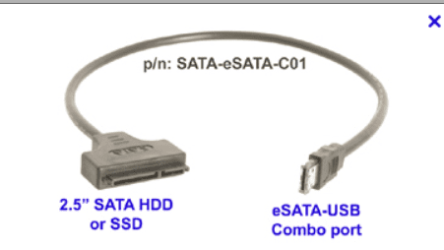
If you have a spare SSD then even using this via a USB2 slot will give you EXCELLENT performance when the VM is installed on the SSD. Use one of those SATA==>USB connectors for connecting the SSD to the USB port.

RAM is the key in running VM's.

Cheers
jimbo
 

Attachments

  • satausb.png
    satausb.png
    13.9 KB · Views: 1

My Computer My Computer

Computer type
PC/Desktop
Computer Manufacturer/Model Number
Custom built, several laptops HP/ASUS
OS
Linux CENTOS 7 / various Windows OS'es and servers
CPU
Intel i7 Intel i5
Memory
8GB, 16GB
Graphics Card(s)
On Motherboard
Sound Card
Realtek HD audio
Monitor(s) Displays
Apple Cinema display, Samsung LCD
Screen Resolution
1920 X 1080
Hard Drives
4 X 1TB SATA
Mouse
Toshiba wireless laser
Internet Speed
> 20MB up
I don't see your point. Whether you install virtual system on an external drive or an internal drive makes no difference for the RAM requirement. And the RAM requirements depend on the system that you run in virtual. Whilst most Linux distros will run OK with 1GB of RAM you should allocate 2 or 3GB of RAM for a Windows system.

The total RAM requirement will depend on the amount of virtual systems that you want to run in parallel. I usually run only 1 virtual system in addition to the host system. And for that, 4GB of RAM are sufficient.

Your point of running virtual systems from an external SSD is well taken. I do that all the time and it performs super from a USB3 port and acceptable from a USB2 port. Here is a tutorial I have made for that kind of setup.

http://www.sevenforums.com/tutorials/276540-portable-os-carry-your-os-external-drive.html

Btw: I have a total of 6 Linux virtual systems and 1 Windows 8 virtual system. But I never run them concurrently. Once I also ran Android in Virtual but that was not so swift.
 

My Computer My Computer

Computer Manufacturer/Model Number
HP, Dell, Gateway, Toshiba - 4 laptops and 2 desktops
OS
Vista, Windows7, Mint Mate, Zorin, Windows 8
CPU
from 1.6GHz Duo to i7
Monitor(s) Displays
2x HP w2207
Hard Drives
5x HDD, 7x SSD, 12x Externals
Keyboard
with trackball - no mices
Mouse
Trackball mice
Internet Speed
DSL 6000
Back
Top