
New W7 user experiencing resolution problems

Sy77

New member
Local time
8:05 AM
Messages
36
Location
Harrogate
Howdy y'all! My first post here. I wondered if anybody could help me out - today I finally dragged myself kicking and screaming into the 21st century by having Windows 7 installed (yes, another longtime stubborn XP user!) and I have to say it's a thing of beauty. Everything is running swimmingly except one thing - my screen resolution. My monitor is a 20" widescreen AOC N20W and the widescreen aspect worked great when running on XP. Now that it's on W7 my screen seems scrunched horizontally with 2 inch vertical black bars on either side of the screen when gaming (online golf) or just a very centralised screen when browsing normally with blank vertical edges.
Now, I wouldn't come and bug you fine geniuses without scouring the internet first - I have to admit I'm not very tech. I can't seem to find an answer for this. My graphics card is a GeForce 8600 GT and I've just updated the drivers for both the monitor and the graphics card with no change. My native resolution is 1680 x 1050 and doesn't go any higher. I've tried all the other resolutions but no change. I'm reading things about overscan/underscan and chipsets and aaaaarrrrggghhh! I totally suck at computers haha!
Has anybody else encountered this problem and come up with a remedy?

Any help in laymans' terms would be most awesome. Be excellent to each other x
 

My Computer

OS
Microsoft Windows 7 Professional 64-bit 7601 Multiprocessor Free Service Pack 1
CPU
AMD Athlon(tm) 64 X2 Dual Core Processor 5200+
Motherboard
Foxconn C51XEM2AA
Memory
4.00 GB
Graphics Card(s)
NVIDIA GeForce 8600 GT
Sound Card
High Definition Audio Device
Monitor(s) Displays
AOC N20W Widescreen
Screen Resolution
1680 x 1050 x 32 bits (4294967296 colors) @ 59 Hz
Hard Drives
(1) ST350063 0AS SCSI Disk Device (2) HUAWEI SD Storage USB Device
Hi Sy77, welcome to the forums.

I don't suppose your monitor has an button on it to auto fit the screen?


Paul
 

My Computer

OS
Windows 7 Professional 64 bit
Howdy Paul and thanks for the welcome :)

Yes the monitor does have an auto-fit thingy - but it just does its' shaky/wobbly/fitty thing (very tech, I know hehe) and just resumes its' size.
This is a really nice resolution as it is - it's very sharp and clear. It's just 'squished' inwards horizontally and if pages don't have the black bars then the sides are of the same colour scheme of the page, just redundant.
I've really tried looking into this and only got as far as the nvidia control panel and tried changing the scaling and fullscreen aspects with no joy.
 

My Computer

OS
Microsoft Windows 7 Professional 64-bit 7601 Multiprocessor Free Service Pack 1
CPU
AMD Athlon(tm) 64 X2 Dual Core Processor 5200+
Motherboard
Foxconn C51XEM2AA
Memory
4.00 GB
Graphics Card(s)
NVIDIA GeForce 8600 GT
Sound Card
High Definition Audio Device
Monitor(s) Displays
AOC N20W Widescreen
Screen Resolution
1680 x 1050 x 32 bits (4294967296 colors) @ 59 Hz
Hard Drives
(1) ST350063 0AS SCSI Disk Device (2) HUAWEI SD Storage USB Device
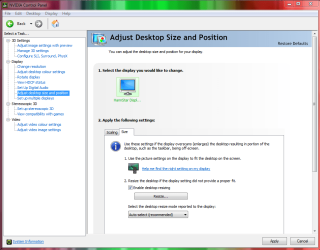
Have you tried resizing the desktop? (see pic)

And also, what is the resolution set to in windows? (Right click desktop/screen resolution)
 

Attachments

  • resize.PNG
    resize.PNG
    40.8 KB · Views: 17

My Computer

OS
Windows 7 Professional 64 bit
I would try, but my CC varies slightly. Whereas you have tabs for scaling and size, I only have tabs for scaling and position - and I've played around with both. Damn I want your control centre haha! One thing I have noticed - I don't know if this has any relevance - but my refresh rate is fixed at 60HZ in both the Nvidia CC and the Windows 7 display properties. There's a dropdown box but it still only shows 60HZ. I wanted to try at 75HZ but can't find the option to...
 

My Computer

OS
Microsoft Windows 7 Professional 64-bit 7601 Multiprocessor Free Service Pack 1
CPU
AMD Athlon(tm) 64 X2 Dual Core Processor 5200+
Motherboard
Foxconn C51XEM2AA
Memory
4.00 GB
Graphics Card(s)
NVIDIA GeForce 8600 GT
Sound Card
High Definition Audio Device
Monitor(s) Displays
AOC N20W Widescreen
Screen Resolution
1680 x 1050 x 32 bits (4294967296 colors) @ 59 Hz
Hard Drives
(1) ST350063 0AS SCSI Disk Device (2) HUAWEI SD Storage USB Device
Oh and the screen resolution is set to 1680 x 1050 in Windows - the same as Nvidia. Next to the resolution is (recommended). All the other resolutions are all blurry. There is no higher resolution than the recommended one available.
 

My Computer

OS
Microsoft Windows 7 Professional 64-bit 7601 Multiprocessor Free Service Pack 1
CPU
AMD Athlon(tm) 64 X2 Dual Core Processor 5200+
Motherboard
Foxconn C51XEM2AA
Memory
4.00 GB
Graphics Card(s)
NVIDIA GeForce 8600 GT
Sound Card
High Definition Audio Device
Monitor(s) Displays
AOC N20W Widescreen
Screen Resolution
1680 x 1050 x 32 bits (4294967296 colors) @ 59 Hz
Hard Drives
(1) ST350063 0AS SCSI Disk Device (2) HUAWEI SD Storage USB Device
I am running out of ideas.

You said " by having Windows 7 installed" in your first post, did you install it or did someone else? After installation were all the motherboard drivers loaded back onto the pc?

Quite often people coming from XP to Windows 7 have problems getting hold of the correct drivers for the motherboard.

I am not saying this is the problem, but it could be.
 

My Computer

OS
Windows 7 Professional 64 bit
Somebody else installed it for me. I've approached them about this and they have no idea.
 

My Computer

OS
Microsoft Windows 7 Professional 64-bit 7601 Multiprocessor Free Service Pack 1
CPU
AMD Athlon(tm) 64 X2 Dual Core Processor 5200+
Motherboard
Foxconn C51XEM2AA
Memory
4.00 GB
Graphics Card(s)
NVIDIA GeForce 8600 GT
Sound Card
High Definition Audio Device
Monitor(s) Displays
AOC N20W Widescreen
Screen Resolution
1680 x 1050 x 32 bits (4294967296 colors) @ 59 Hz
Hard Drives
(1) ST350063 0AS SCSI Disk Device (2) HUAWEI SD Storage USB Device
How about trying an older driver version for the graphics card before we start thinking about motherboard drivers?

These can be found on Nvidias website under "beta drivers and archive" I assume you are running 301.42 at the moment. Try some older ones such as 296.10 and see if that makes any difference.

Edit: this should take you straight to the download - http://www.nvidia.co.uk/object/win7-winvista-64bit-296.10-whql-driver-uk.html
 

My Computer

OS
Windows 7 Professional 64 bit
I don't know how to do a screenshot but here are some specs if they help

System Manufacturer Foxconn
System Model C51XEM2AA
System Type X64 based PC
Processor AMD Athlon 64 X2 Dual Core Processor 5200+, 2611MHZ,
2 core(s), 2 logical processor(s)
BIOS Version/Date Phoenix Technologies, Ltd 6.0 PG, 24/05/2006
SMBIOS Version 2.2
Hardware abstract layer Version = 6.1.7600.16385
Installed Physical Memory 4GB
 

My Computer

OS
Microsoft Windows 7 Professional 64-bit 7601 Multiprocessor Free Service Pack 1
CPU
AMD Athlon(tm) 64 X2 Dual Core Processor 5200+
Motherboard
Foxconn C51XEM2AA
Memory
4.00 GB
Graphics Card(s)
NVIDIA GeForce 8600 GT
Sound Card
High Definition Audio Device
Monitor(s) Displays
AOC N20W Widescreen
Screen Resolution
1680 x 1050 x 32 bits (4294967296 colors) @ 59 Hz
Hard Drives
(1) ST350063 0AS SCSI Disk Device (2) HUAWEI SD Storage USB Device
Oooops you posted as I was writing - I'm not sure what version I'm using but I'll look into it. Thankyou for your help for now. There's a good chance I'll be back - probably crying hehe :)
 

My Computer

OS
Microsoft Windows 7 Professional 64-bit 7601 Multiprocessor Free Service Pack 1
CPU
AMD Athlon(tm) 64 X2 Dual Core Processor 5200+
Motherboard
Foxconn C51XEM2AA
Memory
4.00 GB
Graphics Card(s)
NVIDIA GeForce 8600 GT
Sound Card
High Definition Audio Device
Monitor(s) Displays
AOC N20W Widescreen
Screen Resolution
1680 x 1050 x 32 bits (4294967296 colors) @ 59 Hz
Hard Drives
(1) ST350063 0AS SCSI Disk Device (2) HUAWEI SD Storage USB Device
Oh btw do I need to uninstall the current driver first or can I install the suggested driver straight over it?
 

My Computer

OS
Microsoft Windows 7 Professional 64-bit 7601 Multiprocessor Free Service Pack 1
CPU
AMD Athlon(tm) 64 X2 Dual Core Processor 5200+
Motherboard
Foxconn C51XEM2AA
Memory
4.00 GB
Graphics Card(s)
NVIDIA GeForce 8600 GT
Sound Card
High Definition Audio Device
Monitor(s) Displays
AOC N20W Widescreen
Screen Resolution
1680 x 1050 x 32 bits (4294967296 colors) @ 59 Hz
Hard Drives
(1) ST350063 0AS SCSI Disk Device (2) HUAWEI SD Storage USB Device
Oooops you posted as I was writing - I'm not sure what version I'm using but I'll look into it. Thankyou for your help for now. There's a good chance I'll be back - probably crying hehe :)


No worries, I just had a look for drivers for your Motherboard on the official website but sadly all the drivers are for XP not Windows 7. So I don't think we will get very far down that avenue.
 

My Computer

OS
Windows 7 Professional 64 bit
Oh btw do I need to uninstall the current driver first or can I install the suggested driver straight over it?


It shouldn't be too important, but just to be safe yes uninstall the old ones and then put the new ones on.
 

My Computer

OS
Windows 7 Professional 64 bit
Most awesome of you Paul - thanks for taking the time out :)
 

My Computer

OS
Microsoft Windows 7 Professional 64-bit 7601 Multiprocessor Free Service Pack 1
CPU
AMD Athlon(tm) 64 X2 Dual Core Processor 5200+
Motherboard
Foxconn C51XEM2AA
Memory
4.00 GB
Graphics Card(s)
NVIDIA GeForce 8600 GT
Sound Card
High Definition Audio Device
Monitor(s) Displays
AOC N20W Widescreen
Screen Resolution
1680 x 1050 x 32 bits (4294967296 colors) @ 59 Hz
Hard Drives
(1) ST350063 0AS SCSI Disk Device (2) HUAWEI SD Storage USB Device
Go to Nvidia Control Center and select Adjust Desktop size and position. While you are tinkering around in there wright down every change you make and the results so you have a reference. I also suggest creating a restore point before doing this. It may come in handy.
 

My Computer

Computer type
PC/Desktop
Computer Manufacturer/Model Number
Home made Desktop
OS
Windows 10 Pro. 64/ version 1709 Windows 7 Pro/64
CPU
Intel i7-6800K @ 4.3
Motherboard
ASUS X-99 Deluxe II
Memory
Corsair Platinum 16 gig @2400
Graphics Card(s)
EVGA GTX 1070 OC
Monitor(s) Displays
Asus 27" LED LCD/VE278Q
Screen Resolution
1920-1080 or 1280-720 HDMI
Hard Drives
INTEL SSD 730-240 Gb Sata 3.0/
PSU
EVGA Platium 1200W
Case
Phanteks Luxe Tempered Glass 8 fans/ one radiator
Cooling
XSPC/ Water Cooled CPU
Keyboard
Das 4 Professional
Mouse
Logitech M705/MX Anywhere 2-S
Internet Speed
100 mbits
Antivirus
Microsoft Security Essentials/ Malwarebytes Premium 3.0/ SAS
Browser
I.E. 11 default/Firefox/ ISP Time Warner Cable/Spectrum
Other Info
LG BluRay Burner/
Sound system-KLipsch-THX/
Icy Dock ssd Hot Swap bays.
Go to Nvidia Control Center and select Adjust Desktop size and position. While you are tinkering around in there wright down every change you make and the results so you have a reference. I also suggest creating a restore point before doing this. It may come in handy.

Yup it's called Scalling
 

My Computer

Computer type
PC/Desktop
Computer Manufacturer/Model Number
CoreI7-6700K MrFingerIII Special Builds
OS
Windows 10 Home Premium 64bit sp1
CPU
Intel I7-6700K @ 4.6 Ghz 1.344 volts everyday OC
Motherboard
Asrock Fatality K6 Z170 Socket 1151
Memory
32GB G-Skill TridentZ 3200mhz 16-18-18-38 DDR4
Graphics Card(s)
Sli Gigabyte Windforce GTX 980 G1
Sound Card
AC97 Creative Rage Tactic 3D Headphones Bluetooth
Monitor(s) Displays
27" Asus ROG Swift PG278Q G-Sync 48" Vizio Smart HD TV
Screen Resolution
2560x1440p 27"- 48" Currently Gaming at 2560x1440p Res 2K
Hard Drives
250GB Samsung Evo840SSD Seagate baracuda 500 GB WD Mybook 500Gb 1TB Seagate Barracuda
PSU
HX1050w Corsair Silver 80plus certified crosfire/sli
Case
Enthod Pro Full Tower
Cooling
Corsair H110i GT 280 mm High Performance WaterBlock
Keyboard
Logitech wireless keyboard
Mouse
Logitech wireless mouse
Internet Speed
Cox Cable 100+ mb
Antivirus
WebRoot Spysweeper with Antivirus
Browser
IE-10, Chrome, Opera
Other Info
My Other Rig is a AMD FX8320E @4.6Ghz 16GB Ballistic Sport Ram
Mobo Asrock Fatality 990FX 120GB OCZ SSD 1TB Seagate Barracuda Corsair H75 Cooling PSU Corsair CX750
GPU GTX Gigabyte 970G1
Howdy Layback Bear! Yes I'd already tinkered around in that department with no result. Even in the scaling tab I'd opt for 'fullscreen' (the default is 'aspect ratio') and it didn't change anything. Pretty confusing... :/
 

My Computer

OS
Microsoft Windows 7 Professional 64-bit 7601 Multiprocessor Free Service Pack 1
CPU
AMD Athlon(tm) 64 X2 Dual Core Processor 5200+
Motherboard
Foxconn C51XEM2AA
Memory
4.00 GB
Graphics Card(s)
NVIDIA GeForce 8600 GT
Sound Card
High Definition Audio Device
Monitor(s) Displays
AOC N20W Widescreen
Screen Resolution
1680 x 1050 x 32 bits (4294967296 colors) @ 59 Hz
Hard Drives
(1) ST350063 0AS SCSI Disk Device (2) HUAWEI SD Storage USB Device
Howdy Solarstarshines! You posted as I was writing hehe!
 

My Computer

OS
Microsoft Windows 7 Professional 64-bit 7601 Multiprocessor Free Service Pack 1
CPU
AMD Athlon(tm) 64 X2 Dual Core Processor 5200+
Motherboard
Foxconn C51XEM2AA
Memory
4.00 GB
Graphics Card(s)
NVIDIA GeForce 8600 GT
Sound Card
High Definition Audio Device
Monitor(s) Displays
AOC N20W Widescreen
Screen Resolution
1680 x 1050 x 32 bits (4294967296 colors) @ 59 Hz
Hard Drives
(1) ST350063 0AS SCSI Disk Device (2) HUAWEI SD Storage USB Device
Howdy Solarstarshines! You posted as I was writing hehe!


Howdy ! Welcome to 7 Forums

If you have tryed all those options did you try changing the port ?

I didn't read exactly how it is set up DVI HDMI try switching connection types and see if changing the connection ports give any results sometimes it works
 

My Computer

Computer type
PC/Desktop
Computer Manufacturer/Model Number
CoreI7-6700K MrFingerIII Special Builds
OS
Windows 10 Home Premium 64bit sp1
CPU
Intel I7-6700K @ 4.6 Ghz 1.344 volts everyday OC
Motherboard
Asrock Fatality K6 Z170 Socket 1151
Memory
32GB G-Skill TridentZ 3200mhz 16-18-18-38 DDR4
Graphics Card(s)
Sli Gigabyte Windforce GTX 980 G1
Sound Card
AC97 Creative Rage Tactic 3D Headphones Bluetooth
Monitor(s) Displays
27" Asus ROG Swift PG278Q G-Sync 48" Vizio Smart HD TV
Screen Resolution
2560x1440p 27"- 48" Currently Gaming at 2560x1440p Res 2K
Hard Drives
250GB Samsung Evo840SSD Seagate baracuda 500 GB WD Mybook 500Gb 1TB Seagate Barracuda
PSU
HX1050w Corsair Silver 80plus certified crosfire/sli
Case
Enthod Pro Full Tower
Cooling
Corsair H110i GT 280 mm High Performance WaterBlock
Keyboard
Logitech wireless keyboard
Mouse
Logitech wireless mouse
Internet Speed
Cox Cable 100+ mb
Antivirus
WebRoot Spysweeper with Antivirus
Browser
IE-10, Chrome, Opera
Other Info
My Other Rig is a AMD FX8320E @4.6Ghz 16GB Ballistic Sport Ram
Mobo Asrock Fatality 990FX 120GB OCZ SSD 1TB Seagate Barracuda Corsair H75 Cooling PSU Corsair CX750
GPU GTX Gigabyte 970G1
Back
Top